LexicalCases: extract lexical patterns from text
By Faizon Zaman
Lexical Programmer, Wolfram|Alpha LLC
By Faizon Zaman
Lexical Programmer, Wolfram|Alpha LLC
When collating text segments, one might want to describe patterns at the lexical level. While this is possible to a degree with certain text pattern objects and functions (Containing, TextCases, TextContents), there is a flexibility that’s not yet supported. The LexicalCases paclet aims to provide this flexibility.
Installation
Installation
LexicalCases is a published paclet on the Wolfram Paclet Repository.
Install the Paclet Resource
In[]:=
lexc=PacletInstall[ResourceObject["FaizonZaman/LexicalCases"]]
Out[]=

Load the Paclet
In[]:=
Needs["FaizonZaman`LexicalCases`"]
Usage
Usage
Basic Examples
Basic Examples
As stated above, LexicalCases allows one to specify flexible lexical patterns. For example, let’s search for a pattern in .
"The Origin of Species"
Retrieve the plaintext of
"The Origin Of Species"
In[]:=
oosp=ExampleData[{"Text","OriginOfSpecies"}];
Define the lexical pattern
In[]:=
svad=BoundToken["specie"|"species"]~~TextType["Verb"]~~TextType["Adverb"];
Patterns can have arbitrary structure perhaps making them difficult to read. In those cases you can visualize the pattern with LexicalStructure.
Visualize the lexical pattern
svad
In[]:=
LexicalStructure[svad]
Out[]=
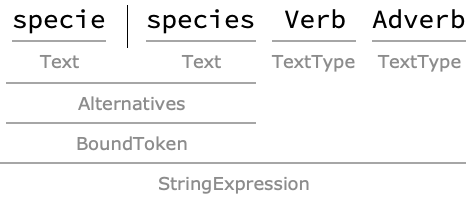
Now that we’ve seen the pattern structure, let’s look at what each token in the StringExpression means. A BoundToken restricts the boundary of its arguments, preventing substrings from matching when they are part of a bigger word. A TextType represents a text content type the Wolfram Language knows about. Feel free to experiment with types, just note some types require more computational power to recognize, and may cause failures.
Now we’re ready to search!
Now we’re ready to search!
Search for a lexical pattern in
"The Origin Of Species"
In[]:=
ls=LexicalCases[oosp,svad]
Out[]=
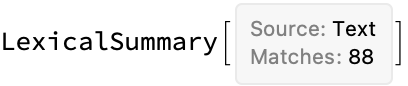
Cool! 88 substrings in match the lexical pattern we supplied. The result we got is called a LexicalSummary object. At a glance, it tells you the source type, and the number of matches. It also has some properties. Let’s see what’s supported.
"The Origin Of Species"
In[]:=
ls["Properties"]
Out[]=
{Data,Dataset,Counts,CountGroups,CountGroupPercentages,LowercaseCountGroupPercentages,PartOfSpeechGroups,WordStemCountGroups,Source,TotalMatchCount,LexicalStructure,Survey}
Since we just got our results, it makes sense that we’d want to see what matches we got. The property will give us a list of associations containing the match and its string position, or if you want it formatted nicely, use the property. In practice I tend to use , which groups matches by their occurrence count. Let’s take a look!
"Data"
"Dataset"
"CountGroups"
Get the CountGroups of the result
In[]:=
ls["CountGroups"]
Out[]=
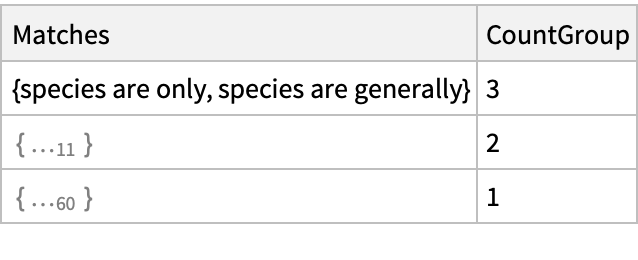
So, you can see that there are a set of matches in count-group 3, a set in count-group 2, and lastly a set in count-group 1. What this means is that each match in count-group 3 appeared 3 times, and each match in count-group 2 appeared twice, etc. So there were phrases appearing times, phrases appearing , and phrases appearing .
2
3
11
twice
60
once
Those are the basics of LexicalCases! Next we’ll take a look at getting more data to search through.
Searching more data
Searching more data
Awesome! You can search a string, but what if you want more text to search over, and maybe don’t have anything on hand, or in mind? This is where Wikipedia comes in!
You can collate text from Wikipedia by giving LexicalCases a content rule as its first argument. The rule specifies what articles should be pulled in for your search. If you want control over how many articles to collect, use the option. Note that the articles will be imported!
MaxItems
Search for a lexical pattern in Wikipedia articles containing the word “music”
In[]:=
lcmusic=LexicalCases["Content"->"music",TextType["Adjective"]~~BoundToken["music"],MaxItems->1000];
LexicalCases displays a progress bar for import and search, as well as the total number of matches found so far. If you have multiple kernels, import and search are performed in parallel.

Now let's look at the results! Like I said before, I like to look at the count groups.
Now let's look at the results! Like I said before, I like to look at the count groups.
Get the lowercase count-groups of
lcmusic
In[]:=
lcmusic["CountGroups"]//CountSummaryLowercase
Out[]=
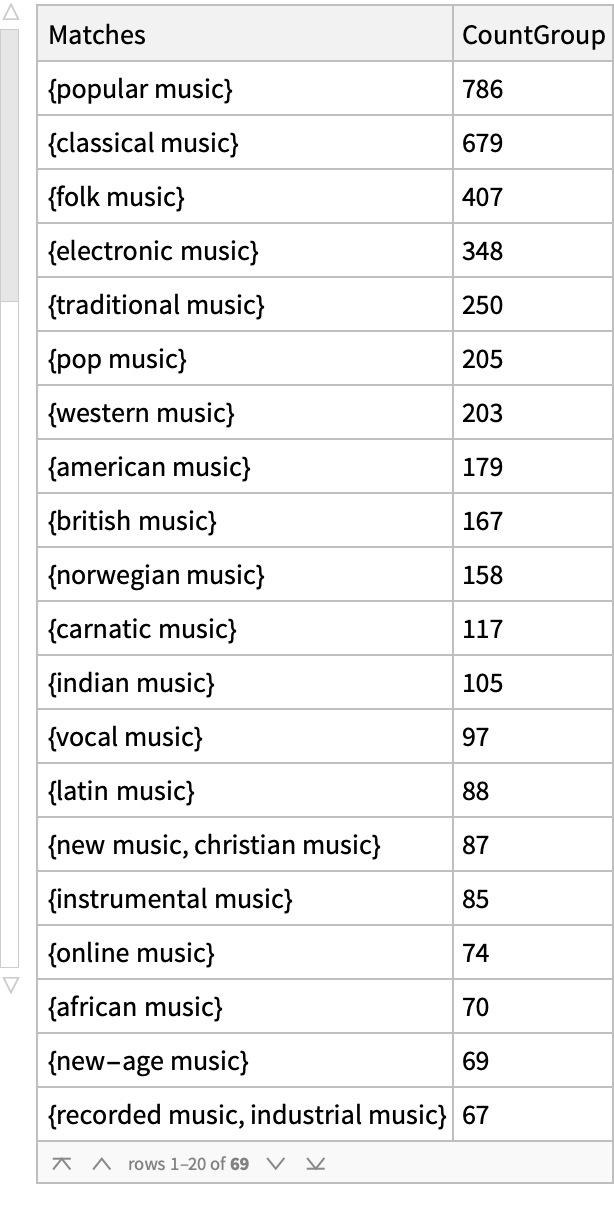
The count-group results show that the phrase occurred times. What does that mean in relation to the other matches? Using the “CountGroupPercentages” property, the phrases gain a bit of context, showing the percentage each count-group represents among all matches. Let’s briefly look at the top 3 count groups.
"popular music"
763
Get the top 3 count group percentages
In[]:=
lcmusic["LowercaseCountGroupPercentages",3]
Out[]=
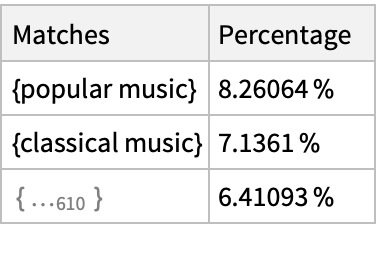
The top 3 count groups account for approximately of all matches.
In[]:=
lcmusic["LowercaseCountGroupPercentages",3][Total,"Percentage"]
Out[]=
Let’s compare the number of articles with a match and the number of articles containing the most frequent match, .
"popular music"
Get the number of articles with matches
In[]:=
articlesWithMatch=(lcmusic["Dataset"]//Select[¬MissingQ[#Match]&]//Query[All,"Article"]//DeleteDuplicates//Length)
Out[]=
727
Get the number of articles containing the highest occurring match
"popular music"
In[]:=
articlesWithPopMusic=(lcmusic["Dataset"]//Select[MatchQ[#Match,"popular music"]&]//Query[All,"Article"]//DeleteDuplicates//Length)
Out[]=
247
Get the number of articles without matches.
In[]:=
articlesWithoutMatch=(lcmusic["Dataset"]//Select[MissingQ[#Match]&]//Query[All,"Article"]//DeleteDuplicates//Length)
Built-in Dashboard
Built-in Dashboard
Testing
Testing
Nice, all tests pass! However, this paclet is not fully supported on the cloud, I’ve published the cloud test results here.
State and Future
State and Future
Acknowledgments
Acknowledgments
Thanks to Swastik Banerjee for helping improve SearchIndexObject support! I did not know there were different types of search index objects, but now there should be support for the common kinds.