
Validating High-G Aerobatic Maneuvers
Validating High-G Aerobatic Maneuvers
Can jet formations maintain safety and performance during extreme maneuvers? This example demonstrates how to validate critical flight behaviors using a model validation workflow—checking whether jet maneuvers stay within safety, performance and structural design limits.
Check the Model
Check the Model
We simulate some jets performing different aerobatic routines.
(Press Shift + Enter to evaluate.)
In[]:=
CloudImport["https://www.wolframcloud.com/obj/6a8e3fc4-e4a1-4c25-a84c-e56857bf472c","SMA"];ImportString,"MO";
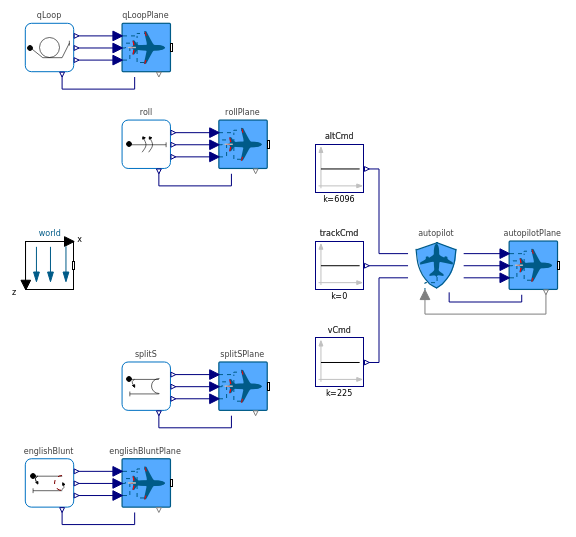
Check the model diagram:
In[]:=
aeroModel=SystemModel["Aerobatics.AerobaticShow"];aeroModel[{"Diagram",ImageSizeLarge,FrameFalse}]
Out[]=
Create the Validation Rule
Create the Validation Rule
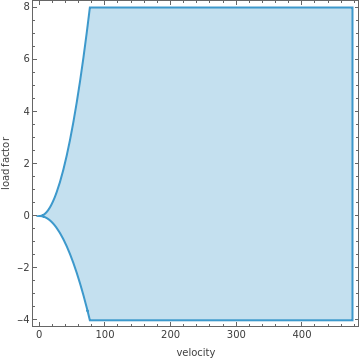
Velocity vs. load factor envelope: the shaded region represents safe combinations of velocity (x-axis) and G-force (y-axis) during flight.
In[]:=
ℛ=ParametricRegion{v,g},0≤v≤stallSpeed&&≤g≤||(stallSpeed<v≤maxVelocity&&nMin≤g≤nMax),{v,g}/.{nMin-4,nMax8,stallSpeed76.395,maxVelocity476.375};RegionPlot[ℛ,FrameLabel{"velocity","load factor"}]
nMin
2
v
2
stallSpeed
nMax
2
v
2
stallSpeed
Out[]=
Define a requirement: "During the Split S maneuver, the aircraft’s velocity and load factor must remain within the allowable envelope defined in the velocity vs. load factor diagram."
In[]:=
reqVG=SystemModelAlways[t,RegionMember[ℛ,{"splitSPlane.flightData.vTot"[t],"splitSPlane.flightData.loadFactor"[t]}]];
Check Run Validation and Compare Configurations
Check Run Validation and Compare Configurations
In[]:=
aeroSim=SystemModelSimulate[aeroModel]
Out[]=
SystemModelSimulationData


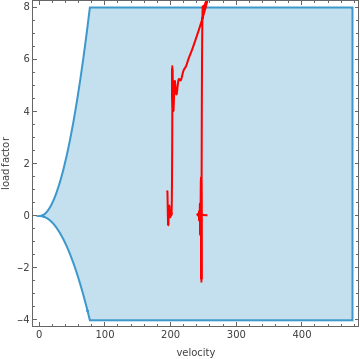
Extract the velocity and load factor curves for the configuration and plot them over the validity region:
In[]:=
simPlot1=Show[{RegionPlot[ℛ,FrameLabel{"velocity","load factor"}],ParametricPlot[Evaluate@aeroSim[{"splitSPlane.flightData.vTot","splitSPlane.flightData.loadFactor"},t],{t,0,30},PlotStyle{Red}]}]
Out[]=
Check the validation results:
In[]:=
SystemModelValidate[aeroSim,reqVG]
Out[]=
SystemModelValidationData

The simulation fails the requirement. Let's adjust the throttle command and validate again:
In[]:=
aeroSimG=SystemModelSimulate[aeroModel,<|"ParameterValues"{"splitS.vCmd.k"0.6}|>];
Plot the results over the validity region:
In[]:=
simPlot2=Show[{RegionPlot[ℛ,FrameLabel{"velocity","load factor"}],ParametricPlot[Evaluate@aeroSimG[{"splitSPlane.flightData.vTot","splitSPlane.flightData.loadFactor"},t],{t,0,30},PlotStyle{Darker@Green}]}]
Check the validation results:
The new configuration validates successfully.
Compare the response of the two configurations: