This project focuses on graphing a multiway graph exploring different board shapes and initial cubes in order to identify patterns within these multiway graphs, and I achieved that by finding the empty coordinates, finding all possible blocks each one could switch with, then repeating the process until I reached the graph. This project enables further research into how to find how the size of the graph increases relating to dimension.
Sliding Block Puzzle
Sliding Block Puzzle
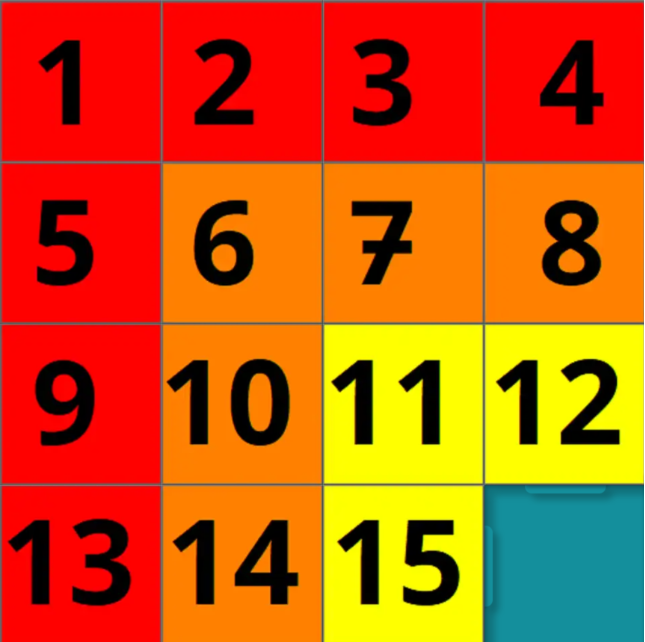
Stephen Wolfram once wrote “ in a multicomputational system . . . states can have multiple successors—and tracing their behavior defines a whole multiway graph of branching and merging threads of time” in his “Games and Puzzles as Multicomputational Systems.” The sliding block puzzle, known as the 15 puzzle, was invented by Noyes Palmer Chapman, a postmaster from New York in the 1870s. It usually has a 4x4 grid with 15 numbers, with the goal of the puzzle being to put all the numbers in increasing order by sliding the blocks around. The reasoning behind why I chose this project is because there is no 3-dimensional sliding block puzzle and I wanted to see if I could do anything exploring possible ones. The goal of the project was to explore the sliding block puzzle in higher dimensions to find interesting conclusions. I decided to approach the project by seeing which blocks were adjacent to the empty blocks and switching them continuously until I got a multiway graph(a graph that starts from one state and goes to other states) that would no longer expand. When the puzzle is expanded to 3 dimensions or even 4 or 5, the puzzle quickly becomes extremely complex, as the permutations increase rapidly. For simplicity, we set all the dimensions to be 2, so a 2x2x2 cube in the 3 dimensional case.
3 Dimensions
3 Dimensions
The setup for any object that is composed of cubes is as follows:
First we set up the dimensions x, y, and z:
First we set up the dimensions x, y, and z:
In[]:=
xDim=2;yDim=2;zDim=2;
Then we set up the cube, with values in the coordinates in a nested list. For example, the 0 is at position {1, 1, 1} of the list, so it is on x=1,y=1,z=1.
In[]:=
cubeNumbers={{{0,1},{-1,2}},{{2,2},{2,2}}};
The zeroPlace function shows all positions of zeros, which are empty spaces where cubes can slide into, while staticBlockPlace shows all of the -1s, or immovable blocks. In this case, -1’s can be seen as cubes that don’t exist. This is used in the future so we can see which blocks could move around and which blocks couldn’t.
In[]:=
zeroPlace[cube_]:=Position[cube, 0]staticBlockPlace[cube_] :=Position[cube, -1]
The zeroPossibilities function shows all adjacent cubes that are inside the cuboid, takes one of the vertices in the list, and deletes vertices outside of the cuboid or corresponding to immovable blocks. Later, it will be used to take in the coordinates of a zero and show all blocks it can be swapped with.
zeroPossibilities[{a_,b_,c_}]:=DeleteCases[{{a+1,b,c},{a-1,b,c},{a,b+1,c},{a,b-1,c},{a,b,c+1},{a,b,c-1}},Alternatives@@Join[{{0,_,_},{_,0,_},{_,_,0},{xDim+1,_,_},{_,_,zDim+1},{_,yDim+1,_}},staticBlockPlace[cubeNumbers]]]
swapPosition swaps 2 coordinates of the list unless they are a -1 (immovable). It takes a list (which is eventually going to be cubeNumbers), and two coordinates that will be swapped. Later a zero and its adjacent vertex will be swapped.
swapPosition[cuboid_,{x1_,y1_,z1_},{x2_,y2_,z2_}]:=If[cuboid[[x1,y1,z1]]!=-1&&cuboid[[x2,y2,z2]]!=-1,ReplacePart[cuboid,{{x1,y1,z1}->cuboid[[x2,y2,z2]],{x2,y2,z2}->cuboid[[x1,y1,z1]]}]];
visualizeGraph draws the graph of a specific cube permutation, with the block values taking different colors. The colors are chosen by taking the value and dividing it by a number using the hue function, so any two values would have different numbers. Here, -1 is automatically set as Black and 0 is automatically set as transparent.
visualizeGraph[x_]:=Show[Table[Graphics3D[{If[x[[i,j,k]]==0,Transparent,If[x[[i,j,k]]==-1,Black,Hue[x[[i]][[j]][[k]]/(xDim*yDim*zDim)]]],Cuboid[{i,j,k},{i+1,j+1,k+1}]}],{i,xDim},{j,yDim},{k,zDim}]]
partialGraph tries to use swapPosition on all of the zeroPossibilities of zeroPlace until the graph goes to itself; then, the NestWhileGraph stops it from running. It only takes one of the zeros. In real life, it represents only looking at one of the blank spaces and seeing everything that can happen by moving that blank space.
partialGraph[list_,n_]:=SimpleGraph[UndirectedGraph[ResourceFunction["NestWhileGraph"][Table[swapPosition[#,zeroPlace[#][[n]],i],{i,zeroPossibilities[zeroPlace[#][[n]]]}]&,{list},UnsameQ@@#&,2],VertexSize->0.5,VertexShape->{state_:>visualizeGraph[state]}]]
Finally, cubicGraph loops through every single one of the zero positions and combines all of the partial graphs to make a big graph.
cubicGraph=Graph[GraphSum@@Table[partialGraph[cubeNumbers,l],{l,Length[zeroPlace[cubeNumbers]]}],VertexSize->1.5,VertexShape->{state_:>visualizeGraph[state]}]
Out[]=
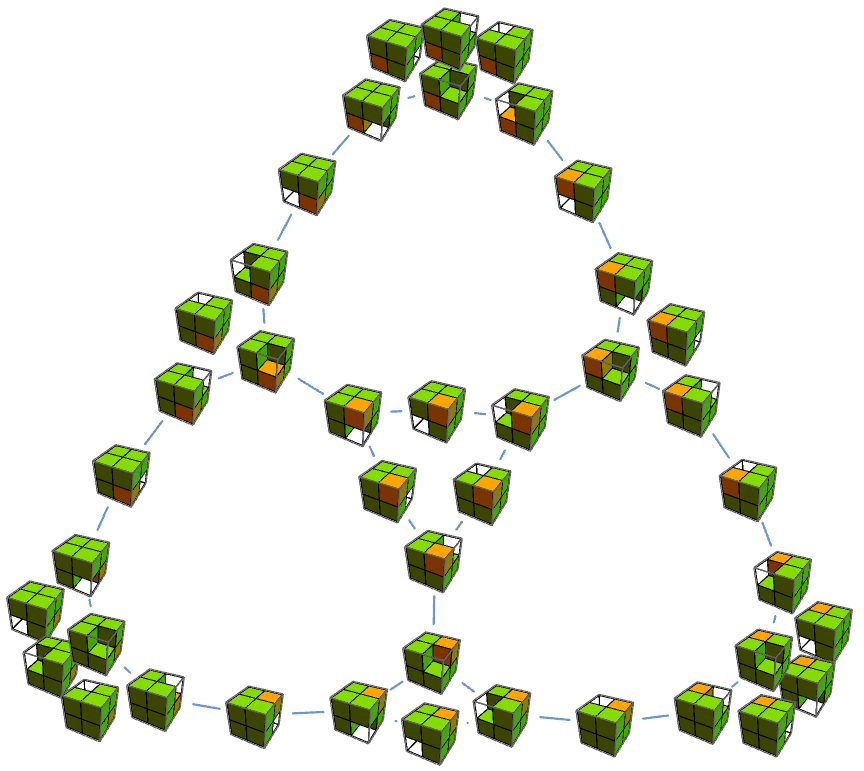
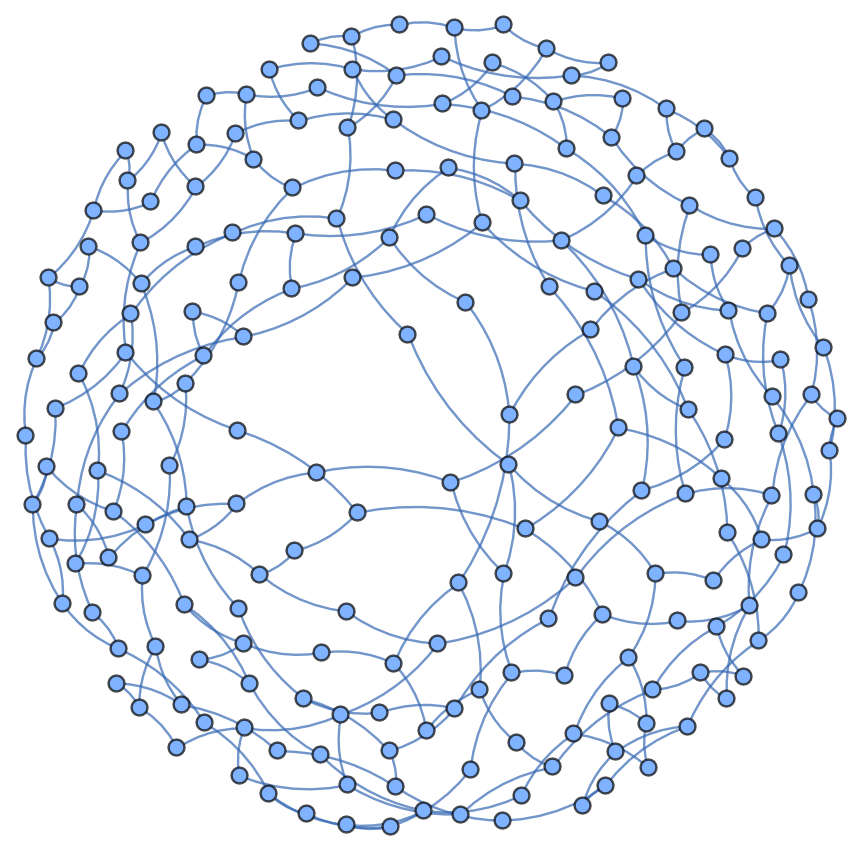
When some of the values are different, the result is as follows. In this case, there are only 5 different values and there are already 210 different cubes, so one can imagine that when there are 8 different values, there will be a lot of vertices in the graph.
In[]:=
secondCubeNumbers={{{0,1},{2,3}},{{4,4},{4,4}}};secondCubicGraph=Graph[GraphSum@@Table[partialGraph[secondCubeNumbers,l],{l,Length[zeroPlace[secondCubeNumbers]]}],GraphLayout->None]VertexCount[GraphSum@@Table[partialGraph[secondCubeNumbers,l],{l,Length[zeroPlace[secondCubeNumbers]]}]]
Out[]=
Graph


Out[]=
210
In[]:=
GraphPlot[secondCubicGraph,GraphLayout->"GravityEmbedding"]
Out[]=
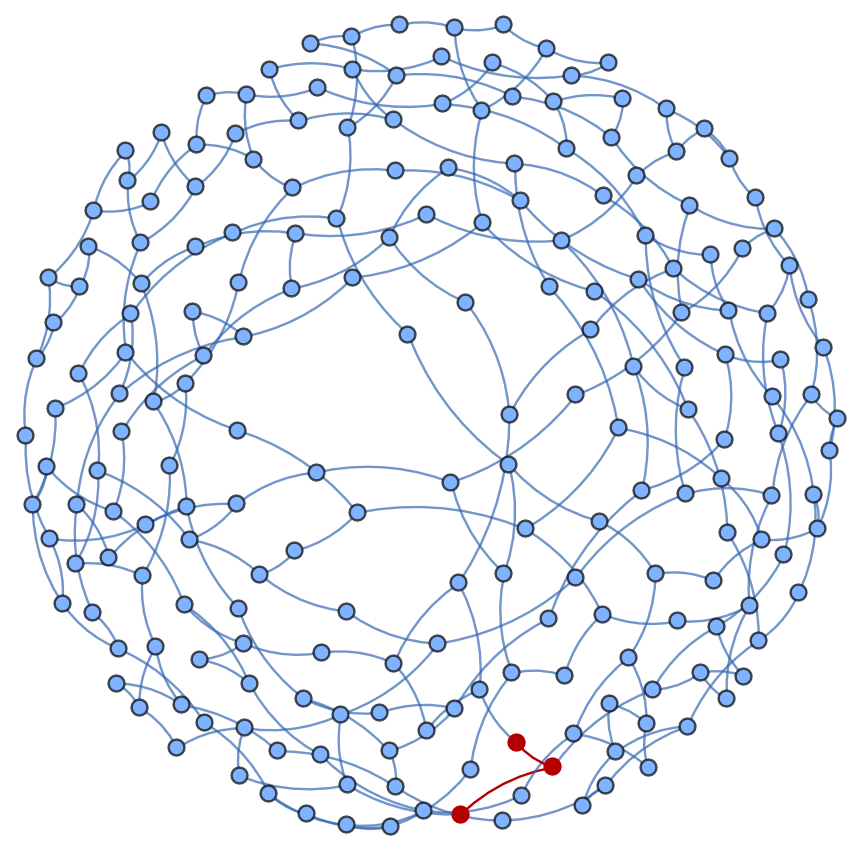
One can use FindShortestPath to find the shortest number of moves between any two vertices, which shows the least number of moves to get from one state to another.
In[]:=
startingvertex={{{0,1},{2,3}},{{4,4},{4,4}}};endingvertex={{{1,3},{2,0}},{{4,4},{4,4}}};HighlightGraph[secondCubicGraph,PathGraph[FindShortestPath[secondCubicGraph,startingvertex,endingvertex]],GraphLayout->"GravityEmbedding"]Length[FindShortestPath[secondCubicGraph,startingvertex,endingvertex]]-1
Out[]=
Out[]=
2
twoDimVisualizeGraph shows all of the layers of the cube allowing for full visualization, as generally some parts of the cube will be blocked by other parts.
4 Dimensions
4 Dimensions
A 4d sliding block puzzle cannot be imagined using 3d methods, but we can still try to visualize the graph of a theoretical 4d sliding block puzzle. When we look at higher dimensions, we cannot graph the hypercube itself, but we can still look at the multiway graphs. Much of the steps are similar to the 3d case, just with an added direction.
Setting the dimensions again gives:
Setting the game state again, but with 4 nested lists this time:
This is the 4d version of all possible vertices a certain vertex can switch with:
This is the 4d version of the swapping function, which will be used to swap the zero and an adjacent vertex if it isn’t -1:
graphing4d and cubicGraph4d graph the final graph without showing what the cube actually looks like, since a hypercube would be hard to interpret:
We can visualize the shortest path between states:
N Dimensions
N Dimensions
Once I was done with 3 and 4 dimensions, it was natural for the next step to be to try to generalize this to N dimensions.
In N dimensions, totalDims is the number of dimensions, in this example 6, and dims is the dimensions themselves, like 2x2x2x2x2x2.
Turning the N dimensional cube into a list by using the Normal function:
Finding 0 and - 1 in the Nd list using Position:
Possible moves for zero in the list:
A challenge during this step was that I couldn’t just list all of the things to remove, and I had to use a pure anonymous function.
A challenge during this step was that I couldn’t just list all of the things to remove, and I had to use a pure anonymous function.
The Nd swap Function:
Graphing a part of the graph using one of the zeros:
Graphing the entire graph:
Even having 62 of the 64 numbers being the same already gives 4032 vertices, so we can imagine what would happen if they were all different.
Conclusion And Interesting Properties for Future Exploration
Conclusion And Interesting Properties for Future Exploration
In this project, we achieved the goals of exploring 3d and 4d cases for the sliding block puzzle, and even expanded it to N dimensions as well as irregular shapes that could be formed with cubes by using -1s. Future topics of exploration could be determining how fast the graph grows each move or exactly what determines the solvability of a permutation.
A few interesting properties and questions about these graphs that could be future topics are:
A few interesting properties and questions about these graphs that could be future topics are:
◼
The first few moves, many of the graphs approximately double in vertex size, then slow down.
◼
Many graphs have exactly one vertex that is on the opposite side of the graph as the starting vertex.
◼
Many graphs can cycle through all permutations, but a few aren’t
◼
What makes a graph not be able to cycle through all permutations?
◼
How does the growth work?
Acknowledgements
Acknowledgements
I would like to thank the program director Rory Foulger, academic directors Megan Davis and Eryn Gillam for their support of my project as well as my mentor Logan Gilbert and TAs Ian Gu and Gregory Roudenko for helping me debug my code for multiple hours a day, helping come up with new ideas to try out, and showing me functions I never knew existed.
References
References
Wolfram, S. (2022, June 8). Games and puzzles as Multicomputational Systems. Stephen Wolfram Writings. https://writings.stephenwolfram.com/2022/06/games-and-puzzles-as-multicomputational-systems/#sliding-block-puzzles
CITE THIS NOTEBOOK
CITE THIS NOTEBOOK
Analyzing higher dimensions of the sliding block puzzle
by Eddy Zhang
Wolfram Community, STAFF PICKS, July 11, 2025
https://community.wolfram.com/groups/-/m/t/3500501
by Eddy Zhang
Wolfram Community, STAFF PICKS, July 11, 2025
https://community.wolfram.com/groups/-/m/t/3500501