CITE THIS NOTEBOOK: Shakespearean GPT from scratch: Create a generative pre-trained transformer by Jofre Espigule-Pons. Wolfram Community MAR 8 2023.
Recently, Stephen Wolfram wrote a blog post titled “What Is ChatGPT Doing … and Why Does It Work?”. Where he explains how ChatGPT and neural networks operate and he discusses the limitations of GPT models when not assisted by external computational tools. In this post we will walk through the technical details of training our own GPT model using the Wolfram Language.
What is a GPT?
GPT stands for Generative Pre-trained Transformer, which is a type of deep neural network architecture based on the Transformer. Basically, a GPT is a machine learning model that can generate text based on the prompts it is given.
To give you a quick summary of how GPTs work, the "generative" part means that a GPT can generate text (a sequence of tokens), while the "pre-trained" part means that it's been trained on a lot of text from books, the internet, and other sources. Finally, the "transformer" part refers to the type of neural network used in a GPT, which is a decoder-only transformer neural network.
Some examples of large language models that use GPT architecture include OpenAI's GPT-3 models (i.e. ChatGPT), Codex (used in Github Co-pilot), Google's LaMDA... These models are special because they're very large (billions of parameters) and trained on lots of data (hundreds of gigabytes of text).
We won't be able to train them on our personal computer, but we can build and train a small Shakespearean GPT model using the same architecture. Let's get started!
Converting input text into a sequence of tokens
Converting input text into a sequence of tokens
When working with text data, we often use a process called tokenization to break down the text into smaller pieces, or tokens.
Once we have our tokens, we need a way to represent them numerically in our machine learning models. To do this, we use a vocabulary that maps each token to a unique integer.
There are various methods of tokenization that we can use, depending on the specific needs of our task. For example, we might use more advanced techniques like Byte-Pair Encoding or WordPiece. However, the underlying principle remains the same.
Here to construct our small GPT model, we can just tokenize the text into 1-word tokens (OpenAI GPT models use sub-word tokens) along with any accompanying punctuation marks.
Once we have our tokens, we need a way to represent them numerically in our machine learning models. To do this, we use a vocabulary that maps each token to a unique integer.
There are various methods of tokenization that we can use, depending on the specific needs of our task. For example, we might use more advanced techniques like Byte-Pair Encoding or WordPiece. However, the underlying principle remains the same.
Here to construct our small GPT model, we can just tokenize the text into 1-word tokens (OpenAI GPT models use sub-word tokens) along with any accompanying punctuation marks.
Tokenizing all Shakespeare plays
Tokenizing all Shakespeare plays
OpenAI’s GPT models are trained on massive amounts of textual data. For example 60% of GPT-3 pre-training dataset comes from a filtered version of Common Crawl consisting of a total of 410 billion tokens.
For educational purposes, we train our GPT solely on Shakespeare’s plays. Besides having some fun, this allows us to train the model on a single laptop in a reasonable amount of time (around 1 hour).
There are several publicly available repositories containing all Shakespeare’s plays. In order to spare us some time, I’ve shared via the Wolfram Cloud the following list with all lines of Shakespeare’s plays (the file size is around 8MB):
For educational purposes, we train our GPT solely on Shakespeare’s plays. Besides having some fun, this allows us to train the model on a single laptop in a reasonable amount of time (around 1 hour).
There are several publicly available repositories containing all Shakespeare’s plays. In order to spare us some time, I’ve shared via the Wolfram Cloud the following list with all lines of Shakespeare’s plays (the file size is around 8MB):
In[]:=
We can check a random sample of 5 lines:
In[]:=
RandomSample[lines,5]
Out[]=
{"And kill the innocent gazer with thy sight,","Should dying men flatter with those that live?","This is a gentle provost: seldom when","Into what pitch he please.","Did feign that Orpheus drew trees, stones and floods,"}
With Select , StringStartsQ and StringEndsQ we can pick up the proper lines which are written within quotation marks and finally we remove the marks with StringTake:
In[]:=
lines=Select[lines,StringStartsQ[#,"\""]&&StringEndsQ[#,"\""]&];lines=StringTake[lines,{2,-2}];
Once we cleaned up the lines, we can split them into 1-word tokens using StringSplit with WordBoundary:
In[]:=
lines=StringSplit[lines,WordBoundary];
We also want to add the end of sentence token “$End” which can provide context, indicate the model when to stop a sequence and avoiding generating repetitive sequences:
In[]:=
lines=Map[Append[#,"$End"]&,lines];
Roughly, Shakespeare wrote a total of ~100k play lines:
In[]:=
Length@lines
Out[]=
108755
Let’s check 5 random tokenized sentences:
In[]:=
Column@RandomSample[lines,5]
Out[]=
{I, ,could, ,do, ,nothing, ,without, ,bidding,.,$End} |
{The, ,one, ,in, ,fear, ,to, ,lose, ,what, ,they, ,enjoy,,,$End} |
{To, ,make, ,us, ,wonder,',d, ,at, ,in, ,time, ,to, ,come,.,$End} |
{or, ,staggering, ,take, ,this, ,basket, ,on, ,your, ,shoulders,:,$End} |
{Brach, ,Merriman,, ,the, ,poor, ,cur, ,is, ,emboss,',d,,,$End} |
Creating the vocabulary
Creating the vocabulary
We construct our tokens vocabulary by analyzing the training data and identifying all the distinct words or punctuation characters that appear in the text. We can create the vocabulary by using Union on the list of all tokens:
In[]:=
vocabulary=Union[Flatten[lines]];
There are ~30k different tokens:
In[]:=
Length@vocabulary
Out[]=
27713
We can compare it with the number of current common English words and we see that both vocabularies are on the same order of magnitude:
In[]:=
Length@WordList[]
Out[]=
39176
We can also compare it with the vocabulary used in GPT-2, where ~50k sub-word tokens were used in order to reduce the number of tokens and at the same time allow the model to process all kinds of non-English words and other strange characters from internet:
In[]:=
NetExtract[NetModel["GPT2 Transformer Trained on WebText Data","Task"->"LanguageModeling"],{"Output","Labels"}]//Short
Out[]//Short=
{ t, a,he,in,re,50248,$,#,",}
Let’s check some random words from Shakespeare’s plays and see that several of them are much less common nowadays:
In[]:=
RandomSample[vocabulary,15]
Out[]=
{borrows,distractions,bescreen,gleeking,spilth,Beginning,priestess,usually,certainly,obstruct,notes,zo,Hero,Iron,nimbleness}
Tokens Encoder and Decoder
Tokens Encoder and Decoder
Encoder
Encoder
In[]:=
encoder=NetEncoder[{"Class",vocabulary}]
Out[]=
NetEncoder

For example the token “love” corresponds to the following integer:
In[]:=
loveToken=encoder["love"]
Out[]=
14382
Decoder
Decoder
The output of the model will be a vector with the predicted probabilities for the next token of the sequence. For example the following probabilities vector has 0 probabilities for all tokens with exception of the “love” token that we set to 1 with UnitVector:
In[]:=
vector=UnitVector[Length@vocabulary,loveToken];
In[]:=
decoder=NetDecoder[{"Class",vocabulary}]
Out[]=
NetDecoder
In[]:=
decoder[vector]
Out[]=
love
Choosing the token with the highest probability to make a final prediction is commonly known as greedy decoding or sampling.
Basic Layers of a GPT Model
Basic Layers of a GPT Model
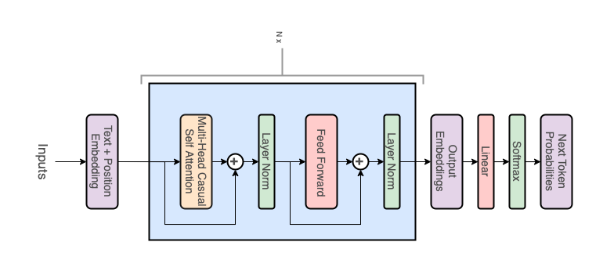
GPT models are a type of transformer neural network, the decoder-only transformer. In this section, we will build each type of layer separately and then we will combine them to obtain a final GPT model represented by the following diagram:
Out[]=
Tokens and Positional Embedding Layers
Tokens and Positional Embedding Layers
Tokens embedding
Tokens embedding
An embedding is a way to represent a token as a vector of numbers. Each token is assigned a unique vector, which is learned by the transformer during training. These embeddings capture the semantic and syntactic relationships between tokens in the text. The dimension of this vector will determine the “depth” of the network, which in our small model will be 128, but it can be much larger, like in GPT-3 DaVinci models, 12288.
Positional embedding
Positional embedding
In addition to token embeddings, transformers also have positional embeddings to encode the position of each token in a sentence. This is important because the order of words in a sentence carries meaning in natural language. In our case, the positional embedding will be learned during training. We could also use a sinusoidal positional embedding like the one used in the original transformer paper (“Attention Is All You Need”, 2017). The results are practically the same.
Combining both embeddings
Combining both embeddings
We then add this positional vector to the corresponding token embedding to create a combined representation of the token and its position within the sentence.
In[]:=
embedding[depth_, vocabulary_] := NetInitialize @ NetGraph @ FunctionLayer[ Module[{emb1, emb2, posembed}, emb1 = EmbeddingLayer[depth][#Input]; posembed = SequenceIndicesLayer[50][#Input]; emb2 = EmbeddingLayer[depth][posembed]; emb1 + emb2 ]& , "Input" {"Varying", NetEncoder[{"Class", vocabulary}]} ]
We can visualize it as the following NetGraph:
In[]:=
embedding[128,vocabulary]
Now we can represent it with ArrayPlot the initial embeddings for the famous Shakespeare’s sentence “To be, or not to be”. Each row corresponds to a token embedding vector with its added positional embedding:
Masked Multi-head Self-Attention Layer
Masked Multi-head Self-Attention Layer
Self-Attention Mechanism
Self-Attention Mechanism
The Self-Attention Mechanism involves generating three matrices called Query, Key and Value. Each of them contain query, key and value vectors for each token in the sequence. We obtain these vectors by multiplying the input sequence embedding by learned weight matrices Wq, Wk and Wv:
Once the query, key, and value vectors have been generated, the Self-Attention Mechanism computes a weight for each token in the sequence by taking the dot product between the query vector for that token and the key vector for every other token in the sequence. The dot products are then scaled by a factor that is the square root of the dimensionality of the key vector.
Next, we apply a softmax function to the scaled dot products to obtain a set of weights that sum to one. These weights are then used to compute a weighted sum of the value vectors, where the weights represent the importance of each token in the sequence.
Next, we apply a softmax function to the scaled dot products to obtain a set of weights that sum to one. These weights are then used to compute a weighted sum of the value vectors, where the weights represent the importance of each token in the sequence.
The resulting weighted sum is then passed through a feedforward neural network to obtain the final output of the Self-Attention Mechanism. This output is then used as input to the next layer of the network.
Masked Attention
Masked Attention
Masked attention is used to prevent the model from “peeking” at future positions in the input when making predictions for a given position. In masked self-attention, certain positions in the input are “masked” or “blocked” so that the model cannot attend to them when making predictions for a given position. This is typically done by setting the attention weights for these positions to a large negative value, which after the softmax become 0. Basically, the masking prevents the model to see any tokens following the current token it is trying to predict. That’s why sometimes it is also called “Causal Self-Attention”.
Attention Heads
Attention Heads
The attention heads are a way of parallelizing the Self-Attention Mechanism to allow the model to attend to different parts of the input sequence in a more fine-grained way.
An attention head is essentially a separate instance of the Self-Attention Mechanism that operates in parallel with the other attention heads in the model. Each attention head has its own set of query, key, and value weight matrices, which allows it to focus on different aspects of the input sequence.
By using multiple attention heads, the Transformer model can learn to attend to different parts of the input sequence at the same time, which can improve the quality of the model’s output. For example, one attention head might focus on the syntax of the input sequence, while another attention head might focus on the semantics.
After each attention head has computed its own set of weights, the results are concatenated together before being passed through a linear layer to generate the final output of the Self-Attention Mechanism.
Typically the embedding size is set to be divisible by the number of heads. In our case, the embedding size is 128 and the number of heads will be 4. So the dimension of the key vector will be 32.
An attention head is essentially a separate instance of the Self-Attention Mechanism that operates in parallel with the other attention heads in the model. Each attention head has its own set of query, key, and value weight matrices, which allows it to focus on different aspects of the input sequence.
By using multiple attention heads, the Transformer model can learn to attend to different parts of the input sequence at the same time, which can improve the quality of the model’s output. For example, one attention head might focus on the syntax of the input sequence, while another attention head might focus on the semantics.
After each attention head has computed its own set of weights, the results are concatenated together before being passed through a linear layer to generate the final output of the Self-Attention Mechanism.
Typically the embedding size is set to be divisible by the number of heads. In our case, the embedding size is 128 and the number of heads will be 4. So the dimension of the key vector will be 32.
Dropout Layer
Dropout Layer
The dropout layer works by randomly setting a fraction of the activations in the previous layer to zero during each training iteration. This has the effect of reducing the capacity of the model and preventing it from relying too heavily on any one feature or set of features.
Normalization Layer
Normalization Layer
The normalization layer is used to normalize the output of the previous layer, which helps to prevent the activations from becoming too large or too small, a phenomenon known as “internal covariate shift”. This normalization is done by centering and scaling the activations to have zero mean and unit variance, respectively.
Residual Connection
Residual Connection
A residual connection involves adding the input to a layer to the output of that layer before passing it through the next layer of the network. This has the effect of creating a "shortcut" or "skip" connection that allows the gradient to bypass the layer and flow directly to the next layer.
The role of residual connections is to address the problem of vanishing gradients, which can occur in deep neural networks when the gradient signal becomes too small to effectively update the parameters of the model.
Masked Self-Attention Block
Masked Self-Attention Block
We can add all the previous layers to create a self-attention block using AttentionLayer, DropoutLayer and NormalizationLayer:
Feed-Forward Layer
Feed-Forward Layer
The Feed-Forward Layer is a fully connected neural network that consists of two linear layers with an activation function in between (GELU ElementwiseLayer function in our case). The first linear layer maps the input to a higher-dimensional space, while the second linear layer maps the output back to the original dimensionality.
The purpose of the Feed-Forward Layer is to introduce non-linearity and allow the model to learn more complex features from the output of the Self-Attention Mechanism. This non-linearity is achieved through the GELU activation function (Gaussian Error Linear Unit), which applies a thresholding function to the output of the first linear layer:
The purpose of the Feed-Forward Layer is to introduce non-linearity and allow the model to learn more complex features from the output of the Self-Attention Mechanism. This non-linearity is achieved through the GELU activation function (Gaussian Error Linear Unit), which applies a thresholding function to the output of the first linear layer:
Decoder-only Transformer
Decoder-only Transformer
Now, we can put all these layers together to build a decoder-only transformer:
In our case, we build a small GPT model with an embedding size of 128, 4 heads and 4 decoder-blocks:
Training the GPT model
Training the GPT model
Finally, we only need to add a cross entropy layer (CrossEntropyLossLayer) as the final layer of the network to calculate the loss between the predicted output and the true output using NetTrain.
The cross-entropy loss is a standard loss function used in many natural language processing tasks, such as language translation, text summarization, and text classification. The loss is calculated by comparing the predicted output to the true output using a probability distribution.
The predicted output is represented as a probability distribution over the vocabulary. The true output, on the other hand, is represented as a one-hot vector with a 1 at the position of the true output word and 0s elsewhere. The cross-entropy loss is calculated by taking the negative logarithm of the predicted probability of the true output word.
The cross-entropy loss is then back-propagated through the network to update the weights of the network in order to minimize the loss. This is done using an optimization algorithm, such as stochastic gradient descent (SGD) or ADAM in our case, which iteratively updates the weights of the network to reduce the loss:
The cross-entropy loss is a standard loss function used in many natural language processing tasks, such as language translation, text summarization, and text classification. The loss is calculated by comparing the predicted output to the true output using a probability distribution.
The predicted output is represented as a probability distribution over the vocabulary. The true output, on the other hand, is represented as a one-hot vector with a 1 at the position of the true output word and 0s elsewhere. The cross-entropy loss is calculated by taking the negative logarithm of the predicted probability of the true output word.
The cross-entropy loss is then back-propagated through the network to update the weights of the network in order to minimize the loss. This is done using an optimization algorithm, such as stochastic gradient descent (SGD) or ADAM in our case, which iteratively updates the weights of the network to reduce the loss:
It’s a good practice to save the trained nets, so if we re-start the session we don’t need to re-train the network again:
Now we can directly obtain the trained net from the cloud using CloudGet:
Autoregressive Text Generation
Autoregressive Text Generation
We can generate full sentences by iteratively getting the next token prediction from our model. At each iteration, we append the predicted token back into the input. This process of predicting a future value (regression), and adding it back into the input (auto) is why you might see a GPT described as autoregressive.
A more efficient way to generate text with the trained network would be to unfold the network with NetUnfold in order to avoid computing some parts of the network multiple times. Here, for simplicity we will just use NestWhileList over the predictor:
By picking always the token with highest probability (greedy sampling) the model often outputs nonsensical repetitive words. Let’s check some more advanced sampling methods.
Sampling
Sampling
We can introduce some stochasticity (randomness) to our generations by sampling from the probability distribution instead of being greedy.
This allows us to generate different sentences given the same input. When combined with techniques like top-k, top-p, and temperature which modify the distribution prior to sampling, the quality of our outputs is greatly increased. These techniques also introduce some hyperparameters that we can play around with to get different generation behaviors (for example, increasing temperature makes our model take more risks and thus be more “creative”):
This allows us to generate different sentences given the same input. When combined with techniques like top-k, top-p, and temperature which modify the distribution prior to sampling, the quality of our outputs is greatly increased. These techniques also introduce some hyperparameters that we can play around with to get different generation behaviors (for example, increasing temperature makes our model take more risks and thus be more “creative”):
We can also pick up randomly one of the best top 3 tokens each time:
Let’s generate multiple random lines at once. First we need to pick up words from our vocabulary that are starting with an upper case letter:
Nice! They indeed sound like Shakespeare’s lines, but most of them are still nonsensical.
Further Improvements
Further Improvements
Our results aren’t amazing and our trained model won’t write a coherent new Shakespeare’s play. If we want to improve the model here are several things that we could try:
◼
Increase the dimension of the embeddings.
◼
Increase the number of decoder blocks.
◼
Increase the number of heads in the Causal Multi-head Self-Attention.
◼
Increase the length of the training sequences. Putting together multiple lines the model might be able to generate multiple lines that are “coherent”.
Increasing these parameters will also increase the training time of the model. So, we should probably get access to some GPUs.
Creating a Shakespearean GPT directly using GPT-3
Creating a Shakespearean GPT directly using GPT-3
Alternatively, we can create a bot that writes like Shakespeare using a much more powerful GPT model. In this final section, we will use GPT-3 DaVinci model via OpenAI’s API.
OpenAI API
OpenAI API
On the Wolfram Paclet Repository there is a recent paclet called OpenAILink which was created by Christopher Wolfram. To set it up on your session we just need PacletInstall:
Writing a Prompt to create a chat bot persona
Writing a Prompt to create a chat bot persona
A prompt is a specific input sequence or set of instructions that is given to a language model to elicit a particular response or output. We can use prompts to guide the behavior of a language model. Our goal is to make chat with characters from Shakespeare’s plays or that writes in his style.
Large Language Models (LLMs) are few shot learners. This means that they can learn new tasks directly from examples of a prompt without the need of re-training or fine-tuning the models.
Large Language Models (LLMs) are few shot learners. This means that they can learn new tasks directly from examples of a prompt without the need of re-training or fine-tuning the models.
And here there is another example generated using the same prompt:
Useful Resources
Useful Resources
The main purpose of this post was to learn about the inner workings of GPT models and transformer neural networks in general. If you are interested in learning more about this topic here are some links that I found useful:
◼
Introduction to Machine Learning by Etienne Bernard, Chapter: Deep Learning Methods.
https://www.wolfram.com/language/introduction-machine-learning/deep-learning-methods/
https://www.wolfram.com/language/introduction-machine-learning/deep-learning-methods/
◼
The Illustrated Transformer: https://jalammar.github.io/illustrated-transformer/
◼
Good review on different Attention Mechanisms: https://lilianweng.github.io/posts/2018-06-24-attention/
◼
The Transformer Family Version 2.0: https://lilianweng.github.io/posts/2023-01-27-the-transformer-family-v2/
PS: Generating the header image
PS: Generating the header image
I created the header image of the post using the same OpenAILink paclet. Dall-e 2 can generate amazing images, it’s just a matter of finding the right prompt and generate a bunch of examples with variations.
I got inspired by looking at prompts that people share on Prompt Hero Hub: https://prompthero.com/
I got inspired by looking at prompts that people share on Prompt Hero Hub: https://prompthero.com/