Wolfram Language at a compilers LAB college class
By Prof. Daniel Carvalho
@danielscarvalho - https://twitter.com/danielscarvalho
Nov 2021
Classes notes
LAB: Languages & Workshop
By Prof. Daniel Carvalho
@danielscarvalho - https://twitter.com/danielscarvalho
Nov 2021
Classes notes
LAB: Languages & Workshop
◼
C
◼
Lua
◼
Elixir
◼
JavaScript
◼
Java
◼
Python
◼
Wolfram Language - THIS LAB
◼
Wolfram Cloud - www.wolframcloud.com
◼
Mathematica (Local)
◼
Wolfram Notebook Interface (GUI)
◼
Assembly
◼
NASM - https://www.nasm.us/
◼
LLVM
Compiler Design
Symbolic and numerical processing
Interpreted and compiled process
Programming Languages float point issue (error)
Compiler Design
Symbolic and numerical processing
Interpreted and compiled process
Programming Languages float point issue (error)
Symbolic and numerical processing
Interpreted and compiled process
Programming Languages float point issue (error)
Wolfram notebook user interface (GUI) provides an environment for exploratory computation, ideal for research and scientists. Jupyter Notebook is inspired by Wolfram notebook (1988), not otherwise.
Float point at Wolfram Language
In[]:=
.1+.2
Out[]=
0.3
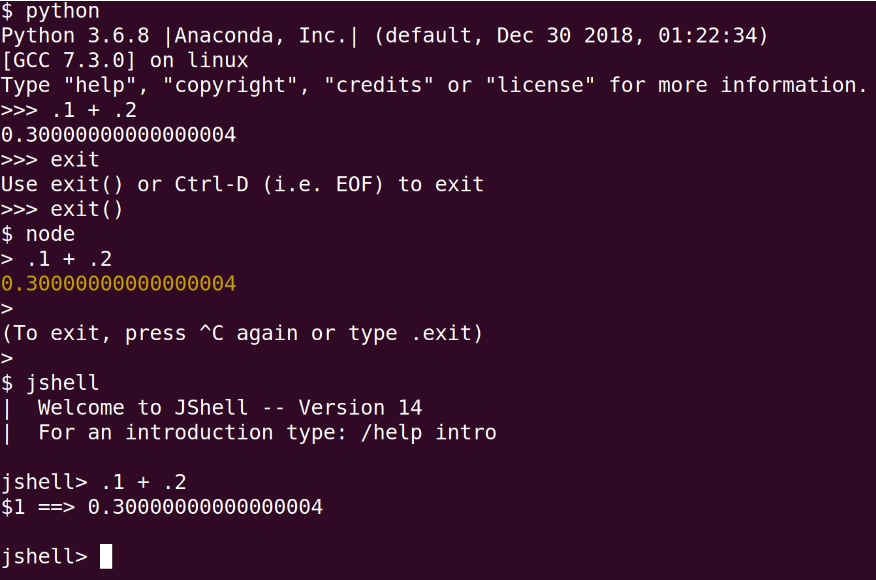
Testing float point operation at some popular programming languages on Linux environment, command line interface (CLI):
- Python
- NodeJs - JavaScript
- JShell - Java
- Python
- NodeJs - JavaScript
- JShell - Java
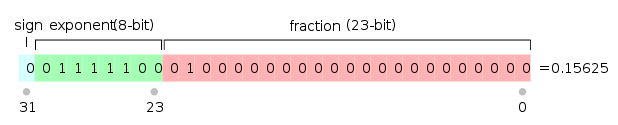
How those languages represent a float point number, 32 bits or 64 bits
Wolfram Language symbolic and numerical processing
By default (language kernel) the interpreted code give symbolic result, everything is an computable expression
In[]:=
1/2*20/7
Out[]=
10
7
You can ask for the numerical value
In[]:=
N[10/7]
Out[]=
1.42857
In[]:=
10./7
Out[]=
1.42857
But it has an arbitrary precision, not limited by machine float point limitations
In[]:=
N[10/7,200]*2
Out[]=
2.8571428571428571428571428571428571428571428571428571428571428571428571428571428571428571428571428571428571428571428571428571428571428571428571428571428571428571428571428571428571428571428571428571429
In the notebook GUI, you can run code in other programming languages installed
In[]:=
1/2*20/7
Out[]=
1.42857
Wolfram Language symbolic computation:
In[]:=
1/2*20/7/x
Out[]=
10
7x
Other languages such as Python, gives and error, it do not know what to do with a symbolic value. The kernel is numeric...
In[]:=
1/2*20/7 /x
Out[]=
Failure

Wolfram Language compiled:
Defining a symbolic function
In[]:=
F[v_]:=v/Sqrt[v]
In[]:=
F[10]
Out[]=
10
In[]:=
F[1]
Out[]=
1
Request the numerical response
In[]:=
N[F[133],100]
Out[]=
11.53256259467079588935418323881787250058306885124138683332787807613527144147488257205290252967436635
Now set the function to return just numerical result
In[]:=
FN[v_]:=N[v/Sqrt[v]]
In[]:=
FN[133]
Out[]=
11.5326
Some tests, lets do it together, with functional programming:
In[]:=
Range[10]
Out[]=
{1,2,3,4,5,6,7,8,9,10}
In[]:=
Map[Z,Range[10]]
Out[]=
{Z[1],Z[2],Z[3],Z[4],Z[5],Z[6],Z[7],Z[8],Z[9],Z[10]}
In[]:=
Z/@Range[10]
Out[]=
{Z[1],Z[2],Z[3],Z[4],Z[5],Z[6],Z[7],Z[8],Z[9],Z[10]}
In[]:=
F/@Range[100]
Out[]=
1,
2
,3
,2,5
,6
,7
,22
,3,10
,11
,23
,13
,14
,15
,4,17
,32
,19
,25
,21
,22
,23
,26
,5,26
,33
,27
,29
,30
,31
,42
,33
,34
,35
,6,37
,38
,39
,210
,41
,42
,43
,211
,35
,46
,47
,43
,7,52
,51
,213
,53
,36
,55
,214
,57
,58
,59
,215
,61
,62
,37
,8,65
,66
,67
,217
,69
,70
,71
,62
,73
,74
,53
,219
,77
,78
,79
,45
,9,82
,83
,221
,85
,86
,87
,222
,89
,310
,91
,223
,93
,94
,95
,46
,97
,72
,311
,10In[]:=
FN/@Range[100]
Out[]=
{1.,1.41421,1.73205,2.,2.23607,2.44949,2.64575,2.82843,3.,3.16228,3.31662,3.4641,3.60555,3.74166,3.87298,4.,4.12311,4.24264,4.3589,4.47214,4.58258,4.69042,4.79583,4.89898,5.,5.09902,5.19615,5.2915,5.38516,5.47723,5.56776,5.65685,5.74456,5.83095,5.91608,6.,6.08276,6.16441,6.245,6.32456,6.40312,6.48074,6.55744,6.63325,6.7082,6.78233,6.85565,6.9282,7.,7.07107,7.14143,7.2111,7.28011,7.34847,7.4162,7.48331,7.54983,7.61577,7.68115,7.74597,7.81025,7.87401,7.93725,8.,8.06226,8.12404,8.18535,8.24621,8.30662,8.3666,8.42615,8.48528,8.544,8.60233,8.66025,8.7178,8.77496,8.83176,8.88819,8.94427,9.,9.05539,9.11043,9.16515,9.21954,9.27362,9.32738,9.38083,9.43398,9.48683,9.53939,9.59166,9.64365,9.69536,9.74679,9.79796,9.84886,9.89949,9.94987,10.}
In[]:=
?Timing
Out[]=
Now lest define the same function, but now compiled (and numeric)
We can set the target language
Test
Compare compiled X interpreted timing
The symbolic operations are expressions, check with FullForm
Wolfram Language (Basics)
Wolfram Language (Basics)
Wolfram Cloud: www.wolframcloud.com
Lets do it together, step by step:
NLP - Natural Language Processing, asking Wolfram|Alpha, in plain English
GEO Processing:
Wolfram Language
- Functional
- Numerical
- Symbolic
- Curated Data
- Algorithms (functions ready to go)
- Functional
- Numerical
- Symbolic
- Curated Data
- Algorithms (functions ready to go)
Computable expressions everywhere:
More AI with Wolfram|Alpha
Code generation:
Curated data:
Try numerical computation and 2D and 3D visualization, in just on line of code:
Integrated with Wolfram Cloud, share on the WEB is easy:
Easy interactivity:
Image Processing and AI
Image Processing and AI
Let do it together, step by step.
As all is an expression, you can just past an image in the source code... the image is an expression too:
As all is an expression, you can just past an image in the source code... the image is an expression too:
Here we can see the image as a computable expression:
IA, ML
IA, ML
Wolfram Language is largely used in science, enterprise P&D, research, education, data science, startups, AI & ML, prototyping etc...
WL can call other programming languages, and it can be called by other programing languages, data bases, works on Windows, Linux, Mac, etc... it is friendly
Speed up Wolfram Language:
- CPU Kernels (Local)
- GPU - CUDA (Local at your gaming PC)
- Compile - LLVM
- Cluster at AWS (HPC) - Cloud
- GridMathematica (Network)
Very high level programming language, designed to communicate clearly with real people.
To learn more: https://www.wolfram.com/wolfram-u/
WL can call other programming languages, and it can be called by other programing languages, data bases, works on Windows, Linux, Mac, etc... it is friendly
Speed up Wolfram Language:
- CPU Kernels (Local)
- GPU - CUDA (Local at your gaming PC)
- Compile - LLVM
- Cluster at AWS (HPC) - Cloud
- GridMathematica (Network)
Very high level programming language, designed to communicate clearly with real people.
To learn more: https://www.wolfram.com/wolfram-u/
Benchmark Java vs C
Benchmark Java vs C
Next class (LAB)
JIT - Just In Time compiler (JRE)
NASM - Assembly
GCC - C
GCC - C
Can Java be faster than C??