Abstract
Abstract
This project explores an enhanced way to deliver spatial audio using acoustic modeling and artificial sound localization instead of traditional filtering and delay based approaches. It utilizes two models to simulate the propagation of sound in a space and attenuates the audio accordingly.
Introduction to Spatial Audio
Introduction to Spatial Audio
Sound Localization
Sound Localization
Neuroscientists have discovered that the azimuth of a sound in an ideal anechoic space can be determined by one's brain with two primary binaural parameters. Namely, the difference in arrival time between each ear (interaural time difference) and the relative amplitude of high-frequency sounds after attenuation (interaural level difference). The former can be modeled quite easily and yields consistent results.
Approaching the Problem
Approaching the Problem
Visualizing a space containing a single sound source and two ears:
In[]:=
PlotPoint2dAudio
Out[]=
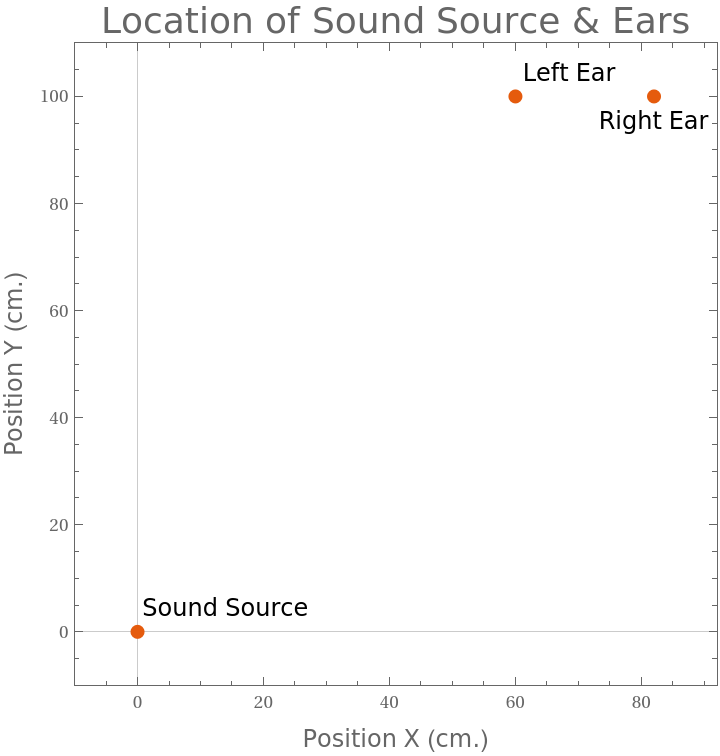
The delay of sound perception in either ear can be computed using the distance and speed of sound. Once the delay is determined, the timing of the audio can be shifted in both stereo channels to effectively simulate audio originating from a sound source at some distance away.
Implementation of Described Algorithm:
In[]:=
Point2dAudio[audioObject_, speakerPoint_, leftEar_, rightEar_]:=Module[{f=audioObject, s=speakerPoint, le=leftEar, re=rightEar},(*Trimming Raw Audio & Separating Audio for each Channel*)leftA = AudioPan[f, -1.] // AudioNormalize;rightA= AudioPan[f, 1.] // AudioNormalize;(*Calculating Delays*)leftDist = Quantity[EuclideanDistance[le,s], "centimeters"];rightDist = Quantity[EuclideanDistance[re,s], "centimeters"];c = StandardAtmosphereData[Quantity[0, "feet"],"SoundSpeed"];leftDelay = leftDist/c;rightDelay = rightDist/c;(*Debug*)Print["Left Ear Distance:"]; Print[leftDist];Print["Right Ear Distance:"]; Print[rightDist];Print["Left Ear Delay:"]; Print[leftDelay];Print["Right Ear Delay:"]; Print[rightDelay];(*Audio Delaying*)leftDelayA = AudioDelay[leftA, leftDelay];rightDelayA = AudioDelay[rightA, rightDelay];(*Mixing to Generate Final Sound*)AudioNormalize[AudioChannelCombine[{leftDelayA, rightDelayA}]]]
Importing sample audio and trimming:
In[]:=
trimmedAudio=AudioTrimCloudImport,"Audio",{1,45}//AudioNormalize
Passing speaker and ear positions as well as the sample audio to the algorithm:
delayedAudio=Point2dAudio[trimmedAudio,{0,0},{60,100},{82,100}]
Left Ear Distance:
Right Ear Distance:
Left Ear Delay:
Right Ear Delay:
Confirming that the audio has been delayed using a plot:
In[]:=
AudioPlotdelayedAudio,PlotRange{{0.`,0.15`},{-0.1`,0.1`}},
Out[]=
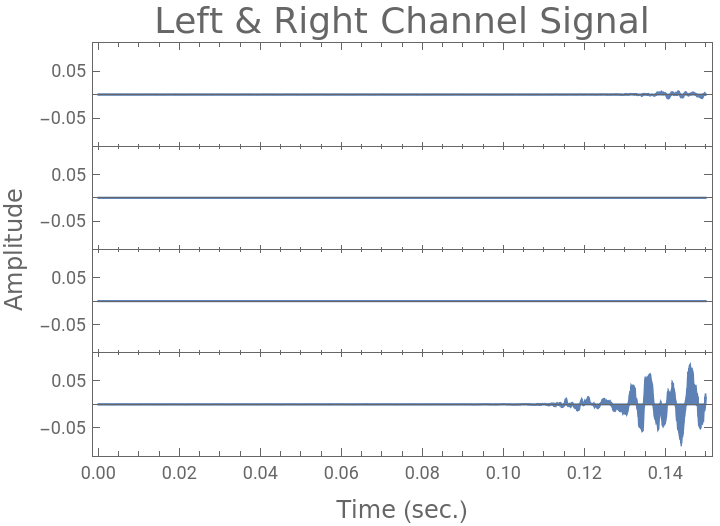
Notice that the signal for one channel begins before the other by a small margin. This delay is enough for the brain to localize the sound.
Motivation to Utilize Acoustic Modeling
Motivation to Utilize Acoustic Modeling
While the audio from the algorithm seems promising, it isn't truly a representation of reality. One of the shortcomings that is immediately obvious is the lack of attenuation. Ideally as the listener distances themself away from the sound source, the amplitude should reduce. This doesn't happen with the current model since it only channels delayed audio into each ear. If the listener changed their distance from the source while maintaining the same angle, the algorithm will simply apply a delay to the beginning of each channel. Both the relative delay between channels and the amplitudes will remain the same. Succinctly stated, there will be no audible difference if the distance from the sound source is changed.
Although introducing an attenuation coefficient computed based on distance is feasible, modeling the inverse square law reduction can become complicated. However, let's assume that the amplitude reduction is implemented successfully. Consider the case where the sound source, and both ears are collinear. The head would effectively serve as an obstacle or boundary preventing the sound from reaching one of the ears, thereby reducing the amplitude by a magnitude much more than what would've been determined with the inverse square law. This phenomenon is more commonly known as the head shadowing effect. Introducing obstacles to the space and attenuating with a simple approach similar to the one described above will quickly become complicated. Thankfully, the field of acoustics offers the necessary tools to address some of the aforementioned limitations.
Although introducing an attenuation coefficient computed based on distance is feasible, modeling the inverse square law reduction can become complicated. However, let's assume that the amplitude reduction is implemented successfully. Consider the case where the sound source, and both ears are collinear. The head would effectively serve as an obstacle or boundary preventing the sound from reaching one of the ears, thereby reducing the amplitude by a magnitude much more than what would've been determined with the inverse square law. This phenomenon is more commonly known as the head shadowing effect. Introducing obstacles to the space and attenuating with a simple approach similar to the one described above will quickly become complicated. Thankfully, the field of acoustics offers the necessary tools to address some of the aforementioned limitations.
Modeling Acoustics in the Time Domain
Modeling Acoustics in the Time Domain
The mathematical model that governs waves in classical physics is a second-order linear partial differential equation, conveniently called the Wave Equation. Solving this equation using NDSolveValue yields an Interpolating Function that takes in positional arguments & a time argument and returns the corresponding pressure.
Obtaining the Interpolating Function
Obtaining the Interpolating Function
Defining a region for sound to propagate through, note that the large white circle represents the head of the listener:
In[]:=
Ω=RegionDifference[RegionDifference[Rectangle[{0,0},{0.25,0.25}],Disk[{0.1,0.1},0.025]],Disk[{0.25,0},0.0125]];RegionPlotΩ,
Out[]=
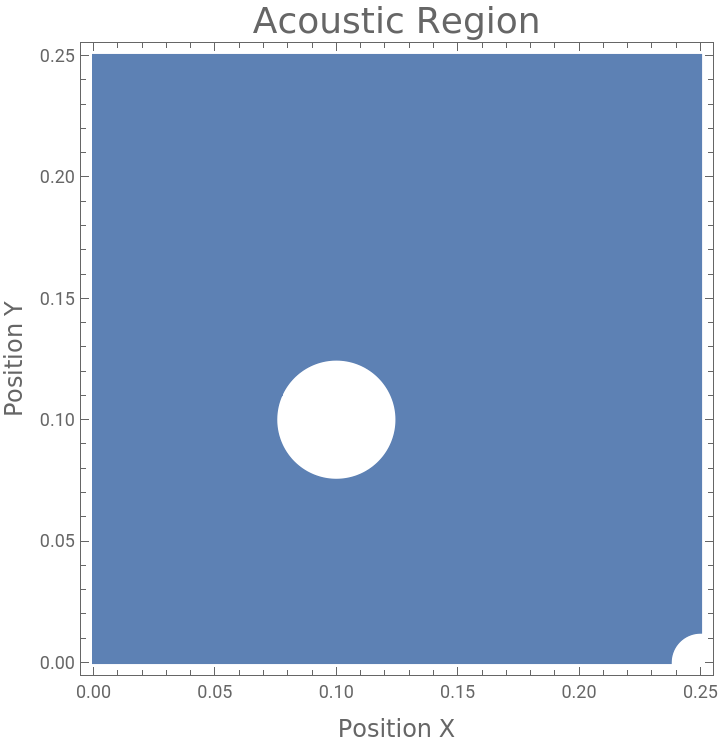
In order to help guide sound through the region, boundary conditions must be set. There are a wide variety of options when it comes to selecting boundary conditions, but for the purpose of visualizing the best options would be a Neumann Absorbing Boundary for the walls and a Neumann Radiating Boundary for the sound source.
Setting the boundary conditions:
In[]:=
Γ
ABC
(ω)p[x,y]
ρc
Γ
RBC
(ω)p[x,y]
ρc
(2ω)5
ρc
Extract sound speed and air density from ThermodynamicData:
In[]:=
c
air
ρ
air
Setting sound wavelength and frequency:
In[]:=
λ=1/10;f=/λ;
c
air
Defining the PDE and solving it with NDSolveValue:
Visualizing the Interpolating Function's Output
Visualizing the Interpolating Function's Output
Visualizing Pressure in the Region Over Time in 2D:
Interpreting the Visualizations
Interpreting the Visualizations
The visualizations of wave propagation help describe the differences in sound pressure throughout the region and more specifically the change in pressure. Furthermore, the data appears to match one's intuitive understanding of sound, in that the signal attenuates as it moves farther away from the sound source and that the head affects the acoustics of the room. However, adjusting the sound source to radiate a Fourier Transformation of the original audio and then probing the amplitude data at each ear location for every time step to determine the attenuation coefficient is very inefficient. The main issue here is the time parameter, which can be easily bypassed by modeling in the frequency domain rather than the time domain.
Modeling Acoustics in the Frequency Domain
Modeling Acoustics in the Frequency Domain
A model similar to the wave equation described previously is the Helmholtz Equation. However, the Helmholtz equation eliminates the need of the time parameter. Instead of mapping from the time domain to sound pressure, it maps from the frequency domain to sound pressure.
Obtaining the Interpolating Function
Obtaining the Interpolating Function
Defining a region for sound to propagate through. Again, the large white circle represents the observer's head:
Defining the sound source and boundary conditions:
Extract sound speed and air density from ThermodynamicData:
Defining the PDE and solving it with ParametricNDSolve:
Visualizing the Interpolating Function's Output
Visualizing the Interpolating Function's Output
Visualizing Pressure in the Region at 500Hz with a Monopole Sound Source in 2D:
Visualizing Pressure in the Region between 100Hz and 500Hz with a Monopole Sound Source in 2D:
Interpreting the Visualizations
Interpreting the Visualizations
The visualizations indicate the corresponding amplitude at any position for a certain frequency. Since any waveform can be decomposed into a sum of sinusoids with a Fourier Transform, each sinusoid can be attenuated using coefficients extracted from our Helmholtz Model. In addition, the phase shifts can also be determined using the Wave Model.
Using Acoustic Models to Modify Audio
Using Acoustic Models to Modify Audio
The final audio file can be produced by multiplying the amplitude coefficients from the Helmholtz Model by the values at each frequency stored in the Fourier Transformation of the original audio.
Attenuating on Short Time Fourier Transform data
Attenuating on Short Time Fourier Transform data
Loading the audio and trimming:
Applying the Short Time Fourier Transform:
Attenuating by frequency range for each ear:
Combining channels to get a final audio object:
Checking if attenuation coefficients were applied successfully:
Further Steps
Further Steps
While this project can serve as an acceptable foundation for spatial audio, there is certainly room for improvement. The first thing that becomes apparent upon hearing the generated audio files is the quality loss. By applying a Fourier transform to the audio and attenuating different frequency intervals, the quality of the sound is noticeably reduced. This can be addressed to some extent by increasing the sample rate in the Fourier Transform, but will be computationally intensive and time consuming. Upon advice from a mentor, I will be attempting to use a Hann window to smooth the result of the Fourier Transform. This could help improve the resultant sound quality. Another possible improvement would be the introduction of the third spatial dimension into these models. There has been research about how sound is localized when the elevation of the source is changed relative to the observer and it can be incorporated into the scope of this project.
Acknowledgements
Acknowledgements
I would like to thank my mentor, Faizon Zaman, as well as all of the other staff at the 2020 Wolfram Summer Camp, including Jeremy Stratton-Smith and Arben Kalziqi for helping me develop this project. I would also like to thank Carlo Giacometti for helping me understand some of the technical aspects of acoustics. I am grateful for being provided the opportunity to work alongside some of the brightest students I've met and receive mentorship from experienced staff, especially amidst these trying times.
References
References