CITE THIS NOTEBOOK: Debugging and performance tuning for data parallelism by Roman Maeder. Wolfram Community Dec 21 2022.
A look at undocumented debugging options in Parallel Tools
Parallel Monitoring Tools Basics
Parallel Monitoring Tools Basics
When you enable the “Parallel Monitoring Tools” in the preferences,
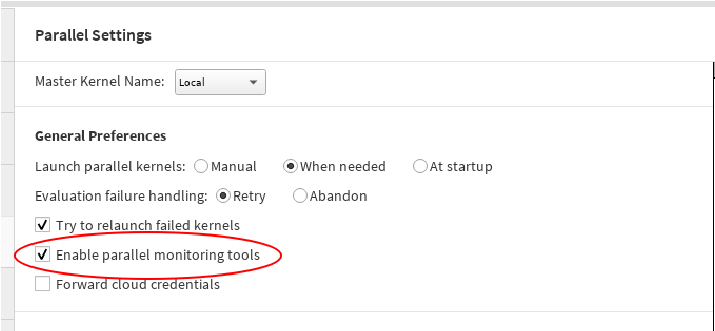
you get access to some undocumented settings that allow you to watch the communication between the master kernel and the parallel subkernels it controls.
In[]:=
Needs["Parallel`Debug`"]
In[]:=
Options[$Parallel]
Out[]=
{Tracers{},TraceHandlerPrint}
In[]:=
OptionValues[Tracers]
Out[]=
{MathLink,Queueing,SendReceive,SharedMemory}
The “SendRecieve” key will show the communication that happens.
In[]:=
SetOptions[$Parallel,Tracers->{SendReceive}]
Out[]=
{Tracers{SendReceive}}
In[]:=
LaunchKernels[4];
In[]:=
ParallelMap[PrimeQ,{1,2,3,4,5,6,7,8,9}]
SendReceive: Sending to kernel 1: $`w[Map[PrimeQ][Unevaluated[{1,2}]],1] (q=0)
SendReceive: Sending to kernel 2: $`w[Map[PrimeQ][Unevaluated[{3}]],2] (q=0)
SendReceive: Sending to kernel 3: $`w[Map[PrimeQ][Unevaluated[{4}]],3] (q=0)
SendReceive: Sending to kernel 4: $`w[Map[PrimeQ][Unevaluated[{5}]],4] (q=0)
SendReceive: Receiving from kernel 1: [{False,True}] (q=0)
eid
1
SendReceive: Sending to kernel 1: $`w[Map[PrimeQ][Unevaluated[{6}]],5] (q=0)
SendReceive: Receiving from kernel 2: [{True}] (q=0)
eid
2
SendReceive: Sending to kernel 2: $`w[Map[PrimeQ][Unevaluated[{7}]],6] (q=0)
SendReceive: Receiving from kernel 3: [{False}] (q=0)
eid
3
SendReceive: Sending to kernel 3: $`w[Map[PrimeQ][Unevaluated[{8}]],7] (q=0)
SendReceive: Receiving from kernel 4: [{True}] (q=0)
eid
4
SendReceive: Sending to kernel 4: $`w[Map[PrimeQ][Unevaluated[{9}]],8] (q=0)
SendReceive: Receiving from kernel 1: [{False}] (q=0)
eid
5
SendReceive: Receiving from kernel 2: [{True}] (q=0)
eid
6
SendReceive: Receiving from kernel 3: [{False}] (q=0)
eid
7
SendReceive: Receiving from kernel 4: [{False}] (q=0)
eid
8
Out[]=
{False,True,True,False,True,False,True,False,False}
What we can see here, besides some internals, is that the computation is broken up into 8 jobs, two for each of our four kernels. One of them consists of 2 evaluations, the other contain just a single one.
You can also see that a new job is sent to each kernel as soon as a result is received. If the evaluations are uneven, taking vastly different amount of time, this feature provides for load-balancing.
For load balancing to have maximal effect, each evaluation should be submitted as a single job, which is what the Method option can do.
In[]:=
ParallelMap[PrimeQ[#!+1]&,{1,2,3,4,5,6,7,8,9,10},Method->"FinestGrained"]
SendReceive: Sending to kernel 1: $`w[Map[PrimeQ[#1!+1]&][Unevaluated[{1}]],9] (q=0)
SendReceive: Sending to kernel 2: $`w[Map[PrimeQ[#1!+1]&][Unevaluated[{2}]],10] (q=0)
SendReceive: Sending to kernel 3: $`w[Map[PrimeQ[#1!+1]&][Unevaluated[{3}]],11] (q=0)
SendReceive: Sending to kernel 4: $`w[Map[PrimeQ[#1!+1]&][Unevaluated[{4}]],12] (q=0)
SendReceive: Receiving from kernel 1: [{True}] (q=0)
eid
9
SendReceive: Sending to kernel 1: $`w[Map[PrimeQ[#1!+1]&][Unevaluated[{5}]],13] (q=0)
SendReceive: Receiving from kernel 2: [{True}] (q=0)
eid
10
SendReceive: Sending to kernel 2: $`w[Map[PrimeQ[#1!+1]&][Unevaluated[{6}]],14] (q=0)
SendReceive: Receiving from kernel 3: [{True}] (q=0)
eid
11
SendReceive: Sending to kernel 3: $`w[Map[PrimeQ[#1!+1]&][Unevaluated[{7}]],15] (q=0)
SendReceive: Receiving from kernel 4: [{False}] (q=0)
eid
12
SendReceive: Sending to kernel 4: $`w[Map[PrimeQ[#1!+1]&][Unevaluated[{8}]],16] (q=0)
SendReceive: Receiving from kernel 1: [{False}] (q=0)
eid
13
SendReceive: Sending to kernel 1: $`w[Map[PrimeQ[#1!+1]&][Unevaluated[{9}]],17] (q=0)
SendReceive: Receiving from kernel 2: [{False}] (q=0)
eid
14
SendReceive: Sending to kernel 2: $`w[Map[PrimeQ[#1!+1]&][Unevaluated[{10}]],18] (q=0)
SendReceive: Receiving from kernel 3: [{False}] (q=0)
eid
15
SendReceive: Receiving from kernel 4: [{False}] (q=0)
eid
16
SendReceive: Receiving from kernel 1: [{False}] (q=0)
eid
17
SendReceive: Receiving from kernel 2: [{False}] (q=0)
eid
18
Out[]=
{True,True,True,False,False,False,False,False,False,False}
“CoarsestGrained”, on the other hand, will pack as many evaluations as needed into a single job per kernel. This is great for long lists of simple evaluations.
In[]:=
ParallelMap[PrimeQ[#!+1]&,{1,2,3,4,5,6,7,8,9,10},Method->"CoarsestGrained"]
SendReceive: Sending to kernel 1: $`w[Map[PrimeQ[#1!+1]&][Unevaluated[{1,2,3}]],19] (q=0)
SendReceive: Sending to kernel 2: $`w[Map[PrimeQ[#1!+1]&][Unevaluated[{4,5,6}]],20] (q=0)
SendReceive: Sending to kernel 3: $`w[Map[PrimeQ[#1!+1]&][Unevaluated[{7,8}]],21] (q=0)
SendReceive: Sending to kernel 4: $`w[Map[PrimeQ[#1!+1]&][Unevaluated[{9,10}]],22] (q=0)
SendReceive: Receiving from kernel 1: [{True,True,True}] (q=0)
eid
19
SendReceive: Receiving from kernel 2: [{False,False,False}] (q=0)
eid
20
SendReceive: Receiving from kernel 3: [{False,False}] (q=0)
eid
21
SendReceive: Receiving from kernel 4: [{False,False}] (q=0)
eid
22
Out[]=
{True,True,True,False,False,False,False,False,False,False}
Data Parallel Performance
Data Parallel Performance
Data parallelism (applying the same function to each element of a list) works best when these three conditions are met:
◼
short input
◼
time-consuming computation per element
◼
short output
The one example everybody seems to try first, is just the opposite. But first we should turn off debugging.
In[]:=
SetOptions[$Parallel,Tracers->{}]
Out[]=
{Tracers{}}
In[]:=
list=Range[0.0,1,0.000001];Length[list]
Out[]=
1000001
In[]:=
AbsoluteTiming[result=ParallelMap[Sin,list];]
Out[]=
{0.740531,Null}
Of course, it takes the kernel a lot less time to just compute it locally.
In[]:=
AbsoluteTiming[result=Map[Sin,list];]
Out[]=
{0.092721,Null}
Perhaps surprisingly, we can see quite an improvement, if we put the Range command inside ParallelMap.
In[]:=
AbsoluteTiming[result=ParallelMap[Sin,Range[0.0,1,0.000001]];]
Out[]=
{0.32335,Null}
The parallel code is smart enough to recognize the symbolic Range[] command and avoid expanding it. Rather, it is dissected into Range commands for contiguous sub ranges. A smaller example shows how this works, this time for Table instead of Range.
In[]:=
SetOptions[$Parallel,Tracers->{SendReceive}]
Out[]=
{Tracers{SendReceive}}
In[]:=
ParallelTable[Sin[r],{r,0.0,1.0,0.01},Method->"CoarsestGrained"]
SendReceive: Sending to kernel 1: $`w[Identity[Table[Sin[r],{r,0.,0.255,0.01}]],527] (q=0)
SendReceive: Sending to kernel 2: $`w[Identity[Table[Sin[r],{r,0.26,0.505,0.01}]],528] (q=0)
SendReceive: Sending to kernel 3: $`w[Identity[Table[Sin[r],{r,0.51,0.755,0.01}]],529] (q=0)
SendReceive: Sending to kernel 4: $`w[Identity[Table[Sin[r],{r,0.76,1.005,0.01}]],530] (q=0)
SendReceive: Receiving from kernel 1: [{0.,0.00999983,0.0199987,0.0299955,0.0399893,0.0499792,0.059964,0.0699428,0.0799147,0.0898785,0.0998334,0.109778,0.119712,0.129634,0.139543,0.149438,0.159318,0.169182,0.17903,0.188859,0.198669,0.20846,0.21823,0.227978,0.237703,0.247404}] (q=0)
eid
527
SendReceive: Receiving from kernel 2: [{0.257081,0.266731,0.276356,0.285952,0.29552,0.305059,0.314567,0.324043,0.333487,0.342898,0.352274,0.361615,0.37092,0.380188,0.389418,0.398609,0.40776,0.416871,0.425939,0.434966,0.443948,0.452886,0.461779,0.470626,0.479426}] (q=0)
eid
528
SendReceive: Receiving from kernel 3: [{0.488177,0.49688,0.505533,0.514136,0.522687,0.531186,0.539632,0.548024,0.556361,0.564642,0.572867,0.581035,0.589145,0.597195,0.605186,0.613117,0.620986,0.628793,0.636537,0.644218,0.651834,0.659385,0.66687,0.674288,0.681639}] (q=0)
eid
529
SendReceive: Receiving from kernel 4: [{0.688921,0.696135,0.703279,0.710353,0.717356,0.724287,0.731146,0.737931,0.744643,0.75128,0.757843,0.764329,0.770739,0.777072,0.783327,0.789504,0.795602,0.80162,0.807558,0.813416,0.819192,0.824886,0.830497,0.836026,0.841471}] (q=0)
eid
530
Out[]=
{0.,0.00999983,0.0199987,0.0299955,0.0399893,0.0499792,0.059964,0.0699428,0.0799147,0.0898785,0.0998334,0.109778,0.119712,0.129634,0.139543,0.149438,0.159318,0.169182,0.17903,0.188859,0.198669,0.20846,0.21823,0.227978,0.237703,0.247404,0.257081,0.266731,0.276356,0.285952,0.29552,0.305059,0.314567,0.324043,0.333487,0.342898,0.352274,0.361615,0.37092,0.380188,0.389418,0.398609,0.40776,0.416871,0.425939,0.434966,0.443948,0.452886,0.461779,0.470626,0.479426,0.488177,0.49688,0.505533,0.514136,0.522687,0.531186,0.539632,0.548024,0.556361,0.564642,0.572867,0.581035,0.589145,0.597195,0.605186,0.613117,0.620986,0.628793,0.636537,0.644218,0.651834,0.659385,0.66687,0.674288,0.681639,0.688921,0.696135,0.703279,0.710353,0.717356,0.724287,0.731146,0.737931,0.744643,0.75128,0.757843,0.764329,0.770739,0.777072,0.783327,0.789504,0.795602,0.80162,0.807558,0.813416,0.819192,0.824886,0.830497,0.836026,0.841471}
So, we achieved our first tuning objective.
The third one concerns cases where we do not need an output for each evaluation, typically search functions, such as Select.
As there is no ParallelSelect, we use Parallelize[Select[...]].
As there is no ParallelSelect, we use Parallelize[Select[...]].
Even faster are cases where we ask only for a summary result, such as the number of matching elements.
Load Balancing
Load Balancing
For the second bullet point, we need some non-trivial computation, such as primality testing. The time it takes to test a number for primality varies a lot, and so this example can also demonstrate the effect of load balancing.
Here is this example with minimal communication, but no load balancing. If you try this at home, you can see that the first kernel finishes much sooner than the last one.
For maximal load balancing, we should submit all evaluations individually, so let us first turn off debugging, to avoid seeing 1000 lines of output.
This should be much quicker.
What about the other Tracers Tags?
What about the other Tracers Tags?
The “MathLink” tag is useful for diagnosing problems with launching (remote) kernels.
It is no longer that useful, because the magic now happens in a separate KernelObject package, which has its own hidden debug switch.
Seeing the actual ssh command can help in finding problems with missing authentication, etc.
The “SharedMemory” tag shows the callbacks that happen when you use shared variables.
Which will give you a clue that there is something wrong.
That’s better!
Conclusions
Conclusions
For successful parallelization you need to minimize the communication among the kernels. These debugging options can help you find inefficiencies. If the debugging output overflows your notebook window, you should have a closer look at what is actually happening.