Two aspects in converting Docx into ePub:
(1) Restoring the index into a book style index,
(2) Restoring the hyperlink references (including some that occur in footnotes).
Some rough and ready routines in Mathematica for assistance w.r.t. Calibre 6.3.0.
Expression of a general philosophy that an ePub better looks like a book except for paper.
NB. This has been written for Windows 10, Word for Windows Office 16, and Mathematica 13. The Docx was converted into ePub originally in Calibre 6.2.1, but 6.3.0 has the same conversion properties.
(1) Restoring the index into a book style index,
(2) Restoring the hyperlink references (including some that occur in footnotes).
Some rough and ready routines in Mathematica for assistance w.r.t. Calibre 6.3.0.
Expression of a general philosophy that an ePub better looks like a book except for paper.
NB. This has been written for Windows 10, Word for Windows Office 16, and Mathematica 13. The Docx was converted into ePub originally in Calibre 6.2.1, but 6.3.0 has the same conversion properties.
Abstract
Abstract
This Mathematica notebook has rough and ready routines and documentation for reworking a Calibre 6.3.0 ePub that has been freshly converted from a MS Word Docx. These aspects are handled: (i) the index, (ii) hyperlink references (some that occur in footnotes). As a philosophy, an ePub should retain the good properties of books while including the advantages of saving trees, flexible letter size, clicking on hyperlinks, and cheaper colour pictures. The current Calibre format of an index has “linked entries, that each occur on a separate line”: those can be turned into a normal book format, i.e. “per line: the index entry and clickable numbers/instances”. Also discussed are (iii) another format for the table of contents and (iv) responsiveness of pictures to the window size.
The targeted readership for this notebook is:
-- Users of ePubs who wonder about linked indices and other links.
-- Programmers of Calibre, Python and other programs who might consider creating such options and who might want an idea of what programming would be involved.
-- Users of Mathematica who might appreciate an application for this rough and ready issue as well.
-- The digital industry that supports editing and publishing, of websites and books and typesetting: for the diagnosis that the world lacks basic openness for text editing, and that this causes a lot of hassle. (The term “open standard” suggests too much that there first must be a standard and only later openness. The emphasis is on openness from the start.)
PM. It may be doubted whether ePub is such a useful phenomenon, and it would help to get a focus on getting such openness (e.g. if it lacks on relevant aspects in Word).
PM. I used Calibre by recommendation by my POD publisher. It is not my present purpose to evaluate the program. Calibre has various features that are very useful, and that I got to appreciate, so that critical comments here should not distract from the overall situation. I am not in a position to evaluate it or ePubs in general, and have no desire to do so. I just want to report about my journey from a converted ePub towards a final ePub, and to show what rough and ready programs I created in Mathematica. Perhaps others may get an idea about the issues and workflow. And, I want to highlight a general philosophy on this issue.
PM. These routines are called “rough and ready” since they were written on the go, and they have not been edited once they worked. Normally, one associates the Mathematica working environment with structured mathematical modeling. Personally, I keep the routines in “The Economics Pack” structured and neat. In this case for Calibre’s input of Docx and output of ePub, the reader might expect “mathematical models of what a book, Docx and ePub are”, and transformations in-between: but this would be too ambitious. It suffices to make things on the go.
Modelofabook | ||
↙ | ↓ | ↘ |
ModelforDocx | ModelforL A TE X | ModelofanePub |
Aparticularfile | ←----Rough&ready-----> | xHtml,CSS |
PM. Calibre states a conversion order of decreasing preference: LIT, MOBI, AZW, EPUB, AZW3, FB2, FBZ, DOCX, HTML, PRC, ODT, RTF, PDB, TXT, PDF. Thus I have presumed that converting a Docx directly is better than first converting Docx into ODT (e.g. by LibreOffice) and then try Calibre again.
Contents
Contents
Introduction
Introduction
A general philosophy on writing, printing and publishing
A general philosophy on writing, printing and publishing
For digital books (Word, ODF, PDF, -PDF, ePub), I would like to retain all benefits from the printed book (skipping paper and the smell of ink), and include all benefits from being digital.
L
A
TE
XProgrammers are invited to follow the maxim: Do not program to others that you don't want to be programmed to yourself. (The enclosed rough & ready routines are not for wide application.)
The reader is invited to the perspective that MS Word could have been open from the start in 1983 rather than 2000 - see OOXML at https://en.wikipedia.org/wiki/Office_Open_XML. All kinds of other software - like browsers, PDF and its readers, typography, ePub, the actual ODF, and also the Mathematica environment that I am using now - could have been based upon this standard, allowing easier additions and transformations. (Similarly, one may dream about an operating system written in Mathematica, rather than VBA in Windows or the command line like in MS DOS .) (The term “open standard” suggests too much that there first must be a standard and only later openness. The emphasis is on openness from the start.)
L
A
TE
X-- Word already showed flexibility by the inclusion of the hyperlinks featured by browsers (Netscape). Thus html could have remained only a manner to create links, instead of developing into its own language and some variant of Word itself (and an editor like MS Expression Web 4).
-- Mathematica and other algebraic packages started from the need to do mathematics on the computer. Word has some mathematical notation and the use of macros. There came also with the objective of typesetting “only”, but then also the need for editing.
L
A
TE
X-- Word retains the flexible window and allows different views: print, web, “read view”. (One is invited to look at this Read View: if it were offered as “read only”, say file extension “ducx”, it is basically like an ePub. The world is essentially trying to program around the MS Word monopoly. ) Reading from paper remains quite useful at times. PDF includes a fixed page size for actual paper that should be independent of the printer. PDF readers still are useful for inspection of PDFs, and can also include hyperlinks and allow some editing like including comments. (In Paint, one can directly go to a point on a paper/canvas, and in text editors like Word, one first must create a path to it.)
One sees a tendency (i) that something starts as a special application, and (ii) then needs editing, and (iii) then develops into some “variant of Word”, instead of including the special application within Word (with Word seen as the general editing environment).
All this seems like an overgrowth of “special standards”. It “only” derives from a lack of early openness (starting with the commercially successful MS product). (Perhaps there should be an international union of programmers, with an open attitude, to make this possible in the future ? But a workers union might want to create more jobs instead of less.)
A huge problem is American litigation. This grants legal protection for the "look and feel" of a computer screen. When a user is used to the layout of reading and editing options in MS Word (I still think that Word 97 is more agreeable than the Office 16 version that I am using now), then for a slightly different application, the producer of a new application is forced by American litigation to produce a different screen layout, and the reader is forced to learn to navigate around in the new environment, with the effect that one essentially does the same. Potentially, within the ISO world, there has been too little attention for the “look and feel” issue. Using a mouse, and pointing and clicking apparently are one thing, but the layout of a menu bar and the pictures used in icons can be classified too easily as “intellectual property”. (And if it is, then one requires the law to protect against the abuse of law, by perhaps the creative commons licences.)
Particular branches in this overgrowth make claims for their existence. Those claims should be judged critically. A new standard might come with commercial interests. Counterarguments by MS of course require critical evaluation as well. Potentially the world at least has steered away from a more dismal situation (e.g. all OS’s fully apart).
A new standard might come not from litigation but from “thinking within the box”. For example, italics and bold text styles used to be treated as “exceptions”. In html, <p > text <i >italics </i> text2 </p> allowed for text in common style with only the exception of some italics in-between. Suddenly, someone in the industry wanted to get rid of thinking in terms of exceptions, and the span and div tags came about, putting normal text at the same level as the exception: <p ><span> text</span> <i >italics </i><span> text2</span> </p>. It makes for awkward reading of code and longer files, while it is unclear why this happened and was considered necessary, and why there is no option to get rid of all this clutter. (An exception within an exception is just another recursive loop.)
It may be noted that the ePub standard of 2007 had a precursor in the Open eBook (standard) of 1999. While it started in openness, it could have adopted OOXML in 2000, which derived from MS but was open (though perhaps not sufficiently so). A prime motivation for the publishing industry was Digital Rights Management (DRM). ePub is sold as a manner to save trees, and not as a manner to maintain the middle men between author and readers. (Often agents in the middle have knowledge of all relationships and may be tempted to grab if not control then at least part of the pie.)
An alternative to ePub is to present a read-only Word file (not only Read Mode), with some DRM protection. Rather than an ePub reader, the user would use the hypothetical "Open Word" or its variants like nowadays ODF. ePub is essentially superfluous. It derives some relevance from that it has evolved into some standard within the publishing industry. (This is not quite the same as arguing that French is essentially superfluous, and only exists since some people speak it. The evolution of natural languages differs from the deliberate development of digital standards by programmers.)
Potentially, ePub, by focussing on reading-only (though with the options of inserting comments and bookmarks like putting post-its in an actual book), provides a real service to readers who want to read only, and who are not served in other ways (yet).
LATEX for digital books like ePub
L
A
TE
XTypesetting arises in particular when there is line-justification for fixed line widths. Digital texts tend to avoid justification. For fixed line widths, there may be the single investment in calculation time to get nice typography. For flexible window sizes, immediate calculation will cause delays. Potentially, an ePub could offer a reader the option to choose a preferred line width, and then restyle the book with typography. Potentially, a later version of the programme tex4ebook might support such development.
The problem of CSS and the philosophy of its programmers
The problem of CSS and the philosophy of its programmers
MS Word already had a stylesheet (normal.dot). Potentially other earlier editors too. It dawned on other designers of editors, in particular of html, that a stylesheet was a good idea. CSS programmers have been overzealous however. While adding things that are useful, they also have been destroying some useful aspects. As said below: the <img> tag used to have a property of align="middle", but this no longer works, and one is forced to define a particular (CSS) style. For this centering, a local <center> or <div> container still can be used.
While it used to be possible to make local tweeks in html, this is now getting eradicated. This actually causes that application programmers increase the size of the (CSS) stylesheet, since each particular tweek gets its own “style”.
For example, while pictures could have a standard layout on say centering and padding, their sizes can differ, and while <img> establishes this locally, this now might need to be exported to CSS, so that ultimately each picture gets its own style declaration, and instead of looking at the local situation, one must move to another spot, the stylesheet, to do the actual edit. (Fortunately, the Calibre environment allows one to click on the class declaration, but it remains a hassle to work out of context.)
The argument that CSS allows for stylised editing is correct, but it is not correct, and madness on the side of W3C that apparently oversees this, that only such types of programs are adequate. The criterion must be that an edit works. It can save a lot of hassle for an editor (application programmer) when a particular issue can be solved locally.
PM. The conceptual error may have originated earlier in the https://www.scss.tcd.ie/misc/15445/15445.HTML ISO-standard: “This International Standard requires a complete separation of style and content.”
NB. There seems to arise a tendency that what was already defined as a standard in html, now must be defined in each particular instance in CSS. (I lost the example.)
PM. A benefit of all this development is that while html had the philosophy of continuous scrolling, there now is the option of “page breaks”.
This notebook
This notebook
This notebook looks at a practical book, with an index and linked references like “see p21”. Above general notions and the notion of a “page” are kept as guiding principles.
I first describe the problem that I ran into, show the final result, and then provide the routines that solved the problem.
For readers who are not familiar with Mathematica: A notebook combines text and executable code and feedback from running the code. Here, such pages have been moved to Appendices.
Method
Method
1. Unzip the ePub into a working directory.
2. Determine the html file that has the index.
3. Read that file in Wordpad.exe and determine some properties that depend upon the particular ePub. For example, below we use (i) that “<p class=\”block_40\”>” identifies a paragraph that contains index entries, and (ii) that the html-files have common names only distinguished by a count in their name.
4. Adapt and run the routines. Check the result in a browser, and adapt particulars in Wordpad.exe.
5. Similarly for the hyperlinks.
6. Zip to “.ePub” format again, and use Calibre or Sigil for additional editing.
The problem of the index within Calibre
The problem of the index within Calibre
Version
Version
Calibre has regular updates. The Docx was converted originally in Calibre 6.2.1. Conversion of another Docx in 6.3.0 showed that this has the same features. The text below refers to 6.2.1 but the Title and Abstract can refer to 6.3.0 since this is the most recent situation.
An index in a book
An index in a book
ePubs allow a free search, and this suggests that an index might no longer be needed. However, an index still can be relevant. The index can be seen as a database of past searches by a knowledgeable reader.
(i) It supports the reader on e.g. what person names occur and what search terms might be relevant.
(ii) It provides an overview of where such entries could be found within the book.
For example, John Ford may be mentioned within the book mostly as John, without his full name, and then the index on "Ford, John" would still support the reader on the occurrence of John Ford. Index entries would be clickable on their page numbers. (Potentially also line numbers, or like “Luke 16 verse 13”.)
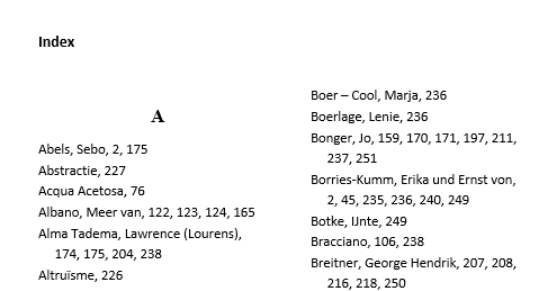
The first picture below shows an index within Word. The entries and page numbers are horizontal, per line. The page numbers are not clickable - i.e. a common criticism w.r.t. Word.
An index in a Calibre ePub
An index in a Calibre ePub
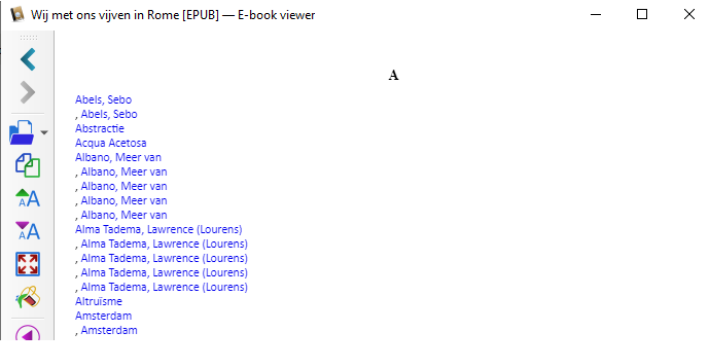
The second picture shows the conversion by Calibre 6.2.1. The entries are made clickable, but the page numbers have disappeared, and each entry is on a separate line (with tabs).
The result of the programmes below
The result of the programmes below
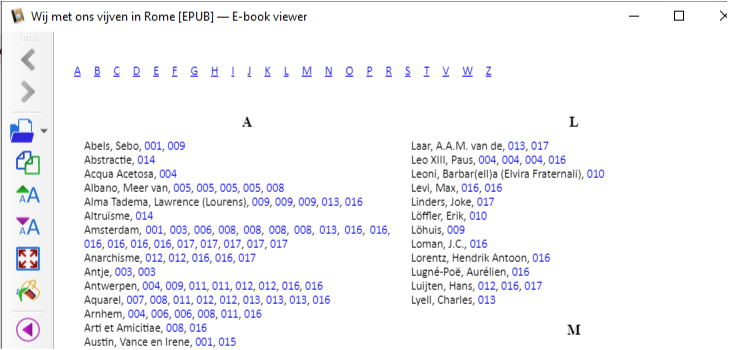
This notebook shows how the Calibre file can be transformed into a book style format, with index entry and page numbers on one line, with clickable page numbers, and in two columns. One can also jump to the first letter of index entries. The final result is, with apparently no index entries that start with Q, U, X or Y, and a column middle at the letter L:
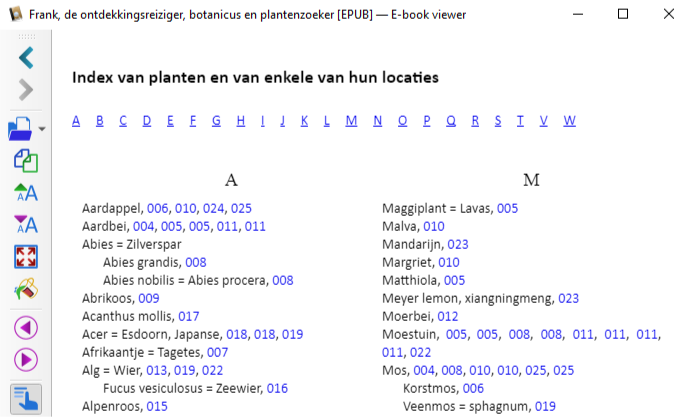
In another book, the index had sub-entries, and the programming resulted into this:
Responsive pictures via the CSS object-fit property
Responsive pictures via the CSS object-fit property
The solution in CSS
The solution in CSS
For ePubs, one expects that images are responsive to the window size. When converting Docx into ePub, Calibre apparently copies the non-responsiveness in Word. It is curious that Calibre doesn’t provide for responsive images even though it is supposed to become an ePub.
For Word, responsiveness is no issue (though some might think otherwise), for the program has less the function of a "reader". Users are used to adapting the window size while the page size remains the same. (The “Read View” in Word had responsive images.) For PDF, there is a fixed page size with the option of magnification. When Firefox reads a PDF, the window size determines the magnification (with Automatic Zoom).
For responsive behaviour w.r.t. an image, we only need a position in the document (starting location and a size), and a maintenance of the aspect ratio. Pictures can become responsive to the window size by inserting the CSS property “object-fit”.
It appears that the relevant CSS code is:
Calibre provides h as the actual height in the Docx, and currently sets height: h pt, instead of max-height. The percentage value can be taken as the ratio of this h to the height of the cover picture (assuming that it takes a full window). Since each picture might be special (different caption), it was done manually.
PM. It was indeed a joy to replace the grayscale pictures from the hard-copy by colour pictures for the ePub. Calibre automatically adapted the new file-names within the htmls as well.
IMG could do it in the past, but now we need CSS
IMG could do it in the past, but now we need CSS
It may seem that CSS is all, and that <img> is only used to identify the src=”picture” and pass on the class=”style” statement. But pause for a moment. If <img> is so powerful to decode the class statement, why should <img> not be capable of directly recognising the very same parameters that are entered into the CSS ? In the past <img> used to be able to do so. Apparently, <img> is being culled from directly entering of parameter values, forcing users to use a style statement.
Wikipedia, a portal and no source, suggests that since 2014: “The W3C has now deprecated the use of all presentational HTML markup.[15]” https://en.wikipedia.org/wiki/CSS
A few years before, in 2012 the “object-fit” command was proposed.
Not being a CSS expert, it took me a few days to find the latter, but Dangerous Duck at Codegrepper.com gave me this solution (see the link below). Once you know about it, you can see it in all kinds of places.
The upshot of all of this is that, after quite some experimentation with adjusting viewing windows, my guesstimate of the parameter settings is as in the above.
A further discussion has been transferred to Appendix 3.
Pages and their count for ePubs
Pages and their count for ePubs
The notion of a page is informative. Given a text, the number of pages is determined by font size, line spacing, page size and margins. A ballpark density could be 275 words per page, using A5, line spacing of 1.5 and a font size 10.5 pt (there are too few steps between 9 and 12 pt). The present book has about 400 words per page, using a slightly larger page and 1.2 spacing. (Each book could also state its average number of words per page.)
Amongst creators of ePubs, there appears to exist the curious misunderstanding that “pages” and “page numbers” would no longer be relevant. The argument would be (i) that ePubs use “views” that differ from predetermined page-sizes and (ii) that a reader can search and jump to places without reference to page numbers.
The latter is a necessary argument to get rid of page numbers, but it is not a sufficient argument.
The notion of a page in a printed book still is relevant, namely as a rough measure for the amount of text, with a reading time. The page number itself provides a rough indication of a location within the book.
A table of contents would properly have per line, for a chapter or section: {page number, size in number of pages, title}. The page number is a cumulative number of the sizes. An example is:
By historical happenstance, the present-day conventional table of contents has {title, page number}. It is in the wrong order and it is left to the reader to determine the size of the chapter by taking the differential. This historical setup may cause editors to insert a line of dots to connect the title and the page number, to better see what belongs to what.
PM. It is awkward that MS Word doesn't show above format either, and officially allows either numbers or links but not the combination. In my present version the numbers appear to be Ctrl-clickable (though it is not an option in the pop-up screen for the creation of a table).
PM. Calibre has a useful “navigation pane” with clickable chapter and section headers, that allows the reader to navigate within the ePub without reference to page numbers. This navigation pane is called an (external) “table of contents”. This name is incorrect. It causes confusion for users of Calibre, with the (correct) (internal) table of contents that is within the ePub itself. The Calibre documentation on its “table of contents” is very confusing. Perhaps the creator likes to call the navigation pane a “table of contents” but it should be left to users of the programme and to programmers to give it another name. It is useful that the navigation pane doesn’t mention page numbers but an ePub best includes a table of contents with page numbers (advisably in above format). (For the current editing, the (inline) table of contents appeared important too.)
Below succeeds in adapting the (inline) table of contents.
Hyperlink references to text (also within footnotes)
Hyperlink references to text (also within footnotes)
Calibre apparently doesn’t handle hyperlink jumps well (also within footnotes). This needs repair too. This is done below. Remarkably, for an ePub one expects proper translation of hyperlinks in Docx to hyperlinks in ePub, but this doesn’t happen. Perhaps there is a “fear of pages”, when Docx hyperlinks refer to pages ?
Overall, the handling of footnotes in ePub is problematic, see below.
While this version of the ePub has footnotes that generate a pop-up window, it appeared in Calibre that some such windows were blank, and the actual text could only be found by additionally clicking on the arrow in the upper r.h. corner of the pop-up. Using the same ePub in Google Books showed that it showed the text immediately. I have presumed that it was an issue for the Calibre Reader only.
Some comments on the programming issue
Some comments on the programming issue
New to the field and a curious loss of time
New to the field and a curious loss of time
The reader might excuse the present writer, who is new to this field of the ePub, for making the following comments.
Using Calibre
Using Calibre
Calibre has the option to rescale an input “base font size” into an output “base font size”. This seems to have the curious effect that anything of a particular font size is rescaled, regardless whether it is a header or footnote or something that happens to have the same font size. (For example, a caption could have been made slightly smaller to make it fit on the same page.) Fortunately, Calibre allows to disable this feature.
- All styles can be edited in the CSS, and perhaps a separate routine is useful for editing particular styles like headers, captions and footnotes. One presumes that when a Word file is converted, initially all styles can be adopted that already occur in the Word file.
- Overall, for both printing and screen, there are are too few steps for font sizes between 9, 9.5, 10, 10.5, 11, 11.5 and 12 pt. A font size dial (with a “focus dial” on this range) is better than sequentially clicking through a long list. (A focus dial is a local enlargement of the dial to allow a fine-tuning. Sometimes a magnification slider may have a focus enlargement around 100% for fine-tuning there.)
- Calibre 6.2.1 apparently lacks magnification (zooming) (with the option of increasing the window with it). Calibre 6.3.0 states that this “bug” 985021 has been fixed. However, I have now made the pictures to fit the window size with a maximum on their resolution, so zooming for pictures has little effect here. It might remain useful to have magnification also towards lower resolution for some readers. (In Firefox, Ctrl+ and Ctrl- in html may also affect the pictures. In Calibre these controls affect the font size, and they adapt lines within a fixed window, but do not change the pictures.) The 90% - 110% range of magnification should allow for fine tuning (i.e. this is not a linear scale).
- Overall, for both printing and screen, there are are too few steps for font sizes between 9, 9.5, 10, 10.5, 11, 11.5 and 12 pt. A font size dial (with a “focus dial” on this range) is better than sequentially clicking through a long list. (A focus dial is a local enlargement of the dial to allow a fine-tuning. Sometimes a magnification slider may have a focus enlargement around 100% for fine-tuning there.)
- Calibre 6.2.1 apparently lacks magnification (zooming) (with the option of increasing the window with it). Calibre 6.3.0 states that this “bug” 985021 has been fixed. However, I have now made the pictures to fit the window size with a maximum on their resolution, so zooming for pictures has little effect here. It might remain useful to have magnification also towards lower resolution for some readers. (In Firefox, Ctrl+ and Ctrl- in html may also affect the pictures. In Calibre these controls affect the font size, and they adapt lines within a fixed window, but do not change the pictures.) The 90% - 110% range of magnification should allow for fine tuning (i.e. this is not a linear scale).
PM. The magnifying glass apparently has become the standard for search rather than magnification. A Mathematica notebook has a clickable percentage of magnification, e.g. 75% or 110% in the lower right corner, which is useful, but Calibre uses this format for indicating where one is in the book.
PM. One wonders why ePubs are not satisfied with overall magnification, and why different font sizes would be substituted instead. Perhaps the idea is that the resolution might be a problem. However, the Mathematica Frontend apparently adjusts the resolution with the degree of magnification. (Perhaps the software recognises what is being magnified and applies different algorithms.)
PM. Html uses the term “line height” that in typography and Word is called “line spacing”. Within Calibre, it should be easier to adapt line spacing, and it should also be an option for the reader. Potentially a reader might be offered different (CSS) stylesheets, with adaption of common elements, so that one might read a book in a preferred layout. (It seems that I may be happy with 1.3em.)
Epub readers
Epub readers
A simple book editor like myself doesn’t have a suite of ePub readers to check upon results. It would be helpful when common browsers allowed a check on reading. Remarkably MS Edge has an ePub plugin, while Edge should be able to read the ePub itself. (Remarkably, Word has a Read View option, but Word cannot read ePub or export to it.)
An ePub can be unzipped and then read by a common browser. A small drawback in navigation is that when the contents.xhtml does not mention all main html files, then some files might be overlooked. Makers of browsers are invited to make them capable of browsing ePubs, with an index.html and order.html that define the order, and with an option of continuous scrolling.
To scroll or not to scroll
To scroll or not to scroll
In hard-copy books the reader flips pages. On phones, one can swipe left-right and up-down. For Word, browsers, and PDF, the common way has become to scroll up and down. Such programs provide some pagination support with a “Page Up” and “Page Down” key. I associated “digital” with “scrolling up and down”.
For me, it was a somewhat strange experience to swipe on a phone from left to right and that an ePub forced me to use a left-right slider. In Calibre, I find it curious that there are left-right icons, instead of "Page Up" and "Page Down". (The icons are equilateral triangles but should be acutely pointed.) Well, I suppose that it should be left to the reader. Programs rather should allow for more ways to navigate in a document, and offer readers ways to switch easily between ways of navigation. (When the cover picture is shown, there often is no way to scroll away from it.)
Adapt in Word or Calibre ?
Adapt in Word or Calibre ?
Some authors suggest creating hyperlinks within the index. In Word, this can be done by inserting bookmarks at each XE entry, or perhaps a bookmark per page. For our purposes, we then must hope that those hyperlinks would be maintained when the Word index is converted into an ePub.
See for example the chapter on “Setting hyperlinks on index entries in Juan Pablo González, Cindy Meister, Suat Ozgur, Bill Dilworth, Anne Troy, T J Brandt (2006), “Office VBA Macros You Can Use Today: Over 100 Amazing Ways to Automate Word, Excel, PowerPoint, Outlook, and Access”. The following is a first page of that chapter:
For our purposes, it is somewhat risky to assume that a clickable index in Word would directly translate into such an index in Calibre in the same format. Thus it is safer to rework the current Calibre output.
Conversion of a particular book
Conversion of a particular book
A particular book and ePub editor
A particular book and ePub editor
The book that is handled here, is, in Dutch, by Tine Cool (1928, 2022), “Wij met ons vijven in Rome. The ePub that resulted from the programs below is now available at https://www.mijnbestseller.nl/books/303465.
PM. The hard-copy POD, in Dutch, is at https://www.mijnbestseller.nl/books/279687. Overall, Tine's website is at http://thomascool.eu/Painting/Tine/index.html. There is a hardcopy English version too, "The five of us in Rome", for more countries and also at https://www.amazon.com/five-Rome-artists-Strohl-Fern-1892-1896/dp/9403639393/ref=sr_ 1_ 1 . See Tine's website for the hard-copy German version. Potentially there might be English and German ePubs at some time.
The present objective for this notebook was to turn the Dutch edition into an ePub. This project has been completed but it was not simple. For the present project, Tex4ebook wasn’t known yet.
On conversion
On conversion
(A) When I used Calibre to convert this ePub into Docx again, the text itself was recovered, with the following characteristics: (1) much of the layout was different, (2) footnotes were still there, but had become endnotes (each footnote text on a separate page), (3) index entries had been replaced by bookmarks (with numbers): but there was no index anymore.
Concluding comments
Concluding comments
The actual routines are in Appendices 1, 2 and 3.
For me, the routines have been advantageous already twice. Two ePubs have been created. The first one allowed the discovery of the workflow and the definition of the exact transformation. The second one could be done much faster. A new aspect was the handling of an index with subentries. The routines create the scope for making ePubs for the English and German editions of the first book.
Appendix 1. The actual routines
The index: using the simple html structure in Calibre
The index: using the simple html structure in Calibre
Using the simple structure
Using the simple structure
The index file in Calibre has a simple structure. For example, the “Abels, Sebo” entry (a Dutch researcher on genealogy) has the following code:
Thus, we can identify a paragraph, the index entry, and the relevant id and html file.
Thus, it ought to be simple to write a routine to decode these fields and transform the index html into another format.
PM. Once entries may have subentries, the issue gets a bit more complicated, see Appendix 2.
PM. Some users would use Python but my preferred environment is Mathematica.
PM. It appeared that my Word Docx had an XE entry that used curly quotation marks, that caused problems for Calibre. It was easier to adapt the Docx. (Fortunately, still part of the XE entry was still included in the erroneous output, so that the source of the problem could be identified.)
Some properties of Mathematica when a file is read as a String
Some properties of Mathematica when a file is read as a String
For testing routines, the above <p .... /p> paragraph statement can be used as an example index line. When Mathematica reads the html as text, it transforms quotation marks into “\””. The “\n” is code for a new line, and “\t” is code for a tab. Copy from the original html file and paste between two quotes “”, so that Mathematica will insert the escape slashes. Above entry then becomes (and observe that the newline command generates a new line at the end):
The Calibre index has a <br .... > break statement. For a single index entry, it can be removed. For an index entry with subentries, it must be handled differently. For now, below routines remove this. The above then is transformed into this:
The file, that we will work on, not only contains the index but at the end also starts with the footnotes. We also must beware of the <h2 ... /h2> statement. This appears at the bottom of the file, and if needed we could fix this manually. Eventually, I decided to split the file within Calibre, and then got a file for only the index.
Routines, and applying them along the way
Routines, and applying them along the way
First step: removing breaks and empty paragraphs
First step: removing breaks and empty paragraphs
After Calibre has converted the Docx into an ePub, this has been unzipped to the Test\Files location.
The file with the index is:
The file is read into memory, reworked, and then written to file again. The text can be manipulated as a single String, or be split into paragraphs, that are reworked, and then joined again.
PM. Some checks:
PM. Some checks:
The number of these breaks in the original text and the new text3:
The number of these empty paragraphs:
Routines on a single entry
Routines on a single entry
Reworking a single entry
Reworking a single entry
The following two routines move the index entry to the first position. The text is split up into a list of single hyperlinks “<a ... /a>”. The first hyperlink is used to extract the index entry itself, here called the “head”. In the example this is “Abels, Sebo”. Tabs and newline commands are removed. Calibre has a reverse order of the hyperlinks, so this is restored to the natural order.
Turning the block of text into a list of paragraphs
Turning the block of text into a list of paragraphs
We turn the block of text into a list of single paragraphs, lis = {p1, ..., pn}, so that we can work on those separately. We split at “<p “ and “<h2 “ spots. We use the name texti for a block of text i, and resi for that block turned into list i, for i = 1, ....,n.
The first 20 characters of element 3 is equal to the “block_40” expression that we identified earlier as the mark of the beginning of an index entry.
Decoding all entries
Decoding all entries
Reading test.html in a browser shows that we have achieved the required transformation. We can also overwrite the original input file. However, we will not do so yet, since there are other interesting edits.
Some additional edits
Some additional edits
Since the ePub is available in unzipped format, it is an option to do some additional edits.
(i) It maybe useful to have the alphabet at the top of the index, to be able to jump to the relevant letter.
(ii) One may think of a two-column layout of the index, with the flexibility to return to one column when the window is not wide enough.
(iii) The navigation pane in Calibre 6.2.1 apparently doesn’t jump directly to the index. This can be adapted in the Calibre “Edit ToC” too, that can be included in the toolbar.
(iv) It may also be advisable to increase the default line spacing for the whole ePub to 125%. This can be adapted in the Calibre stylesheet.css. (Currently I seem to be in favour of 1.3em.)
(v) It would be nice to do something about the footnotes, but this appears to be too complex for the current purposes.
Insert the clickable alphabet
Insert the clickable alphabet
The clickable alphabet is not A ... Z but would depend upon the book.
An entry header will be called a “kopje”. We can create anchors <a name=”kopje_(number)”></a>. While setting those anchors, we can collect the kopjes as well.
The kopjes can be recovered by noticing that they deviate from the index entry paragraphs. Also, Calibre apparently gives the first index header another class than the others.
The first kopje “A” requires special treatment. For a single instance, it is less useful to write a routine, and we simply replace the line.
It will be useful to parametrize the number.
The first clickable kopje “A”:
We now proceed with the other kopjes, for which we must write a routine. We will take the input from res2 and replace into res3.
If an element in the list satisfies the kopjemark, then it can be reworked, The tally can be increased by one, and the clickable kopje can be included in the list. It appears necessary to use non-breaking spaces to keep the kopjes at some distance to each other.
NB. When there are two index files, for persons and subjects, then it may be advisable to have different ids, e.g. “#kopje_” and “#kopid_”.
Resetting num and applying the kopje reworking to all entries:
As a result, we also have a list of the linked kopjes
It will be useful to read the result into a browser, to check that we have a clickable line with kopjes, so that it has become easier to navigate to the various entries.
Flexible 2 columns: CSS code
Flexible 2 columns: CSS code
The CSS code for a flexible table with two columns is:
.column {
box-sizing: border-box;
display: block;
float: left;
width: 50%;
padding: 10px
}
.row {
box-sizing: border-box;
display: block
}
box-sizing: border-box;
display: block;
float: left;
width: 50%;
padding: 10px
}
.row {
box-sizing: border-box;
display: block
}
Flexible 2 columns: creating the table
Flexible 2 columns: creating the table
Observe that res4 is longer than res3, since we have inserted a line. For other insertions, we better start at the end of the file, and then start with res3 again.
The end of the table can be inserted at the <h2 ... /h2> spot.
When we have text in columns, they should have about the same length. The second column might start with the letter N, since this is halfway in the alphabet. It is better, though, to search for the actual half length.
Above, we observed that there are 22 kopjes.
We get about similar column lengths by making a break at the letter L instead of the letter N.
The column break thus can be made at the location of the letter L.
The begin of the table can be inserted at position 2.
And at that spot we now also insert the line with clickable kopjes.
Reading test.html in a browser shows that we have achieved the required transformation. We can overwrite the original input file.
PM. It appeared later that Calibre seems to require that html specific style statements are moved to the stylesheet as well. The meta name viewport could be removed. This was editing within Calibre, see below on validity.
The table of contents
The table of contents
The “table of contents” is within the document, as in a book, and must not be confused with the navigation pane. Calibre has this confusion.
In transforming the Docx into the ePub format, the present setup has two ToCs, namely
(i) one with links and without page numbers,
(ii) one without links and with page numbers.
Programmers haven't yet converged on what should be standard:
(iii) a ToC with links and page numbers: {page number, size in number of pages, title}.
Let us see whether we can make this now.
Extracting the page numbers
Extracting the page numbers
The ToC without links but with numbers has all its numbers enclosed in a span, like for example “ ... class=\”text_6\”>18</span> ... “. It appears to be remarkable easy to extract those page numbers.
The sizes of the chapters and/or sections can be found by differencing. We include the additonal knowledge that the index would take three pages, to arrive at the total number of pages for the book.
Extracting the linked titles
Extracting the linked titles
It seems that the titles of chapters and sections can also be extracted easily, because the all are within anchors <a .... /a>. A problem is the distinction between chapter and sections. In this case however, the name “Hoofdstuk” indicates a chapter.
The number of titles in the ToC should be 57, and we must drop the first one, since it is no proper title.
Putting all into a table
Putting all into a table
Simplest is to create an actual table with three columns. We create a list of elements, and later we can include that each element must be written on a new line.
Subsequently, it will be required to copy and paste from this file into a file within the collection for the ePub.
FAQ: The EPUB produced with calibre is not valid?
FAQ: The EPUB produced with calibre is not valid?
The Calibre website has this useful FAQ: https://manual.calibre-ebook.com/faq.html#the-epub-i-produced-with-calibre-is-not-valid
QUOTE Calibre does not guarantee that an EPUB produced by it is valid. The only guarantee it makes is that if you feed it valid XHTML 1.1 + CSS 2.1 it will output a valid EPUB. calibre tries hard to ensure that EPUBs it produces actually work as intended on a wide variety of devices, a goal that is incompatible with producing valid EPUBs, and one that is far more important to the vast majority of its users. If you need a tool that always produces valid EPUBs, calibre is not for you. This means, that if you want to send a calibre produced EPUB to an online store that uses an EPUB validity checker, you have to make sure that the EPUB is valid yourself, calibre will not do it for you – in other words you must feed calibre valid XHTML + CSS as the input documents. UNQUOTE
It so happens that Calibre 6.2.1 produces html files that have the“class=”calibre” attribute and setting in the html declaration. This does not seem to happen in 6.3.0 anymore, but it was in 6.2.1. In particular:
<html xmlns=”http://www.w3.org/1999/xhtml” lang=”en” xml:lang=”en” class=”calibre”>
In itself this would be allowed, since “class” is regarded as a global attribute:
"The global attributes are attributes that can be used with all HTML elements."
Unfortunately, there exists a validity checker that produces an error on this nevertheless:
In the meantime, there was no solution but to adapt all html files that Calibre has produced, including some 200 files for the footnotes (each footnote separately).
If the problematic string does not occur, then we can skip the correction.
There remained one file that gave particular problems. The POD publisher used checking software from Calibre. This may differ from the one that came with the version that I downloaded. (The POD publisher also moved the local <style> statement in the file, in the earlier version with a viewport, to the general CSS file.) Then, this checking software inserted a single class=”calibre” statement again, and the publisher had to remove this manually. Magically, then it was accepted.
Utility: find a particular string in the various files
Utility: find a particular string in the various files
Sometimes one wants to find a particular text string with the files. The Calibre Find/Replace function allows such already, but while working within the environment of Mathematica, it is useful to have this option available here too.
Jumping to location, also within a footnote
Jumping to location, also within a footnote
Calibre apparently did not include hyperlink jumps to specific locations, also within footnotes.
A single instance in a file
A single instance in a file
Within each footnote file we have a structure like this:
We can use the first part of the identifier to recover the whole.
Observe that the structure of the string.
Multiple instances in a file
Multiple instances in a file
Within each footnote file we have a structure like this:
We can use the first part of the identifier to recover the whole.
For the following, we must take the minimal outcome for each instance.
Observe that the structure of the string.
Collecting all into a routine
The routine also works in a single instance.
For a particular file
For a particular file
A file gave a problem, but this has been solved.
Cases for all files
Cases for all files
It will be useful to sort on the identifiers.
Above references had to be inserted manually, since the locations were all specific. (Those locations had been provided by the Docx but had been neglected during its conversion to ePUb.)
Footnotes in general
Footnotes in general
For a printed book, the editor handles the footnotes.
For a digital version it should be left to the reader how footnotes will be handled. It is somewhat awkward for the editor to determine how readers should handle the notes. Let me mention three options.
(1) Some readers want the notes at the end, and not be bothered by them. This is easy to arrange.
(2) Potentially there might be a footnote side-pane that moves along with the main text. It depends upon the width of the screen whether such a pane can exist (also to the side of the navigation pane).
(3) Personally, I like a layout with footnotes at the bottom of the page or the ePub window. This allows a fast movement of the eye, without the need to click to see the footnote (and e.g. move the popup window that obscures where the footnote originated from, and then click again to get rid of the popup).
The following is an example. The storyline contains an evening with music, first a violin, and then singing of a German song. A reader who is immersed in the storyline could skip the footnote. Some readers combine the reading of the storyline with processing of additional information. The footnote tells where the song comes from, Germany 1820, and that one can listen to Marlene Dietrich singing it. It depends upon the reader whether such additional information is appreciated. A downside of hiding the information in an endnote is that the reader is not alerted to information that might be appreciated. Having the information available for a quick scan allows for a quick evaluation what information is available, or the type of information.
It is a matter of programming to put two windows onto the screen, one for the body of the text and one for the footnotes, both separated by a small line.
This issue has not been resolved. This seems to be something deeper within the ePub-reader.
Appendix 2. Routines for entries with subentries
Index entries with subentries
Index entries with subentries
First step: removing breaks and empty paragraphs
First step: removing breaks and empty paragraphs
After Calibre has converted the Docx into an ePub, this has been unzipped to a \Files location.
The Break is now used to identify entries
PM. Some checks:
PM. Some checks:
The number of these breaks in the original text and the new text3:
The number of these empty paragraphs:
Problem of subentries
Problem of subentries
Turning the block of text into a list of paragraphs
Turning the block of text into a list of paragraphs
We turn the block of text into a list of single paragraphs, lis = {p1, ..., pn}, so that we can work on those separately. We split at “<p “ and “<h2 “ spots. We use the name texti for a block of text i, and resi for that block turned into list i, for i = 1, ....,n.
The first 20 characters of element 3 is equal to the “block_30” expression that we identified earlier as the mark of the beginning of an index entry.
Decode 2
Decoding all entries
Decoding all entries
Reading test.html in a browser shows that we have achieved the required transformation. We can also overwrite the original input file. However, we will not do so yet, since there are other interesting edits.
Appendix 3. Responsive pictures
Responsive pictures: IMG or SVG ?
Responsive pictures: IMG or SVG ?
The main body of the text has mentioned the proposed solution for making pictures responsive in a Calibre ePub, that has been freshly converted from Docx.
Thus we have a solution, and we need not worry about finding it.
The objective of this Appendix is to further discuss this solution and to document some software that I wrote along the way that has become superfluous because of the CSS solution.
Calibre deviates from html syntax of <img>
Calibre deviates from html syntax of <img>
Observe that the official syntax has <img .... > without />, while Calibre uses <img .... /> . One can get an error message in Calibre when one doesn’t use the latter />. It may take a while before the “error” is found, i.e. before one realises that Calibre deviates from html syntax.
(See e.g. the page: https://manual.calibre-ebook.com/conversion.html with the statement:
<h2 title=”Chapter 2”><img src=”chapter2.jpg” /></h2>.)
<h2 title=”Chapter 2”><img src=”chapter2.jpg” /></h2>.)
PM. Adapting the stylesheet to w = % and h = auto has the effect that the Calibre preview window no longer shows the associated size: one has to go to the reader and reload the ePub to see the effect.
The basic power still resides in the <img> tag
The basic power still resides in the <img> tag
For an ePub, one theoretical possibility is to remain with html and the <img src=... height=”p%” width=”auto” >. This should provide for all that is needed for responsive behaviour. However, this apparently no longer works (fully). A case is centering. This used to be available in html with <img ... align=”middle”> (with alternative values “left” and “right”). The latter apparently no longer works. While width=”w%” and height=”auto” work, I noticed that the transpose doesn’t work.
Check this link and this additional code with / without the <center> or <div> container.
<p>This doesn’t work on centering if the <center> container is removed</p>
<center>
<img src=”img_girl.jpg” alt=”Girl in a jacket” width=”50%” height=”auto” align=”middle”>
</center>
<p>This doesn’t work on the % anyway </p>
<div style=”text-align:center;”>
<img src=”img_girl.jpg” alt=”Girl in a jacket” height=”50%” width=”auto” align=”middle”>
</div>
<center>
<img src=”img_girl.jpg” alt=”Girl in a jacket” width=”50%” height=”auto” align=”middle”>
</center>
<p>This doesn’t work on the % anyway </p>
<div style=”text-align:center;”>
<img src=”img_girl.jpg” alt=”Girl in a jacket” height=”50%” width=”auto” align=”middle”>
</div>
Still, the routine does all the work, when a style statement is given to it.
PM. A path from inanity to codegrepper
PM. A path from inanity to codegrepper
On alignment in the center in 2015, while html was released in 1993:
M.A. Demers in 2015 apparently agreed upon the inanity of image handling in ePubs.
CSS however comes with the added feature of max width and height.
Codegrepper.com:
The problem of SVG
The problem of SVG
The book uses png and jpeg, and no proper vector graphics, and thus the use of SVG would only be a tweek to arrive at scalability, already provided by <img>.
An argument used to be that SVG is not supported on the iPhone lower than OS 13. Nowadays OS 13 is available.
The use of SVG forces us to state width and height three times, if not four times counting some CSS. It is fine for the Viewbox that it can be used for panning and zooming, but this is not an objective for an ePub, as I understand the notion.
Considering the two options, it seems better to stick to the <img> tag and hope that W3C retracts from it path towards deprecation. The principle of design must be: All parameters that <img> can take from a style entry, should also be available as local parameters.
Our main environment again
Our main environment again
The Calibre title page already uses SVG
The Calibre title page already uses SVG
The titlepage.xhtml produced by Calibre actually uses SVG. It reduces the cover.jpeg to a size {495, 751}, with a viewport of 100%. (An editor must study SVG to understand what Calibre does here.) (We can drop the preserveAspectRatio parameter, since we want our pictures centered by default.) (If I understand these issues correctly.)
<svg xmlns=”http://www.w3.org/2000/svg” xmlns:xlink=”http://www.w3.org/1999/xlink” version=”1.1” width=”100%” height=”100%” viewBox=”0 0 495 751” preserveAspectRatio=”none”>
<image width=”495” height=”751” xlink:href=”cover.jpeg”/>
<image width=”495” height=”751” xlink:href=”cover.jpeg”/>
It will be useful to set the Calibre reader window such that it neatly captures the cover picture. In this setup, the viewbox for the cover picture is the same as the window size. This allows us to compare the sizes (percentages) for the other pictures.
The actual cover picture size.
There are these aspect ratios (w / h is the inverted tangent h / w).
A simple text and the size of the image
A simple text and the size of the image
The code for an image, as produced by Calibre, may look like:
Per image, two class statements control the display, see the table below.
(1). It so happens that the left margin of 6pt in the block_92 of the second picture was a small error in the Word file: there should have been no margin here too.
(2) It is not clear why the font size got included in the first picture, which is a jpeg without text. The different line spacings concerned the lines where the pictures were located, keeping text on a page, but are not relevant for the position of the picture w.r.t. the page itself.
(3) The conversion removes the width and height within the <img> statement from their local relevance into a remote stylesheet.
(4) The disadvantage of editing the CSS is that we also must check whether other instances would be affected. Fortunately, for us, it seems that Calibre adopted the conversion approach that each image gets its own style statement.
(5) And now, why has this setup not been made responsive ? It was not necessary to state responsiveness in Word, so why would "conversion to ePub" imply that also the fixed format is simply copied, instead of turned into responsiveness ? ePubs exist since 1999 and 2007, and the advantage of ePubs is that pictures can be responsive to the window size. The question is not only "Why pt instead of px ?" but: "Why not % and auto ?" At best it could be an option for the reader, to choose between fixed sizes and responsiveness. A default would be to make it an option at conversion, with responsiveness as default anyway. Potentially there are issues that I am not aware of.
The following Mathematica calls in this subsection were useful to understand what Calibre does with the size of the pictures. The calls are not relevant for what we will actually do below. The reader may still be interested in the information.
Image-5.jpeg has these actual parameters:
There are these aspect ratios:
The <img> and viewbox use px while that particular CSS statement uses pt. We use that 1pt = 1.3333 pixels.
Image-5.jpeg would have the following percentages, compared to the 100% of the cover picture embedded in the ePub.
Looking at the reader (set to the size of the cover picture) shows that these ratios are slightly off. The actual width is closer to 80% of the window, and the height is closer to 60% of the window. Indeed, if we take 80% of the window size of 495 px, then the height percentage becomes about 62%. Let us take account of an unknown proportionality factor.
The factor might be influenced by the surrounding CSS block. Does the line-height of 1.2 come into play here ? Using this, we might get the actual width and height percentages.
For the SVG Viewbox we would need the actual pixels. Let us assume that the factor is 1.2 indeed.
To remain proportional, we may feel more comfortable by using the original aspect ratio, and not use this factor 1.2, but use the visually confirmed impression that the width is about 86%. (The new factor is about 1.2 * 1.3333.)
How to process all pictures
How to process all pictures
In this case I feel a bit wary of automatic replacement. The code around a picture might contain some subtle exceptions, e.g. on a caption. Theoretically it will be useful to do some preparations for each picture, and then use this as possible input for manual editing. However, the new layout of a style can also be put into a small text file and be copied and pasted, since we will be looking at each picture itself.
Thus the working routine is: (a) Use Calibre’s search through all text files, and search for “.jpeg” and “.png”. (b) Make sure that the picture and caption are within a non-breaking container. (c) Click on the style label, jump to the stylesheet, turn its text into a comment, paste above statement, and copy the size of the max-height. (d) check the percentage.
Searching for pictures
Searching for pictures
For the actual editing, I used the Calibre Find routine. However, at the start of looking into this issue, it helped to have an idea about how Calibre stored the pictures and in which files they were referred to. The following routine does a search in all files. It recovers the names that Calibre has given to my original pictures.
Since a file may have more pictures, it is better to first take say 40 positions, and then collect the image name from the smaller selection.
All images in the text txt.
All pictures.
This allows a check whether all pictures were handled manually.