Hello readers! Earlier today I shared a post on color arithmetic. In this post I’m going to continue explore dispersion as an image style from the visible spectrum.
As usual some helper functions:
ClearAll[pipe,branch,branchSeq]pipe=RightComposition;branch=Through@*{##}&;branchSeq=pipe[branch[##],Apply[Sequence]]&;
Also, for spectrum of “white” light I’m using Image`ColorOperationsDump`tris instead of ColorData["VisibleSpectrum"], as the latter one is clipped by RGB colorspace boundary:
In[]:=
Quiet[ChromaticityPlot[];]spectrum=Image`ColorOperationsDump`tris;ChromaticityPlot3D[{XYZColor/@spectrum,ColorData["VisibleSpectrum"]/@N[Subdivide[380,750,100]],"RGB"},Appearance"VisibleSpectrum",PlotStylePointSize[.03]]
Out[]=

In[]:=
spectrum//Total//&//XYZColor//branch[Identity,InputForm]//Row[#,"\t"]&
#
Max@#
Out[]=

Now I may ask the question: given any color , how to set fraction of the spectrum so it adds to ?
c
c
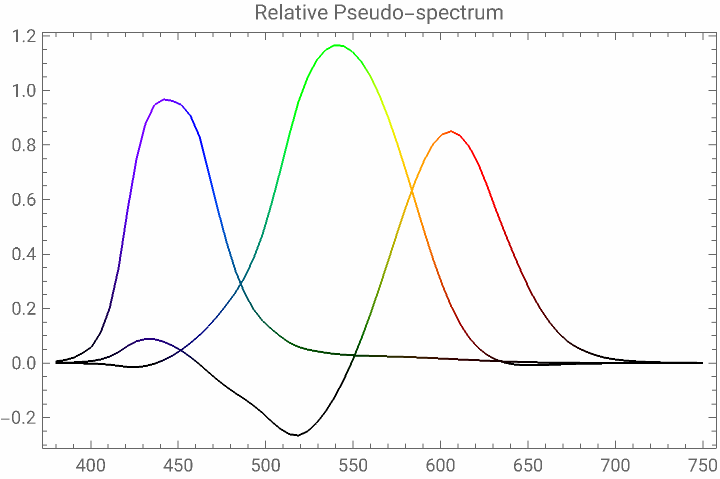
Let me call this fraction distribution the relative pseudo-spectrum of color . Of course there will be infinite pseudo-spectrum for , but if I just want something meet the eyes, LeastSquares provides a very fast solution:
c
c
In[]:=
Needs["Developer`"]
In[]:=
spectrumScaled=spectrum//&//ToPackedArray;
#
#//Total//Max
In[]:=
{Red,Green,Blue}//Map@pipe[ColorConvert[#,"XYZ"]&,List@@#&,LeastSquares[spectrumScaled,#]&,Line[{N@Subdivide[380,750,Length[#]-1],#},VertexColorsMap[XYZColor,spectrum#]]&]//Graphics#,AspectRatio,FrameTrue,PlotLabel"Relative Pseudo-spectrum"&
1
GoldenRatio
Out[]=
In[]:=
{Red,Green,Blue}//Map@pipe[ColorConvert[#,"XYZ"]&,List@@#&,LeastSquares[spectrumScaled,#]&,spectrumScaled.#&,XYZColor,ColorConvert[#,"RGB"]&,Apply@List,Chop]
Out[]=
{{1.,0,0},{0,1.,0},{0,0,1.}}
LeastSquares is highly efficient so I can do the same for each single pixel in a given image:
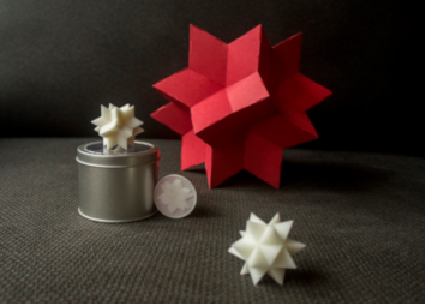
(The testing photo is taken by myself at home. I’d like to thank Frederick Wu for sending me all those beautifully printed spikeys as gifts!)
In[]:=
img=
;
In[]:=
AbsoluteTiming[pseudoSpectrumLS=img//pipe[RemoveAlphaChannel,ColorConvert[#,"XYZ"]&,ImageData[#,"Real",InterleavingTrue]&,LeastSquares[spectrumScaled,Flatten[#,1]]&,ArrayReshape[#,Append[ImageDimensions[img]//Reverse,Length[spectrum]]]&,Transpose[#,{2,3,1}]&];]
Out[]=
{0.172731,Null}
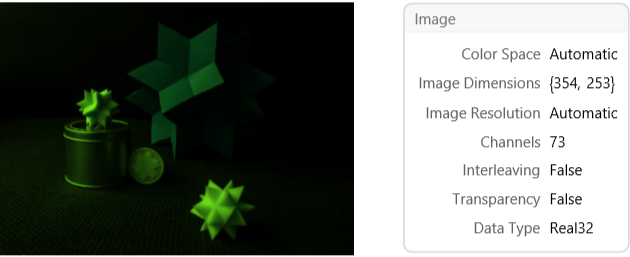
pseudoSpectrumLS as a (pseudo-)hyperspectral image:
pseudoSpectrumLS//Image[#,InterleavingFalse]&//branch[Identity,Information]//Row[#,"\t"]&
Out[]=
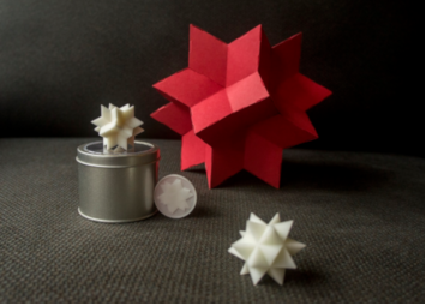
Of course pseudoSpectrumLS adds back to original image exactly:
spectrumScaled.pseudoSpectrumLS//Image[#,ColorSpace"XYZ",InterleavingFalse]&
Out[]=
Now come the fun part. As I have a rich spectrum for each pixel as 73 color channels, making some image distortions based on channel wavelength should be fun!
In[]:=
distortionF=Block{height,weight,scale,focus,x,y,arg},Module{toScale,fromScale,tf},{toScale,fromScale}=RescalingTransform{0,1},0,,{{-1,1},{-1,1}}//branch[Identity,InverseFunction];tf=Block{Part=Inactive[Part]},{x,y}//toScale//scale#&//fromScale//ReplaceAll[Thread[{x,y}->{arg〚1〛,arg〚2〛}]];Inactive[Compile]{{arg,_Real,1},scale,focus,height,weight},tf,,CompilationTarget"C"//Activate
height
weight
focus+
2
focus+Norm[#]
Out[]=

distortionF is parallelized so it’s fast enough:
In[]:=
With[{size=ImageDimensions@img//N},AbsoluteTiming[distortions=With[{f=4.,h=size〚2〛,w=size〚1〛},MapThread[Function[{img,s},ImageTransformation[img,distortionF[#,s,f,h,w]&]],{Image/@pseudoSpectrumLS,Reverse@N@Subdivide[1-.4,1-.3,Length[spectrum]-1]},1]//Map[ImageData[#,"Real"]&]];]]
Out[]=
{2.81709,Null}
Now adding the distorted spectrum back, I get this rainbow effect mimicking dispersion of an inferior lens:
spectrumScaled.distortions//Image[#,ColorSpace"XYZ",InterleavingFalse]&
Adjusting the lens’ shifting and zooming gives the result in covering GIF: