This project explores the necessity of virtual reality (VR) in accurately perceiving the shapes of various objects through spherical image projections. By capturing 3D geometries of objects and generating their 2D projections from multiple angles, we investigate how different objects require VR for shape recognition. For instance, while a sphere appears identical from any viewpoint, complex shapes reveal unique geometric features only in 3D. We analyze the feature space of these projections to determine the ease of discerning an object’s orientation from 2D images. Our findings show the critical role of VR in visualizing intricate shapes that are indistinguishable in 2D, highlighting its importance in applications demanding precise spatial comprehension.
Introduction
Introduction
The goal of this project is to identify what kind of 3D objects can or can not be understood using their 2D projections, for example, a sphere is the same from every angle, therefore it is very easily understood, whilst a more complicated object such as a cylinder would be much more difficult to be understood. Our final product will be a rating system (1-100) on how complicated/ how difficult it is to understand a 3DGraphic Input in 2D.
3DGraphics Introduction
3DGraphics Introduction
In Wolfram Mathematica, Graphics3D is a function used to create, visualize, and manipulate 3D graphics. It allows users to create 3D objects, specify their properties, and manipulate their appearance and viewpoint. In my project, Graphics3D is a central element and generates and displays the 3D projections of objects from various angles, which is critical for analyzing how well their shapes can be understood from 2D images.
Example 3DGraphics
Example 3DGraphics
In[]:=
Manipulate[Graphics3D[Cube[]],SaveDefinitions->True]


In[]:=
Manipulate[Graphics3D[Pyramid[]],SaveDefinitions->True]
Out[]=

Importing Shapes
Importing Shapes
To begin, we import simple shapes such as a sphere, cube, cone, pyramid, and cylinder.
In[]:=
sphere=Graphics3D[Sphere[]];cube=Graphics3D[Cube[]];cone=Graphics3D[Cone[]];pyramid=Graphics3D[Pyramid[]];cylinder=Graphics3D[Cylinder[]];
Creating Angle Images
Creating Angle Images
Creating a Projection Function
Creating a Projection Function
We create a function where random viewpoints of the 3DGraphics are made.
The createProjections function generates random projections of a given 3D object obj. Each projection is viewed from a randomly chosen viewpoint within the specified range, and the bounding box around the graphic is removed. The result is a list of 5 different views of the object.
The createProjections function generates
n
In[]:=
createProjections[obj_,n_]:=Table[Show[obj,ViewPoint->RandomInteger[{-2,2},3],Boxed->False],{n}]n=5;
Now we can apply this function to all the shapes.
In[]:=
sphereProjections:=createProjections[sphere,n];cubeProjections:=createProjections[cube,n];coneProjections:=createProjections[cone,n];pyramidProjections:=createProjections[pyramid,n];cylinderProjections:=createProjections[cylinder,n];
Rasterizing Images
Rasterizing Images
Here we convert lists of 3D projections (sphereProjections, cubeProjections, etc.) into lists of 2D raster images (sphereImages, cubeImages, etc.). Each projection is rasterized, creating a 2D image from the 3D graphics. Additionally, we convert the color to Grayscale so FeatureExtract won’t sort by color.
In[]:=
sphereImages:=Table[ColorConvert[Rasterize[sphereProjections[[i]]],"Grayscale"],{i,Length[sphereProjections]}];cubeImages:=Table[ColorConvert[Rasterize[cubeProjections[[i]]],"Grayscale"],{i,Length[cubeProjections]}];coneImages:=Table[ColorConvert[Rasterize[coneProjections[[i]]],"Grayscale"],{i,Length[coneProjections]}];pyramidImages:=Table[ColorConvert[Rasterize[pyramidProjections[[i]]],"Grayscale"],{i,Length[pyramidProjections]}];cylinderImages:=Table[ColorConvert[Rasterize[cylinderProjections[[i]]],"Grayscale"],{i,Length[cylinderProjections]}];
Presenting Images
Presenting Images
Here we organize the 2D raster images of various 3D objects into formatted tables, making it easier to visually inspect and compare the projections from different angles. The Row function arranges the images in a clear, structured format. Each variable (e.g., SphereAngles, CubeAngles, etc.) holds a table of images for a specific shape.
In[]:=
SphereAngles:=Row[{Table[sphereImages[[i]],{i,Length[sphereImages]}]}];CubeAngles:=Row[{Table[cubeImages[[i]],{i,Length[cubeImages]}]}];ConeAngles:=Row[{Table[coneImages[[i]],{i,Length[coneImages]}]}];PyramidAngles:=Row[{Table[pyramidImages[[i]],{i,Length[pyramidImages]}]}];CylinderAngles:=Row[{Table[cylinderImages[[i]],{i,Length[cylinderImages]}]}];
What we get as a result is:
In[]:=
SphereAnglesCubeAnglesConeAnglesPyramidAnglesCylinderAngles
Out[]=

Out[]=
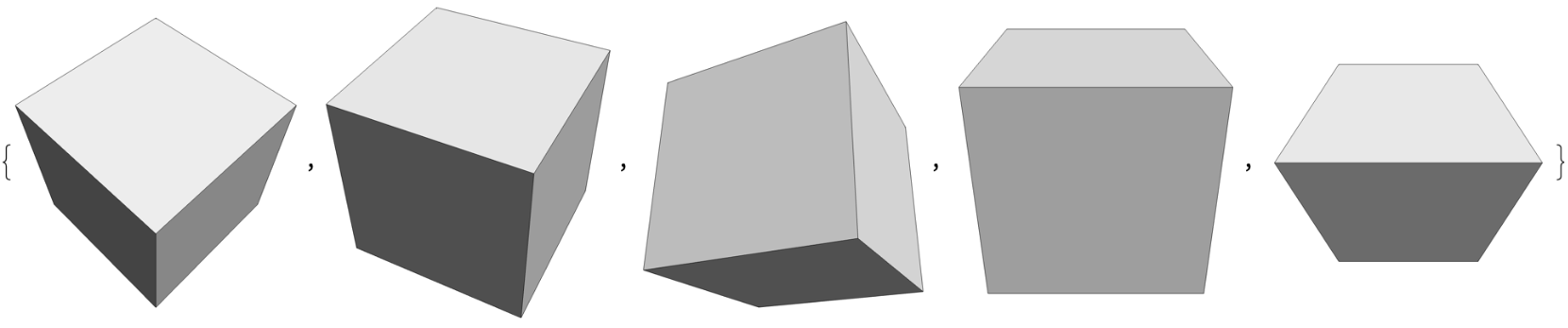
Out[]=
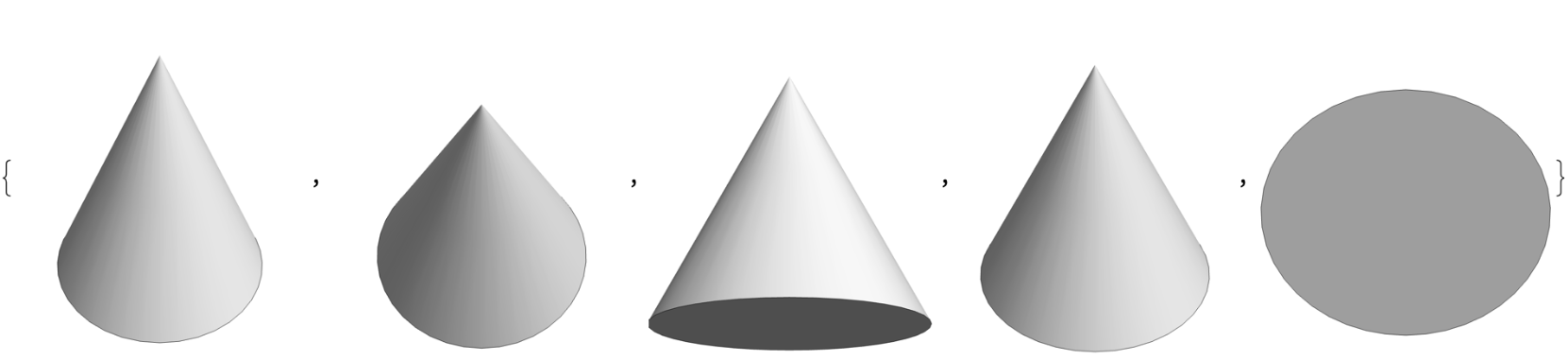
Out[]=

In[]:=
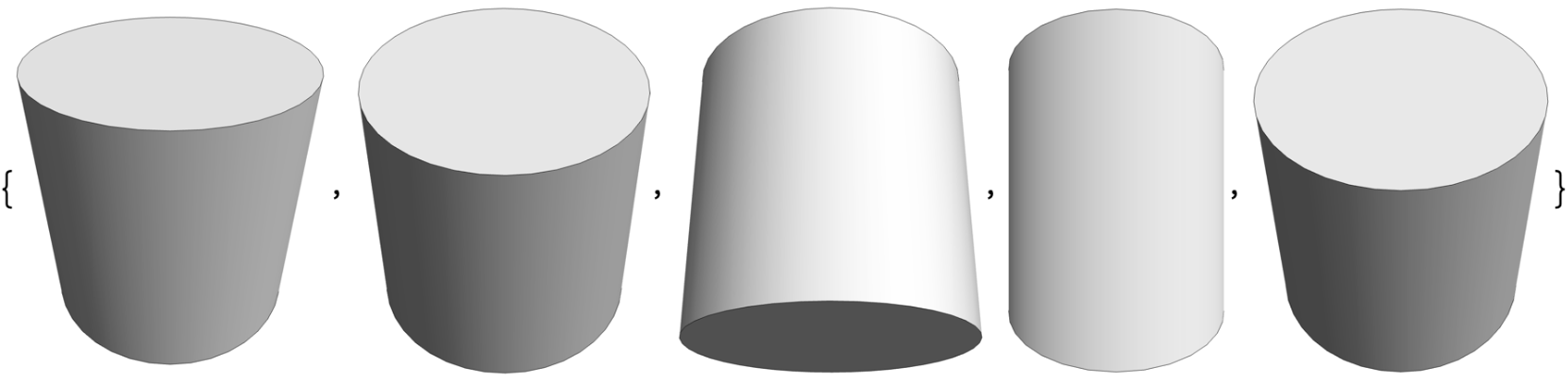
Applying more Complex Shapes
Applying more Complex Shapes
Importing Complex shapes
Importing Complex shapes
One of the more complex 3D structures is the built in StanfordBunny (Fun Fact: The Stanford Bunny was the first detailed polygon mesh model of a complex object with numerous small nooks, crannies, and crevices. )
Importing it:
Projection :
Presenting:
Angles :
Angles :
Here we can see that the StanfordBunny, a way more complex shape with irregular features and shape, shows very different appearance from all different angles. It’s details significantly change it’s shape depending on the angle/viewpoint shown. Simple geometric shapes such as spheres, cubes, cones, pyramids, and cylinders have symmetrical and regular forms. Their appearances remain the same and is predictable across different angles, making it easier to interpret from 2D projections. The StanfordBunny, unlike simple shapes, has a lot of depth and dimensionality that can not be fully captured in 2D projections. Viewing it from different angles provides a more comprehensive understanding of its three-dimensional structure compared to flat, 2D representations.
Function for Angle images
Function for Angle images
Features
Features
Extract Features
Extract Features
The extractFeatures function simplifies the process of extracting image-specific features using Mathematica’s built-in FeatureExtract function.
Output:
Similarity Measure
Similarity Measure
The calculateSimilarity function computes how similar feature representations of different shapes (spheres, cubes, cones, pyramids, cylinders, and a test object) are based on their extracted image features. It uses Euclidean distance to quantify similarity and provides a single metric (average distance) to summarize the similarity among the feature vectors for each shape.
Score
Score
The normalizeScores function ensures that the similarity scores for different shapes (Sphere, Cube, Cone, Pyramid, Cylinder, and StanfordBunny) are uniformly scaled to a comparable range (1 to 100). This normalization allows for easier interpretation and comparison of the similarity levels across different shapes based on their feature-based similarity scores.
Extreme Example
Extreme Example
We can notice an obvious problem. The StanfordBunny is at max rating, and there are more complicated 3DGraphics out there. This means we’d need an extreme example to set as max. For our min, we already have the sphere, which looks the same at every angle.
Here we see a list of random images, setting this as the max we’ll be able to have a better rating system.
Here we see a list of random images, setting this as the max we’ll be able to have a better rating system.
Final Product
Final Product
Import Shapes
Create Projections
Projections for each
Put extreme example
Rasterize Images
Convert Images to Feature Vectors
Create a Similarity Measure
Using Euclidean distance as the similarity measure
Using Euclidean distance as the similarity measure
Aggregate the Similarity Measures
Normalize the Scores to a 1-100 Scale
Output the Scores
Here we can see Sphere is 1 and ExtremeExample is 100.
Final Function
Final Function
Function:
Function:
Since we already have a working code, we can convert this into a function!
The Understand3DRating function rates a 3D graphics object based on its similarity to a standard 3D sphere and a set of extreme example images. It generates multiple random projections of the input object, extracts features from these projections, and calculates similarity scores using Euclidean distance. These scores are then normalized to a 1-100 scale. The function outputs the normalized similarity score for the input object, providing a rating.
Outputs
Outputs
Conclusion
Conclusion
Conclusion
Conclusion
In this project, we explored what kind of 3D structures can or cannot be understood through their 2D projections. By creating multiple projections of various shapes: sphere, cube, cone, pyramid, cylinder, and the Stanford Bunny, we extracted the image features and calculated similarity scores to show how distinct each shape’s projections are from different angles. These scores were normalized to a scale of 1 to 100. Our analysis revealed that simpler shapes, such as the sphere, had very low similarity scores (1.0), indicating that their projections look nearly identical from all angles. In contrast, more complex shapes like the Stanford Bunny received much higher scores (80-90) showing that it’s projections vary significantly and require 3D visualization for better understanding. Intermediate shapes like the cube, cone, pyramid, and cylinder had moderate similarity scores (ranging from 50-70), showing their complexity in 2D projections.
Future Extensions
Future Extensions
In the future, I would like to extend this to understanding 4D Structures in a 3D format. I’d also like to create a function to reconstruct a whole 3DGraphic using the different 2D angles.
References
References
Inspo: Abott, Edwin Abott. Flatland. Oxford University Press, 2008.
Stanford Bunny Info: “The Tale of the ‘ubiquitous’ Stanford Bunny.” Stanford University School of Engineering, 5 Apr. 2023, engineering.stanford.edu/magazine/tale-ubiquitous-stanford-bunny.
Photos credits:
◼
Unsplash
◼
Bhanuka Dilshan (Flower Photo)
◼
Eric Prouzet (Bracelet Photo)
◼
One Pixel (Pencil Photo)
◼
Shubham Dhage (Sunset Photo)
◼
Jeremy Bishop (Tree Photo)
◼
NASA (Space Photo)
◼
Ian dooley (Hot Balloon Photo)
◼
Me (Cloud Photo)
◼
Me (Fish Photo)
◼
Me + My brother + My cat (Cat photo)
Acknowledgements
Acknowledgements
Thank you so much to my Mentor Jesús Adrián Montesinos Correa! Thanks to all the TAs and the Directors for helping me! Thanks to my roommates Gloria, Abigail, and Iris!
CITE THIS NOTEBOOK
CITE THIS NOTEBOOK
Analyze 2D projections of 3D objects
by Averyl Xu
Wolfram Community, STAFF PICKS, July 12, 2024
https://community.wolfram.com/groups/-/m/t/3215251
by Averyl Xu
Wolfram Community, STAFF PICKS, July 12, 2024
https://community.wolfram.com/groups/-/m/t/3215251