1. Inspiration
1. Inspiration
In my previous post, I developed a fluid interference pendant. Later, I think It might be possible to build a jewelry based on solid physics.
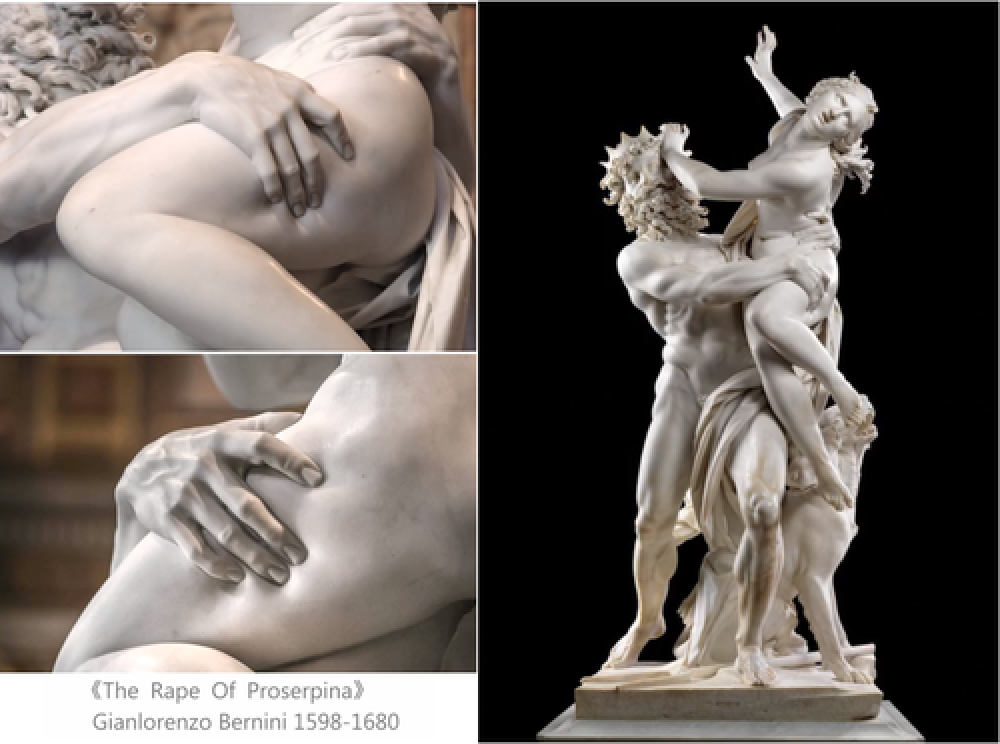
I was shocked by Bernini’s masterpiece of sculpture “The Rape of Proserpina” (1622), The man’s powerful fingers of right hand are sunk into the elastic skin of woman’s leg during their fighting. At that moment, Bernini bought the cold and rigidity marble into life. This strong contrast on surface reveals the principle of soild physics underneath.
Out[]=
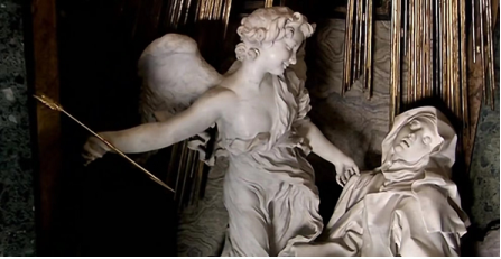
When I am looking at Bernini’s another work “The Ecstasy of Saint Teresa” (1652), I raised a question, what will be happen if the Cupid’s arrow penetrated a heart from the view point of material mechanics. This inspired me to make a new piece of heart jewelry of my own.
In[]:=
In the article I am going to describe in detail how my new jewelry is designed based on WL finite element method and hammered into ring by complex mapping, It’s also an experiment for me to apply mathematical and physical method into art design.
2. Shooting Heart (FEA Simulation)
2. Shooting Heart (FEA Simulation)
2.0 Initialing
2.0 Initialing
2.1 Geometry
2.1 Geometry
In[]:=
JuliaHeart[u_,v_]:=1.5{(4Sin[u]-Sin[3u])Sin[v],2Cos[v],1.2(4Cos[u]-Cos[2u]-Cos[3u]/2)Sin[v]}
Use ParametricPlot3D to plot a 3D heart surface based on parametric equation.
In[]:=
Image[heart=ParametricPlot3D[JuliaHeart[u,v],{u,0,2Pi},{v,0,Pi},AxesTrue,AxesLabel{"x","y","z"},PlotStyleRed,PlotLabelStyle["Julia's parametric heart surface",14,Bold],ViewPointFront,MaxRecursion2,PlotPoints100,ImageSize350{1,1}]]
Out[]=
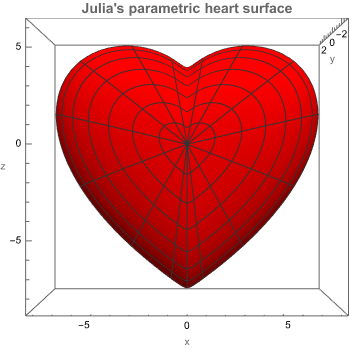
Export the model in STL format, this is my initial heart shape.
In[]:=
Export["heart.stl",heart]
Out[]=
heart.stl
2.2 Mesh
2.2 Mesh
Use OpenCascadeShapeImport to import a simplified mesh heart.
In[]:=
shape=OpenCascadeShapeImport["heart_Simplified.stl"]
Out[]=
OpenCascadeShapeExpression[1]
In[]:=
bMesh=OpenCascadeShapeSurfaceMeshToBoundaryMesh[shape]
Out[]=
ElementMesh[{{-7.40468,7.40454},{-3.22894,3.22907},{-8.1012,5.736}},Automatic]
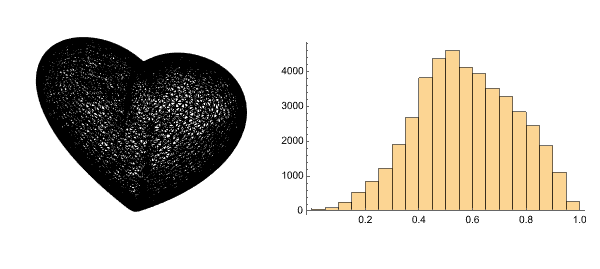
Meshing the shape. The vMesh is the 3D volume mesh, bMesh is the 2D surface mesh of boundary.
In[]:=
vMesh=ToElementMesh[bMesh,MaxCellMeasure{"Length"1}]
Out[]=
ElementMesh[{{-7.40468,7.40454},{-3.22894,3.22907},{-8.1012,5.736}},{TetrahedronElement[<43844>]}]
In[]:=
bMesh=ToBoundaryMesh[vMesh]
Out[]=
ElementMesh[{{-7.40468,7.40454},{-3.22894,3.22907},{-8.1012,5.736}},Automatic]
visualizing wireframe of mesh and check mesh quality.
In[]:=
Image@GraphicsRow[{vMesh["Wireframe"],Histogram[vMesh["Quality"]]},ImageSize600]
Out[]=
2.3 Solve
2.3 Solve
The material parameters of human heart is not available to for me. So the elastic of rubble ( silicone rubber ), which might be close to human’s tissue, are used as a alternative. Young’s modulus of rubber is in range of 1-10 MPa, Poisson ‘s ratio is about 0.47-0.55.
In[]:=
{Young,ν}={5,.49};(*materialrubber,Young'smodulusunitMPa*)
Take the 3D stress operator.
In[]:=
stressOperator[Y_,ν_]:=;
Considering the balance of force in FEA analysis, I assume, the heart are fixed within a small area near center.
In[]:=
With[{a=1.2},RegionPlot[-a<=0,{x,-5,5},{y,-5,5}]]
3
(+-)
2
x
2
y
2
a
2
x
3
y
Out[]=
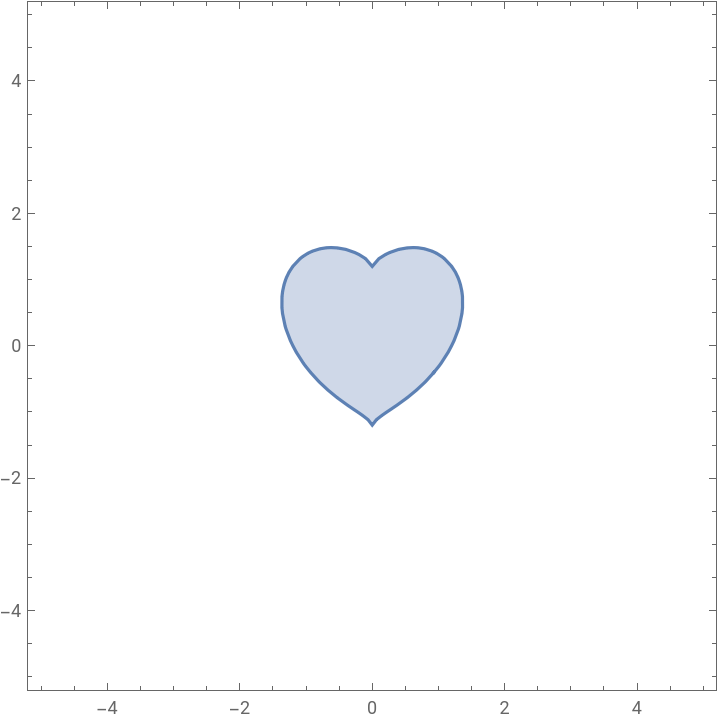
Within the small heart area, the displacement along x, y and z direction are rigidly fixed for anchoring the big heart.
In[]:=
(*Specifyconstraintssuchthattheboundaryofthemodelisheldfixedatthesepositions*)Subscript[Γ,T]={DirichletCondition[{u[x,y,z]0.,v[x,y,z]0.,w[x,y,z]0.},(-1.2<=0)]};
3
(+-)
2
x
2
z
2
1.2
2
x
3
z
I set the pressure to 3 MPa, that should be powerful enough to make a rubber heart clear deformation. The pressure will go through the whole 3D region to simulate the final moment of arrow penetrating the heart.
Here is the free-body diagram, red arrow represents Cupid’s arrow, the pink heart stands for a silicone heart, the blue tetrahedron is regarded as constrain condition.
With previous operator, mesh and boundary conditions, NDSolveValue start to solve the FE equations.
2.4 Calculate (stress and strain)
2.4 Calculate (stress and strain)
NDSolveValue results the interpolating function of displacement, I further calculated the stress and strain distribution.
Calculating the distribution of overall stress (von Mises Stress).
Calculating the distribution of overall displacement.
2.5 Visualizing (deformation)
2.5 Visualizing (deformation)
Visualizing the deformed element mesh.
Comparing the initial heart in gray against the deformed heart in red . The deformation are clear, on the right side is concave and on the left side is convex surface.
Notice: Here I export the heart model again, this is a deformed heart.
2.6 Visualizing (stress and strain on deformed mesh)
2.6 Visualizing (stress and strain on deformed mesh)
Visualizing the distribution of stress and strain on the deformed mesh.
Left graphics shows the displacement distribution, the big deformation are located at right entrance and left exit. Furthermore, the whole heart have a clear “heart-moving” towards left side, because the arrow and pressure comes from the right side.
Right graphics shows the stress distribution, the high stress are also located at right entry and left exit. The centre area of small heart are rigid fixed, therefore high stress appears around its boundary.
Use Graphics3D to compliment a red arrow.
Here is transient animation for the whole penetrating process.
3. Arrow Model
3. Arrow Model
Building the Cupid’s arrow in detail, it’s composed by three parts, arrow head, body and tail.
4. Hammering Ring (conform mapping)
4. Hammering Ring (conform mapping)
Since the best solution of love is the marriage, the best outcome of Cupid’s arrow is the wedding ring.
Next, I will introduce the how a straight arrow with heart will be re-shaped into a ring.
4.1 Traditional Processing
4.1 Traditional Processing
In traditional ring-make processing, silversmiths use a conical ring-gauge stick, different location indicates with different inner diameter of rings. Silversmiths punch the ring with plastic or rubber hammer to resize and re-shape it on gauge stick. In the meantime, the ring will be heated several times to released the inner stress due to its bending. A sophisticated silversmith would take a few hours to re-shape a piece of ring. However, in WL, you don’t need a few hours, it take only a few seconds.
4.2 Review Conformal Mapping
4.2 Review Conformal Mapping
4.3 Apply Conformal Mapping on Region
4.3 Apply Conformal Mapping on Region
Import the Boolean Union-ed heart and arrow model.
Transforming the orientation of model, preparing for the next conformal mapping.
Apply conformal mapping on 3D region in three steps.
◼
Step one: Mapping all coordinates of points, x and y is conformal mapping, z is a scaling transformation, accordingly.
◼
Step two: All topological information are preserved in mesh, they remains and unchanged in MechCells.
◼
Step three: Use the new coordinates and preserved mesh to generate a new transformed region.
Export the ring, this is model of final transformed ring.
4.4 Rendering
4.4 Rendering
Rendering the ring with MaterialShading in silver.
5. Prototype
5. Prototype
With 3D printing and lost-wax casting, my jewelry is made in silver and surface are polished. Between the heart and arrow, concave entry and convex exit are clear. The tiny surface records for arrow and heart, they are not just attached easily, they were interacting each other strongly.
On the inner wall of heart, I marked the name of my wife, Julia.
This is the story of my wedding ring in Wolfram Language.