In this project, we use deep learning to make an emotion recognition convolution neural network by customizing the EfficientNet model pretrained on the ImageNe dataset. We used the FER-2013 dataset available in the Wolfram repository. Seven classes of emotions are considered in the dataset: happy, sad, angry, surprise, disgust, fear, and neutral. We try out different methods to tackle class imbalance. This model can be applied in teaching autistic children, young children in general, and people blind to facial expressions. It can also be used to train robots to interact more efficiently with humans.
Data Exploration
Data Exploration
The data set used here is FER-2013. It has 35887 greyscale images of faces with expressions categorized into one of the seven categories: happy, sad, angry, surprise, disgust, fear, neutral. It was made under all challenging conditions, such as varying lighting, different head movements, and variances in facial features due to ethnicity, age, gender, facial hair, and glasses. This is important to not create a bias in our model.
Obtaining the data
Obtaining the data
ro=ResourceObject["FER-2013"]data=ResourceData[ro];
Out[]=
ResourceObject


Overview of the data
Overview of the data
classes=DeleteDuplicates[Values[data]];dataPerClass=Map[Function[{class},Select[data,SameQ[Values@#,class]&]],classes];
In[]:=
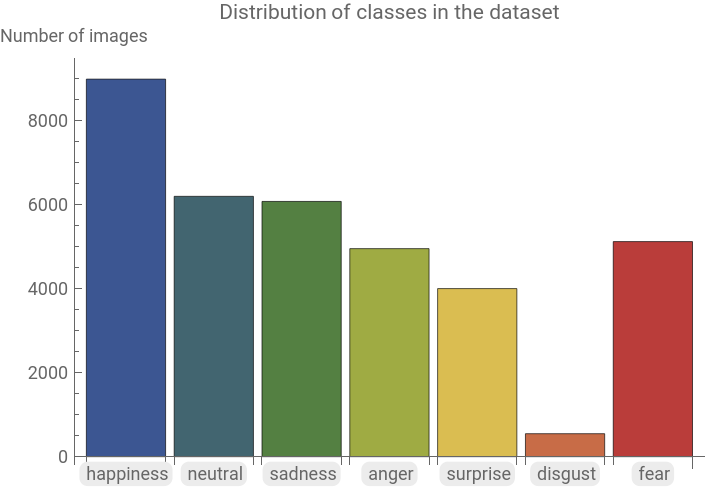
Counts[Values[data]]BarChart[Counts[Values[data]],ChartLabels->Keys@Counts[Values[data]],ChartStyle->"DarkRainbow",PlotLabel->"Distribution of classes in the dataset",AxesLabel->{Automatic,"Number of images"}]
Out[]=
8989,6198,6077,4953,4002,547,5121
Out[]=
Data distribution of classes of train and test sets
Data distribution of classes of train and test sets
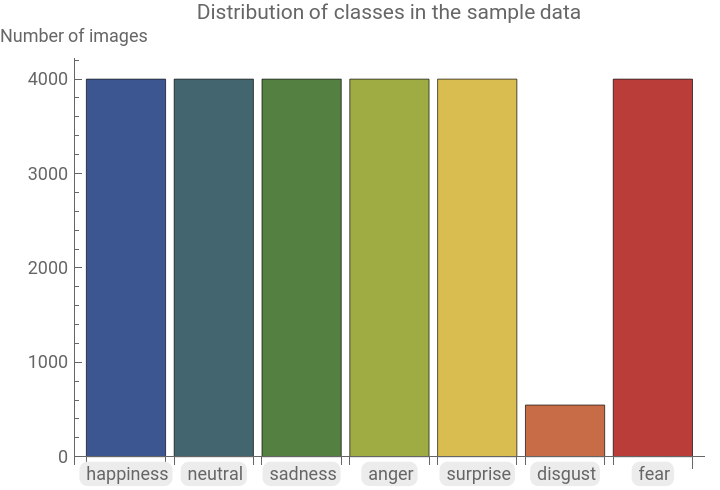
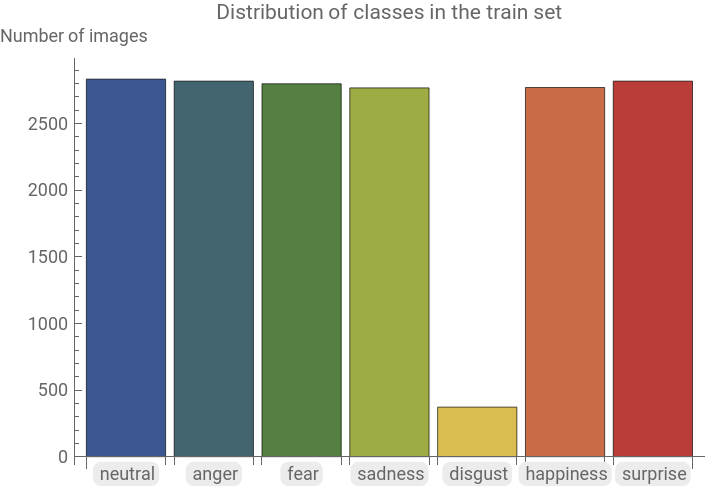
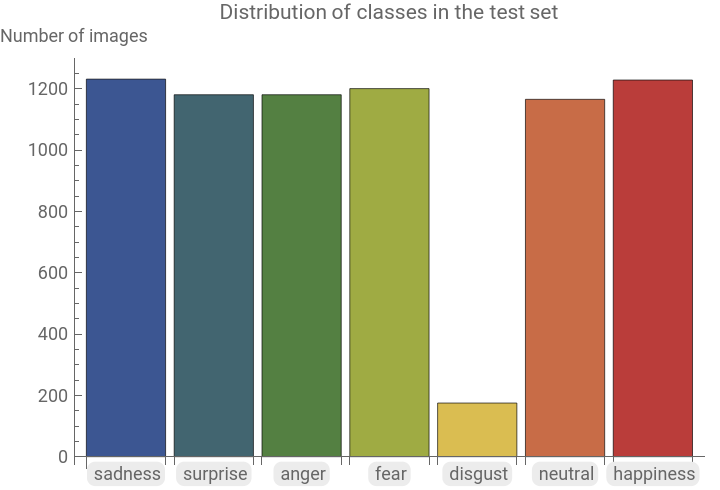
We choose 4000 random images from each class for our sample dataset. 70% of this sample dataset is chosen randomly as train dataset and the other 30% as test dataset. The function RandomSample is used to ensure that the data was chosen randomly to ensure an accurate representation of the original dataset in the train and test sets.
sampleData=Flatten@Map[RandomSample[#,UpTo[4000]]&,dataPerClass];{train,test}=TakeDrop[RandomSample[sampleData],Floor[0.7*Length[sampleData]]];
In[]:=
dataPerClass=Map[Function[{class},Select[data,SameQ[Values@#,class]&]],classes];sampleData=Flatten@Map[RandomSample[#,UpTo[4000]]&,dataPerClass];{train,test}=TakeDrop[RandomSample[sampleData],Floor[0.7*Length[sampleData]]];
In[]:=
BarChart[Counts[Values[sampleData]],ChartLabels->Keys@Counts[Values[sampleData]],ChartStyle->"DarkRainbow",PlotLabel->"Distribution of classes in the sample data",AxesLabel->{Automatic,"Number of images"}]BarChart[Counts[Values[train]],ChartLabels->Keys@Counts[Values[train]],ChartStyle->"DarkRainbow",PlotLabel->"Distribution of classes in the train set",AxesLabel->{Automatic,"Number of images"}]BarChart[Counts[Values[test]],ChartLabels->Keys@Counts[Values[test]],ChartStyle->"DarkRainbow",PlotLabel->"Distribution of classes in the test set",AxesLabel->{Automatic,"Number of images"}]
Out[]=
Out[]=
Out[]=
Transfer Learning with EfficientNet
Transfer Learning with EfficientNet
To create a neural network, rather than create a new network from scratch, which may take days or weeks to train, we can use a pretrained model as a starting point and customize it for our needs. EfficientNet trained over the dataset ‘ImageNet’ can be adapted to the ‘FER-2013’ dataset as shown below:
Creating the neural network
Creating the neural network
We start with calling EfficientNet model pretrained on the dataset ‘ImageNet’.
In[]:=
NetModel["EfficientNet Trained on ImageNet"]
Out[]=
NetChain


In order to train a new model, we can use this architecture. We remove the last Linear and Softmax layers and add our own layers as required to customize the net to our dataset.
In[]:=
net=NetTake[NetModel["EfficientNet Trained on ImageNet"],{1,-3}]
Out[]=
NetChain

Customizing neural network
Customizing neural network
After the last 2 layers of the model EfficientNet are removed, we construct a customized neural network by adding new layers. This allows the model to learn new features form our dataset.
In[]:=
newNet=NetChain[<|"pretrainedNet"->net,"linear1"->LinearLayer[64],"dp"->DropoutLayer[0.2],"bn"->BatchNormalizationLayer[],"linear2"->LinearLayer[7],"softmax"->SoftmaxLayer[]|>,"Output"->NetDecoder[{"Class",classes}]]
Out[]=
NetChain

The layers contribute as follows:
◼
LinearLayer: Adds complexity to the neural network.
◼
DropoutLayer: Prevents overfitting by randomly putting off the neurons while training.
◼
BatchNormalizationLayer: Normalizes its input data by learning the data mean and variance.
◼
SoftMaxLayer: Contributes the activation function layer for multiclass classification.
Handling data unbalance using different methodologies
Handling data unbalance using different methodologies
It is evident from the graphs that the emotion class ‘disgust’ has a significantly less amount of data compared to the other classes. Most machine learning algorithms are based on the assumption that data is equally distributed among all classes in the data set and hence, when training the learning develops a bias towards the majority classes. We will look at a few different ways in which we can resolve this issue.
Undersampling
Undersampling
In the Undersampling method, we remove excess number of samples from the majority classes so all classes end up with about the same amount of sample data. Here, the class ‘disgust’ only has 547 samples. By taking 500 samples from each class for our sample data, each of our classes end up with the same amount of data.
Training the net
Training the net
The model trains with a BatchSize 24 and 2 training rounds.
Net evaluation
Net evaluation
To compare how our different methods work, we shall compute the confusion matrices, accuracies, and F1 scores of each.
1
.Confusion matrix:
2
.F1 score:
3
.Accuracy:
Weighted Class Training
Weighted Class Training
Customizing neural network
Customizing neural network
Training the net
Training the net
Net Evaluation
Net Evaluation
1
.Confusion matrix:
2
.F1 score:
3
.Accuracy:
Focal Loss Training
Focal Loss Training
Training the net
Training the net
Net Evaluation
Net Evaluation
1
.Confusion matrix:
2
.F1 score:
3
.Accuracy:
Concluding remarks
Concluding remarks
By comparing the results from the three methods we used to address the data imbalance in the dataset, the accuracies obtained are as follow: Undersampling gives us 0.494286 accuracy, using FocalLoss gives us 0.558316 and weighted sampling, 0.498982. We can see that using FocalLoss gave us the highest accuracy and F1 scores. The weighted class model performed the next best. The accuracies could be improved in the future with more training rounds and network layers.
Keywords
Keywords
◼
Undersampling
◼
Weighted sampling
◼
Focal Loss
Acknowledgment
Acknowledgment
There are many people I would like to thank for their support. I would first like to thank Siria Sadeddin for being my mentor, her immense help and guidance allowed me to learn and use many new skills which I could use to complete this project. I would also like to express my sincere gratitude to Tuseeta Banerjee and Mads Bahrami for their time and consideration, the TAs for being available whenever I was in trouble, and Aravind Hanasoge and the entire Wolfram team for conducting this program.
References
References
◼
Sadeddin, Siria. “Face mask detection: classifying image data.” Wolfram Community. 2021. https://community.wolfram.com/groups/-/m/t/2139499.
◼
Sadeddin, Siria. “Loss Focal: Una solución para el desbalance de datos.” AI en Español. June 12, 2020.
https://siriasadeddin.wixsite.com/siriaai/post/loss-focal-una-soluci % C3 % B3n-para-el-desbalance-de-datos.
https://siriasadeddin.wixsite.com/siriaai/post/loss-focal-una-soluci % C3 % B3n-para-el-desbalance-de-datos.
◼
Chandler, Seth. “Machine learning with weighted data.” Wolfram Community. 2018. https://community.wolfram.com/groups/-/m/t/1223968.
◼
Shrivastava, Ishan. “Handling Class Imbalance by Introducing Sample Weighting in the Loss Function.” GumGum Tech Blog. December 17, 2020. https://medium.com/gumgum-tech/handling-class-imbalance-by-introducing-sample-weighting-in-the-loss-function-3bdebd8203b4.
◼
Lin, Tsung-Yi., Goyal, Priya., Girshick, Ross., He, Kaiming., Dollár, Piotr. “Focal Loss for Dense Object Detection.” arXiv. February 7, 2018. https://arxiv.org/pdf/1708.02002.pdf.
◼
Saxena, Shipra. “Introduction to Softmax for Neural Network.” Analytics Vidhya. April 5, 2021.
https://www.analyticsvidhya.com/blog/2021/04/introduction-to-softmax-for-neural-network/.
https://www.analyticsvidhya.com/blog/2021/04/introduction-to-softmax-for-neural-network/.
◼
Singh, Kamaldeep. “How to Improve Class Imbalance using Class Weights in Machine Learning.” Analytics Vidhya, October 6, 2020. https://www.analyticsvidhya.com/blog/2020/10/improve-class-imbalance-class-weights/.
◼
Godoy, Daniel. “Understanding binary cross-entropy/log loss: a visual explanation.” November 21, 2018.
https://towardsdatascience.com/understanding-binary-cross-entropy-log-loss-a-visual-explanation-a3ac6025181a.
https://towardsdatascience.com/understanding-binary-cross-entropy-log-loss-a-visual-explanation-a3ac6025181a.
◼
Hoeltgen, Laurent. “Designing Neural Networks in Mathematica.” Laurent Hoeltgen. May 5, 2015. https://laurenthoeltgen.name/post/ml-nn-mathematica/
◼
Singh, Gaganjot. “Facial Emotion Classification using Deep Learning.” December 18, 2019.
https://medium.com/analytics-vidhya/facial-emotion-classification-using-deep-learning-d08dd02a2d38.
https://medium.com/analytics-vidhya/facial-emotion-classification-using-deep-learning-d08dd02a2d38.
◼
Chowdhry, Arsh. “Emotion Recognition With Deep Learning On Google Colab.” April 5, 2021.
https://blog.clairvoyantsoft.com/emotion-recognition-with-deep-learning-on-google-colab-24ceb015e5.
https://blog.clairvoyantsoft.com/emotion-recognition-with-deep-learning-on-google-colab-24ceb015e5.