In this blog series, we explore how to tackle challenges in the world of electric vehicles (EVs) using math and technology. We’ll delve into various EV components and scenarios, such as reinforcing driveshafts, managing battery heat, and optimizing energy efficiency-all through the lens of Partial Differential Equation (PDE) analysis.
Understanding boundary conditions is key in PDE analysis, and while it sounds technical, We are here to walk you through it in Layman’s terms, using system modeling to extract these conditions from real-life phenomena. While we use tools like Wolfram System Modeler and Mathematica, the focus is on the process and practical application.
In this series, we’re dissecting electric vehicles piece by piece, focusing on a different component in each post. We’ll share our journey, the challenges we face, and how we overcome them, aiming to provide insights and maybe a bit of inspiration. So, whether you’re keen to understand EV dynamics or just love solving problems, we are glad you’re here to join us on this adventure.
Understanding boundary conditions is key in PDE analysis, and while it sounds technical, We are here to walk you through it in Layman’s terms, using system modeling to extract these conditions from real-life phenomena. While we use tools like Wolfram System Modeler and Mathematica, the focus is on the process and practical application.
In this series, we’re dissecting electric vehicles piece by piece, focusing on a different component in each post. We’ll share our journey, the challenges we face, and how we overcome them, aiming to provide insights and maybe a bit of inspiration. So, whether you’re keen to understand EV dynamics or just love solving problems, we are glad you’re here to join us on this adventure.
System Level Model
System Level Model
In this blog, we’ll walk you through how to model an electric vehicle (EV) driveline and battery to understand battery dynamics using the open-source EHPTlib library, focusing on how to streamline your workflow and get meaningful results.
Importing the System Model
Importing the System Model
As a first step we import open source system model library . When we do this, then there is no need to open the System Modeler application separately. The model library provides us with several premade models.
"EHPTlib.mo"
Import the Library:
In[]:=
modelFileName=FileNameJoin[{NotebookDirectory[],"package.mo"}];model=Import[modelFileName]
Out[]=
Exploring the EV Model
Exploring the EV Model
We choose the “EV” model from the library’s examples. Here’s how to visualize its diagram and inspect its properties:
In[]:=
model=SystemModel["EHPTlib.Examples.EV.MBEVdata"];model["Diagram"]
Out[]=
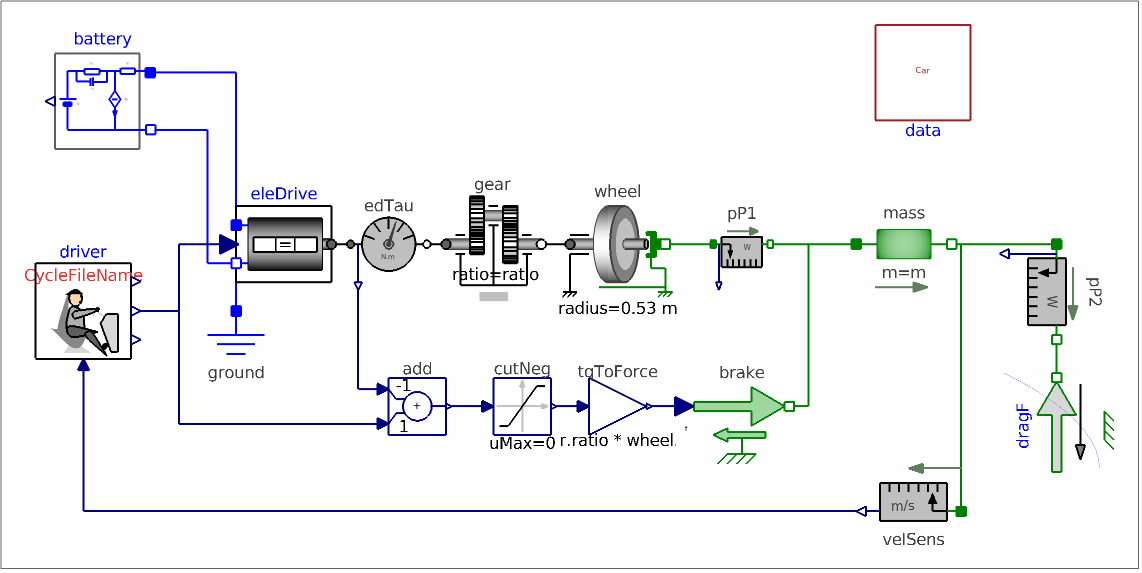
You can see a comprehensive representation of the EV’s structure, including its battery, drive system, and transmission components. For deeper insight, you can read the library documentation.
Parameters and Simulating the Model
Parameters and Simulating the Model
To simulate the behavior of the Tesla Model S, we’ve chosen specific parameters that reflect its key characteristics. This allows us to model the car’s dynamics accurately and fine-tune its performance in different scenarios.
Vehicle Mass (m): The weight of a Tesla Model S can vary depending on the model and battery pack. Generally, the vehicle mass ranges from approximately 2,200 kg to 2,300 kg (4,850 to 5,070 pounds).
Vehicle Cross Area (S): The Tesla Model S has a frontal cross-sectional area of around 2.34 square meters. This area, combined with the aerodynamic drag coefficient, contributes significantly to its overall drag force at high speeds.
Aerodynamic Drag Coefficient (fc): The Tesla Model S has an aerodynamic drag coefficient of approximately 0.208, which is among the lowest for production vehicles, making it highly efficient at high speeds.
Rolling Friction Coefficient (Cx): The rolling friction coefficient of a vehicle can depend on factors such as tire type and inflation. Typically, for modern electric vehicles like the Tesla Model S, the rolling friction coefficient ranges from 0.005 to 0.01. We assume it to be 0.007.
Vehicle Cross Area (S): The Tesla Model S has a frontal cross-sectional area of around 2.34 square meters. This area, combined with the aerodynamic drag coefficient, contributes significantly to its overall drag force at high speeds.
Aerodynamic Drag Coefficient (fc): The Tesla Model S has an aerodynamic drag coefficient of approximately 0.208, which is among the lowest for production vehicles, making it highly efficient at high speeds.
Rolling Friction Coefficient (Cx): The rolling friction coefficient of a vehicle can depend on factors such as tire type and inflation. Typically, for modern electric vehicles like the Tesla Model S, the rolling friction coefficient ranges from 0.005 to 0.01. We assume it to be 0.007.
In[]:=
carParameters=model[{"ParameterValues",{"data.m","data.S","data.fc","data.Cx"}}]
Out[]=
{2300,0.208,2.34,0.007}
data.m
data.Cx
data.S
data.fc
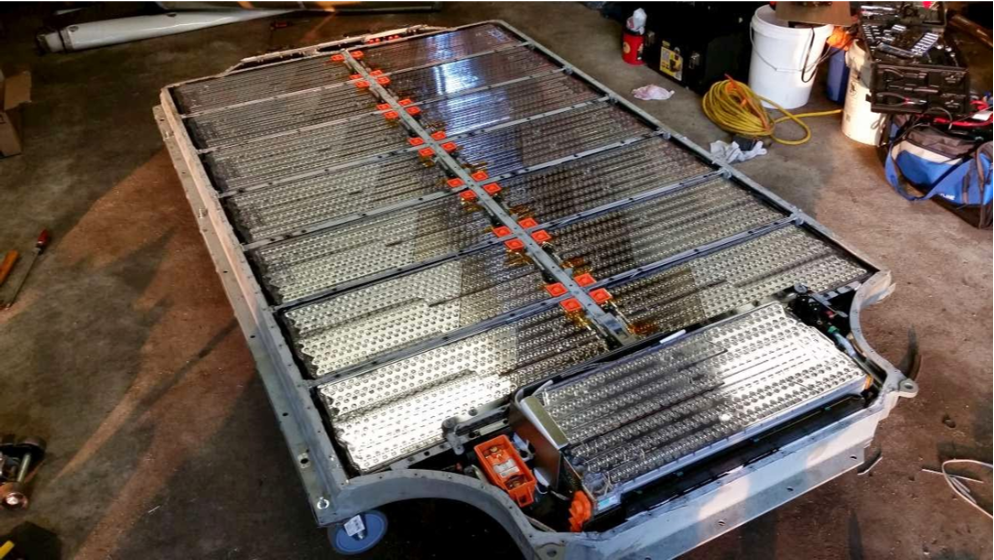
There are also battery related parameters that need to be set, number of battery cells, their maximum and minimum voltages, maximum admissible current and nominal electric charge values.
In[]:=
batteryParameters=model[{"ParameterValues",{"battery.np","battery.ns","battery.ECellMax","battery.ECellMin","battery.ICellMax","battery.QCellNom"}}]
Out[]=
{12162.2,3.3,4.15,1900,96,74}
battery.QCellNom
battery.ECellMin
battery.ECellMax
battery.ICellMax
battery.ns
battery.np
We can simulate the model. For this, we use .
In[]:=
sim=SystemModelSimulate[model];
The simulation generates comprehensive data, which we can analyze further.
Visualizing Simulation Results
Visualizing Simulation Results
The result is a that contains all simulation results of interest.
Visualize default System Modeler plots with the function:
In[]:=
SystemModelPlot[sim,"Vehicle speed",ImageSize->Medium,PlotRange->Full]
Out[]=
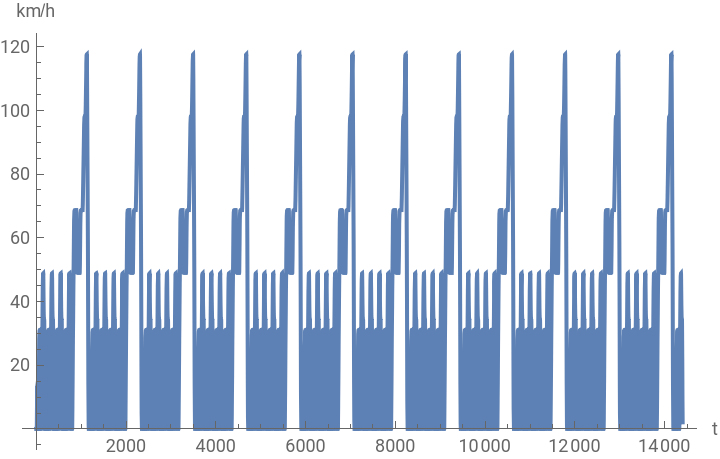

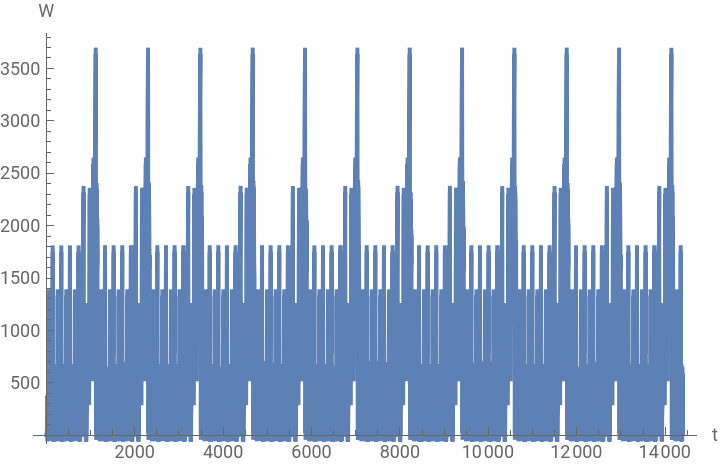
Here, we observe the battery temperature and car velocity. This car velocity profile is a benchmark velocity profile, New European Driving Cycle (NEDC). It is a driving cycle, last updated in 1997, designed to assess the emission levels of car engines and fuel economy in passenger cars (which excludes light trucks and commercial vehicles).
PDE Battery Simulation with FEM
PDE Battery Simulation with FEM
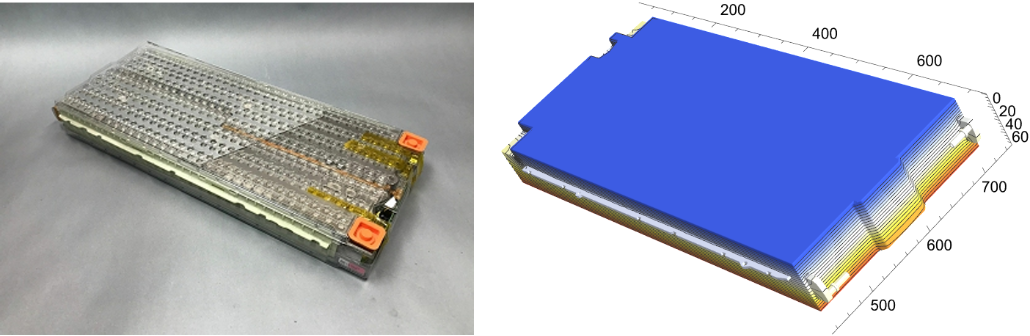
In this section, we’ll dive a level deeper into the modeling for an electric vehicle (EV) using a heat transfer PDE model for simulation. The PDE will be solved with the finite element method (FEM). Our goal is to see what the temperature distribution over the battery body looks like and understand its spatial dynamics.
Setting Up the Heat Transfer Model
Setting Up the Heat Transfer Model
We start by enabling the necessary packages:
In[]:=
Needs["NDSolve`FEM`"]Needs["OpenCascadeLink`"]
And set the $HistoryLength to zero to avoid memory to fill up.
In[]:=
$HistoryLength=0;
Heat Transfer Model Setup
Heat Transfer Model Setup
The heat transfer PDE is defined by the following equation:
ρ+∇·(-k∇T(t,X))=Q
C
p
∂T(t,X)
∂t
Here, the dependent variable is temperature , which changes over time and position . This model describes how thermal energy moves through a medium with with density and specific heat capacity [J/(kg·K)]. The specific heat capacity determines how much energy is needed to raise the temperature of a unit mass by one degree Kelvin.
T
t
X
ρkg
3
m
C
p
Model Parameters and Steady-State Case
Model Parameters and Steady-State Case
To simplify the equation, we can drop the time-dependent terms, arriving at a steady-state form:
Let’s set up the PDE model variables:
Creating the Battery Model
Creating the Battery Model
The Tesla Model S’s thermal management is influenced by a variety of materials with differing conductivities. The battery pack’s casing, typically made of aluminum, has a thermal conductivity of around 200-250 W/m·K, aiding in heat dissipation, while the cathode and anode components have lower conductivities, ranging from 0.1 to 1 W/m·K. The overall thermal conductivity of the battery might average between 10 to 50 W/m·K, ensuring effective thermal management through a balanced integration of materials.
We start by specifying parameters for the thermal conductivity of the material used in the model, represented by a diagonal matrix :
Next, we import the CAD model of the electric vehicle from a file named “tesla.stl”:
We import the battery’s shape into our environment as a 3D object. It’s worth noting that this geometry could be further detailed to include each cell and its connecting wires. However, for clarity and focus, we choose to keep it streamlined and straightforward.
After that, we convert this shape into a boundary element mesh, which helps define the model’s surface structure:
After that, we convert this shape into a boundary element mesh, which helps define the model’s surface structure:
To ensure accurate scaling, we then set the length unit of the mesh to millimeters:
Finally, we retrieve and examine the mesh’s bounds and wireframe to get a sense of its spatial dimensions and geometric structure:
The model geometry, complete with its mesh, is now set up.
Solving the Heat Transfer Equation
Solving the Heat Transfer Equation
Now that we have the geometry, we need to divide it to apply the boundary conditions. In this particular case, we need at least get the pins geometry and related mesh.
Here, we would like to visualize the mesh elements that make up the pins and how we can pick those by using element markers, as an alternative to the heat source. This will enable us to distinguish pin regions while assigning boundary conditions as heat flux.
It seems like we could locate pins successfully by using ElementMarker IDs which are selection from 1 up to 82.
Then, lets assume surface temperature is 303K at the pin surfaces.
We define the heat transfer PDE component and solve it:
Visualizing Results
Visualizing Results
Finally, let’s visualize the temperature distribution:
This provides a clear visual representation of the heat distribution throughout the battery, showing temperature variations across its geometry.
Transient Heat Transfer in EVs
Transient Heat Transfer in EVs
In this section, we’ll show how to set up a transient heat transfer model for an electric vehicle’s battery. Our goal is to make use of the heat source from the system-level model for the transient PDE analysis.
We define the PDE model variables and set up the initial conditions, T0 = 293 K.
We also set up a time series to track the heat flow within the battery:
We apply heat flux to the battery pack. Observations show that the applied heat primarily flows through the pins, which are connected to the top of each cell inside the battery. Therefore, we assume the heat is predominantly applied at the top of the battery, with some distributed through the pins.
Here we also apply convection term representing heat transfer between battery and the surrounding air.
Visualization of Heat Flow
Visualization of Heat Flow
To analyze how heat flows through the battery, we plot its transient behavior:
Here, we computed the average power loss caused heat flux assumed to be applied as a heat source over the battery surface.
Let’s create the PDE operator:
Let’s animate the temperature distribution:
Conclusion
Conclusion
The modeling and simulation of the Tesla Model S provide a comprehensive analysis of its thermal management, performance, and energy dynamics. By utilizing a system-level model and incorporating finite element analysis, the vehicle’s battery, drivetrain, and heat transfer characteristics can be effectively explored. This approach offers valuable insights into the car’s real-world behavior, helping to refine design choices and optimize its efficiency and performance, particularly in managing heat distribution and battery dynamics.
CITE THIS NOTEBOOK
CITE THIS NOTEBOOK
Electrical vehicle insights: battery management system-thermal dynamics
by Vedat Senol, Oliver Rübenkönig and Ankit Naik
Wolfram Community, STAFF PICKS, July 01, 2024
https://community.wolfram.com/groups/-/m/t/3202678
by Vedat Senol, Oliver Rübenkönig and Ankit Naik
Wolfram Community, STAFF PICKS, July 01, 2024
https://community.wolfram.com/groups/-/m/t/3202678