This project aims to develop robust tools for the integration of GIBS satellite imagery and AρρEEARS geographic data products into the Wolfram Language. The focus of this project is to build efficient and flexible methods to import, visualize, and interpret these geographic data using WL, as well as examples and documentation detailing the methods involved. As the culmination of these three weeks of work at the Wolfram Summer School, we are delighted to announce the release of the "RemoteSensing" paclet to the Wolfram Paclet Repository. I will continue to work on this repository after the summer school, and look forward to your feedback!
Introduction to the RemoteSensing paclet
Introduction to the RemoteSensing paclet
The RemoteSensing paclet contains various functions that allow you make requests to the GIBS and AρρEEARS APIs for geographic products from various US federal agencies, and work with the returned data in the Wolfram Language. The RemoteSensing GIBS functions can be used with GeoImage and GeoGraphics through the GeoServer option, while the AρρEEARS functions can be used to request scientific grade geographic data product samples.
It could go on at length, explaining why this is useful, but why bother when I can simply mesmerize you with nice pictures? In the following sections, we will see some simple examples of what the RemoteSensing paclet can do. I hope my examples will inspire you to try it for yourself, and perhaps even work with it in your own projects!
Installing and loading the RemoteSensing paclet
Installing and loading the RemoteSensing paclet
Before you get started with the RemoteSensing paclet, you’ll need to make install and import the paclet in your notebook:
In[]:=
PacletInstall["PhileasDazeleyGaist/RemoteSensing",UpdatePacletSites->True];
In[]:=
PacletObject["PhileasDazeleyGaist/RemoteSensing"]
Out[]=
PacletObject

In[]:=
Needs["PhileasDazeleyGaist`RemoteSensing`"]
Perfect! Now for the good stuff!
GIBS Examples
GIBS Examples
A few words about GIBS
A few words about GIBS
The NASA GIBS (Global Imagery Browse Services) API is a web service provided by NASA used to access and retrieve satellite imagery and related data. The API provides an interface to access a vast collection of global Earth science data through WMTS (Web Map Tile Service).
Conveniently, it does not require authentication to access.
GIBS provides raster tiles, which can be useful for visualisation and data exploration, but should be avoided for serious research purposes, as it does not provide access to the raw layer data. Its main advantages are that is is fast, pretty robust, and very flexible.
The NASA GIBS (Global Imagery Browse Services) API is a web service provided by NASA used to access and retrieve satellite imagery and related data. The API provides an interface to access a vast collection of global Earth science data through WMTS (Web Map Tile Service).
Conveniently, it does not require authentication to access.
GIBS provides raster tiles, which can be useful for visualisation and data exploration, but should be avoided for serious research purposes, as it does not provide access to the raw layer data. Its main advantages are that is is fast, pretty robust, and very flexible.
GIBSData: Layer metadata from the GIBS
GIBSData: Layer metadata from the GIBS
Use the GIBSData function to get information about the available GIBS geographic products:
Show available GIBS layers:
In[]:=
Take[GIBSData[],5]//Column
Out[]=
Agricultural_Lands_Croplands_2000 |
Agricultural_Lands_Pastures_2000 |
AIRS_L2_Carbon_Monoxide_500hPa_Volume_Mixing_Ratio_Day |
AIRS_L2_Carbon_Monoxide_500hPa_Volume_Mixing_Ratio_Night |
AIRS_L2_Cloud_Top_Height_Day |
As you can see, there are many layers to choose from:
In[]:=
GIBSData[]//Length
Out[]=
979
Get information about a layer:
In[]:=
GIBSData["Agricultural_Lands_Croplands_2000"]//Dataset(*GIBSData["Agricultural_Lands_Croplands_2000",All]//Dataset*)(*GIBSData["Agricultural_Lands_Croplands_2000","Dataset"]*)
Out[]=
Get the value of a specific property of a layer:
In[]:=
(*Possiblevaluesare:{"Title","TileMatrixSet","Template","DateRange","DateDefault"}*)GIBSData["Agricultural_Lands_Croplands_2000","Title"]
Out[]=
Croplands (Global Agricultural Lands, 2000)
GIBSGeoServer: Requesting map tiles from GIBS
GIBSGeoServer: Requesting map tiles from GIBS
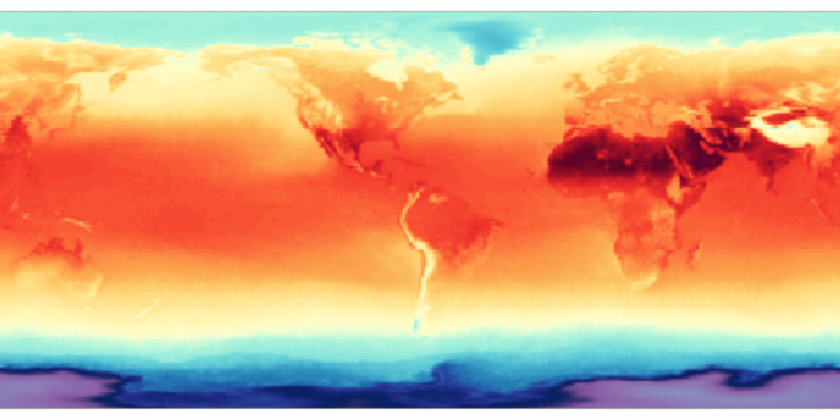
Use the GIBSGeoServer function to make a specified GIBS layer available to GeoGraphics and GeoImage.
Plot a GeoGraphics object, with a specified GIBS layer:
In[]:=
GeoGraphics[GeoServer->GIBSGeoServer["AIRS_L3_Surface_Air_Temperature_Monthly_Day"]]
Out[]=
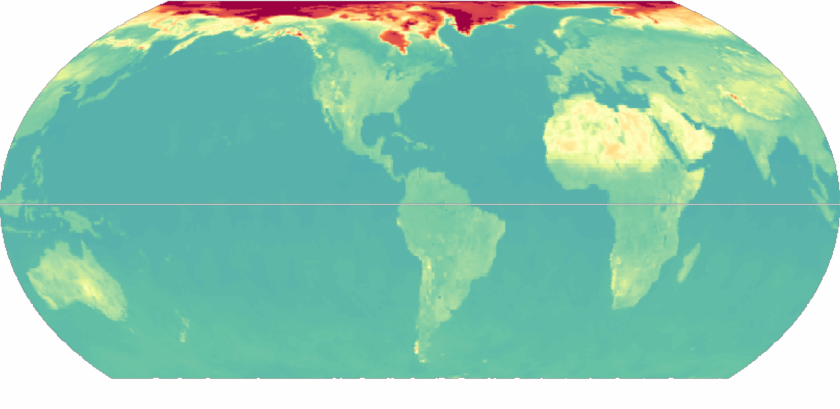
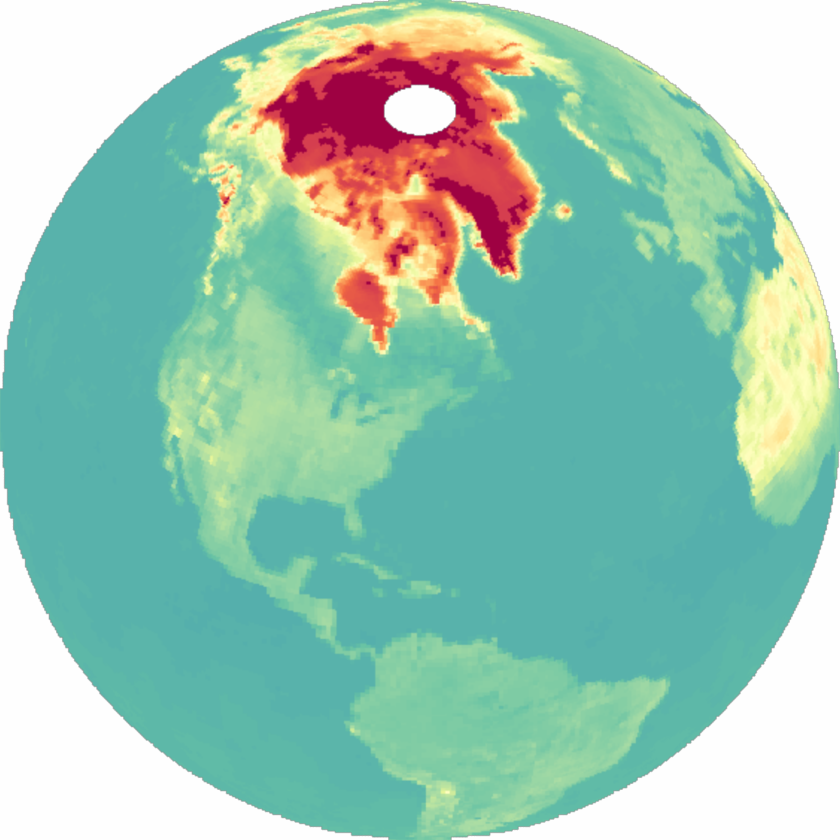
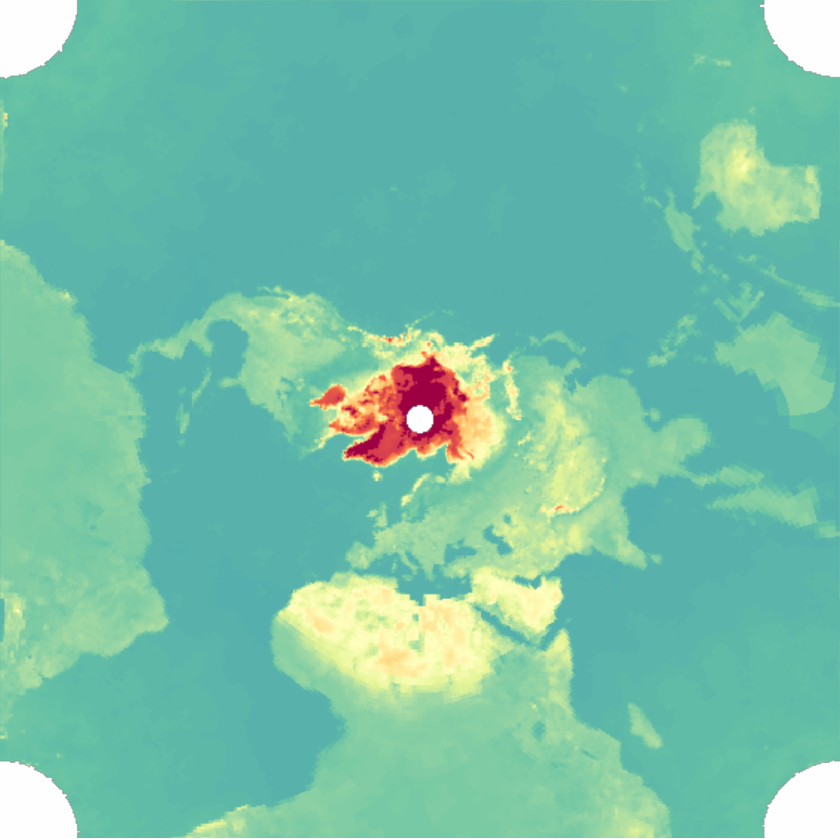
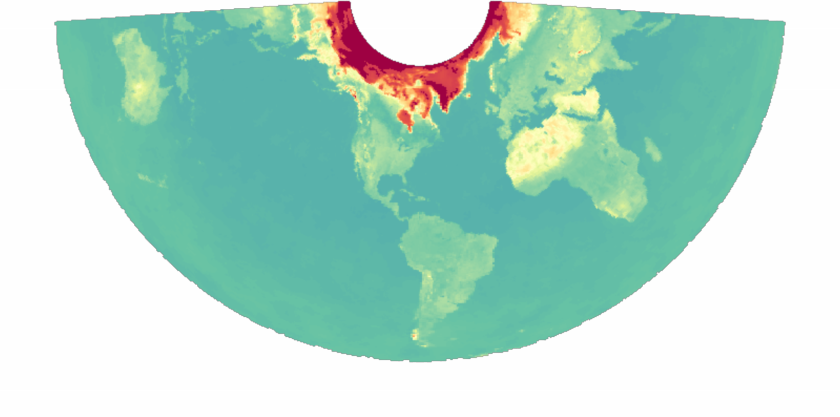
GIBSGeoServer supports GeoProjections: plot:
In[]:=
GeoGraphics[GeoServer->GIBSGeoServer["MERRA2_Surface_Albedo_Monthly"],GeoProjection->#]&/@{"EqualEarth","Orthographic","PeirceQuincuncial","ConicEquidistant"}
Out[]=
,
,
,
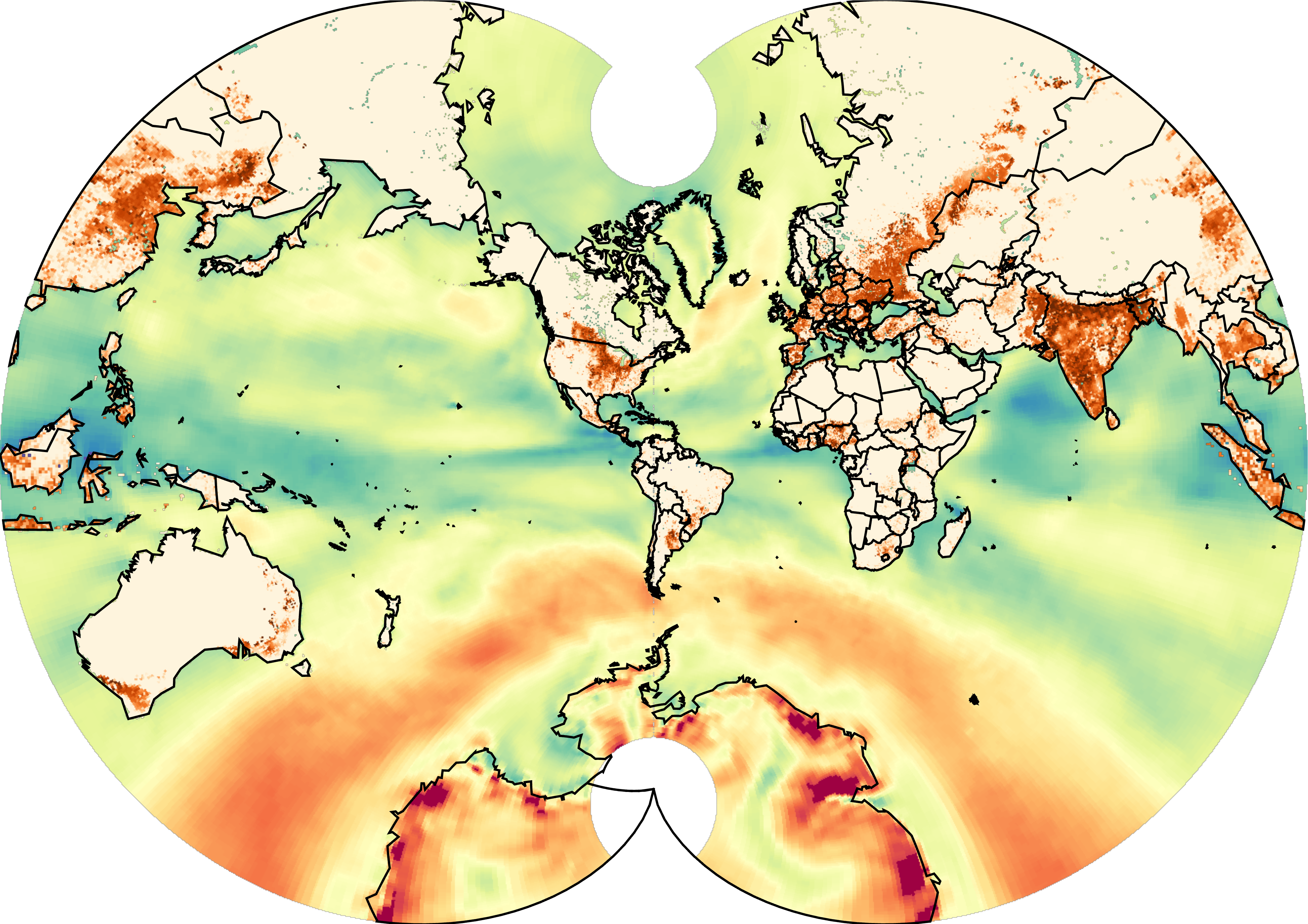
Combine several GIBS layers:
In[]:=
Show[##,ImageSize->Large]&@@Rasterize#,&/@GeoGraphicsGeoServer->GIBSGeoServer["MERRA2_Surface_Wind_Speed_Monthly"],,GeoGraphicsGeoServer->GIBSGeoServer["Agricultural_Lands_Croplands_2000"],,GeoGraphicsGeoBackground->,
Out[]=
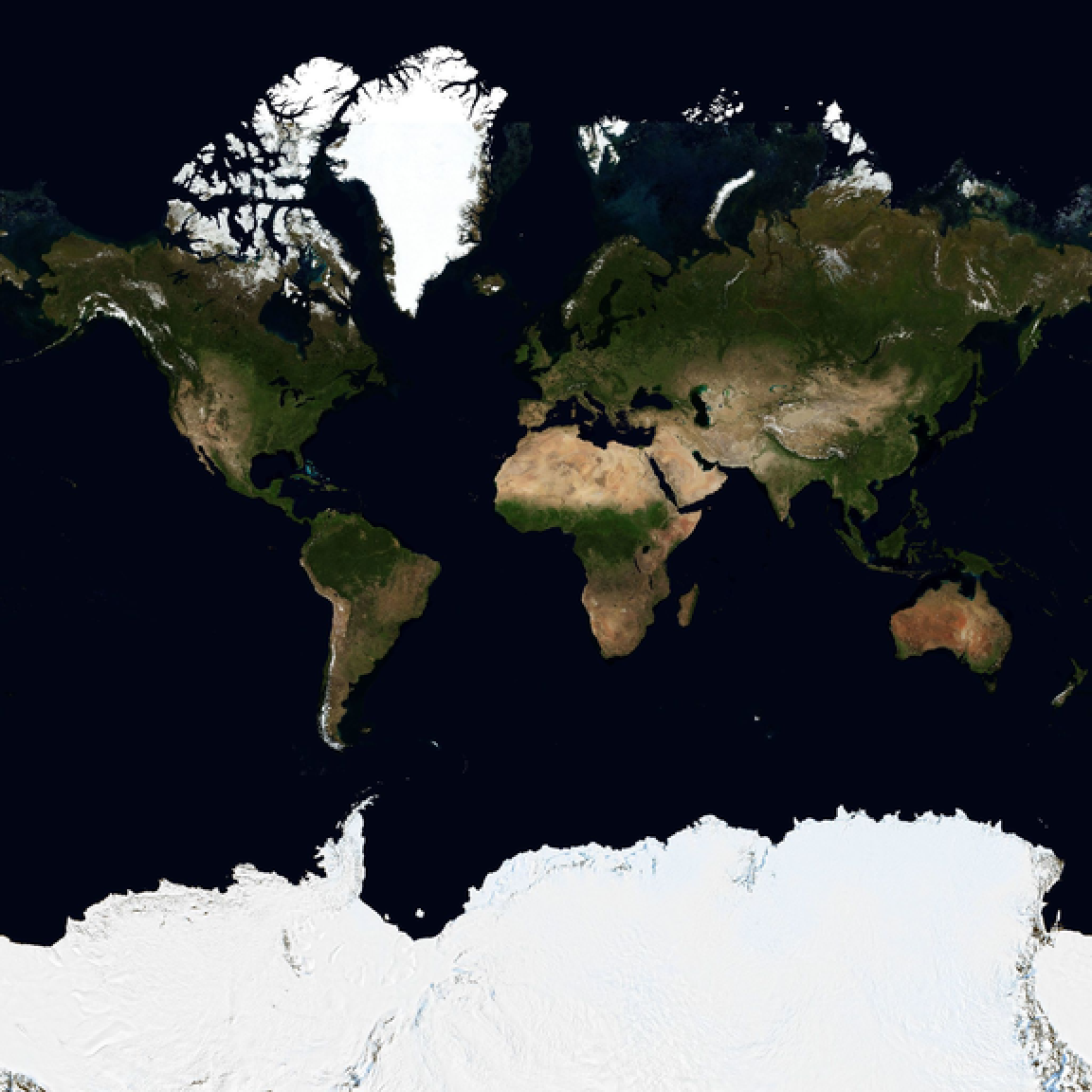
Use GIBSGeoServer in GeoImage:
In[]:=
GeoImage["World",GeoServer->GIBSGeoServer["BlueMarble_NextGeneration"],GeoZoomLevel->3,ImageSize->Large]
Out[]=
AρρEEARS Examples
AρρEEARS Examples
A few words about AρρEEARS
A few words about AρρEEARS
AρρEEARS is a geographic data access service provided by NASA.
The AρρEEARS website describes it like so: “The Application for Extracting and Exploring Analysis Ready Samples (AρρEEARS) offers a simple and efficient way to access and transform geospatial data from a variety of federal data archives. AρρEEARS enables users to subset geospatial datasets using spatial, temporal, and band/layer parameters.”
Rather inconveniently, it requires you to be signed in on NASA EARTHDATA. Fortunately, it’s quite easy (and most importantly, free) to register an account, and the RemoteSensing paclet provides tools to log you in programmatically.
AρρEEARS allows you to access the real recorded data values for any available remote sensing product it offers. This makes it the appropriate tool to use if you are in need of accurate data for analysis or other scientific purposes. However, it is not so good for data exploration, as it can be fairly slow depending on the scale of the task and the availability of the API, and it will often return large numbers of heavy files. Use AρρEEARS if you already know what you want, and you need precise and accurate data.
So let’s see what AρρEEARS can do!
The AρρEEARS website describes it like so: “The Application for Extracting and Exploring Analysis Ready Samples (AρρEEARS) offers a simple and efficient way to access and transform geospatial data from a variety of federal data archives. AρρEEARS enables users to subset geospatial datasets using spatial, temporal, and band/layer parameters.”
Rather inconveniently, it requires you to be signed in on NASA EARTHDATA. Fortunately, it’s quite easy (and most importantly, free) to register an account, and the RemoteSensing paclet provides tools to log you in programmatically.
AρρEEARS allows you to access the real recorded data values for any available remote sensing product it offers. This makes it the appropriate tool to use if you are in need of accurate data for analysis or other scientific purposes. However, it is not so good for data exploration, as it can be fairly slow depending on the scale of the task and the availability of the API, and it will often return large numbers of heavy files. Use AρρEEARS if you already know what you want, and you need precise and accurate data.
So let’s see what AρρEEARS can do!
AppEEARSData: Product and layer metadata from AρρEEARS
AppEEARSData: Product and layer metadata from AρρEEARS
Use the AppEEARSData function to get information about the available AρρEEARS geographic products and their layers:
List available AρρEEARS products:
Get the properties of an AρρEEARS product:
Get the value of a particular AρρEEARS product property.
Get a list of available layers for a product:
Get the properties of an AρρEEARS layer:
Get the value of a particular AρρEEARS layer property:
Get information about available projections for AρρEEARS products:
AppEEARSAuthenticate: “Logging in”
AppEEARSAuthenticate: “Logging in”
If you like, you can manually authenticate with the AρρEEARS API. If you do not do this, you will be prompted by an authentication popup when you run a function requiring authentication in a kernel session for the first time.
MakeAppEEARSTaskRequest: Manually opening API tasks
MakeAppEEARSTaskRequest: Manually opening API tasks
If you like to tinker and keep your kernel free while your API task runs in the background, you can use MakeAppEEARSTaskRequest to start a new AρρEEARS task, specifying a {product, layer} pair, and the request settings.
The function requires that you specify a parameter “BoundingBox” or “Points” in your request. The former can be any geographic region or GeoBoundingBox, while the latter must be a list of {lat,lon} pairs.
Here’s how you could manually make an AρρEEARS task request:
An area request
A point request (supported, but not prioritized)
MakeAppEEARSTaskRequest returns an AppEEARSTask object. You can use it to access information about the task, and, once it completes, the files corresponding to your request.
AppEEARSTask: Asynchronously calling task methods
AppEEARSTask: Asynchronously calling task methods
The RemoteSensing paclet uses AppEEARSTask objects to represent AρρEEARS tasks. Here’s a peek at what you can do with them:
Represent an AρρEEARS task given its task ID:
Request the task ID from the task object:
Request details about a task:
Request task status information:
Request a progress summary for a task:
Request the progress percentage:
List raw available file details from AρρEEARS for a completed task:
List available file details for a completed task (excluding supporting files)
List the names of available files grouped by date and layer:
Download all available files form the completed request (this can take a long time):
Download available files by their file names:
AρρEEARSImages (for small requests, I suggest)
AρρEEARSImages (for small requests, I suggest)
If you are confident your task will resolve in a timely manner (i.e. you have a good internet connection, the task it short, and the AρρEEARS API is working normally*) you use AppEEARSImages to make a request, keep track of its progress, and automatically download the resulting data. Here’s what that looks like:
Start a new task, monitor its progress automatically, and automatically import desired data:
*The AρρEEARS API has regular maintenance on Wednesdays which may disrupt the service.
Acknowledgment
Acknowledgment
I would like to express my sincere gratitude to Christopher Wolfram for his support and guidance throughout this project. On many occasions, Christopher’s advice and debugging skills were crucial in moving my work on this project forward. Without his help, I am sure it would not have moved as fast or gone as far as it has. My thanks extend also to Stephen Wolfram for suggesting this project to me, and for his kind words of support and enthusiasm at the sight of my nearly finalized project.
References
References
◼
◼
CITE THIS NOTEBOOK
CITE THIS NOTEBOOK
Remote sensing paclet: GIBS satellite imagery and AρρEEARS geographic data products
by Phileas Dazeley-Gaist
Wolfram Community, STAFF PICKS, July 12, 2023
https://community.wolfram.com/groups/-/m/t/2959942
by Phileas Dazeley-Gaist
Wolfram Community, STAFF PICKS, July 12, 2023
https://community.wolfram.com/groups/-/m/t/2959942