Designers use math

Introduction
Introduction
Effective visual communication is not an accidental occurrence, but the result of serious intention on the part the designer to balance all aspects of the design. This is often achieved through careful application of proportion based on certain guiding principles long in existence: the golden ratio, or divine proportion, and the Fibonacci sequence. Both mathematical constructs that mirror patterns found throughout nature, from leaves and shells to sunflowers and pinecones. Artists and designers have made use of these principles for centuries to create work with long lasting appeal, from renaissance paintings to modern logos.
I used Wolfram Language to confirm the proportions (the golden ratios) used in the logo in this book and the logo of my favorite audio-visual brand.
Yond logo
Yond logo
Yond S.r.l. is a company that deals with the production and selling of socks.
In[]:=
img=
;

Image
Image
Give the morphological erosion of the logo image and create a binary image.
erosion=Erosion[img,DiskMatrix[4]];edge=Binarize[erosion,.7];{Xmax,Ymax}=ImageDimensions@edge;Grid[{{img,Style[">",Gray,48],edge}}]
Out[]=
> |


Hough Transform
Hough Transform
I tried to find circle segments in this image in the same way I use ImageLines function to find line segments in image. However, I couldn’t find ImageCircles in Wolfram Language funcitons. So, I decided to use the Hough transform to create my simple function like ImageCircles.
In[]:=
HoughTransform4Circle[img_Image,rmax_Integer:100,rmin_Integer:10]:=Module[{Xmax,Ymax,Rmax,Rmin,imgdata,cnttbl,x,y,r,cx,cy,dx,dy},{Xmax,Ymax}=ImageDimensions@img;If[rmax===100,Rmax=Min[Ymax,Xmax],Rmax=rmax];Rmin=rmin;imgdata=ImageData@img;cnttbl=ConstantArray[0,{Xmax,Ymax,Rmax}];Monitor[For[y=1,y≤Ymax,y++,For[x=1,x≤Xmax,x++,If[imgdata[[y,x]]===1,For[cy=1,cy<=Ymax,cy++,dy=Abs[y-cy];If[dy>Rmax,Continue[]];For[cx=1,cx≤Xmax,cx++,dx=Abs[x-cx];r=Round@Norm[{dx,dy}];If[r<=Rmax&&r≥Rmin,cnttbl[[cx,cy,r]]++];]]]]],ProgressIndicator[y/Ymax]];cnttbl]
Let' s run HoughTransform4Circle. It outputs a table of coordinates and radius of circles in the image. This is quite time consuming, so I gives it the maximum and minimum radii I' ve known from the results.
In[]:=
cnttbl=HoughTransform4Circle[edge,55,25];
ClusterClassify
ClusterClassify
Extract the elements with values greater than 30, because the elements with the larger values in the table are likely to be the center and radius of the circle.
In[]:=
cntmin=30;cntlist=cnttbl//Flatten//Union;elements=Flatten[Position[cnttbl,#]&/@Select[cntlist,#≥cntmin&],1];
Classify the extracted elements into two (large circle and small circle candidates) using ClusterClassify. The center coordinates of the circles as a result of ClusterClassify are shown below.
cxyr=ClusterClassify[elements];gbcxyr=GatherBy[elements,cxyr];ListPlot[{#[[1]],Ymax-#[[2]]}&/@#&/@gbcxyr,PlotRange{{0,Xmax},{0,Ymax}},AspectRatio1,ImageSizeSmall]
Out[]=
get center coordinates and radii of circles
get center coordinates and radii of circles
Let the average of the center coordinates and radii with the max value in the table be the center coordinate and radius of each classified circle.
(*largecircle*)values=Extract[cnttbl,#]&/@gbcxyr[[1]];pos=Position[values,Max@values]//Flatten;Mean@gbcxyr[[1]][[pos]]//N
Out[]=
{72.,77.,47.}
(*smallcircle*)values=Extract[cnttbl,#]&/@gbcxyr[[2]];pos=Position[values,Max@values]//Flatten;Mean@gbcxyr[[2]][[pos]]//N
Out[]=
{118.5,77.,29.}
The radius of a large circle is 47, and the radius of a small circle is 29. The ratio of the two radii is 47/29 = 1.6 (golden ratio). The visualization is as follows.
circles={Circle[{72,Ymax-77},47],Circle[{118.5,Ymax-77},29]};Grid[{{HighlightImage[edge,circles,ImageSizeSmall],Style[">",Gray,48],HighlightImage[img,circles,ImageSizeSmall]}}]
Out[]=
> |
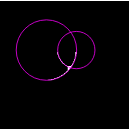
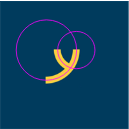
Bang & Olufsen logo
Bang & Olufsen logo
Bang & Olufsen (B&O) is a company that designs and manufactures audio products.
In[]:=
img=
;

Image
Image
Give the morphological erosion of the logo image and create a binary image.
erosion=Erosion[img,DiskMatrix[3]];edge=Binarize[erosion,.7];{Xmax,Ymax}=ImageDimensions@edge;Grid[{{img,Style[">",Gray,48],edge}}]
Hough Transform
Hough Transform
Let' s run HoughTransform4Circle.
ClusterClassify
ClusterClassify
Extract the elements with values greater than 50.
Classify the extracted elements into three(large , medium and small circle candidates) using ClusterClassify. The center coordinates of the circles as a result of ClusterClassify are shown below.
get center coordinates and radii of circles
get center coordinates and radii of circles
Let the average of the center coordinates and radii with the max value in the table be the center coordinate and radius of each classified circle.
The radius of a large circle is 32 and the radius of a small circle is 20.5. The ratio of the two radii is 32/20.5 = 1.6 (golden ratio). The visualization is as follows.
It is unclear whether this logo is created using the golden ratio. In addition to the medium circle, there are two more smaller circles at the "&" part of the logo. This logo has at least five circles. Therefore, I believe that there may be a far more profound world in the logo.
ImageCircles
ImageCircles
As mentioned above, Wolfram Language does not have ImageCircles function. At first, I wondered about why no, but after implementing it by myself, I understood its difficulty at once. When Hough transform is used to find lines, the coordinates through the line are limited in the image and the angle is from 0 to 2 Pi. On the other hand, in the case of circles, there is no limit to the coordinates of the center and the radii, and the computational complexity is explosively large.