My school changed the daily schedule to an 8-day rotating block schedule. I made a website that displays the schedule for a specified range of dates within the school year so that my parents could see the schedule for specific times of year. I used modulus 8 and a start date to determine the schedule for each day. This code can be modified for other types of rotating schedules that are not easily mapped out for long term planning.
Variables
Variables
I manually made a list of holidays for my school and a list of holiday names (sample dates and names are used below). Then I entered a range of dates using DayRange for the dates and datesWHols variables, which I used as the input for my calendar functions.
For those interested in modifying/using this code:
◼
If you are following a religious, country, or other calendar that is already in Wolfram, you can skip the holidays section and go to weekends.
◼
If not, but there’s a pattern to your holidays, use HolidayCalendar with DayRange for dates and datesWHols.
◼
If there’s no pattern, read on!
Manually input custom list (make sure to update year if year changes part way through!):
In[]:=
sampleHolidays={DateObject[{2023,8,28},"Day"],DateObject[{2023,9,19},"Day"],DateObject[{2023,10,4},"Day"],DateObject[{2023,11,30},"Day"],DateObject[{2023,12,15},"Day"],DateObject[{2024,1,29},"Day"],DateObject[{2024,2,26},"Day"]};
Names of holidays:
In[]:=
sampleNames={"Holiday 1","Holiday 2","Holiday 3","Holiday 4","Holiday 5","Holiday 6","Holiday 7"};
Association between holiday dates and names:
In[]:=
sampleHolidayNames=AssociationThread[sampleHolidays,sampleNames];
List of weekends (used to remove weekends in datesWHols):
In[]:=
weekends={"Saturday","Sunday"};
List of dates in set range without holidays or weekends. Note: “BusinessDay” includes US holidays, so make sure that is not an issue with your calendar. If it is you can use the Select method with weekends shown in datesWHols before the Complement function is used.
In[]:=
dates=Partition[Complement[DayRange[DateObject[{2023,8,28},"Day"],DateObject[{2023,9,10},"Day"],"BusinessDay"],sampleHolidays],UpTo[5]]
Out[]=
,,,,,,,
For datesWHols I couldn’t use “BusinessDay” because it include US holidays, so I removed weekends using the “weekends” variable and Select[].
List of dates in manually set range with holidays included, but no weekends:
In[]:=
datesWHols=Partition[Select[DayRange[DateObject[{2023,8,28},"Day"],DateObject[{2023,9,10},"Day"]],!MemberQ[weekends,ToString[DayName[#]]]&],UpTo[5]]
Out[]=
,,,,,,,,,
Functions (schedule, wednesdaySched, scheduleRange, scheduleRangeWHols, nearestMonday, nearestStart)
Functions (schedule, wednesdaySched, scheduleRange, scheduleRangeWHols, nearestMonday, nearestStart)
I used modulus 8 because my schedule is on an 8 day rotation. Each day either has all even or all odd periods, except for the last period which is the 4th period number plus 1. On Wednesday (the exception), the 1st, 2nd, 4th, and 5th period numbers come from the even/odd pattern and then the 3rd period is determined by adding 1 to the 5th period number. For an even day starting on Period 6, the schedule would be Period 6, Period 8, Period 2, Period 4, and Period 5 - notice that after hitting 8, it goes back to 2.
To reset if there’s a schedule change that doesn’t act like a holiday: change DateObject[{2023, 8, 29}, “Day”] in schedule, wednesdaySched, and thursSched to the new Day 1 (if the schedule changes, but the day numbers are pushed back 1, such as missing a Day 2 and then having the next closest school day be a Day 2, then just add that missed day to the holidays). Format is DateObject[{“year”,”month”,”day”},”Day”]
Returns a list of classes for a day that’s not a Wednesday:
In[]:=
schedule[day_DateObject]:=Module[{classes=<|1->"Period 1",2->"Period 2",3->"Period 3",4->"Period 4",5->"Period 5",6->"Period 6",7->"Period 7",0->"Period 8"|>,dayNum=Mod[Length[Complement[Select[DayRange[DateObject[{2023,8,29},"Day"],day],!MemberQ[weekends,ToString[DayName[#]]]&],sampleHolidays]],8]},{StringJoin[classes[Mod[dayNum,8]]," 8:00-9:15"],"Adv/Assem 9:15-9:35",StringJoin[classes[Mod[dayNum+2,8]]," 9:35-10:50"],"Comm/Assem 10:50-11:30",StringJoin[classes[Mod[dayNum+4,8]]," & Lunch 11:30-1:00"],StringJoin[classes[Mod[dayNum+6,8]]," 1:00-2:00"],StringJoin[classes[Mod[dayNum+7,8]]," 2:15-3:15"]}]
Returns a list of classes for a Wednesday (could do something similar for a different day/schedule format, my outlier day just happened to be a Wednesday):
In[]:=
wednesdaySched[day_DateObject]:=Module[{classes=<|1->"Period 1",2->"Period 2",3->"Period 3",4->"Period 4",5->"Period 5",6->"Period 6",7->"Period 7",0->"Period 8"|>,dayNum=Mod[Length[Complement[Select[DayRange[DateObject[{2023,8,29},"Day"],day],!MemberQ[weekends,ToString[DayName[#]]]&],sampleHolidays]],8]},{StringJoin[classes[Mod[dayNum,8]]," 8:00-8:50"],"Adv 8:50-9:10",StringJoin[classes[Mod[dayNum+2,8]]," 9:10-10:00"],StringJoin[classes[Mod[dayNum+7,8]]," 10:00-10:50"],StringJoin[classes[Mod[dayNum+4,8]]," 11:00-11:50"],StringJoin[classes[Mod[dayNum+6,8]]," 11:50-12:40"]}]
Returns a list of classes for a Thursday, which ended up being another outlier in terms of timing, but not class order:
In[]:=
thursdaySched[day_DateObject]:=Module[{classes=<|1->"Period 1",2->"Period 2",3->"Period 3",4->"Period 4",5->"Period 5",6->"Period 6",7->"Period 7",0->"Period 8"|>,dayNum=Mod[Length[Complement[Select[DayRange[DateObject[{2023,8,29},"Day"],day],!MemberQ[weekends,ToString[DayName[#]]]&],sampleHolidays]],8]},{StringJoin[classes[Mod[dayNum,8]]," 9:00-10:00"],"Adv 10:00-10:10","Comm 10:10-10:45",StringJoin[classes[Mod[dayNum+2,8]]," 10:45-11:45"],StringJoin[classes[Mod[dayNum+4,8]]," & Lunch 11:45-1:15"],StringJoin[classes[Mod[dayNum+6,8]]," 1:15-2:15"],StringJoin[classes[Mod[dayNum+7,8]]," 2:15-3:15"]}]
Sample schedule:
In[]:=
schedule[DateObject[{2023,9,11},"Day"]]
Out[]=
{Period 2 8:00-9:15,Adv/Assem 9:15-9:35,Period 4 9:35-10:50,Comm/Assem 10:50-11:30,Period 6 & Lunch 11:30-1:00,Period 8 1:00-2:00,Period 1 2:15-3:15}
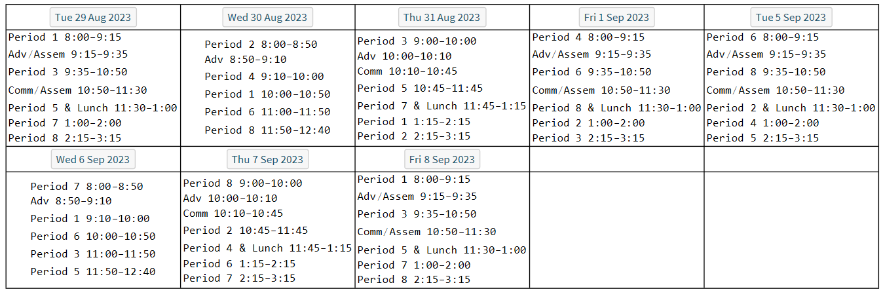
Returns schedules for inputted range of dates in calendar form:
In[]:=
scheduleRange[dates_List]:=Module[{dateSched=Partition[Table[Which[ToString[DayName[day]]=="Wednesday",Column[wednesdaySched[day]],ToString[DayName[day]]=="Thursday",Column[thursdaySched[day]],True,Column[schedule[day]]],{day,Flatten[dates]}],UpTo[5]]},Grid[Riffle[dates,dateSched],Frame->All,AllowedDimensions->{5,Automatic}]]
In[]:=
scheduleRange[dates]
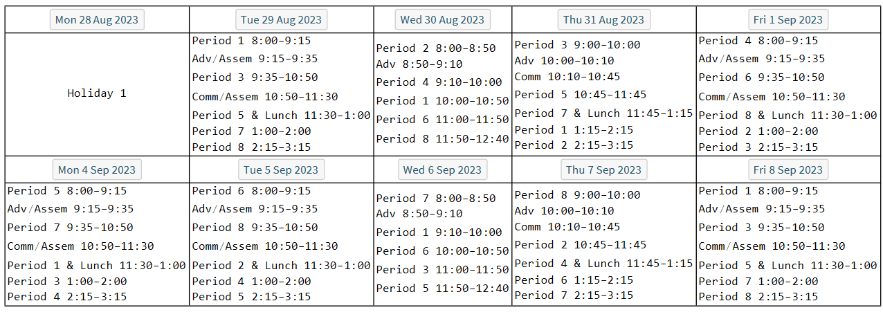
Returns schedules for inputted range of dates in calendar form and indicates holidays:
In[]:=
scheduleRangeWHols[dates_List]:=Module[{dateSched=Partition[Table[Which[MemberQ[sampleHolidays,day],sampleHolidayNames[day],ToString[DayName[day]]=="Wednesday",Column[wednesdaySched[day]],ToString[DayName[day]]=="Thursday",Column[thursdaySched[day]],True,Column[schedule[day]]],{day,Flatten[dates]}],UpTo[5]]},Grid[Riffle[dates,dateSched],Frame->All,AllowedDimensions->{5,Automatic}]]
In[]:=
scheduleRangeWHols[datesWHols]
Wanted calendar to have Monday-Friday look. To achieve this look I found nearest Monday to the inputted start date, so that the calendar would always start on a Monday.
List of Mondays for 2023-2024 years:
In[]:=
mondays23T24=Select[DayRange[DateObject[{2023,1,1},"Day"],DateObject[{2024,12,1},"Day"]],ToString[DayName[#]]=="Monday"&];
Finding nearest Monday using Nearest and mondays23T24 list:
In[]:=
nearestMonday[day_DateObject]:=Nearest[mondays23T24,day][[1]]
In[]:=
nearestMonday[DateObject[{2023,8,29},"Day"]]
Out[]=
Didn’t want to lose days, so found nearest Monday coming before specified start date. Found that Friday is the only weekday for which Nearest moved calendar forward.
Used second-nearest Monday for Fridays and nearest Monday for all other weekdays.
In[]:=
nearestStart[day_DateObject]:=Module[{nears=Nearest[mondays23T24,day,2]},If[ToString[DayName[day]]=="Friday",nears[[2]],nears[[1]]]]
In[]:=
nearestStart[DateObject[{2023,8,29},"Day"]]
Out[]=
In[]:=
nearestStart[DateObject[{2023,9,8},"Day"]]
Out[]=
Run this to get schedule for dates (after updating “dates” and “holidays” variables as needed in “Variables” section above)
Run this to get schedule for dates (after updating “dates” and “holidays” variables as needed in “Variables” section above)
Make sure to use “dates” not “datesWHols” for scheduleRange
Run this for same as above but with holidays
Run this for same as above but with holidays
Make sure to use "datesWHols" not "dates" for scheduleRange
CloudDeploy without holidays
CloudDeploy without holidays
Cloud deploys scheduleRange function:
CloudDeploy with holidays
CloudDeploy with holidays
Cloud deploys scheduleRangeWHols function :
Bugs so far...
Bugs so far...
◼
Partition bug - it was cutting off four/fewer days because had set group size to a plain 5:
◼
fixed using UpTo[5]
◼
Wednesday bug - didn’t display Wednesday holidays
◼
fixed by moving Holiday condition to first spot in Which[] for scheduleRangeWHols
◼
Mondays bug - make sure mondays23T24 is up to date! Had nearest Monday for 2024 as 1/1/24
◼
fixed by updating mondays23T24 so it had all Mondays for 2024, not just the first one :)
◼
Calendar view bug - would start block on whatever day happened to be inputted for start, even if it wasn’t a Monday
◼
fixed by implementing nearestMonday
◼
nearestMonday bug - would skip days if start date was a Friday
◼
fixed by implementing nearestStart (used second option from Nearest)
◼
Holidays bug - wanted to see holidays
◼
had to manually remove weekends using Select and “weekends” variable
◼
then added condition to Which in scheduleRangeWHols
◼
Reminder bug - using Labeled to display reminder above calendar wasn’t working
◼
used AppearanceRules (“Title”) inside FormPage[]
◼
was able to use Style[] on Reminder text to change the style
◼
used PageTheme option for FormPage for scheduleRangeWHols to differentiate between scheduleRangeWHols and scheduleRange
Possible extensions/features:
Possible extensions/features:
◼
adding times
◼
adding holiday names
◼
adding additional events that are not classes (e.g. meetings, assemblies)
◼
adding extracurriculars
◼
highlighting days with later start
◼
adding info about periods that are only sometimes free
◼
having a way to update new Day 1 from website for snow/sick day (would have to one time thing as I don’t want to change base code remotely)
◼
adding way for someone to input their classes for periods 1-8 on website and then see schedule with those classes (would have to one time thing as I don’t want to change base code remotely)
◼
making it so user doesn’t have to manually enter holidays
◼
adding to user interface of website (e.g. user can add holidays)
CITE THIS NOTEBOOK
CITE THIS NOTEBOOK
Modifiable academic schedule generator
by Sophie Chen
Wolfram Community, STAFF PICKS, August 25, 2023
https://community.wolfram.com/groups/-/m/t/2998411
by Sophie Chen
Wolfram Community, STAFF PICKS, August 25, 2023
https://community.wolfram.com/groups/-/m/t/2998411