Colligative properties -- including boiling point elevation, freezing point depression, osmotic pressure, and vapor pressure lowering -- are interesting because they provide valuable information about the behavior of solutions and help us understand the interactions between solute and solvent particles. To collect this data, a chemist usually performs measurements on solutions with different concentrations of solute. When analyzing these properties, the accuracy of the measurements is crucial, as small errors can lead to significant deviations in the calculated values. Additionally, the solubility of solutes is important as some of them may not completely dissociate in the solvent. Analyzing the colligative properties of any dataset is extremely useful as it directly relates to other physical properties of a substance, such as evaporation, surface tension, and the inherent intermolecular forces. This project creates a function, ColligativeProperties, that computes the colligative properties of binary (single solvent and single solute solution) solutions, using an experimental dataset collected by the user. It also visually demonstrates the ColligativePorperties function in the form of a graphical user interface and a cluster model of the correlation between molecular structure and ebullioscopic constant.
Introduction
Introduction

A solution is a type of homogenous mixture (being composed of two or more substances). In this type of solution, there is a solute (substance) being dissolved in a solvent (larger quantity of a different substance). A solution has various of chemical and physical properties, and the colligative properties of a solution are physical properties that depend on the ratio of the number of solute particles to the number of solvent particles in a solution. Therefore, colligative properties are intensive (a physical quantity that does not depend on the amount of substance measured) properties for a solution at a given concentration. There are four colligative properties of a any solution: boiling point elevation, freezing point depression, osmotic pressure, and vapor pressure lowering.
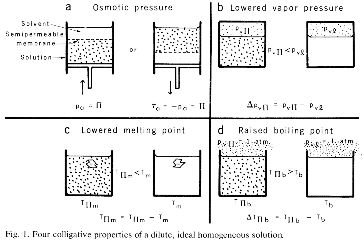
The boiling point of a liquid is the temperature at which its vapor pressure is equal to the ambient atmospheric pressure and therefore evaporation is able to occur. In the presence of a solute, the vapor pressure will change and therefore the solution will require a higher temperature (than it did with a pure solvent) to boil, and the increase in boiling point is called the boiling point elevation.
The following equation measures the change in boiling point,
Δm
T
b
K
b
which is subsequently added to the pure solvent’s boiling point to get the boiling point elevation:
T
b
T
b
T
s
To calculate the boiling point elevation, the following values would be necessary: the ebullioscopic constant () of the solvent, the molal concentration (m) of a solute in a solvent, the boiling point of the pure solvent, and the calculated boiling point of the new solution ().
K
b
Δ
T
b
Similar to the boiling point elevation, the freezing point of a solutions is lower than that of a pure liquid. An example of this phenomenon is the use of salt to ‘de-ice’ roads when they get frozen.
The following equation measures the change in freezing point,
Δm
T
f
K
f
which is subtracted to the pure solvent’s freezing point to get the freezing point depression:
T
f
T
f
T
s
To calculate the freezing point depression, the following values are needed: the cryoscopic constant () of the solvent, the molal concentration (m) of a solute in the solvent, the freezing point of the pure solvent, and the calculated freezing point of the new solution ().
K
f
Δ
T
f
The process of osmosis involves the diffusion of solvent molecules through a semi-permeable membrane. Throughout the process of osmosis, the volume of the solution increases and as a result, the level of the solution rises. This results in the faster transfer of solvent molecules back to the pure solvent side. The pressure that yields a reverse solvent transfer rate equal to the osmosis rate is called the osmotic pressure (). My favorite applied example of osmotic pressure is the emergence of plants through asphalt as a result of the osmotic pressure of the water moving through the plant cell’s membranes.
Π
The following equation measures the osmotic pressure of a dilute solution,
ΠMRT
The osmotic pressure (represented as Π) is equal to the solute molarity (M), the absolute temperature (T), and the universal gas constant (R = ).
0.08206
Latm/(Kmol)
The mathematical equation representing vapor pressure lowering, Raoult’s Law, is the formally defined as the partial pressure exerted by any component of an ideal solution is equal to the vapor pressure of the pure component multiplied by its mole fraction in the solution:
P
A
X
A
*
P
A
I’m passionate about the effects of pollutants on the surface tension of water. Surface tension and colligative properties are both manifestations of intermolecular forces thereby connecting this project with my previous research efforts. In this equation, the partial pressure exerted by component A in the solution is , the vapor pressure of pure A is , and the mole fraction of A in the solution is . Raoult’s Law is fundamental in the process of distillation (separation of a mixture of liquids based on their boiling points). Raoult’s Law allows us to estimate the vapor pressures of the compounds and thereby complete the process of distillation.
P
A
*
P
A
X
A
Boiling Point
Boiling Point
The first step in creating a function to calculate the boiling point elevation of a compound (in this case, I am using benzene which is famously known for its ring structure), is understanding the data.
Let’s consider a 0.33 m solution of a nonvolatile -- the inability of a substance to easily evaporate into gas -- solute in benzene.
To further improve my data association, I added a Quantity Function. The Quantity function allows the results to be more accurate as the significant figures are better taken into account.
Creating an association of experimental data:
In[]:=
benzeneBoilingPoint=<|"Kb"->Quantity[2.53`3,"DegreesCelsiusDifference"/"Molal"],"Molality"->Quantity[0.333`3,"Molal"],"BoilingPoint"->Quantity[80.1`3,"DegreesCelsiusDifference"]|>
Out[]=
Kb,Molality,BoilingPoint
The added backtick (`) is used to account for significant digits. In short, the number of significant digits in a result is simply the number of figures that are known with some degree of reliability. For example, the number 5 has 1 significant digits while the number 5.0 has 2 significant digits. Therefore, in the function: Quantity[0.333`3], the number 0.333 is the measured value and the `3 denotes the number of significant digits that can be used.
Now, we can proceed to create a function to compute the boiling point elevation.
To better visualize the three pieces of data in use, we can create a dataset.
Processing the data set:
In[]:=
Dataset[benzeneBoilingPoint]
Out[]=
Using this information and the equation above, we know that we have to multiply the Kb (ebullioscopic constant) and the Molality and add that to the
BoilingPoint. To do so, we can set up a function using the given values.
BoilingPoint. To do so, we can set up a function using the given values.
Computing the boiling point:
In[]:=
Plus[benzeneBoilingPoint["BoilingPoint"],Times[benzeneBoilingPoint["Kb"],benzeneBoilingPoint["Molality"]]]
Out[]=
While this function works, in large scales computations this would be extremely inefficient and therefore, creating a function to do this computation would be very useful. Let’s try to do this less manually.
Defining the function:
ColligativeProperties[data_Association]:=data["Kb"]*data["Molality"]+data["BoilingPoint"]
This function, ColligativeProperties, takes an association of experimental values (in this case named data) and applies the function (in this case, the Plus and Times) to experimental values stored as “Kb,” “Molality,” and “BoilingPoint.”
Computing with the function:
In[]:=
ColligativeProperties[benzeneBoilingPoint]
Out[]=
Because the function ColligativeProperties was coded to receive data in the form of an association, we can input our benzene data association and calculate the boiling point elevation. However, this function only calculates the boiling point, let’s try to make a unified function to rule them all!
Creating the Function
Creating the Function
Now that I have demonstrated the computation of one colligative property, let’s turn to building a function to compute all four.
Inputting Experimental Data
Inputting Experimental Data
This is a much larger data association that links all the needed variables to complete any colligative property function with its respective piece of data. Essentially, it expands my boiling point dataset to include pieces of data for each of the colligative properties. Each colligative property has its own respective equation and therefore it requires many different values. This association takes these different values and encodes them to a specific variable to be able to use later. The following values were chosen randomly by me: Molality, Molarity, AbsoluteTemperature, MoleFraction, and VaporPressurePureA. The rest of the values are constants of the compound benzene. These are the different values necessary to compute any colligative property. Now that the numbers have been encoded to their respective variables, we can simply use the variables instead of the raw data.
Example data sets:
In[]:=
benzeneBoilingPoint=<|"Kb"->Quantity[2.53`3,"DegreesCelsiusDifference"/"Molal"],"Molality"->Quantity[0.333`3,"Molal"],"BoilingPoint"->Quantity[80.1`3,"DegreesCelsiusDifference"]|>benzeneFreezingPoint=<|"Kf"->Quantity[5.12`3,"DegreesCelsiusDifference"/"Molal"],"Molality"->Quantity[0.333`3,"Molal"],"FreezingPoint"->Quantity[5.5`3,"DegreesCelsiusDifference"]|>benzeneOsmoticPressure=<|"Molarity"->Quantity[0.333`3,"Molar"],"UniversalConstant"->0.08206,"AbsoluteTemperature"->Quantity[310.0`4,"Kelvins"]|>benzeneVaporPressure=<|"MoleFraction"->Quantity[0.333`3,"Molar"],"VaporPressurePureA"->Quantity[0.333`3,"Atmospheres"]|>
Out[]=
Kb,Molality,BoilingPoint
Out[]=
Kf,Molality,FreezingPoint
Out[]=
Molarity,UniversalConstant0.08206,AbsoluteTemperature
Out[]=
MoleFraction,VaporPressurePureA
ColligativeProperties Function
ColligativeProperties Function
This function takes a user’s input (one of the four colligative properties) and using the data association above, completes the respective equation that corresponds to the colligative property. Because the variables have set numbers, the colligative properties don’t change but I will add a chemical compound variable that would allow the user more choice in function/input options.
Clearing previous definitions:
This clears any previous functions associated with the function colligative properties, so that the previous code does not interfere with any present function.
Compiled version of ColligativeProperties:
Testing each property in the ColligativeProperties function:
This output are the values of the four computed colligative properties. The ColligativeProperties function requires the association and the property as I have defined my Switch function to operate only when one of the four specified inputs are received -- “BoilingPoint,” “FreezingPoint,” “OsmoticPressure,” and “VaporPressure.”
Graphical User Interface
Graphical User Interface
To better illustrate the ColligativeProperties function, I generated a graphical user interface so that the user (you!) would be able to interact and better visualize these properties. The main components are as follows: solute input field and 3D molecule output, variable sliders and different tabs, and the compute and reset buttons.
Solute Input Field and 3D Molecule Output
Solute Input Field and 3D Molecule Output
This section takes a user’s input -- in the form of a string -- and creates a 3D molecule plot of the given compound. This allows the user to visualize their solute.
Variable Sliders and Tabs
Variable Sliders and Tabs
I used the Manipulate function to create all the left sidebar sliders. They allow the user to input their experimental data -- from the range of -10 to 10 -- into the GUI. I also used the TabView function to allow the user to choose between the four different colligative properties. This section also features a diagram of a simplified version of the behavior of the particles in each situation and how the elevation/depression is contrasted to the pure version. It also allows the user to view their numerical input in each of the variables before ‘computing.’
Compute and Reset Buttons
Compute and Reset Buttons
These buttons take the user inputs and using the Dynamic function, they calculate their respective function. The compute button then takes the numerical value and put it next to the “Answer” string. Finally, the Reset button takes any numerical value next to the ‘Answer:’ string and removes it.
Note to user: This Manipulate is does not work in the cloud, so to run this function, you can download the notebook and evaluate this code to make full use of the really cool dynamic features! Also, be sure to use the sliders and not type in the InputField and write the name of the chemical compound -- in the ‘Solute’ InputField -- using quotation marks.
Note to user: This Manipulate is does not work in the cloud, so to run this function, you can download the notebook and evaluate this code to make full use of the really cool dynamic features! Also, be sure to use the sliders and not type in the InputField and write the name of the chemical compound -- in the ‘Solute’ InputField -- using quotation marks.
Comparing Molecule Similarity Based on Kb Values
Comparing Molecule Similarity Based on Kb Values
Molecular Fingerprinting
Molecular Fingerprinting
The molecular fingerprint is a way to describe a molecular structure that can convert a molecule into a bit string (0,1). Since molecular fingerprinting encodes the structure of a molecule, it’s quite a useful method to describe the structural similarity among the molecules as a molecular descriptor. A value of 0 between two molecules means that the two are exactly the same while a value of 1 means that the two are completely opposite. The data I used included 44 molecules and my overall similarity threshold was 0.75.
To calculate the fingerprint distance between two molecules, I used the following function from the Chemistry Paclet:
Example use of MolecularDistance:
The value 0.8772 describes the similarity of a caffeine and adenosine molecule and because 0.8772 is closer to 1, the two molecules are more different rather than similar.
Creating Clusters
Creating Clusters
Collecting all the Kb constants of the molecules in the Wolfram Paclet:
Reformatting the data set to turn it into a list:
The following function takes the ebullioscopicList set of data and creates clusters in a map based on the ebullioscopic constants and the molecular fingerprint of the given molecules.
Graphing the clusters and comparing the molecular structure with the ebullioscopic constant:
The above graph illustrates the similarities of the different molecules in terms on molecular structure and overlays the molecule’s name and ebullioscopic constant. The denser clusters portray areas of similarity while the lone molecules indicate complete dissimilarity. The denser areas also show greater similarity in ebullioscopic constant value. Therefore, the more similar the molecular structure, the more similar the ebullioscopic constant. Based on these results, I am assuming that the results would be similar for cryoscopic constants.
Conclusion and Further Research
Conclusion and Further Research
This project analyzes the concept of the colligative properties of a solution through a functional, graphical, and comparative lens. Using the ColligativeProperties function, the user can create a data association for their compound and input it into my function. This can be applied to further understand other important properties of the dataset (such as the intermolecular forces). My function also allows the user to receive an accurate computed value (as a result of the use of QuantityObject). I have also created a GUI to model and better understand the different effect different variables have on the overall numerical results. The clusters model the connection between molecular structure and ebullioscopic constant value and demonstrate the connection between molecular structure and the physical attribute -- in this case, the ebullioscopic constant.
Because this function has not been explored in the Wolfram Language, there are a couple of ways to expand this research:
◼
My function currently works with binary solutions (singular solute and singular solvent) and this can be expanded to include n-components (potentially by adding other input fields to allow the user to input data for their different compounds).
◼
This project only works with ideal solutions (thereby assuming a Van’t Hoff Factor of 1). Non-ideal solutions involve tricky mathematical modeling and therefore would provide an interesting challenge as an extension.
Acknowledgements
Acknowledgements
I would like to thank my mentor Jason Sonnenberg for being a source of indispensable help and hilarious jokes. My mentor group, for being chem nerds and always accompanying me on Starbucks runs. Joseph, Sophie, Logan, Sam and all TAs for truly making me understand how to think computationally. Eryn-Megan-Rory, the unstoppable triumvirate. Nick DeMello, for teaching me all the chemistry I know. And Dr. Ismail, for getting me started on this journey. Last but in no way least, thank you to Stephen Wolfram, for all the Q&A sessions and inspiring project ideas.
Citations
Citations
[1] "11.4 Colligative Properties - Chemistry: Atoms First 2E." OpenStax, https://openstax.org/books/chemistry-atoms-first-2e/pages/11-4-colligative-properties
[2] "Wolfram Chemistry Resources." Wolfram Cloud, www.wolframcloud.com/obj/WolframChemistryTeam/Published/ChemistryResources.nb
[3] "Wolfram Language Paclet Repository." ChemistryFunctions | Wolfram Language Paclet Repository, https://resources.wolframcloud.com/PacletRepository/resources//WolframChemistry/ChemistryFunctions
[4] "Wolfram: Alpha: Making the World's Knowledge Computable." WolframAlpha Computational Knowledge AI, www.wolframalpha.com/.
[5] Hammel, H. T. "Colligative Properties of a Solution." Science, vol. 192, no. 4241, 1976, pp. 748–56. JSTOR, http://www.jstor.org/stable/1742494
[6] Chemistry Memes. Science Simon Knows His Colligative Properties. 11 Sept. 2012, https://www.facebook.com/ChemistryMemes/photos/a.281022862006179/281429785298820/?type=3.
[2] "Wolfram Chemistry Resources." Wolfram Cloud, www.wolframcloud.com/obj/WolframChemistryTeam/Published/ChemistryResources.nb
[3] "Wolfram Language Paclet Repository." ChemistryFunctions | Wolfram Language Paclet Repository, https://resources.wolframcloud.com/PacletRepository/resources//WolframChemistry/ChemistryFunctions
[4] "Wolfram: Alpha: Making the World's Knowledge Computable." WolframAlpha Computational Knowledge AI, www.wolframalpha.com/.
[5] Hammel, H. T. "Colligative Properties of a Solution." Science, vol. 192, no. 4241, 1976, pp. 748–56. JSTOR, http://www.jstor.org/stable/1742494
[6] Chemistry Memes. Science Simon Knows His Colligative Properties. 11 Sept. 2012, https://www.facebook.com/ChemistryMemes/photos/a.281022862006179/281429785298820/?type=3.
CITE THIS NOTEBOOK
CITE THIS NOTEBOOK
Create a function to compute colligative properties of binary solutions
by Lakshmi Agrawal
Wolfram Community, STAFF PICKS, July 13, 2023
https://community.wolfram.com/groups/-/m/t/2965216
by Lakshmi Agrawal
Wolfram Community, STAFF PICKS, July 13, 2023
https://community.wolfram.com/groups/-/m/t/2965216