The COVID-19 pandemic placed significant pressure on healthcare systems worldwide, driving a sharp increase in demand for hospital resources. To support healthcare planning during this period, several organizations developed predictive models to estimate future hospital resource utilization and made these projections publicly available for research purposes. The dataset used in this study was obtained from the COVID-19 Hospital Resource Use Projections dataset, available through the Wolfram Data Repository. It provides projected hospital resource utilization for all U.S. states and includes several healthcare-related time series suitable for time series analysis and machine learning applications. For this study, the Wyoming state dataset was selected, containing multiple projected variables, including All Beds Mean, All Beds Lower, All Beds Upper, ICU Beds Mean, ICU Beds Lower, ICU Beds Upper, Ventilator Mean, Ventilator Lower, and Ventilator Upper. This work focuses specifically on the projected All Beds Mean time series, representing the estimated average daily number of hospital beds required. Prior to developing the neural network model, the selected time series was organized chronologically and prepared for analysis. Preprocessing included converting the date into a suitable temporal representation, standardizing the variables, and partitioning the dataset into training and testing subsets. The processed data were then used to train and evaluate the proposed neural network model in learning and forecasting the temporal pattern of projected hospital bed utilization. This project was undertaken as a self-learning exercise, inspired by and built upon the methodology presented in the work titled Neural Network Prediction of the Hubble Space Telescope Semimajor Axis, published on the Wolfram Community.
1. Data Preprocessing and Visualization
1. Data Preprocessing and Visualization
This section presents the preprocessing and visualization of the projected All Beds Mean time series. The data are prepared for neural network modeling through date processing, dataset partitioning, standardization, and graphical visualization.
Define the projected All Beds Mean time series as fullData:
In[]:=
fullData=;Short@fullData
,0.1524,70,,0.0013
Convert the timestamps to daily dates:
In[]:=
data=fullData/.DateObject[{year_,month_,day_,___},___]:>DateObject[{year,month,day},"Day"];Short@data
,0.1524,,0.2915,68,,0.00295,,0.0013
Check the dimensions of the dataset:
In[]:=
Dimensions[data]
Out[]=
{72,2}
Visualize the All Beds Mean time series:
In[]:=
DateListPlotdata,
Out[]=
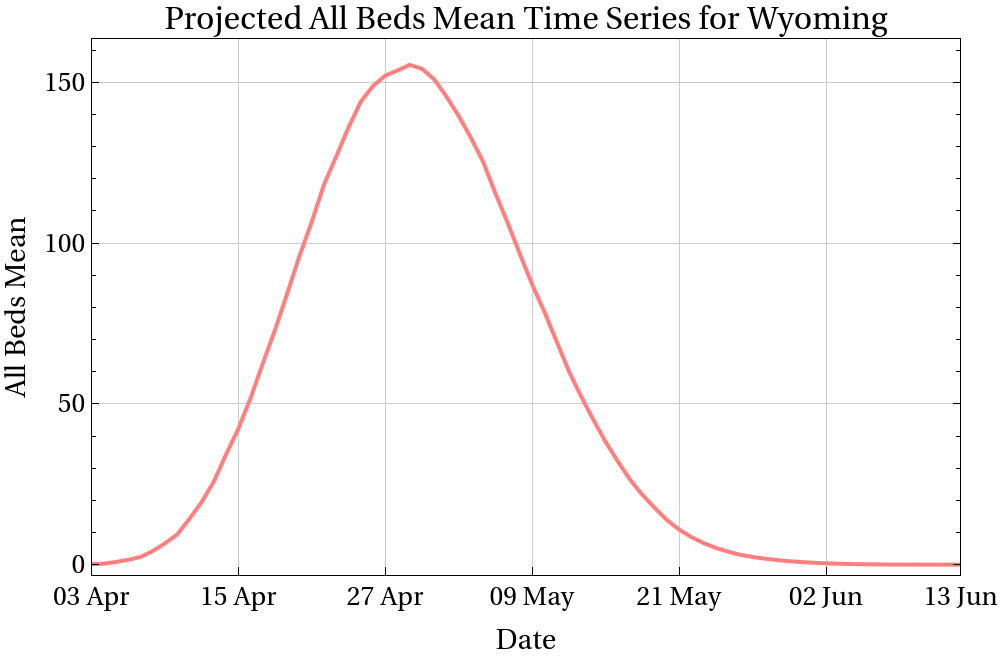
The plot presents the projected All Beds Mean time series for Wyoming from April to June . The series increases to a maximum value and then gradually decreases over the remaining period. This visualization represents the original time series before dataset partitioning and standardization.
3
13
2020
Extract the date and value components:
In[]:=
dataDay=data[[All,1]];dataNum=data[[All,2]];
Define the training and testing intervals: April 3–May 20 and May 21–June 13, 2020, respectively:
In[]:=
intervals=Partition[Position[dataDay,#][[1,1]]&/@{{2020,4,3},{2020,5,20},{2020,5,21},{2020,6,13}},2];Column@intervals
{1,48} |
{49,72} |
Split the dataset into training and testing sets and verify their sizes:
In[]:=
{trainingData,testingData}=data[[#1;;#2]]&@@@intervals;Length/@{trainingData,testingData}Column[Short[#,2]&/@{trainingData,testingData}]
Out[]=
{48,24}
|
|
The first 48 observations were used for training, while the remaining 24 observations were reserved for testing the predictive performance of the neural network.
In[]:=
absoluteTime=AbsoluteTime/@dataDay
{3794860800,3794947200,3795033600,3795120000,3795206400,3795292800,3795379200,3795465600,3795552000,3795638400,3795724800,3795811200,3795897600,3795984000,3796070400,3796156800,3796243200,3796329600,3796416000,3796502400,3796588800,3796675200,3796761600,3796848000,3796934400,3797020800,3797107200,3797193600,3797280000,,3798576000,3798662400,3798748800,3798835200,3798921600,3799008000,3799094400,3799180800,3799267200,3799353600,3799440000,3799526400,3799612800,3799699200,3799785600,3799872000,3799958400,3800044800,3800131200,3800217600,3800304000,3800390400,3800476800,3800563200,3800649600,3800736000,3800822400,3800908800,3800995200}
Standardize and verify the time values:
In[]:=
dataDaySt=N@Standardize[absoluteTime];Short@dataDayStChop@{Mean[#],StandardDeviation[#]}&@dataDaySt
{-1.69626,-1.64847,-1.60069,-1.55291,64,1.55291,1.60069,1.64847,1.69626}
Out[]=
{0,1.}
Standardize and verify the data values:
In[]:=
dataNumSt=N@Standardize@dataNum;Short@dataNumStChop@{Mean[#],StandardDeviation[#]}&@dataNumSt
{-0.878453,-0.875951,-0.866235,-0.854065,64,-0.881043,-0.881104,-0.881142,-0.881171}
Out[]=
{0,1.}
Construct the standardized dataset:
In[]:=
standardizedData=Transpose[{dataDaySt,dataNumSt}];Short@standardizedData
{{-1.69626,-0.878453},{-1.64847,-0.875951},69,{1.69626,-0.881171}}
Split the standardized dataset into training and testing sets:
In[]:=
{standardizedTrainingData,standardizedTestingData}=standardizedData[[#1;;#2]]&@@@intervals;Column[Short[#,2]&/@{standardizedTrainingData,standardizedTestingData}]
{{-1.69626,-0.878453},{-1.64847,-0.875951},{-1.60069,-0.866235},43,{0.501709,-0.563329},{0.549491,-0.631567}} |
{{0.597273,-0.685031},{0.645055,-0.727275},{0.692837,-0.760678},18,{1.60069,-0.881104},{1.64847,-0.881142},{1.69626,-0.881171}} |
Visualize the training and testing datasets before and after standardization:
In[]:=
plot=DateListPlot{trainingData,testingData},;plotSt=ListLinePlot{standardizedTrainingData,standardizedTestingData},;Row[{plot,plotSt}," "]
Out[]=


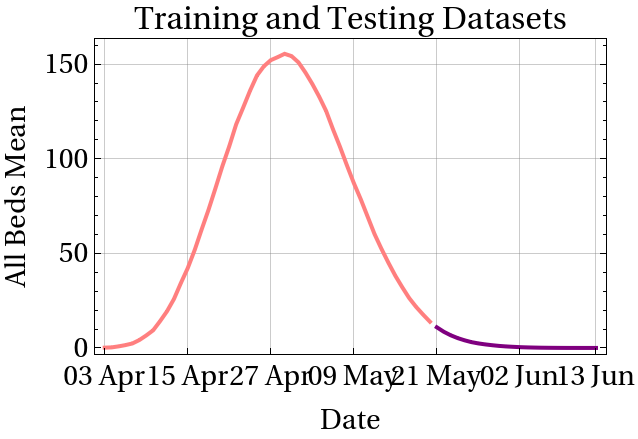
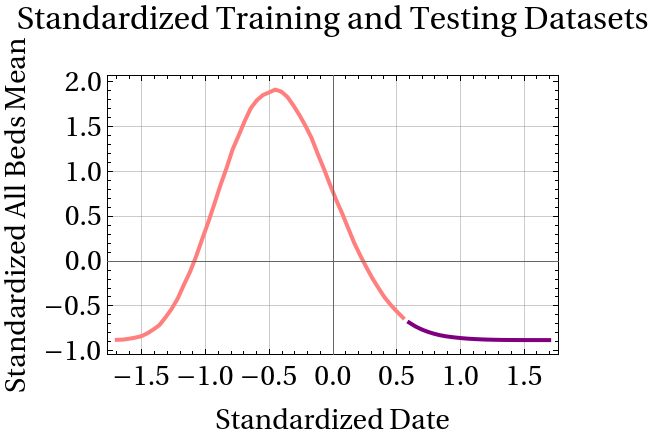
The plots illustrate the projected All Beds Mean time series before and after standardization. The left plot represents the original dataset, while the right plot shows the standardized dataset that will be used for the subsequent neural network modeling. The apparent discontinuity between the curves results from plotting the training and testing subsets separately and does not represent any missing data or gaps in the original time series.
2. Neural Network Model
2. Neural Network Model
After preprocessing and standardizing the time-series data, a neural network model is developed to learn the relationship between time and the projected All Beds Mean values. The model is trained using the training set and then evaluated on the testing set to assess its predictive performance. Several performance metrics are used to quantify the accuracy of the model and analyze its prediction errors.
Define the neural network architecture:
In[]:=
network=NetChain[{32,Ramp,16,Tanh,1}]
Out[]=
NetChain


Train the neural network using the standardized training data:
In[]:=
SeedRandom[1234];predictorNN=NetTrainnetwork,Rule@@@standardizedTrainingData,All,ValidationSetScaled[0.2],Method"SGD","L2Regularization",MaxTrainingRounds1500,LearningRate0.02
-5
10
Out[]=

Extract the trained neural network:
Convert the network predictions to the original scale:
Combine the dates with the predicted values:
Split and display the training and testing predictions:
Visualize the predictions against the original data:
The plot shows the training and testing datasets along with the neural network predictions. The predictions closely follow the training data, while some deviations are observed in the testing period, although the overall trend is captured.
Calculate the prediction residuals:
Calculate the testing residuals:
Visualize the testing residuals over time:
The testing residuals vary around zero, with positive residuals during late May followed by negative residuals in June, indicating some systematic deviation between the predicted and observed values over the testing period.
Visualize the test residuals and test set distributions:
Calculate the root mean square error (RMSE) of the test residuals:
Calculate the standard deviation of the test data:
Display information about the trained neural network:
Display the properties of the trained neural network:
Evaluate the learning rate multipliers of the network arrays:
Display the list of arrays:
The result shows the numerical arrays of the neural network, including the weights and biases, along with their dimensions.
Evaluate the total memory size of the network arrays:
Evaluate the full graphical summary of the neural network architecture:
View the input form of the neural network:
View the layers of the neural network:
Determine the counts of each layer type:
Generate the computational graph of the neural network:
Determine the unique hash of the neural network topology:
The result provides a unique identifier for the topology of the neural network, representing its specific layer structure and connections.
Determine the properties of the prediction neural network:
Inspect the training network used by the predictor:
Determine the training time, number of training rounds, total batches, and batch size:
Identify the optimization method used for training the predictor:
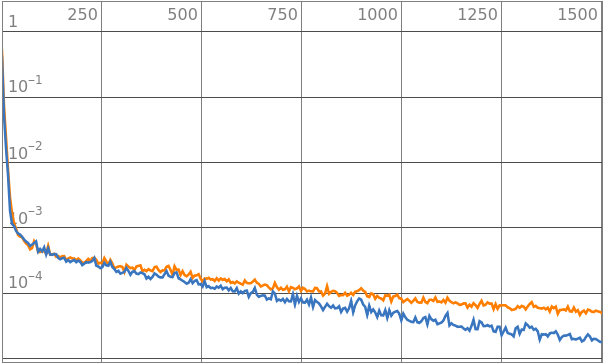
Visualize the training loss over the training process:
Determine the mean number of examples processed per second during training:
Retrieve the positions of the validation data used during training:
3. Conclusion
3. Conclusion
◼
These results demonstrate that a relatively simple neural network, combined with proper preprocessing, can effectively learn the temporal pattern of a projected hospital resource-use series, and that the Wolfram Language provides an integrated environment for the full modeling workflow — from data preparation to network inspection. However, the analysis relies on a limited number of observations and uses time as the sole predictor, without additional epidemiological or healthcare covariates; the reported performance therefore reflects this specific series and should not be generalized as universal predictive accuracy. Future work could extend the approach using larger datasets, lagged observations, additional variables, and alternative time-series models.
Acknowledgment
Acknowledgment
I would like to express my sincere gratitude to my family for their continuous support and encouragement throughout this journey.
I am also grateful to everyone who taught and guided me during my academic journey and contributed to the development of my scientific knowledge and skills.
Finally, I would like to thank everyone who contributed to supporting and helping me complete this work.
Online Resources
Online Resources
CITE THIS NOTEBOOK
CITE THIS NOTEBOOK
COVID-19 hospital resource use neural network modeling
by Ahlam Ahmed
Wolfram Community, STAFF PICKS, August 19, 2026
https://community.wolfram.com/groups/-/m/t/3783795
by Ahlam Ahmed
Wolfram Community, STAFF PICKS, August 19, 2026
https://community.wolfram.com/groups/-/m/t/3783795