Introduction
Introduction
SSPSF Model
SSPSF Model
The SSPSF Model is one of the models widely used to explain spiral galaxy formation. It stands for Stochastic Self Propagating Star Formation and was initially proposed by Mueller and Arnet in 1976. It proposes that new stars form as a consequence of shock waves primarily generated by supernovae. The spiral shape, which I explore in this essay, is produced by a chain reaction mechanism in a differentially rotating galaxy. The reaction is produced by high mass stars which become supernovae. The expanding shells of gas from these cosmic events trigger the nucleation of stars in nearby regions some of which subsequently also become high mass stars which in turn will also turn into supernovae, resulting in a self propagating cycle (i.e the name of the model).
Through this project we aimed to create a Reactive Approximation of Galactic Organisation (R.A.G.O.) based on the SSPSF model that results in stars organising themselves to resemble the shape of a conventional two arm spiral galaxy (e.g The Milky Way). The stochasticity of the model is achieved by introducing a finite probability for star formation in the model. This is done as we have no assurances that each supernova will trigger the creation of a another high mass star. Through the results of the RAGO, we were able to conclude that the SSPSF model does indeed produce a galactic/stellar organisation that closely resembles that of a spiral galaxy. This project also investigates the effect of changing certain parameters on the resultant shape of the galaxy.
Through this project we aimed to create a Reactive Approximation of Galactic Organisation (R.A.G.O.) based on the SSPSF model that results in stars organising themselves to resemble the shape of a conventional two arm spiral galaxy (e.g The Milky Way). The stochasticity of the model is achieved by introducing a finite probability for star formation in the model. This is done as we have no assurances that each supernova will trigger the creation of a another high mass star. Through the results of the RAGO, we were able to conclude that the SSPSF model does indeed produce a galactic/stellar organisation that closely resembles that of a spiral galaxy. This project also investigates the effect of changing certain parameters on the resultant shape of the galaxy.
Galactic Reference
Galactic Reference
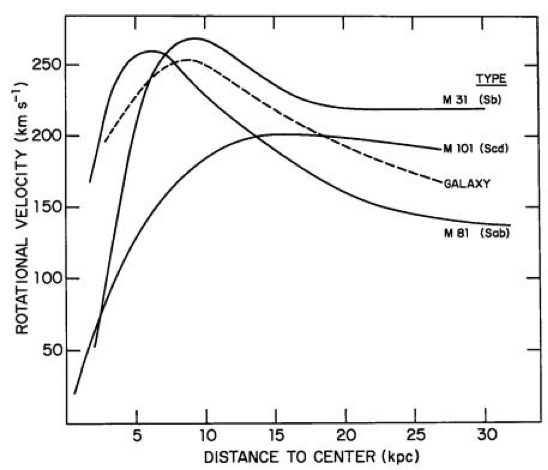
To get a more accurate spiral shape, the rotation and galaxy dimensions are modelled after an existing galaxy. In this instance of the RAGO we’ve modelled it after M101 as it had the easiest curve to interpret and interpolate from the above graphs. The graph above is a Rotational Velocity vs Distance to Center curve, with the distance being expressed in KPC (Kiloparsecs) due to the massive scale of the galaxy. This shows the speed of the galactic rotation based on the distance from that point to the galactic center. Using this curve, we interpolated the data to use it in the code. The values we’re roughly eyeballed as precision was not needed here.
Interpolation of the M101 Curve.
In[]:=
m101=Interpolation[{{1.25,25},{5,100},{10,165},{15,185},{20,180}}];
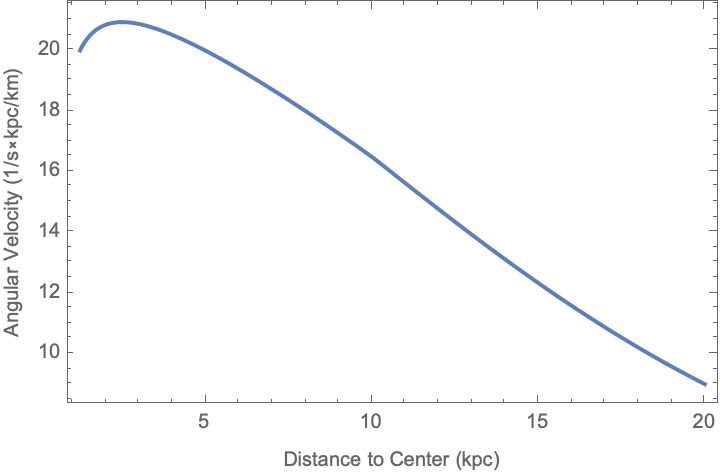
Using the interpolation we can derive the angular velocity of any point in the galaxy (with reference to the galactic center) based on its distance from the center as angular velocity can be calculated by dividing the rotational velocity by the Euclidean distance from the galactic center. We have both those pieces of information, hence we can plot it on a new graph
Plot a graph of Angular Velocity vs Distance to Center by dividing the rotational velocity (of the M101 Profile) by the distance to center. First argument is the y value, second is the x value.
In[]:=
Plot[m101[r]/r,{r,1.25,20},FrameLabel->{"Distance to Center (kpc)","Angular Velocity (1/skpc/km)"},Frame->True]
Out[]=
Parameter and Constants Range
Parameter and Constants Range
The main constants of the RAGO are as follows:
1. Grid Radius - For this simulation we’ve taken the total disk radius to be 15 KiloParsecs.
2. Ring Radial Length - This refers to the distance between any two rings. This value remains constant for any pair of rings. It is calculated by (Grid Radius/Number of Segments of Disk) which is 15/50 in our case.
3. Outer Rim Angle of Rotation - This refers to the angle of rotation of the outermost rim of the galaxy, according to our constants and parameters, the outermost rim completes 13 rotations in 500 steps so this constant will have a value of (13*2π)/500
The main parameters of the RAGO are as follows:
1. Number of Rings - For this simulation we’ve taken 49 rings with 50 circles.
2. Star Formation Probability Constant - According to Gerola and Seiden’s paper, the recommended range for this constant is between 24% and 30% to ensure galactic stability and appropriate stellar density.
3. Regeneration Time of Grid Cell - The base value is kept as 5 time steps, which means a new star can only form in a grid cell after at least 5 time steps have passed since an event took place in that cell.
4. Lifetime of Stars - The base value is kept as 15 time steps, which means a star becomes a supernova 15 time steps after its creation and is removed from the visualisation.
5. Initial Number of Stars Seeded - The base value for this instance of the simulation is 100 stars.
Initialise all parameters and constants:
In[]:=
gridRadius=15(*Unit:kiloparsec*);numSegments=50;gridRadialLen=gridRadius/numSegments;outerRimRotationAngle=(13*2π)/500(*Unit:Radianperstep*);numRings=numSegments-1;(*psf->ProbabilityofStarFormation*)psf=0.26(*26%*);starRegen=5(*Unit:Timesteps*);starLife=15(*Timesteps*);initialSeedNum=100;
For this instance of the RAGO, with the number of rings being fixed and the M101 profile being used, 1 time step is roughly the equivalent of 15 million years.
Model Setup
Model Setup
Grid Layout
Grid Layout
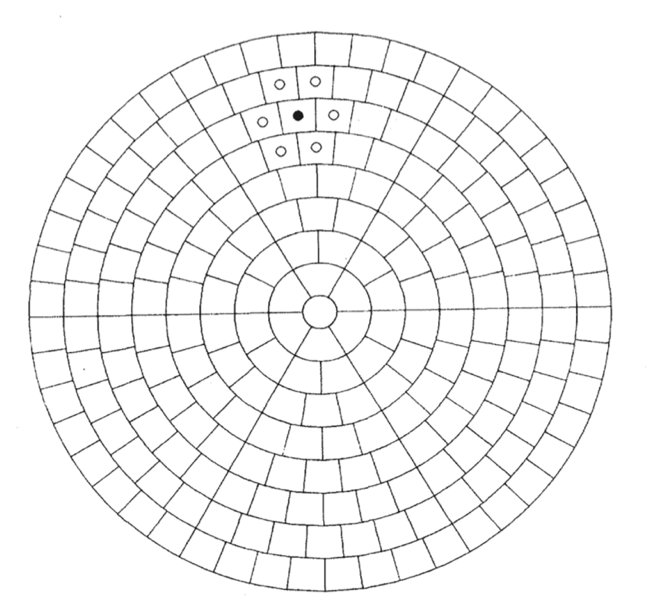
The region of space is taken as a flat circular disk. The model is similar to a 2D polar cellular automata [Schiff]. The disk is then split into number of co-centric circles forming rings. Each circle will be split into grid cells of an almost squarish shape. The innermost circle will remain in a dense core, while the rest of the rings are divided into a certain number of grid cells (as shown above).
n
To initialise it in code, we use a list of grid coordinates which are not the same as their Cartesian coordinates. For example, the cells outside the center core would have integral grid coordinates of .
{2,1},{2,2}......{2,n}
In this instance of the RAGO, we use 50 co-centric circles, which translates to 49 rings (first circle is the core of the galaxy). Hence we’ll have lists till . We are also using the formula to calculate the number of grid cells in the -th ring. The cells are divided in such a way that every cell has (roughly) the same area. The below function uses the same rules to initialise the grid. It creates a 1D list with the grid coordinates of every cell.
{49,n}
3×n
n
Function to initialise the polar grid:
In[]:=
ringMeshID[level_Integer]:=Module[{ring},Flatten[Table[{i,j},{i,level},{j,1,3i}],1]]
Initialise grid with 49 rings (50 circles):
In[]:=
gridCells=ringMeshID[numRings]
Out[]=
Data Storage
Data Storage
To store all the information needed to make the RAGO scientifically accurate and inline with our expectations, we used built-in data structures in Wolfram language, namely Hash Sets and Hash Tables. Hash sets work the same way as lists and hash tables are essentially sets of key value pairs. To run this simulation without hiccups we needed to store all stellar events in the galaxy, the ages of all the stars, the actual Cartesian co-ordinates of the exact center of each grid cell and the numeric probability of a star forming in each grid cell totalling to 3 hash tables and 1 hash set (Hash Set was used to keep track of events) along with 1 Queue data structure to store all frames of the animation.
Initialise Cartesian Coordinate Hash Table:
In[]:=
gridPositions=CreateDataStructure["HashTable"];
Initialise Events Hash Set:
In[]:=
events=CreateDataStructure["HashSet"];
Initialise Probabilities Hash Table:
In[]:=
probabilities=CreateDataStructure["HashTable"];
Initialise Ages Hash Table
In[]:=
cellAges=CreateDataStructure["HashTable"];
Initialise Animation Queue
In[]:=
animations=CreateDataStructure["Queue"];
The keys for all three hash tables are the polar grid coordinates generated by the grid initialisation function. The elements in the events Hash Set also are of the same type.
Grid Coordinate to Cartesian
Grid Coordinate to Cartesian
Since the coordinates of every grid cell does not directly correspond to the same coordinates on a Cartesian plane, for the purpose of the RAGO, we store the middle of the grid cell as it’s corresponding Cartesian plane coordinate.
Initialise grid cell to Cartesian Plane relationship:
In[]:=
polarGridInit[]:=gridPositions["KeyDropAll"](*Clearpreviousgrid(ifany)*);Scan[ gridPositions["Insert",#->N@(gridRadialLen*(#[[1]]+1/2)){Cos[(#[[2]]-1/2)*2π/(#[[1]]*3)],Sin[(#[[2]]-1/2)*2π/(#[[1]]*3)]}]&, gridCells]
Run Initialisation:
In[]:=
polarGridInit[]
The formula to calculate the Cartesian point is unit circle mathematics. Any point on a circle with radius r will be . To find the radius of any ring number , we know that each circle has a difference of radius of . Thus to find the radius of any -th circle it would just be . However, since we need the mid point of each cell we would also need to add to that to signify the radial length between the mid point of the grid cell and the center.
r·{cos(θ),sin(θ)}
n
gridRadialLen=
15
50
n
(15/50)·n
0.5·(15/50)
Angle Calculation
Angle Calculation
Grid Rotation
Grid Rotation
To rotate the grid points on the Cartesian plane, we need to rotate each point by a certain angle based upon its distance from the galactic center. We find this angle using the interpolation of the angular velocity profile of M101 we derived. For the RAGO, we created an association of rotation matrices (through the Wolfram function RotationMatrix) which relates each Cartesian point on the grid to a constant rotation matrix that rotates it each step we execute it.
Define rotation matrix association:
Angle Calculation
Angle Calculation
How to apply the matrix
How to apply the matrix
The output list represents the new points after rotation of the original points. This is not one full rotation it is just the rotation after 1 time step.
Finding neighbouring cells of a grid cell
Finding neighbouring cells of a grid cell
Function to find neighbours of any grid cell {m, n}:
The first two elements in the output list are the grid cells immediately adjacent to the left and right of the argument grid cell. We need to add special conditions to check if the current ring of the grid cell is the either the first or last ring as a cell in the first ring won’t have any cells below it while a cell in the last ring won’t have a cell above it. Hence we use a which function to parse those two cases separately so as to avoid Index out of Bounds errors in Wolfram language. The last test is applicable for any ring. The first With module returns all the cells below the grid cell and is joined to another With module (outputting a list) that checks for all the cells above the grid cell, sorted by distance to the center. This function will output a list of all the grid coordinates of the neighbouring cells.
Initialization and Seeding
Initialization and Seeding
Initialise the polar grid and clear previous data:
Graphic Visualisation of Cartesian Disk Setup:
Each orange point on this circular plane is the mid point of a grid cell, which is why there are relatively large white spaces in between them. As you can see the circular disk is divided into three sectors, which is what we discussed earlier and this fact is used to calculate the angle used to place the Cartesian points on the disk.
Set a random seed:
Generate Initial Stars:
Get all points on grid & all grid points with events occurring:
This code looks up the Cartesian coordinates of all the grid cells with the initial stars seeded to display in Graphics.
Add the initial stars to the events hash table:
Running the R.A.G.O.
Running the R.A.G.O.
Main Simulation Loop:
Check Neighbouring Cells
Check Neighbouring Cells
At the beginning of each step, we get all the current events in the disk and pass each event into the findCellNeighbours function to get a list of every neighbouring cell. This is necessary to adjust the star formation probability of these neighbouring cells, as in the SSPSF model the star formation probability is affected by neighbouring cells having events.
Star and Cell Ages
Star and Cell Ages
The ages of all events are stored in the cellAges hash table. However, we also store the number of time steps since an event has occurred in that cell in the same hash table. Hence the value of any grid cell in the cellAges hash table would either be
a) The age of the event in that cell
b) The number of time steps since an event took place in that cell
b) The number of time steps since an event took place in that cell
Probability Model and Star Formation
Probability Model and Star Formation
Rotation Implementation
Rotation Implementation
Each time a step runs, after all the cellAges and probabilities are updated and events are formed, the grid is rotated. The matrix multiplication of the rotation matrices we created earlier and each point on the disk is executed in the same way as the example earlier in the essay. The Cartesian coordinate of each grid cell and its corresponding rotation matrix is looked up and are multiplied to get the new, rotated coordinates. Those coordinates are then updated to reflect in the grid.
Animation Queue
Animation Queue
After each step, the current state of the events, cell ages and point positions are added to a queue data structure with the idea of using that to create an animation effect to display the results.
Results
Results
Running the animation
Running the animation
The simulation can be run by executing this section. It uses the ListAnimate function to use the data stored in the animation Queue data structure to make frames for the list animate. To change the structure of the of the resulting galaxy, the parameters need to be edited before running all the init functions and the simulation loop.
Result Analysis
Result Analysis
The picture on the left is the result of the simulation with the default parameters defined above. The shape can be adjusted using those parameters. The shape on the right is a image of The Milky Way Galaxy. These two images are here to offer a comparison. As can be seen, the simulated version has a shape extremely close to that of The Milky Way, which is a known spiral galaxy. The only difference is the orientation of the arms, which is negligible in the comparison of absolute shapes. The reason for the empty center of the simulated image is due to the center of the disk not being a grid cell. In terms of the physics behind it, usually the center of a galaxy would be home to a supermassive black hole. The similarity in shape of these two images show that the RAGO does indeed produce accurate shapes, and proves that both the physics and the logic behind the simulation is accurate to a large extent. Of course this comparison does not account of the star density of the two images and/or time steps taken. It is merely a comparison of shape/structure which was the goal behind the RAGO
Parameter Sensitivity
Parameter Sensitivity
Standard Candle
Standard Candle
To perform this experiment of parameter sensitivity, I used a standard candle or constant image. The parameter values for the standard candle are the ones originally used in this instance of the RAGO.
1) psf: 0.26
2) starLife: 15
3) starRegen: 5
4) initialSeedNum: 100
2) starLife: 15
3) starRegen: 5
4) initialSeedNum: 100
The image above is the standard candle used for comparison.
Changing PSF
Changing PSF
To check the effect of changing the PSF, I changed the value of the variable psf from 0.26 to 0.22 and 0.3. The resulting images are as follows:
The images are ordered in increasing order of psf, the first one being psf = 0.22, while the last one being psf = 0.3. The middle image is the standard candle. Visually, we can observe that changing the value of psf does not have a largely significant effect on the overall structure and shape of the galaxy, with a slightly apparent change in stellar density being observed. PSF is directly proportionate to stellar density.
Changing Regeneration Time
Changing Regeneration Time
Changing Star Life
Changing Star Life
Changing Initial Stars
Changing Initial Stars
To check the effect of changing the initial number of stars I changed the values of initialSeedNum from 100 to both 80 and 120. The resulting images are as follows
Future Directions
Future Directions
Some of the future directions this project could take are to analyse the ages of the stars in greater detail. You could study the age distribution of the stars by color coding the dots in the final image based on star age. You could also construct histograms with the same data to analyse the age spread.
Other than that you could also use the RAGO to model other galactic organisations such as pinwheel shapes and/or disk galaxies. It can be extended to include a certain spontaneous star formation as well to make the generation better.
The RAGO can be further improved by making the probability model more accurate. You could also include a density wave in this simulation as well as gas density regions to make the simulation more accurate and smooth. Performance can be improved by perhaps removing any data redundancies from the hash set and the hash tables.
Acknowledgements
Acknowledgements
I’d like to first and foremost thank my mentor, Shenghui Yang, for his immense help with my project. He spent many hours writing code, helping me debug useless code and without him the RAGO would not have seen fruition. Next I’d like to thank the team at WSRP 24 for their continued support and assistance including the directors, the mentors and all the TA’s. Lastly, I’d like to thank the universe for being so spectacularly beautiful that I could even attempt to simulate such a significant cosmic event.
Citations
Citations
◼
M. W. Mueller and W. D. Arnett, “Propagating Star Formation and Irregular Structure in Spiral Galaxies”, ApJ 210, 670 (1976). doi: 10.1086/154873
◼
Schiff, Joel., Cellular Automata: A Discrete View of the World (Wiley Series in Discrete Mathematics & Optimization), https://dl.acm.org/doi/10.5555/1349771
◼
Lopez and Reyes, “Identification of Criticality in Star Formation Avalanches: A Theoretical Investigation of Disk Galaxy Models Driven by Stochastic Self-Propagating Star Formation”, 2022: Proceedings of the 40th Samahang Pisika ng Pilipinas Physics Conference , https://proceedings.spp-online.org/article/view/SPP-2022-1B-02
◼
H. Gerola and P. E. Seiden,“Stochastic Star Formation and Spiral Structure of Galaxies.” , The Astrophysical Journal, vol. 223, 1 July 1978, pp. 129–129, https://doi.org/10.1086/156243
CITE THIS NOTEBOOK
CITE THIS NOTEBOOK
Simulating a reactive approximation of galactic organisation
by Neil Chaudhary
Wolfram Community, STAFF PICKS, July 2024
https://community.wolfram.com/groups/-/m/t/3216083
by Neil Chaudhary
Wolfram Community, STAFF PICKS, July 2024
https://community.wolfram.com/groups/-/m/t/3216083