What can you do with a Wolfram Notebook?
What can you do with a Wolfram Notebook?
Not a lot.
Presenting images
Manipulate and Animate
Manipulate and Animate
Manipulate
Manipulate
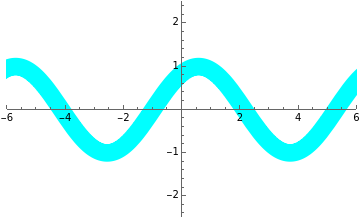
Manipulate is a way of presenting a function that allows the viewer to directly affect aspects of the code in the front-end.
Manipulate is a way of presenting a function that allows the viewer to directly affect aspects of the code in the front-end.
Here’s an example:
In[]:=
Manipulate[Plot[αSin[βx+γ],{x,-2π,2π},PlotRange->{{-6,6},{-2.5,2.5}},PlotStyle->{Hue[h],Thickness[s]}],{{α,1,"Amplitude"},-2,2},{{β,1,"Frequency"},-π,π},{{γ,1,"Phase"},-2π,2π},{{h,.5,"Hue"},0,1},{{s,0.05,"Thickness"},0,0.3}]
Out[]=


Animate
Animate
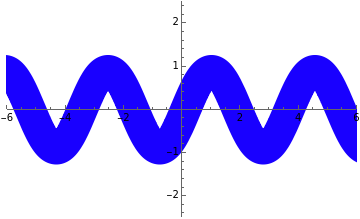
Animate, on the other hand, has Mathematica control the Manipulate function on its own, each parameter at its own rate.
Animate, on the other hand, has Mathematica control the Manipulate function on its own, each parameter at its own rate.
Here’s an example:
In[]:=
Animate[Plot[αSin[βx+γ],{x,-2π,2π},PlotRange->{{-6,6},{-2.5,2.5}},PlotStyle->{Hue[h],Thickness[s]}],{{α,1,"Amplitude"},-2,2,AnimationRate->0.015},{{β,1,"Frequency"},-π,π,AnimationRate->0.02},{{γ,1,"Phase"},-2π,2π,AnimationRate->0.025},{{h,.5,"Hue"},0,1,AnimationRate->0.03},{{s,0.05,"Thickness"},0,0.3,AnimationDirection->ForwardBackward,AnimationRate->.01},Deployed->True]
Out[]=
Text cells
Text vs. Input
Text vs. Input
Notice the difference?
Notice the difference?
These cells are written like normal text, and contain zero code
These cells are written like normal text, and contain zero code
Meanwhile, the below cell is an input cell -- the stuff written inside is taken literally by the program.
In[]:=
See?Thisisinterpretedastext.EvaluatingthiscellgivesaweirdresultbecauseMathematicaisexpectingfunctionstobewrittenhere!
Out[]=
aasbebecausecellexpectingfunctionsgivesinterpretedMathematicaresultthistoweirdwrittentext.Evaluatinghere!See?This
2
is
In order to make an appealing notebook, I have to control the usage of text cells vs. input cells, and also different cell stylings.
This is text cell.
This is a subsubsection cell.
This is a subsubsection cell.
This is a subsection cell.
This is a subsection cell.
This is a section cell.
This is a section cell.
This is a chapter cell.
This is a subtitle cell.
This is a title cell.
This is a title cell.
And this is the end of this notebook.
-AlexR.