CITE THIS NOTEBOOK: Simulating Quantum Computers with QuESTlink by Tyson Jones. Wolfram Community 2020.
ORIGINAL ARTICLE: Jones, Tyson, and Simon Benjamin. QuESTlink?Mathematica embiggened by a hardware-optimised quantum emulator. Quantum Science and Technology, 5: 034012 (2020). https://doi.org/10.1088/2058-9565/ab8506.
See related discussion: Simulating state-vectors and density matrices with QuESTlink
ORIGINAL ARTICLE: Jones, Tyson, and Simon Benjamin. QuESTlink?Mathematica embiggened by a hardware-optimised quantum emulator. Quantum Science and Technology, 5: 034012 (2020). https://doi.org/10.1088/2058-9565/ab8506.
See related discussion: Simulating state-vectors and density matrices with QuESTlink
Article abstract: We introduce QuESTlink,pronounced ‘quest link’, an open-source Mathematicapackage which efficiently emulates quantum computers. By integratingwith the Quantum Exact Simulation Toolkit (QuEST), QuESTlink offers ahigh-level, expressive and usable interface to a high-performance, hardware-accelerated emulator. Requiring no installation, QuESTlink streamlines the powerful analysis capabilities of Mathematica into the study of quantum systems, even utilising remote multi-core and GPU hardware. We demonstrate the use of QuESTlink to concisely and efficiently simulate several quantum algorithms, and present some comparative benchmarking against core QuEST.
Introduction
Introduction
Numerically simulating the behavior of a quantum computer is crucial in the design and study of new algorithms. Since time and memory costs scale exponentially with the number of simulated qubits, it is essential that simulators are high performance and hardware accelerated. But good research tools must also be intuitive and usable, offer a high-level interface and rapid development time. To this end, the Quantum Technology Theory Group in the University of Oxford, with support from Quantum Motion, created QuESTlink; an open-source installation-free simnulator. QuESTlink allows Mathematica simulation of quantum circuits, specified in a concise symbolic language, using remote multithreaded or GPU-accelerated hardware. A technical overview and a thorough user-guide are available in our whitepaper.
Getting started is easy:
In[]:=
Import["https://qtechtheory.org/QuESTlink.m"];CreateDownloadedQuESTEnv["MacOS"];
These functions download the latest version QuESTlink (right from the github), pre-compiled for your operating system, for single-core CPU simulation. See here to compile QuESTlink in multithreaded or GPU modes, or deploy it to remote hardware.
You’re now ready to simulate! Let’s create a 3 qubit state-vector, initialized in the |010> state.
You’re now ready to simulate! Let’s create a 3 qubit state-vector, initialized in the |010> state.
psi=CreateQureg[3];InitClassicalState[psi,2^^010];
The state-vector for psi is stored in a (possibly remote) C++ backend, though we can copy it to the Mathematica front-end if needed. In this case, it’s not very interesting:
In[]:=
GetQuregMatrix[psi]//Chop
Out[]=
{0,0,1.,0,0,0,0,0}
Let’s create a simple circuit.
In[]:=
m=RandomVariate[CircularUnitaryMatrixDistribution[4]];u=,,,[],[Rational[1,3]π],[[0.1]],,R[0.1,],[[{{Exp[0.1],0},{0,Exp[.2]}}]],[m],
H
0
S
1
T
2
C
0
X
2
Rz
0
C
2
Ry
1
SWAP
1,2
X
1
X
2
Z
0
C
0,1
U
2
C
1
U
0,2
M
0,1,2
Note qubits are indexed from 0. This is quite a fancy circuit, containing measurements, multi-qubit rotations (around arbitrary Pauli axis) and randomly-generated general unitary matrices (one and two qubits, even multi-controlled!). We’d better see what’s going on:
In[]:=
DrawCircuit[u]
Out[]=
We could even pass this to CalcCircuitMatrix[] to check the analytic symbolic representation of the circuit, although we’ve baked some floating point numbers into the circuit (and we’d have to throw away our measurements).
Applying this circuit to our state, and viewing the measurement outcomes, is easy:
Applying this circuit to our state, and viewing the measurement outcomes, is easy:
In[]:=
ApplyCircuit[psi,u]
Out[]=
{{1,0,0}}
But QuESTlink can do much more than this. It can also simulate density matrices, decoherence channels and Kraus maps. It can plot density matrices, simulate Hamiltonians in the Pauli basis, compute derivatives of parameterised circuits, and a variety of hardware-accelerated functions like fidelity, purity, and Hilbert-Schmidy distance. Have a look with:
In[]:=
?QuEST`*
Out[]=
Our whitepaper (though you may prefer our arXiv formatting) includes some advanced demonstrations, like studying the effect of decoherence on the accuracy of Trotterisation, and performing quantum variational minimisation of a chemistry Hamiltonian. These demonstrations can be found at the end of the post. Also they are contained in attached paper_demos.nb notebook.
QuESTlink is made using a WSTP layer between Mathematica and QuEST. It is actively maintained and new features are added regularly at the request of users. Its facilities and user-base are actively growing, and it has proven a useful tool to the quantum research community. We hope it’ll be of use to you!
QuESTlink is made using a WSTP layer between Mathematica and QuEST. It is actively maintained and new features are added regularly at the request of users. Its facilities and user-base are actively growing, and it has proven a useful tool to the quantum research community. We hope it’ll be of use to you!
Demonstrations
Demonstrations
Decoherence
Decoherence
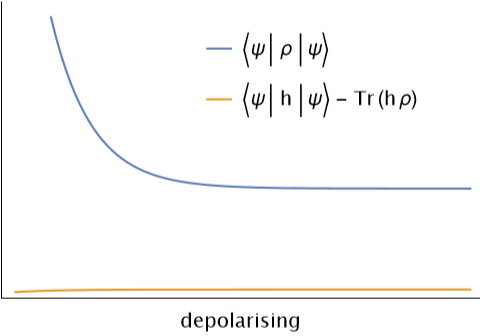
opts = LabelStyle{FontFamily"CMU Serif", FontSize15}, PlotLegendsPlaced[{"〈ψ|ρ|ψ〉","〈ψ|h|ψ〉 - Tr(hρ)"}, {{.65,.75}}], Frame{True,True,False,False}, FrameStyleBlack, AxesNone, FrameTicksNone, FrameLabel{"depolarising"};
{ψ,ϕ}=CreateQuregs[5,2];{ρ,σ}=CreateDensityQuregs[5,2];SetQuregMatrixψ,Normalize@TableRandomComplex[],;InitPureState[ρ,ψ];
5
2
h=.3+.1-.2;data=TableMixTwoQubitDepolarising[ρ,0,1,.1];{CalcFidelity[ρ,ψ],CalcExpecPauliSum[ψ,h,ϕ]-CalcExpecPauliSum[ρ,h,σ]}, 100;
X
0
Y
1
Z
2
Z
0
ListLinePlot[Transpose[data],opts]
DestroyAllQuregs[];
Variational imaginary time
Variational imaginary time
nQb=6;h=GetPauliSumFromCoeffs["https://qtechtheory.org/hamil_6qbLiH.txt"];h〚-2;;〛
0.0591748+0.147366
Z
1
Z
2
Z
4
Z
5
Z
3
Z
4
Z
5
entangle[qbs_]:=Table[R[θ,],{σ,{X,Y,Z}},{q,qbs}]gates=Flatten@Join[Table[[θ],{op,{Rz,Ry,Rx,Rz}},{q,nQb}],entangle[{0,2,4}],entangle[{1,3}]];ansatz=MapIndexed[#1/.θ&,gates];nθ=Length[ansatz];
σ
q
σ
q+1
op
q-1
θ
#2〚1〛
DrawCircuit[ansatz,nQb]
Noisy Trotterisation
Noisy Trotterisation