Zotero is a popular tool to collect, organize, annotate, and cite research papers, books, web articles, and more. This post shows a basic way to connect to the Zotero SQLite database and import its data into a Wolfram Language notebook. This data can be useful for further processing, for example to create a citation in a notebook.
We start with locating the SQLite database file. On my system it is here:
In[]:=
file="/Users/arnoudb/Zotero/zotero.sqlite"
Out[]=
/Users/arnoudb/Zotero/zotero.sqlite
Next we turn this into a relational database object:
In[]:=
rdb=RelationalDatabase[file]
Out[]=
To work with this database directly we convert it to an which creates a Wolfram Language representation of the data in the database
In[]:=
es=EntityStore[rdb]
Out[]=
To actually use the EntityStore in our Wolfram Language session, we need to register it:
In[]:=
EntityRegister[es]
Out[]=
{savedSearchConditions,version,items,feedItems,itemTypesCombined,fulltextWords,customBaseFieldMappings,relationPredicates,collectionRelations,fileTypeMimeTypes,itemAnnotations,deletedItems,fieldsCombined,customItemTypeFields,itemRelations,itemTypeFields,itemTypeFieldsCombined,users,itemDataValues,customFields,itemTags,fulltextItemWords,fieldFormats,libraries,syncQueue,fields,creatorTypes,baseFieldMappings,collectionItems,savedSearches,syncCache,itemAttachments,groups,itemNotes,groupItems,syncDeleteLog,publicationsItems,customItemTypes,fileTypes,itemTypes,storageDeleteLog,itemCreators,syncedSettings,creators,feeds,itemData,proxyHosts,translatorCache,proxies,retractedItems,collections,syncObjectTypes,baseFieldMappingsCombined,tags,itemTypeCreatorTypes,settings,deletedCollections,fulltextItems,charsets,deletedSearches,dbDebug1}
In my copy of Zotero, I have added a small number of books and research papers. Here is what it looks like in Zotero:
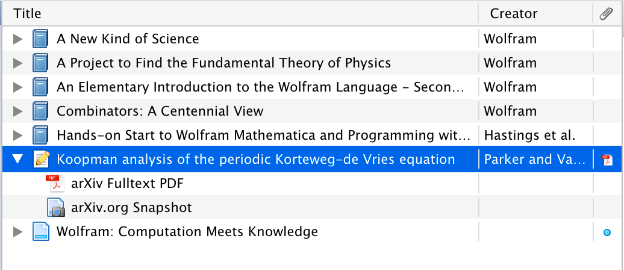
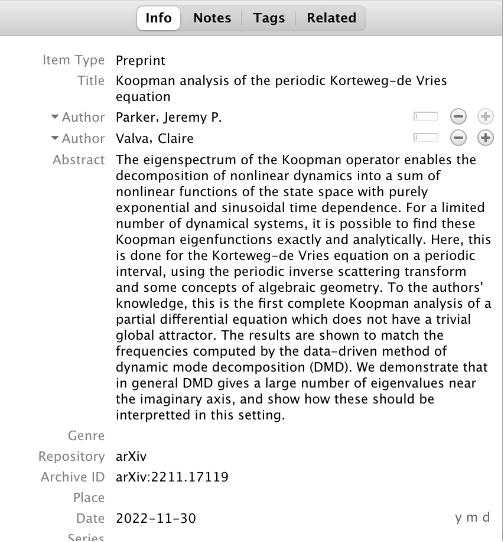
We can now get these as “items” entities and we’re interested specifically in the “itemData” property which stores the actual data:
In[]:=
AbsoluteTiming[itemDatas=EntityValue["items","itemData"]]
Out[]=
{0.246844,{EntityClass[itemData,{itemID1}],EntityClass[itemData,{itemID2}],EntityClass[itemData,{itemID3}],EntityClass[itemData,{itemID4}],EntityClass[itemData,{itemID5}],EntityClass[itemData,{itemID6}],EntityClass[itemData,{itemID7}],EntityClass[itemData,{itemID8}],EntityClass[itemData,{itemID9}],EntityClass[itemData,{itemID10}],EntityClass[itemData,{itemID11}],EntityClass[itemData,{itemID12}],EntityClass[itemData,{itemID13}],EntityClass[itemData,{itemID14}],EntityClass[itemData,{itemID15}],EntityClass[itemData,{itemID16}]}}
The field names are stored with a “fieldID” so we can build a table to associate the “fieldID” with the actual “fieldName”. This makes it easier to understand what each field is for:
In[]:=
AbsoluteTiming[fields=Apply[Rule,EntityValue["fields",{"fieldID","fieldName"}],1]]
Out[]=
{0.185475,{1title,2abstractNote,3artworkMedium,4medium,5artworkSize,6date,7language,8shortTitle,9archive,10archiveLocation,11libraryCatalog,12callNumber,13url,14accessDate,15rights,16extra,17audioRecordingFormat,18seriesTitle,19volume,20numberOfVolumes,21place,22label,23publisher,24runningTime,25ISBN,26billNumber,27number,28code,29codeVolume,30section,31codePages,32pages,33legislativeBody,34session,35history,36blogTitle,37publicationTitle,38websiteType,39type,40series,41seriesNumber,42edition,43numPages,44bookTitle,45caseName,46court,47dateDecided,48docketNumber,49reporter,50reporterVolume,51firstPage,52versionNumber,53system,54company,55programmingLanguage,56proceedingsTitle,57conferenceName,58DOI,59dictionaryTitle,60subject,61encyclopediaTitle,62distributor,63genre,64videoRecordingFormat,65forumTitle,66postType,67committee,68documentNumber,69interviewMedium,70issue,71seriesText,72journalAbbreviation,73ISSN,74letterType,75manuscriptType,76mapType,77scale,78country,79assignee,80issuingAuthority,81patentNumber,82filingDate,83applicationNumber,84priorityNumbers,85issueDate,86references,87legalStatus,88episodeNumber,89audioFileType,90repository,91archiveID,92citationKey,93presentationType,94meetingName,95programTitle,96network,97reportNumber,98reportType,99institution,100nameOfAct,101codeNumber,102publicLawNumber,103dateEnacted,104thesisType,105university,106studio,107websiteTitle}}
Now we’re ready to import all the data from the raw entities into a more suitable :
In[]:=
ds=Dataset[Map[Function[{item},Association[Map[(First[#]/.fields)->Last[#]["value"]&,EntityValue[item,{"fieldID","itemDataValues"}]]]],itemDatas]]
Out[]=


We can look up a specific book or paper by its location in the dataset:
Or, perhaps more useful, we can search for a specific keyword like “title” and search inside the value string for that keyword: