This project explores the evolution of student research topics at the Wolfram Summer Research Program from 2017 to 2024 using data science, machine learning, and natural language processing. Techniques such as K-means and K-median clustering, time series analysis, bar charts, density plots, and Latent Semantic Analysis are used to uncover trends in topic popularity and reveal hidden patterns across years. Interactive visualizations like scatter plots and line graphs highlight rising interest in fields such as chemistry and computational linguistics. By comparing clustering based on project titles (semantic data) and project topics (metadata), this study offers insights into how machine learning can identify meaningful patterns in educational data. The findings highlight how student research directions have changed over time and can be helpful to predict and inform future academic and program planning.
Introduction
Introduction
Data science is a field that uses many algorithms and processes to extract insights and patterns from data, involving steps such as data collection, cleaning, analysis, and visualization. Machine learning focuses on developing algorithms that allow computers to interpret data rather than being programmed for every scenario. Similarly, natural language processing is a part of computer science that allows computers systems to interpret and replicate human language. In recent years, AI has become increasingly effective at analyzing large datasets with greater accuracy, allowing for more complex problem-solving.
The Wolfram Summer Research Program publishes hundreds of computational research projects per year, but little analysis has been done on how these projects have evolved over time. This project explores trends in student research from 2017 to 2024 by analyzing data collected directly from the Project Gallery on the Wolfram website. This research was motivated by an interest in data science, machine learning, and natural language processing, using clustering methods to uncover shifts in topic popularity and structural relationships between projects. This project will examine both structured topic content and unstructured title content and aims to offer insight into how student interests and technologies have changed within the Wolfram community.
The Wolfram Summer Research Program publishes hundreds of computational research projects per year, but little analysis has been done on how these projects have evolved over time. This project explores trends in student research from 2017 to 2024 by analyzing data collected directly from the Project Gallery on the Wolfram website. This research was motivated by an interest in data science, machine learning, and natural language processing, using clustering methods to uncover shifts in topic popularity and structural relationships between projects. This project will examine both structured topic content and unstructured title content and aims to offer insight into how student interests and technologies have changed within the Wolfram community.
Organizing the Data
Organizing the Data
I started by importing the dataset Megan provided me, which contained each project’s year, URL, and title for every year from 2017 to 2024. I then filtered out all the projects from this initial dataset whose links were no longer working or in use. After that, I used the URL in each association to import the groups/topics for that project by reading the plaintext from the HTML of the page. Once I added each project’s groups to its corresponding association, I removed any groups that contained unnecessary words such as “Wolfram” or “Staff Picks,” since most projects had those labels and they wouldn’t be useful for clustering. I stored each step in a variable for easy access during later data visualizations.
Iconized dataset with all project years, titles, and URLs [1]:
In[]:=
projectAssociation=;
Cleaned dataset with all projects whose links no longer work or exist removed:
newProjectAssociation=Quiet[Select[projectAssociation,!FailureQ[Import[#["project-url"]]]&]];
Used CloudPut to reduce runtime of newProjectAssociation:
In[]:=
CloudPut[newProjectAssociation,"newProjectAssociation",Permissions->"Public"]
Out[]=
Stored the cloud object in a variable to quickly access it from everywhere in my code:
In[]:=
cloudNewProjectAssociation=CloudGet[
https://www.wolframcloud.com/obj/aashichandarana/newProjectAssociation
];This section of code was repeated twice, once if the year was 2017 and once for all other years because the HTML plaintext from which I retrieved each project’s groups was formatted differently in 2017 compared to the rest. After retrieving the project groups, I filtered the dataset to only hold the list of groups and removed any extra words or spaces, as well as the unnecessary words “Wolfram” and “Staff Picks” to finish cleaning and organizing my dataset.
Final organized dataset with each project’s groups appended to its corresponding association with the words “Wolfram” and “Staff Picks” removed:
In[]:=
fullProjectAssociation=If[#["year"]=="2017",(Append[#,"project-groups"->Select[(Flatten[StringSplit[(StringDrop[StringDrop[StringCases[Import[#["project-url"],"Plaintext"],"GROUPS:"~~__~~"[WSC17]"],12],-25])," "]]),!StringContainsQ[#,"Wolfram"|"Staff Picks"]&]]),(Append[#,"project-groups"->Select[(Flatten[StringSplit[(StringDrop[StringDrop[StringCases[Import[#["project-url"],"Plaintext"],"GROUPS:"~~__~~"Wolfram High School Summer Research Program"],12],-46])," "]]),!StringContainsQ[#,"Wolfram"|"Staff Picks"]&]])]&/@cloudNewProjectAssociation;
Stored fullProjectAssociation in the cloud as well to cut down on runtime:
In[]:=
CloudPut[fullProjectAssociation,"fullProjectAssociation",Permissions->"Public"]
Out[]=
Stored the cloud object in a variable to ensure access from everywhere in my code:
In[]:=
cloudFullProjectAssociation=CloudGet[
https://www.wolframcloud.com/obj/aashichandarana/fullProjectAssociation
];List of all unique groups from each project, extracted from the fully organized dataset to make data analysis simpler later:
In[]:=
allGroups=DeleteDuplicates[Flatten[cloudFullProjectAssociation[[All,"project-groups"]]]];
Making Bar Charts
Making Bar Charts
After cleaning all my data, I used data analysis functions such as Count and Commonest to identify the most common topics for each year and observe which trends or new topics emerged over time. I wrote each step as a function to make it more efficient to run for any year rather than repeating code manually. Finally, I converted these findings into a bar chart to create clear data visualizations that helped highlight changes in topic popularity. I also used previously defined functions inside newer ones to keep my code easier to read and less repetitive.
groupsPerYear returns a list of all the project groups for every project for the inputted year in a single list:
In[]:=
groupsPerYear[year_]:=Flatten[#["project-groups"]&/@Select[cloudFullProjectAssociation,#["year"]==year&]]
mostCommonGroups outputs a list of the 5 most common groups for the selected year:
In[]:=
mostCommonGroups[year_]:=Commonest[groupsPerYear[year],5]
groupCounterFunction returns an association with each of the five common groups for that year pointing to the number of projects including that topic for the inputted year:
In[]:=
groupCounterFunction[year_]:=<|#->Count[groupsPerYear[year],#]|>&/@mostCommonGroups[year]
groupBarChart returns a bar chart highlighting the five most common topics for the inputted year:
In[]:=
groupBarChart[year_]:=BarChart[groupCounterFunction[year],ChartLegends->Automatic,Frame->True,FrameLabel->{"Groups","Number of Projects"},PlotLabel->year"Popular Topics Bar Chart"]
After coding all of the functions to make the bar chart, I tested them with each year to find out which ones had the most interesting findings, biggest jumps, or subjects that stayed constant. Here are a couple bar charts that demonstrate the evolution of the five most popular subjects throughout all the years.
Using the groupBarChart function to plot the common topics for years 2017-2024 in a grid format:
In[]:=
GraphicsGrid[{{groupBarChart["2017"],groupBarChart["2018"]},{groupBarChart["2019"],groupBarChart["2020"]},{groupBarChart["2021"],groupBarChart["2022"]},{groupBarChart["2023"],groupBarChart["2024"]}},Frame->All,ImageSize->Full]
Out[]=
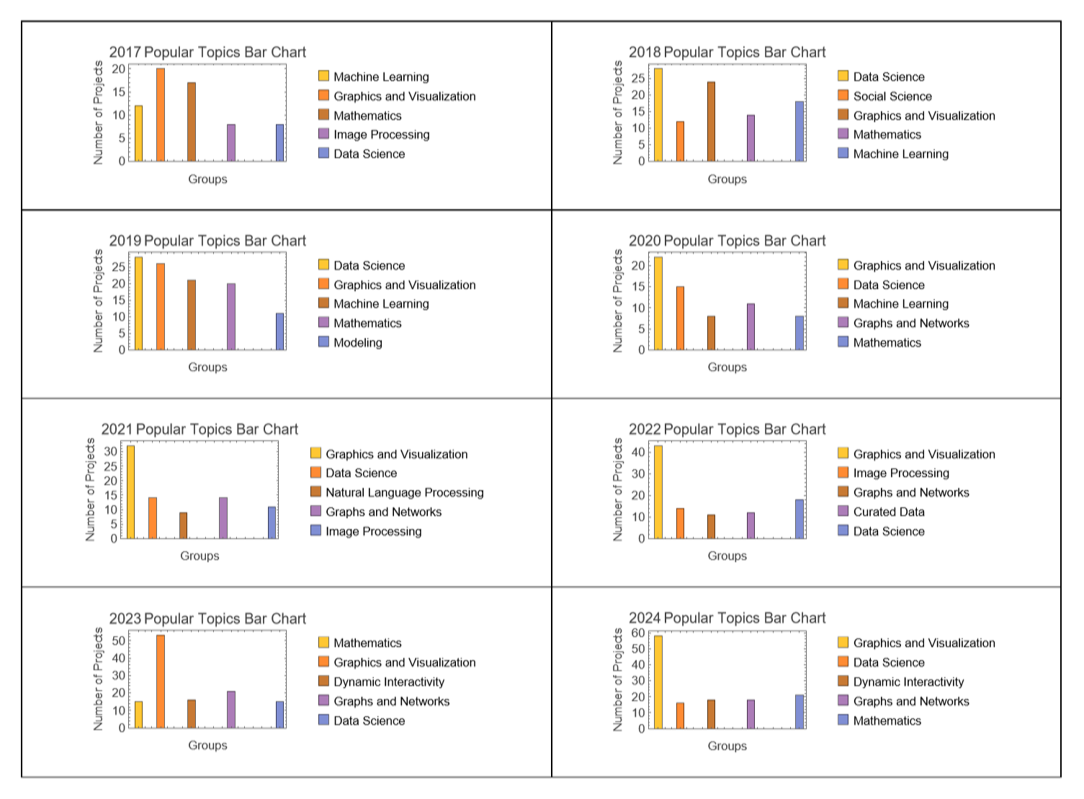
As you can see through these visuals, topics such as Machine Learning and Image Processing slowly lost popularity at the Wolfram Summer Research Program from 2017-2024. On the other hand, topics like Graphs and Networks and Dynamic Interactivity gained much attention over this time span. Additionally, some topics all stayed constant, such as Data Science and Mathematics which students have continuously shown interest in.
Constructing a Density Plot
Constructing a Density Plot
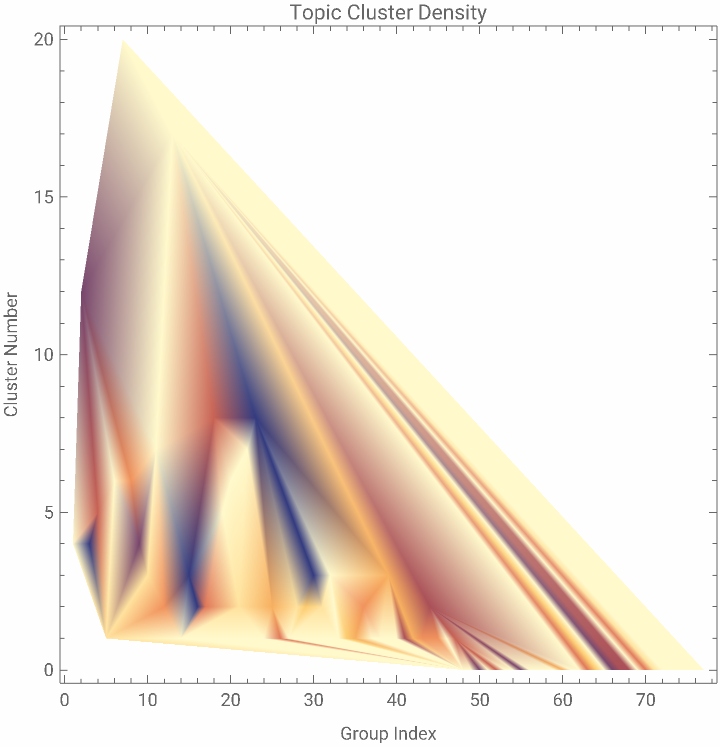
As another interesting visual, I made a density plot that highlights how common a particular project topic was in a certain year. With a key at the side of the graph, it is straightforward to understand which groups were more common and which groups were less common. In this plot, the top of the key, labeled 10, represents the most frequent project topics, while the bottom represents those that were least common. This visual goes a step beyond the bar chart by depicting all the groups in a specific year, not just the top three. I reused the same groupCounterFunction from the bar chart example to get the count of each project topic per year, and I clustered these into ten groups by how common they were.
densityPlotData takes in a year and returns a nested list, with each sublist containing the group index number, the number of projects containing that group for that year, and the group’s cluster number:
In[]:=
densityPlotData[year_]:=Table[{Range[Length[allGroups]][[i]],Flatten[Values[groupCounterFunction[year]]][[i]],ClusteringComponents[groupCounterFunction[year],10][[i]]},{i,Length[allGroups]}]
densityPlotMaker outputs a density plot using the data from the previous function for the inputted year with clear labels:
In[]:=
densityPlotMaker[year_]:=ListDensityPlot[densityPlotData[year],PlotLegends->Automatic,FrameLabel->{"Group Index","Cluster Number"},PlotLabel->"Topic Cluster Density"]
I compared the density plot results for the years 2017 and 2024 to see whether any topics had changed drastically from the first to the most recent Wolfram summer program.
Plugging the year into the function densityPlotMaker for 2017 and 2024 to see topic density:
In[]:=
densityPlotMaker["2017"]
Out[]=

In[]:=
densityPlotMaker["2024"]
Out[]=
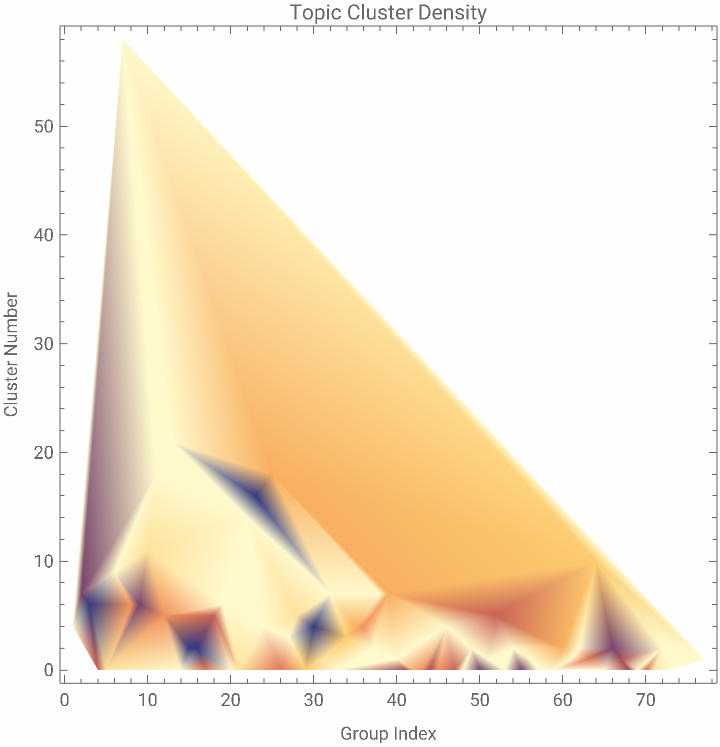
The numbers along the x-axis represent each group’s index in the allGroups list that was created earlier from fullProjectAssociation. The group name for a particular index can be found by evaluating allGroups[[indexNumberHere]].
As the visuals show, many topics that were dense and common in 2017 became far less common by 2024. Only a few, such as the topic at index 1, Social Science, remained consistently popular over this time span.
Making a Time Series
Making a Time Series
The goal of this time series graph is to analyze the trend in popularity of a specific topic or group in the projects at this summer program from 2017 to 2024. This interactive visual allows the user to select a topic from a dropdown menu and see how many projects included that topic each year, illustrating whether interest in that topic has increased, decreased, or remained steady over time.
To construct the visual, I mapped the number of projects containing the selected topic to each year in the dataset and plotted the results using ListLinePlot to create a labeled timeline. I used PatternTest (_?) and MemberQ to find out which projects matched the selected topic in each specific year. Finally, I styled the graph with functions such as PlotLabel, AxesLabel, PlotMarkers, and AxesOrigin to ensure clarity.
To construct the visual, I mapped the number of projects containing the selected topic to each year in the dataset and plotted the results using ListLinePlot to create a labeled timeline. I used PatternTest (_?) and MemberQ to find out which projects matched the selected topic in each specific year. Finally, I styled the graph with functions such as PlotLabel, AxesLabel, PlotMarkers, and AxesOrigin to ensure clarity.
Creates a visual representation with a drop down menu that illustrates the evolution of the selected topic by showing the number of projects associated with that topic per year:
This visual representation is especially useful when identifying shifts in research focus over time and recognizing emerging trends. For example, it reveals a significant rise in topics like robotics and chemistry, along with a decline in interest in areas such as 3D printing and cryptography.
Implementing K-Means Clustering
Implementing K-Means Clustering
After creating some of the more basic visuals, I decided to move into something more complex: clustering the projects based on their groups. I started with K-Means clustering, a machine learning algorithm used to sort elements into a fixed number of groups, or clusters. In statistics, K-Means clustering randomly selects k data points as the initial cluster centroids and assigns every data point to the nearest cluster. Then, it recalculates the cluster centroid by taking the mean of all the data points in the cluster, which moves the centroids to the center of the cluster. K-Means uses squared Euclidean distance to measure the proximity between data points and centroids. This technique is helpful since it is a simple and fast way to find hidden patterns in datasets and separate data based on similarity. Wolfram already has a built in KMeans method, which made this a great start to my analysis.
Global function that filters the full dataset to include only associations from the selected year:
Creates an association with each group in allGroups pointing to a unique number from 1 to the total number of groups:
kmeansClustering maps each project’s groups to their numeric representations and returns a nested list with similar elements clustered together:
kmeansData combines each project with its corresponding 2D coordinate pair using dimension reduction on the clustering output:
kmeansAssociation returns an association that matches each project title to its reduced coordinate pair:
kmeansFindClusters groups the coordinate data into 6 clusters using FindClusters:
kmeansTitleClusters outputs a nested list of project titles ordered to match the coordinate clusters:
kmeansGroupTitleAssociation returns an association with each project title matched up to its list of groups retrieved from the fullProjectAssociation:
Once I had all the necessary data for K-Means clustering, I created a visual to identify patterns more easily. I split the code into two parts for readability: one function builds the hover effects showing project titles and groups, and the other handles styling.
kmeansPlotData outputs a list of coordinate points grouped by cluster, each with a tooltip showing the project’s title and group list:
kmeansFinalListPlot plots the coordinate points with colored clusters and the hover effect, labeled with a graph title:
I used this final function to generate plots for multiple years and found particularly interesting patterns for 2023 and 2018.
Plotting the k-means clustered data for 2023 and 2018:
For 2023, one interesting finding is the cluster of green points, which all relate to science fields. The green point furthest to the right has to do with computer science, which is why it also appears close to the cluster of blue points representing computer science and AI.
2018 also had notable patterns. The cluster of red points consists of projects that commonly include topics like data science, computer science, natural language processing, machine learning, and math. Each project in this cluster shares at least one group with the others, revealing clear internal similarity.
If you hover over the points plotted on each graph, you can see that projects clustered together share many common groups, proving that this K-Means Clustering algorithm was very effective in clustering similar projects, revealing structure and patterns beyond what could be seen from bar charts or density plots. It enabled me to discover hidden relationships that weren’t immediately obvious. An important find from the output of these K-Means plots is that over this time span, the students coming to the Wolfram Summer Research Program began studying a more diverse range of topics. While most clusters in the 2018 plot focus on topics such as Data Science, Machine Learning, and Mathematics, the clusters in the 2023 plot focus on a variety of topics, notably Chemistry, Modeling, and Graphs and Networks. The blue cluster keeps many of the same trends seen in the 2018 plot, but the other clusters expand to different topics: green concentrates on science, red centers on engineering, purple focuses on geography, and orange depicts projects with images and visualizations.
Clustering Using Latent Semantic Analysis
Clustering Using Latent Semantic Analysis
After completing K-Means clustering and grouping projects based on similar groups/topics, I explored another clustering technique: Latent Semantic Analysis (LSA). This time, I grouped similar projects based on their titles, using keyword recognition and natural language processing. I also used the in-built Wolfram function DeleteStopwords to remove unnecessary words like “and” and “the” from the titles. LSA associates text elements together based on how many words they share in common, making it ideal for detecting semantic patterns among titles [2].
Although Wolfram has a built-in method for LSA just like it does for K-Means, it requires a predefined training dataset, which I hadn’t prepared in advance. Therefore, I implemented a more manual method for retrieving and plotting the LSA clusters.
Although Wolfram has a built-in method for LSA just like it does for K-Means, it requires a predefined training dataset, which I hadn’t prepared in advance. Therefore, I implemented a more manual method for retrieving and plotting the LSA clusters.
A function that retrieves the list of all project associations for the selected year:
commonProjectTitles returns a list of all common words across titles for the inputted year with stopwords like “and” and “the” removed:
cleanCommonTitles further filters the previous list by manually removing additional unnecessary words that DeleteStopwords may have missed:
For the next step, Singular Value Decomposition (SVD), I followed the method used by Sophie Chen in her Wolfram research paper, “Implementation of latent semantic analysis and Gibbs sampling topic allocation.” She described how to count the number of times each common word appeared in each project title, and how to use this matrix to detect semantic similarities between titles [4].
lsaMatrix creates a matrix of word frequencies, where each vector represents a project title and shows how often each common word appears in that title:
lsaSVDMatrix uses SVD to reduce the high-dimensional word-frequency matrix into smaller matrices that reveal patterns between words and the context in which they appear:
lsaReducedColumns further reduces the matrix to 2D coordinates so that projects can be visualized in scatter plots, just like in the K-Means section:
lsaGettingClusters returns an association with each project title mapped to its coordinate pair from the previous function:
lsaListPlotData repeats the steps from K-Means clustering by preparing a clustered list of coordinates that includes hover labels with project titles and topics:
lsaFinalListPlot graphs the final labeled scatter plot to display the clustered project titles:
After finalizing all of my functions, I plotted the same years as I did for K-Means to simplify direct comparison between the two clustering methods.
Plotting the LSA clustered data for 2023 and 2018:
A great example in the 2023 plot that demonstrates this technique worked well to cluster the projects by titles is the cluster of four red dots. These projects all have to do with Multiway Systems according to their titles, proving this LSA method to be effective in grouping my data.
The 2018 findings also prove to be clustered pretty accurately based on not only titles, but also the project groups. The cluster of green dots on the graph all relate to data science and machine learning according to their groups, highlighting the accuracy of this clustering.
These LSA plots also depict how the Wolfram Summer Research Program has branched out in its topic selection over time. In the 2018 plot, the three clusters revealed the common topics of data science, visualizations, machine learning, and several mathematics topics. In the 2023 plot, those topics were covered by the blue and green clusters. However, the 2023 plot also had additional clusters highlighting the increase in common topics, including the yellow cluster focusing on science-related topics and the red cluster focusing on multiway systems.
Implementing K-Median Clustering
Implementing K-Median Clustering
For my final clustering method, I chose to implement K-Median clustering, which follows a similar process to K-Means clustering. The main difference is that instead of using the mean of each cluster, this method uses the median of the data points in each cluster, making it more robust to outliers. Another distinction is that K-Median clustering uses Manhattan distance rather than the Euclidean distance used in K-Means, which causes the K-median method to calculate the sum of absolute differences along axes rather than the straight-line shortest distance between points, also causing it to focus more on outliers. For this approach, I used the project groups to cluster the projects [3].
kmedianGroups selects only the project groups for each project in the specified year:
Stores the project groups for each year directly from the fullProjectAssociation to improve runtime:
kmedianGroupNums replaces each group with its corresponding number in newGroupAssociation, creating a numeric list of groups for each project:
kmedianSplitNums splits this list into 2 sublists representing the clusters, adding any extra elements to the second list if there are an odd number of projects:
kmedianVector reduces the dimensions of each project’s group vector to a coordinate pair using DimensionReduce:
kmedianMedians returns two coordinates, one for each cluster, representing the medians of the two sublists:
kmedianPos calculates whether a point is closer to its own cluster’s median or to the opposite one:
kmedianWrongElements returns a list of all the coordinate pairs that are closer to the opposite cluster’s median than their own:
A function that returns the filtered list from kmedianVector with the elements found sorted incorrectly in the previous function removed:
kmedianMoveElementsAssociation returns an association with the incorrectly placed elements and the cluster they should be moved to:
kmedianFinalVector appends each misplaced point to the correct cluster based on its proximity to the medians, containing the final clustered coordinates:
Once I got the data from the K-median clustering, I used the same plotting technique as in K-Means clustering, where the hover effect reveals the project’s title and associated groups.
kmedianData adds each project’s coordinate pair to its association in the data from fullProjectAssociation for that year:
kmedianTitleCoordinateAssociation returns an association with each project title mapped to its coordinates:
kmedianTitleClusters reorders the titles based on the final clustered coordinates from kmedianFinalVector:
kmedianGroupTitleAssociation creates an association between each project title and its list of groups for the graph hover effect:
kmedianPlotData returns a nested list with clusters filled with coordinates displaying the project title and groups when hovered over:
kmedianFinalListPlot plots the data as a labeled scatter plot:
I graphed the K-Median clustering results for 2023 and 2018, just as I did for K-Means and LSA, to allow for a side-by-side comparison of each technique’s effectiveness.
Plotting the K-median clustered data for 2023 and 2018:
In the 2023 graph, the blue cluster mostly includes projects related to math, many of which also share the groups Graphics and Visualization or Graphs and Networks. The yellow cluster features more data science and machine learning topics. While some points along the edges appear to belong in the opposite cluster, overall the sorting seems fairly accurate.
In the 2018 graph, both the yellow and blue clusters contain projects with data science and computer science groups, making them similar overall. However, many of the projects in the blue cluster also involve image processing or signal processing, which creates a subtle but meaningful difference between the two clusters.
Comparing the K-Means, LSA, and K-Median Clustering Technique Results
Comparing the K-Means, LSA, and K-Median Clustering Technique Results
Here are the results for 2023:
Here are the results for 2018:
To compare the effectiveness of the three clustering techniques, I re-plotted the results for the years 2023 and 2018 side by side. These years were selected because they lie near the beginning and end of the 2017–2024 range used in this research, offering a strong basis for observing how project topics have evolved over time.
When comparing the resulting clusters, K-Means clustering produced the most accurate and distinct groupings, with each cluster clearly relating to a specific topic. LSA also performed well. However its clusters showed slightly more overlap, especially with broader topics like data science appearing in multiple clusters. Lastly, K-Median clustering was able to group projects effectively but created very few clusters. This limitation could be addressed in future work by modifying the kmedianSplitNums function to divide the data into more groups. However, given the limited amount of time, this clustering technique resulted in the most overlaps between clusters compared to K-Means and LSA.
When comparing the resulting clusters, K-Means clustering produced the most accurate and distinct groupings, with each cluster clearly relating to a specific topic. LSA also performed well. However its clusters showed slightly more overlap, especially with broader topics like data science appearing in multiple clusters. Lastly, K-Median clustering was able to group projects effectively but created very few clusters. This limitation could be addressed in future work by modifying the kmedianSplitNums function to divide the data into more groups. However, given the limited amount of time, this clustering technique resulted in the most overlaps between clusters compared to K-Means and LSA.
Conclusion
Conclusion
In conclusion, student research interests at Wolfram have significantly evolved from 2017 to 2024. Topics such as chemistry, game development, and computer science have seen a clear rise in popularity, while fields like aerospace engineering and cryptography have experienced a noticeable decline. Some areas, like calculus, have remained consistently represented across the years. Using K-Means clustering, K-Median clustering, and Latent Semantic Analysis helped to uncover patterns in student interests based on project titles and groupings. K-Means was especially effective in identifying topic clusters, while LSA revealed meaningful semantic connections. These techniques revealed the expansion and diversification in topics at the Wolfram Summer Research Program, as students began branching out from data science, machine learning, and mathematics into a variety of topics. Additionally, forming data visualizations to represent all the acquired data proved to be very useful in identifying underlying patterns and hidden trends, as well as easily locating any outliers in the clustered dataset. These trends reflect a broader shift in education, as students increasingly pursue emerging fields like data science and machine learning, ultimately reshaping what innovation looks like in academic research.
Future Directions
Future Directions
Future work could be done to expand this research by incorporating more complex natural language processing techniques, such as transformer-based models or word embeddings, to improve latent semantic clustering of project titles. Additionally, integrating additional semantic and metadata like student background, programming techniques used, or mentor involvement could uncover further dimensions of project trends. An interactive recommender system based on project similarity could also help future students explore and select topics aligned with their interests. Finally, applying these methods to other academic datasets beyond the Wolfram Summer Research Program could generalize the approach and contribute to broader educational trend analysis.
Acknowledgements
Acknowledgements
Thank you so much to my mentor, Sophie Chen, for her constant support and guidance throughout this project. She helped me identify and fix critical issues in my code and significantly reduced the runtime of several key functions. Her continuous feedback and new ideas pushed me to deepen and expand my work. I’m also grateful to everyone else who made this program both enjoyable and enriching.
References
References
1
.Dataset with all project titles, groups, URLs, and years retrieved from the Wolfram Summer Research Program Project Gallery Website
2
.Landauer, T. K., Foltz, P. W., & Laham, D. (1998). An introduction to latent semantic analysis. Discourse Processes, 25(2-3), 259–284. https://doi.org/10.1080/01638539809545028
3
.Subrahmanian, V. S. (2023). Clustering Algorithms: A Quick Overview of k-means, k-median, and k-medoids [Review of Clustering Algorithms: A Quick Overview of k-means, k-median, and k-medoids]. Binary Search Trees. https://piazza.com/class_profile/get_resource/hc7r2hz5r3y38z/heslsh1mq9z4vk
4
.[WELP:U24] Implementation of latent semantic analysis and Gibbs sampling topic allocation. by Sophie Chen, Wolfram Community, STAFF PICKS (2025). https://community.wolfram.com/groups/-/m/t/3389307
CITE THIS NOTEBOOK
CITE THIS NOTEBOOK
Analyzing Topic Trends and Clustering Patterns in Student Research at WSRP from 2017-2024
by Aashi Chandarana
Wolfram Community, STAFF PICKS, July 10, 2025
https://community.wolfram.com/groups/-/m/t/3499193
by Aashi Chandarana
Wolfram Community, STAFF PICKS, July 10, 2025
https://community.wolfram.com/groups/-/m/t/3499193