Sample Questions for Exam on Part 1 of ECE 101
Sample Questions for Exam on Part 1 of ECE 101
Spring 2026
The following questions should give you an idea about the type of questions to expect in the exam. In the actual exam, you can expect similar questions on topics discussed in class. Make sure to use the “Terminology” and “Concepts” slides from each lecture as guides to reviewing the material.
Question 1 (Lecture: The Landscape—Information and Computation)
Question
1
(Lecture: The Landscape—Information and Computation)Recall that any information, such as a choice among a group of things, can be represented using a sequence of bits (a binary number). How many bits are needed to represent one item from each of the following groups? For your convenience, a table of powers of 2 is given:
Out[]=
1 2 | 2 |
2 2 | 4 |
3 2 | 8 |
4 2 | 16 |
5 2 | 32 |
6 2 | 64 |
7 2 | 128 |
8 2 | 256 |
9 2 | 512 |
10 2 | 1024 |
11 2 | 2048 |
12 2 | 4096 |
13 2 | 8192 |
14 2 | 16384 |
15 2 | 32768 |
16 2 | 65536 |
◼
A. One of the following adventures your RSO has planned for folks staying back on campus for Spring Break:
◼
Prairie Palooza Picnic
◼
Krannert Curiosity Crawl
◼
Chalk the Quad Carnival
◼
Library Lo‑Fi Lounge Day
◼
Illini Orange & Blue Treasure Run
◼
Campustown Snack‑Crawl Safari
◼
Arboretum Bloom‑Blitz
◼
B. One of the planets in our solar system: Mercury, Venus, Earth, Mars, Jupiter, Saturn, Uranus, Neptune (Sorry Pluto 😔)
◼
C. One of the senators in the US senate (which has 2 senators from each of the 50 states)
◼
D. One of the hours in a day.
◼
E. Each of the 50 states, Washington D.C. and 5 major territories
◼
F. The Illinois News Bureau reported last fall, “With freshman enrollment tallied at 9,207 (compared to 9,008 last year), the new class brings total student enrollment — undergraduate, graduate and online students — to more than 60,000 for the first time in university history at 60,848 students.”
◼
Each student in the freshman class
◼
Each student on campus
◼
G. One of the following colors:
◼
H. One character from among Mickey mouse and his friends--Minnie mouse, Donald Duck and Daisy Duck.
Solution
Solution
◼
A. 7 choices, so 3 bits.
◼
B. 8 choices, so 3 bits.
◼
C. 100 senators, so 7 bits.
◼
D. 24 hours, so 5 bits.
◼
E. 56 entities, so 6 bits
◼
F. 9207 freshmen, so 14 bits.
60,848 students so 16 bits
60,848 students so 16 bits
◼
G. 9 colors, so 4 bits
◼
H. 4 friends, so 2 bits
Question 2 (Lecture: The Landscape—Information and Computation)
Question
2
(Lecture: The Landscape—Information and Computation)Let’s say that you want to record a 1-hour podcast about ECE101.
Audio is recorded by storing a 1 Byte (8-bit) sample of sound amplitude periodically. For simplicity, let’s say that your system samples 50,000 times each second.
How many total Bytes do you need to record the lecture? Show your work—writing the answer as a product is sufficient.
Audio is recorded by storing a 1 Byte (8-bit) sample of sound amplitude periodically. For simplicity, let’s say that your system samples 50,000 times each second.
How many total Bytes do you need to record the lecture? Show your work—writing the answer as a product is sufficient.
Solution
Solution
1 B × 50000 samples (per second) × 60 seconds (per minute) × 60 minutes (per hour)
In[]:=
1*50000*60*60
Out[]=
180000000
(180,000,000 Bytes = 180 MB; for the raw audio; Audio, for most recordings, is usually compressed)
Question 3 (Lecture: The Landscape—Information and Computation)
Question
3
(Lecture: The Landscape—Information and Computation)Let’s say that you have 100 photos that you took at a friend’s birthday party.
Each photo can be seen on the computer screen as an image consisting of 1920×1080 pixels. Each pixel needs 128 bits to represent the color accurately.
How many total Bytes do you need to record the 100 images? Show your work—writing the answer as a product is sufficient.
Each photo can be seen on the computer screen as an image consisting of 1920×1080 pixels. Each pixel needs 128 bits to represent the color accurately.
How many total Bytes do you need to record the 100 images? Show your work—writing the answer as a product is sufficient.
Solution
Solution
128 bits per pixel × 1920×1080 pixels (per image) × 100 images
In[]:=
128*1920*1080*100
Out[]=
26542080000
(That is 26542080000 bits. Remember 8 bits make a byte. So to provide the answer in bytes you must divide by 8)
In[]:=
26542080000/8
Out[]=
3317760000
3,317,760,000 bytes i.e about 3.31 Gb
Question 4 (Lecture: The Landscape—Information and Computation)
Question
4
(Lecture: The Landscape—Information and Computation)Define the following using a short phrase or sentence:
◼
Bit
◼
Megabyte
◼
Gigabyte
◼
Computation
◼
Information
◼
Digital
◼
Compression
Solution
Solution
Question 5 (Lecture: History, Map of Keywords)
Question
5
(Lecture: History, Map of Keywords)Order the following technologies in chronological order of their invention (as discussed in class)
◼
VLSI (Very Large Scale Integration)
◼
Main frame computers
◼
PCs (Personal Computers)
◼
Internet
◼
Electricity
◼
Ethernet
Solution
Solution
Question 6 (Lecture: Wi-Fi and Cellular)
Question
6
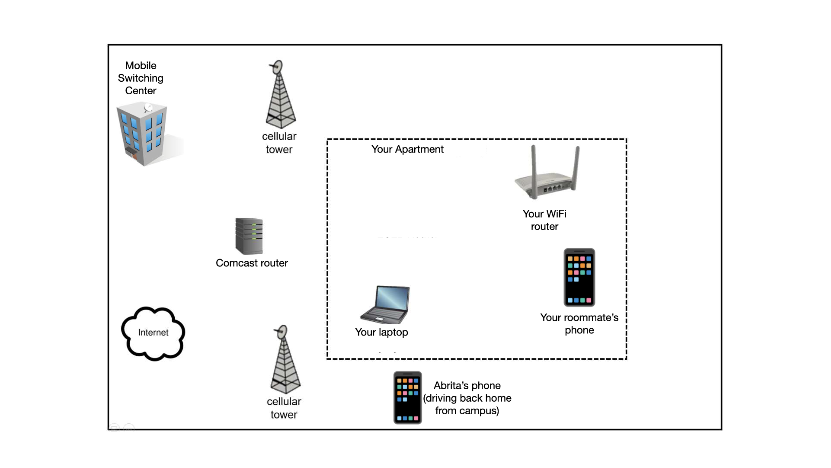
(Lecture: Wi-Fi and Cellular)Draw wired links as solid lines ... and wireless links as dashed lines ... to connect ALL devices (laptops, phones, routers, cellular base stations and mobile switching center) to the Internet.
Solution
Solution
◼
A transmitter is transmitting wireless signals at the strength of 360 Watts.
◼
The strength of the ambient noise at the receiver is 5 Watts,
◼
The strength of interference from other transmitters at the receiver is = 15 Watts,
Calculate the SINR at the receiver, which is about 5 meters from the transmitter.
Hint: first, set up an equation (show work), then solve it.
Hint: first, set up an equation (show work), then solve it.
Solution
Solution
◼
A transmitter is transmitting wireless signals at the strength of 500 Watts.
◼
The strength of the ambient noise at the receiver is 2 Watts,
◼
The strength of interference from other transmitters at the receiver is = 8 Watts,
If acceptable SINR at the receiver is 1.5
◼
Would the receiver be able to receive a signal at 5 m from the transmitter?
◼
Would the receiver be able to receive a signal at 10 m from the transmitter?
Hint: first, set up an equation (show work), then solve it.
Solution
Solution
Case 1: Distance of 5 m
Since 2 > 1.5, the SINR is acceptable and the receiver will be able to receive a signal.
Case 1: Distance of 10 m
Since 0.5 < 1.5, the SINR is NOT acceptable and the receiver will NOT be able to receive a signal.
◼
A transmitter is transmitting wireless signals at the strength of 500 Watts.
◼
The strength of the ambient noise at the receiver is 5 Watts,
◼
The strength of interference from other transmitters at the receiver is = 15 Watts,
If acceptable SINR at the receiver is 2, what is the communication range of this wireless transmitter in meters?
Hint: first, set up an equation (show work), then solve it.
Solution
Solution
We do not know the the range of the transmitter. Let’s assume it is r.
Calculate the received signal strength at distance r from the transmitter.
Calculate the SINR at distance r from the transmitter
The computed SINR must match the acceptable value for SINR. So,
or
So the range of the transmitter is
When I drive away from my home, my phone cannot connect to my home WiFi after some time because ...
◼
(A) My phone's WiFi receiver experiences more noise once they go out of the home environment
◼
(B) My phone’s WiFi receiver sleeps off once it is moving
◼
(C) My phone’s WiFi receiver does not get the WiFi signal anymore because the phone is too far from home.
◼
(D) My phone‘s WiFi receiver always gets the WiFi signal but cannot distinguish this weak signal from noise anymore.
In the context of connecting computers to form a network, what do the following terms mean? You can use a diagram to explain .
◼
Clique
◼
Star topology
◼
Hierarchical network
Fill in the blanks:
(a) A router’s “routing table” maps _________ to __________ on which packets must be forwarded. “Routing tables” are also called “ __________”
(b) When a packet arrives, a router looks at the packet's ______________ and consults its own ______________ to decide which interface the packet should be forwarded on.
(c) Calculating the least-cost route to each destination reachable from the router and selecting the interface to forward a packet on, along that least-cost route is a complicated computation. A routing _________ is used to perform this computation and populate the routing table at each router
(d) The routing algorithm takes three inputs: the ____________, ______________and ______________ and provides as output the _________
(e) The two important components of a network graph are the _________ and ___________
(f) Packets are forwarded across the network by routers in two logically separate planes that share the same physical network. They are the _________ and ___________
Solution
Solution
◼
(a) IP addresses, Interface numbers, Forwarding tables
◼
(b) Destination IP address, routing table
◼
(c) algorithm
◼
(d) network graph, source and destination node ... least cost path
◼
(e) nodes/vertices and links/edges
◼
(f) data plane, control plane
Donald suggests the following idea as an alternative to the existing DNS. Argue why this is NOT a good design choice.
Donald’s Alternative to DNS:
Instead of having separate DNS servers, how about we store the name-to-IP-address- mapping at every router.
This way, when my laptop sends a packet to CNN.com, the first router that gets the packet can replace CNN.com with the corresponding IP address and then forward the packet. That will completely eliminate the delay caused by DNS resolution.
Donald’s Alternative to DNS:
Instead of having separate DNS servers, how about we store the name-to-IP-address- mapping at every router.
This way, when my laptop sends a packet to CNN.com, the first router that gets the packet can replace CNN.com with the corresponding IP address and then forward the packet. That will completely eliminate the delay caused by DNS resolution.
Solution
Solution
Many reasons why this is not a good design.
Here are a few:
(a) all routers will need to have a huge memory to store all the mappings
(b) if a computer (e.g. the main UIUC web server) changes its own IP address, it needs to inform all routers in the world about the change.
(c) for every incoming packet, the first router needs to spend a lot of time resolving the URL name to IP address. It will be unable to forward other packets till this is done. That will cause congestion at that router and internet traffic will be held up.
Here are a few:
(a) all routers will need to have a huge memory to store all the mappings
(b) if a computer (e.g. the main UIUC web server) changes its own IP address, it needs to inform all routers in the world about the change.
(c) for every incoming packet, the first router needs to spend a lot of time resolving the URL name to IP address. It will be unable to forward other packets till this is done. That will cause congestion at that router and internet traffic will be held up.
I will accept other viable reasons as well.
◼
What do link costs, associated with a network of routers, depend on?
◼
What is the least-cost path from s to d in the graph above? What is that least cost?
Solution
Solution
◼
Link costs can depend on many factors:
◼
Computation power of routers,
◼
Storage available at routers,
◼
reliability of routers
◼
installation and configuration labor costs for that link
◼
combination of any of the above
◼
or simply the routers’ preference
◼
Least cost path from s to d: s → n → m → d
Cost f the path = 2 +1 + 2 = 5
Cost f the path = 2 +1 + 2 = 5
Construct routing tables for nodes F and N in the network shown below. Each table should contain an entry for every other node in the network. For simplicity, instead of numbering the interfaces going out of a node, just write the name of the next neighboring node to which F (or N) should forward the packet. For example, node N should forward to A in order to reach C.
Solution
Solution
Compare the two network topologies below, in which six nodes (blue) are connected with or without routers (represented in green). Briefly give two advantages of each topology over the other, keeping in mind that you are only comparing these two specific networks (and not considering “all possible” or “ideal” networks.)
Solution
Solution
Advantages of the shared network (left):
1. No routers needed (lower cost).
2. Fewer links, fewer network interfaces (lower cost)
3. No single link failure disconnects any pair of computers.
4. Possible to achieve up to 2× link capacity from any computer to any other computer, in absence of contention. (E.g. A can send a packet directly to B as well as from A to F to E to D to C to B, assuming no one else is sending anything on the network)
Advantages of the hierarchical topology (right):
1. More overall capacity for traffic when subgroups (nodes A, B and C or nodes D, E and F) communicate amongst themselves. (E.g. D can talk to E while A is talking to B)
2. Cross-subgroup paths do not interfere with local paths (B can reach D, E, or F without interfering with either A or C’s network use).
1. No routers needed (lower cost).
2. Fewer links, fewer network interfaces (lower cost)
3. No single link failure disconnects any pair of computers.
4. Possible to achieve up to 2× link capacity from any computer to any other computer, in absence of contention. (E.g. A can send a packet directly to B as well as from A to F to E to D to C to B, assuming no one else is sending anything on the network)
Advantages of the hierarchical topology (right):
1. More overall capacity for traffic when subgroups (nodes A, B and C or nodes D, E and F) communicate amongst themselves. (E.g. D can talk to E while A is talking to B)
2. Cross-subgroup paths do not interfere with local paths (B can reach D, E, or F without interfering with either A or C’s network use).
Consider the network graph shown below.
◼
A) Identify a link that can fail without affecting the operation of the network, and use your knowledge of routing
to give the new route taken between a pair of nodes (you choose) that normally (before such a failure) uses the failed link. Count hops (cost 1 per link) to pick the routes.
to give the new route taken between a pair of nodes (you choose) that normally (before such a failure) uses the failed link. Count hops (cost 1 per link) to pick the routes.
◼
B) Identify a node that can fail without affecting the operation of the network (other than the node itself, of course).
◼
C) Identify
◼
a link that is critical—if it fails, some nodes will become disconnected from the network
◼
and the nodes that become disconnected from the network if that link fails.
Solution
Solution
◼
A. If L→T fails, the network remains connected. Messages from L to T, which prior to a fail would use the failed link L→T, instead go down L→ K → P → T.
◼
B. Many possible answers. Each of the nodes A, C, D, E, and F can fail (by themselves) without affecting connectivity for other nodes.
◼
C. Failure of the link S→T, for example, disconnects Q, R, and S from the rest of the network.
The Grainger Engineering web server is sending a video clip to your browser on your laptop. It breaks the video into 4 packets and sends packets A, B, C, and D—in that order. Your computer records receiving C, then A, and finally D. B is never received. Explain how TCP makes it possible for you to view that video despite the best effort unreliable delivery offered by transport and physical layers. In particular, what problems occurring in the example above are solved by TCP?
Solution
Solution
TCP provides reliable, in-order delivery. In particular, TCP at the server end will not receive acknowledgement from your laptop about receiving packet B. So B will be retransmitted until your laptop has received it and an acknowledgement has been sent. TCP at your laptop will then reorder the packets so that your browser attempting to play the video sees A first, then B, then C, and finally D-- and the video makes sense to the viewer.
Provide a few examples of services available over the internet (where clients connect to servers and take advantage of the storage, computation power, or special content/applications available on the server computers).
Solution
Solution
◼
Email
◼
Entertainment: Video streaming services
◼
Entertainment: Online gaming services like Minecraft, Roblox, Nintendo switch online, Xbox Live
◼
Cloud storage services: DropBox, iCloud, Google Drive etc.
◼
Cloud computation services: AWS, Azure, etc.
◼
the World Wide Web - web browsers are clients and computers that host the websites are servers.
Professor Snape has some important data about Slytherin house points that he has collected over the years of at Hogwarts, and has written a program to analyze the data. Unfortunately, he does not have a powerful enough computer. So he wants to rent a large, powerful computer from Professor McGonagall’s CompuFarm Service.
In one or two sentences, explain two separate issues that may complicate the use of McGonagall’s computer by Snape.
In one or two sentences, explain two separate issues that may complicate the use of McGonagall’s computer by Snape.
Solution
Solution
◼
Snape’s data is sensitive! Snape must trust McGonagall with private information about the Slytherin students.
◼
Snape's program may be valuable. Snape must trust McGonagall not to steal the program (keep a copy) for their own purpose (analyse Gryffindor points, for example). (Of course we know Professor McGonagall would never do that!)
◼
McGonagall's computer may have different hardware, OS, and/or software from what Snape might need. It's not clear that Snape's program will work when run on McGonagall's machine.
Consider the picture shown below, in which a pair of users are trying to send videos simultaneously through a part of the Internet.
◼
· Jan wants to send a 500 MB video to Pat (along the dotted black line),
◼
· Alice wants to send a 500 MB video to Bob (along the solid, light grey line), and
Their routes share links as shown.
Assume for all questions that TCP is able to reach the rates shown on the links, and that link sharing is fair unless one of the connections is limited by another link along its route.
◼
A. At what rate can Jan send to Pat?
◼
B. At what rate can Alice send to Bob?
◼
C. How long does it take Jan to send the full 500 MB video to Pat?
◼
D. How long does it take Alice to send the full 500 MB video to Bob?
Solution
Solution
The shared link can support 50 MB/s. So ideally Jan would have used 25 MB/s and Alice would have used 25 MB/s. But Jan is limited to 10 MB/s (which is the least bandwidth among 100 MB/s, 25 MB/s and 10 MB/s along their path to Pat).
So if Jan uses only 10 MB/s of the shared link, Alice can use 50-10 = 40 MB/s. The least bandwidth link along Alice’s path to Bob is now 40 MB/s (least of 80, 40 and 93.32).
So if Jan uses only 10 MB/s of the shared link, Alice can use 50-10 = 40 MB/s. The least bandwidth link along Alice’s path to Bob is now 40 MB/s (least of 80, 40 and 93.32).
◼
A. 10 MB/s
◼
B. 40 MB/s
◼
C. 500/10 = 50 s
◼
D. 500/40 = 12.5 s
Consider the picture shown below, in which three pairs of users are trying to send videos simultaneously through a part of the Internet.
◼
· Jan wants to send a 200 MB video to Pat (along the dotted black line),
◼
· Alice wants to send a 200 MB video to Bob (along the solid, light grey line), and
◼
· Erato wants to send a 200 MB video to Denes (along the double, dashed, dark grey line).
Their routes share links as shown.
Assume for all questions that TCP is able to reach the rates shown on the links, and that link sharing is fair unless one of the connections is limited by another link along its route.
◼
A. At what rate can Jan send to Pat?
◼
B. At what rate can Alice send to Bob?
◼
C. At what rate can Erato send to Denes?
◼
D. How long does it take Alice to send the full 200 MB video to Bob?
Given the following social network of people:
◼
How many people are there in this network?
◼
How many distinct friendships/relationships are there?
◼
What is the graph diameter?
◼
Who is the most connected person on the graph?
◼
What is the shortest path from Anna to Arlene?
What properties of small world graphs are seen in social network graphs?
In one or two sentences explain how the huge social network graph (consisting of petabytes of data) may be stored across a number of different computers.
Why is retrieval of the graph information not a problem, despite the size of the graph?
Why is retrieval of the graph information not a problem, despite the size of the graph?
Solution
Solution
The entire graph is broken into pieces (shards). Each vertex in the social network and its associated edges are put in a single piece (or shard) and the pieces are stored in different computers.
Most people are only interested in their local neighborhood on the graph and so only a small part of the graph has to be retrieved.
Most people are only interested in their local neighborhood on the graph and so only a small part of the graph has to be retrieved.
For each term below, write the number corresponding to the correct definition from the list below. The definition chosen should correspond to the term’s use in lecture and lab. Note that not every definition will be used, as there are more definitions than there are terms.
Terms:
◼
___ A. TCP
◼
___ B. URL
◼
___ C. Cloud computing
◼
___ D. IP
◼
___ E. clique
◼
___ F. bandwidth
◼
___ G. buffering
◼
___ H. graph diameter
◼
___ I. HTTP
◼
___ J. IP address
◼
___ K. Data packet
◼
___ L. ISP
Definitions:
◼
1. Harry Truman Tercius Potter, a fictional character created by J. K. Rowling
◼
2. Hyper Text Transfer Protocol: the protocol used to communicate data, such as webpages, between a webserver and a web browser
◼
3. Transmission Control Protocol: a core internet protocol used by the transport layer, that provides reliable, ordered, and error-checked data delivery between applications
◼
4. Internet Protocol: Set of rules used by the network layer, that governs how data is routed and addressed across the internet
◼
5. the maximum possible number of hops required to find a path from any node in a graph to any other
◼
6.Unidentified Retro Link: a link to an old-fashioned web page for which the source can no longer be identified
◼
7. Uniform Resource Locator: a unique identifier that is used to locate a resource on the web across the internet
◼
8. a group of people who won't talk to anyone outside of the group
◼
9. a group of nodes in a graph in which every pair of nodes in the group is connected by an edge in the graph
◼
10. happens when data is not received fast enough to keep video playback smooth and continuous.
◼
11. really just a sequence of 1s and 0s - constitutes of data bits that represent some information (text, image, audio, video, etc) and control bits packaged together into a data packet to be transmitted across the internet
◼
12. rate at which information can be transmitted across a link i.e. how many bits of information can flow across per second
◼
13. Internet as a Service Protocol: A protocol used by clients and servers to provide internet services
◼
14: Internet Service Providers: Companies that are responsible for managing the network infrastructure and maintaining the computer network that is the internet. There can be tier 1, tier 2 or tier 3 ISPs.
◼
15. The physical address of each router on the internet. For example the UIUC router probably has the address 506 S. Wright St. Urbana, IL 61801-3633
◼
16. It is a unique 4 byte identifier for every computer or device that is connected to the internet. It is used to identify where a data packet needs to go.
◼
17. An internet service available in recent years that makes it possible for someone to rent additional computing resources from a provider temporarily by connecting to the provider’s computers from their own computer across the internet
◼
18. A network topology in which computers are connected to each other in the shape of a fluffy cloud
Solution
Solution
◼
3 A. TCP
◼
7 B. URL
◼
17 C. Cloud computing
◼
4 D. IP
◼
9 E. clique
◼
12 F. bandwidth
◼
10 G. buffering
◼
5 H. graph diameter
◼
2 I. HTTP
◼
16 J. IP address
◼
11 K. Data packet
◼
14 L. ISP