The objective is to implement data collectors using SQL functions and run them in background using Wolfram ScheduledTask framework.
The basic idea is to schedule a query to collect data at given frequency and monitor the datapoints in real time .
In the following example I set up a data collector to get cpu/memory usage data and monitor the results in real time.
The basic idea is to schedule a query to collect data at given frequency and monitor the datapoints in real time .
In the following example I set up a data collector to get cpu/memory usage data and monitor the results in real time.
Load SQL package
Load SQL package
Load the last version of SQLOperators package containing SQL function developed so far.
See my previous post : SQL operators as Wolfram Language functions (https://community.wolfram.com/groups/-/m/t/2195893 )
The full package could be find @
https://www.wolframcloud.com/env/damcalrom/Published/SQLOperators.wl
See my previous post : SQL operators as Wolfram Language functions (https://community.wolfram.com/groups/-/m/t/2195893 )
The full package could be find @
https://www.wolframcloud.com/env/damcalrom/Published/SQLOperators.wl
CloudImport["https://www.wolframcloud.com/env/damcalrom/Published/SQLOperators.wl"];
Demo using a data collector to monitor cpu/memory usage in real time
Demo using a data collector to monitor cpu/memory usage in real time
I use SystemProcessData[] function to get current processes.
SystemProcessData[]

Convert SystemProcessData[] to a SQL table and calculate cpu/memory usage using aggregate SQL functions
tbprocesses:=tableSQL[SystemProcessData[]//Normal//Cases[#,x_(x//Values)]&,SystemProcessData[]//First//Normal//Keys]//summarySQL[#,<|"memory":>UnitConvert[Total[Memory],"Megabytes"], "cpu"(Total[(UnitConvert[UserTime,"Seconds"]+UnitConvert[SystemTime,"Seconds"])/UnitConvert[RealTime,"Seconds"]])|>]&//addColumnsSQL[#,<|"timestamp"DateObject[]|>]&;tbprocesses//showTableSQL
Total Rows:1 Elapsed:1.75854
Out[]//TableForm=
memory | cpu | timestamp |
0.40545 |
Main functionsetDataCollector[query,timespec] Input query - SQL table used to collect data timespec - time specification of ScheduledTask Output Association containing some attributes “data” - SQL table containing collected data “startTime” - collector starttime “task” - ScheduledTask object used by collector.
SetAttributes[setDataCollector,HoldAll];setDataCollector[query_,timespec_]:=Module[{res,resfinal,starttime,endtime,task},res=tableSQL[{},query["header"]//Keys]; starttime=DateObject[];task=SessionSubmit[ScheduledTask[res=unionSQL[query,res];resfinal=res;endtime=DateObject[],timespec]];Association["data"->resfinal,"startTime"->starttime,"elapsedTime"->(endtime-starttime),"definition"(query//Definition),"task"->task] ];
Setting up data collectorThe query will be launch every 5 seconds for 100 times.The collected data is in table format.
datacol=setDataCollector[tbprocesses,{5,100}];
Querying the data collected
datacol["data"]//showTableSQL
Total Rows:4 Elapsed:5.8×
-6
10
Out[]//TableForm=
memory | cpu | timestamp |
0.65662 | ||
0.65741 | ||
0.65829 | ||
0.65966 |
Using Dynamic to display data in realtime
In[]:=
Dynamic[datacol["data"]//summaryMapSQL[#,{cpu,memory},TimeSeries[#,{timestamp}]// DateListPlot[{#,{#//Normal//Last}},PlotStyle{Automatic,Directive[Red,PointSize[0.05]]},Joined{True,False}]&&]&//showTableSQL]
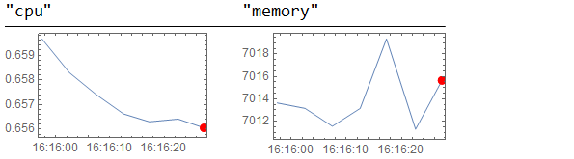
Total Rows:1 Elapsed:0.007463
We can use datacol [“task”] to control the ScheduleTask behind data collector
If I want to stop the task :
If I want to stop the task :
datacol["task"]//TaskRemove
Out[]=
TaskObject

Donations
Donations
If you enjoy the project or find it useful , any donations are welcomed : BTC: bc1qm06aatgwn8ducjtexu6cf0wle0d9r00fy7yp7y ETH: 0x8615b4cdb7aae1ea8fcb63ea7c6b6ccd2a88fbefor via paystring : calin.damian.crypto$paystring.crypto.com