This document outlines a step-by-step guide for submitting queries to IBM Quantum Processing Units (QPUs). Recent updates to IBM’s API have significantly changed the access procedures, and this guide reflects those modifications. For assistance with any issues, please contact quantum@wolfram.com
Connect to IBM quantum
Connect to IBM quantum
Creating IBM quantum account
Creating IBM quantum account
First, create an account with IBM Quantum at: https://quantum.cloud.ibm.com/
You will need the API key and the CRN of an instance. Both can be found in your account (see the reference image below).
You will need the API key and the CRN of an instance. Both can be found in your account (see the reference image below).
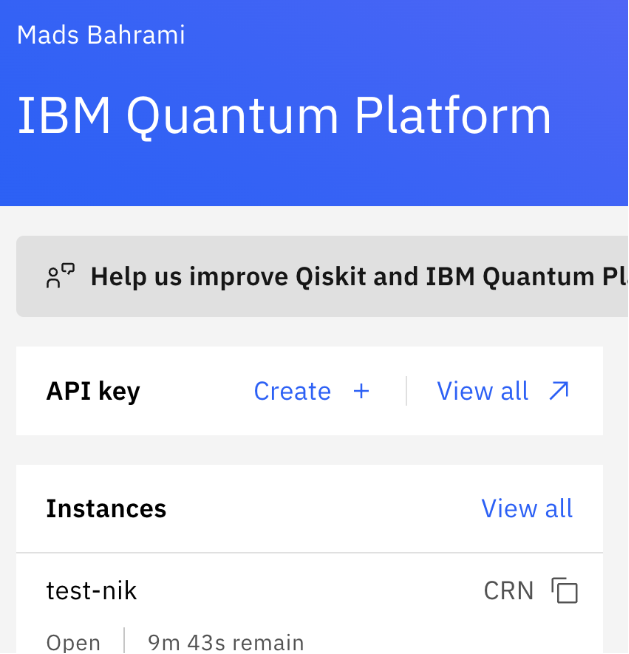
Put your API key and Instance CRN here:
api="XXX";LocalSymbol["ibm_crn"]="XXX"
Uninstall all previously installed quantum paclets to prevent potential conflicts:
In[]:=
PacletUninstall/@PacletFind["*Quantum*"]
Out[]=
{Null,Null}
Install the Wolfram Quantum Framework:
In[]:=
PacletInstall["https://www.wolfr.am/DevWQCF",ForceVersionInstall->True]Needs["Wolfram`QuantumFramework`"]
Out[]=
PacletObject

Connect to IBM Quantum using the credentials above (preferably your own):
In[]:=
Quiet@ServiceFramework`ReloadServiceFramework[];ibm=Quiet@ServiceConnect["IBMQuantumPlatform","New",Authentication->{"apikey"->api}]
Out[]=
ServiceObject

Check the requests that can be sent:
In[]:=
ibm["Requests"]
Out[]=
{Backends,JobRun,JobResults}
Show all available QPUs:
In[]:=
ibm["Backends"]
Out[]=
{ibm_brisbane,ibm_torino}
How to send queries
How to send queries
Wolfram quantum framework
Wolfram quantum framework
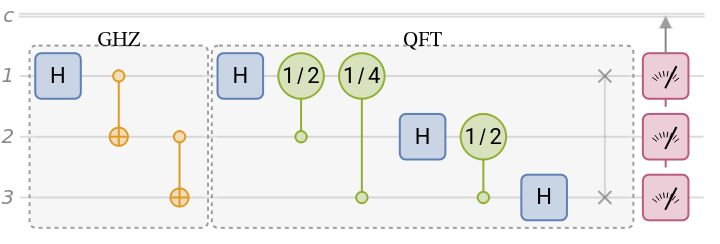
First, create a quantum circuit in the Wolfram quantum framework:
In[]:=
qc=QuantumCircuitOperator[{"GHZ","Fourier"[3],{1,2,3}}];qc["Diagram"]
Out[]=
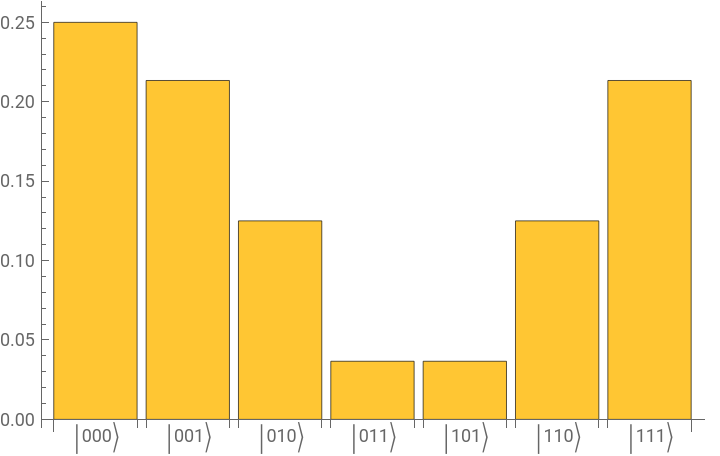
Compute exact results in the Wolfram quantum framework:
In[]:=
wl=FullSimplify/@qc[]["Probabilities"]
Out[]=
000,001(2+,011(2-(2-,111(2+
1
4
1
16
2
),0101
8
1
16
2
),1000,1011
16
2
),1101
8
1
16
2
)Plot the results:
In[]:=
qc[]["ProbabilityPlot"]
Out[]=
Approach-1 to send a query (not recommended)
Approach-1 to send a query (not recommended)
One way to submit the job is to set the execution method as follows.
In[]:=
approach1=qc[Method->{"Qiskit","Provider"->"IBMProvider","Backend"->"ibm_brisbane"}]
Out[]=
QuantumMeasurement

The job will appear in your IBM account after a few second (once done, the above cell will be done):

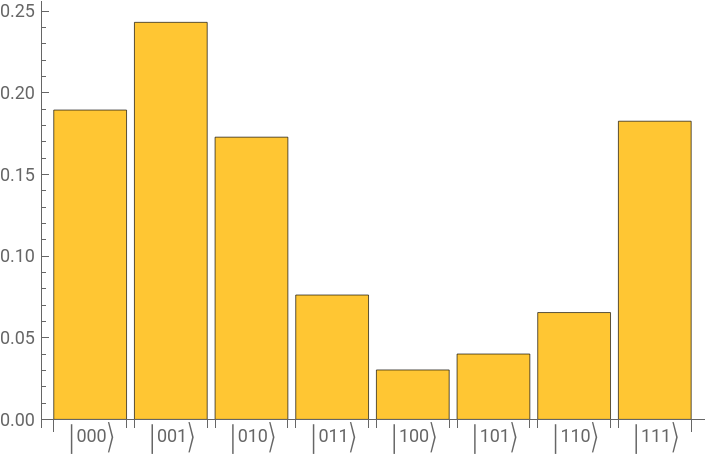
Plot the results:
In[]:=
approach1["ProbabilityPlot"]
Out[]=
Approach-2 to send a query (seems to be the best one)
Approach-2 to send a query (seems to be the best one)
To avoid long waits that tie up the kernel, use this asynchronous submission approach to send queries:
In[]:=
LocalSubmit[(*loadWolframquantumframeworkinaseparatekernel*)Needs["Wolfram`QuantumFramework`"];(*createthecircuitinthatkernel*)qc=QuantumCircuitOperator[{"GHZ","Fourier"[3],{1,2,3}}];(*sendittoQPU*)qc[Method->{"Qiskit","Provider"->"IBMProvider","Backend"->"ibm_brisbane"}],(*storetheresultsfromQPUin"result"asaQuantumMeasurementobject*)HandlerFunctions-><|"TaskFinished":>Function[approach2=#EvaluationResult]|>]
Out[]=
TaskObject
Whatever result is returned from IBM will be stored in the variable result (or any other name you assign in the code):
In[]:=
approach2
Out[]=
QuantumMeasurement

Plot the results:
In[]:=
approach2["ProbabilityPlot"]
Out[]=
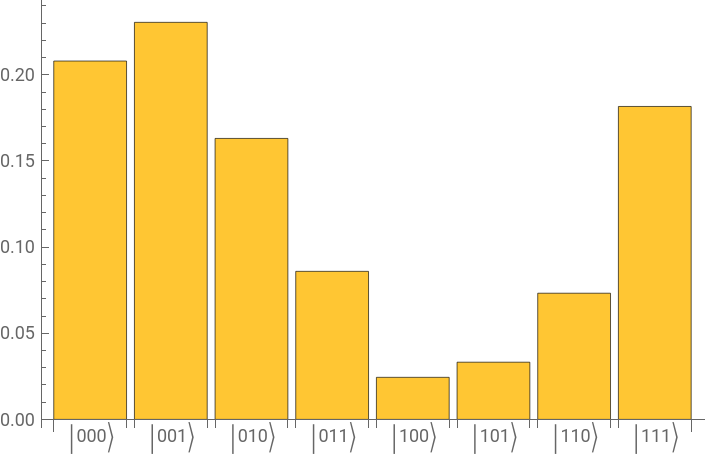
Probabilities are calculated from frequencies (in this case, based on 1024 runs).
Approach-3 to send a query (not recommended)
Approach-3 to send a query (not recommended)
First convert the quantum circuit into its QASM
Send the job to a backend:
Check the status of the job:
Get the raw results (only if the job is “Completed”)
Exact the results of measurements:
Turn them into an association with keys as corresponding collapsed state and values as frequencies:
Plot the results:
Comparing all of them together
Comparing all of them together
Plot all results side by side:
QPU result differences are not caused by the queries themselves, but by noise in QPUs. Each query was executed as a separate job, and noise varied across jobs.
CITE THIS NOTEBOOK
CITE THIS NOTEBOOK
Sending queries from Wolfram Mathematica to IBM quantum processing units
by Mohammad Bahrami
Wolfram Community, STAFF PICKS, 25 January, 2026
https://community.wolfram.com/groups/-/m/t/3624083
by Mohammad Bahrami
Wolfram Community, STAFF PICKS, 25 January, 2026
https://community.wolfram.com/groups/-/m/t/3624083