Cellular automata can simulate traffic flow by modeling how cars respond to those around them. In this project, I created a 2D cellular automaton to model traffic in a system with traffic lights. I tested various algorithms for light control and analyzed the conditions under which it is most efficient. Finally, I used these simple functions to parameterize several spaces of possible algorithms and find the most optimal versions of each algorithm for a given city and car density.
Traffic Models With Cellular Automata
Traffic Models With Cellular Automata
Traffic jams develop because cars do not accelerate at the same time; instead, each car must wait for the car in front to move before beginning to follow it. Cellular automata can model this behavior. For example, Rule 184, describes a 1-dimensional cellular automaton where a square will be a 1 (representing a car) if it was a 0 in the previous generation with a 1 to its left or if it was 1 in the previous generation with a 1 to its right. In terms of traffic, this means cars are traveling in a single lane in a single direction and will only drive forward if there is an entire car length of empty space in front of them.
First few iterations of Rule 184:
ArrayPlot[CellularAutomaton[184,Table[RandomChoice[{0,1}],10],5]]
Out[]=
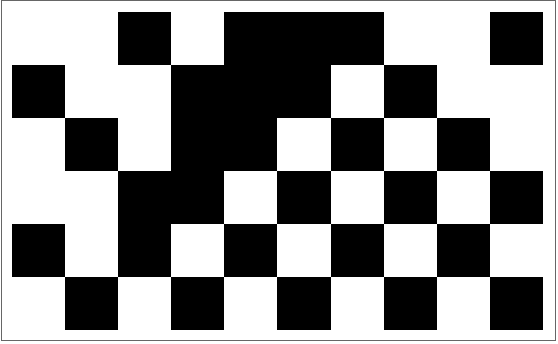
To visualize the cellular automaton as traffic flow, ArrayPlot can be used to display the 1s and 0s as cells and Animate can be used to replace the plot each time step.
Animate[ArrayPlot[{CellularAutomaton[184,Table[RandomChoice[{0,1}],20],x][[-1]]}],{x,0,10,1},SaveDefinitions->True]
Out[]=

Because traffic lights are designed to control the interaction of two lanes of traffic traveling in different directions when they intersect, traffic flow needs to be modeled in two directions. Rule 184 generates each next generation by looking at 3 cells from the previous time step.
RulePlot[CellularAutomaton[184]]
Out[]=

A 2-dimensional version of Rule 184, using the Moore neighborhood, would look at 3^2=9 cells in the previous generation and a car would only move if there is no car in the cell in front and if no car will move to that cell from a perpendicular direction. To start, a 2-dimensional cellular automaton can be created to model only one set of cars moving left-to-right and another moving top-to-bottom, with each car taking up an entire city block and never changing its direction.
Computational description of the rules above:
In[]:=
eastRules={{{_,_,_},{1,0,_},{_,_,_}}->1,{{_,_,_},{_,1,0},{_,_,_}}->0,{{_,_,_},{_,x_,_},{_,_,_}}:>x};southRules={{{_,_,_},{_,2,_},{_,0,_}}->0,{{_,2,_},{_,0,_},{_,_,_}}->2,{{_,_,_},{_,x_,_},{_,_,_}}:>x};
Function to execute the rules, one at a time:
In[]:=
nextBoard[board_]:=CellularAutomaton[southRules][CellularAutomaton[eastRules][board]]
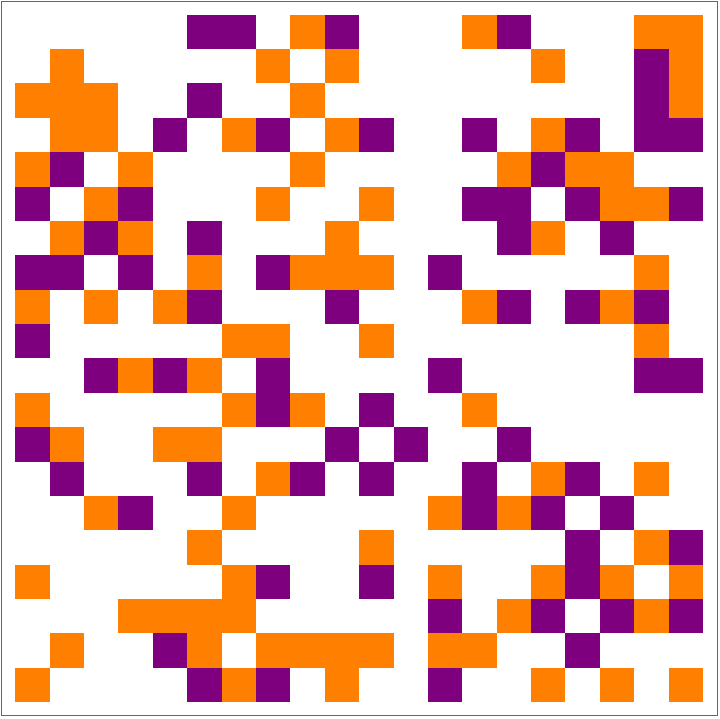
Creating a visual representation of this cellular automaton can start to reveal some patterns in traffic congestion. Dense regions in the grid can be seen spreading in the opposite direction of the traffic flow as more cars are forced to stop.
Visualization using ArrayPlot (purple cars move right, orange cars move down)
sampleBoard=RandomChoice[{0.6,0.2,0.2}->{0,1,2},{20,20}];Animate[ArrayPlot[NestList[nextBoard,sampleBoard,50][[timePassed]],ColorRules->{0->White,1->Purple,2->Orange}],{timePassed,1,50,1},SaveDefinitions->True]
Out[]=
A Simulated City
A Simulated City
A real city differs from the simple cellular automaton above in a few significant ways.
◼
Cars do not wrap around to the start of their lane when they reach the end (in the model above, the cars are essentially traveling on a torus)
◼
Streets can fit more than one car in between each intersection
◼
Traffic lights need to be added to test any algorithms
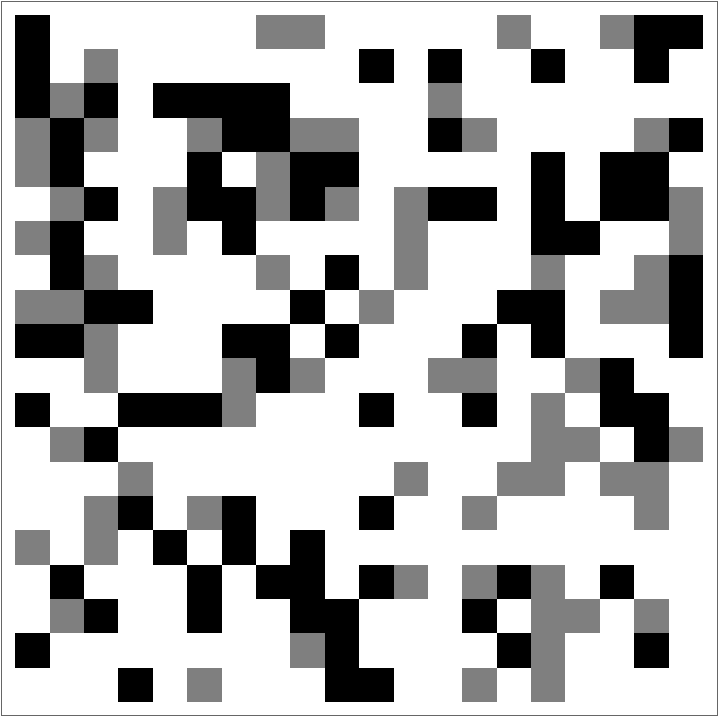
To fix the first issue, I created a function to remove cars from the board when they reach the edges.
Change the last cell in each row and column to zero:
In[]:=
cleanEdges[fullBoard_List]:=Join[Take[#,{1,-2}],{0}]&/@Join[Take[fullBoard,{1,-2}],{Table[0,Length[fullBoard]]}]
{ArrayPlot[sampleBoard],ArrayPlot[cleanEdges[sampleBoard]]}
Out[]=
,

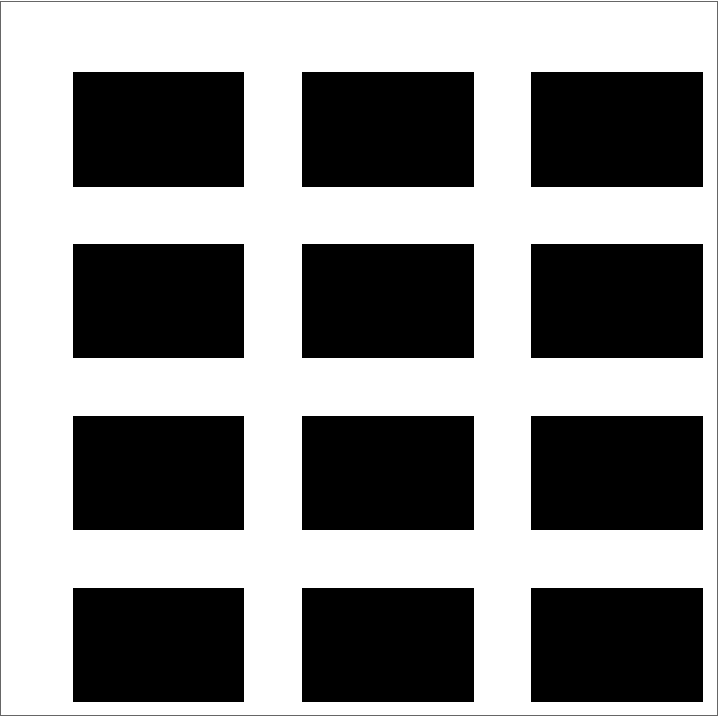
Next, to represent longer city blocks, rectangles of some other number in the initial board will never be replaced by a car (1 or 2). To start, blocks will just have constant dimensions.
Space horizontal streets 3 cells:
spacedStreets[spacing_Integer,sideLength_Integer]:=Table[x,{x,1,sideLength,spacing}]horizontalStreets=spacedStreets[3,12]
Out[]=
{1,4,7,10}
Space vertical streets 4 cells:
verticalStreets=spacedStreets[4,12]
Out[]=
{1,5,9}
Fill in the cells in between these streets:
createBlock[x_,y_]:=Flatten[Table[{#,i},{i,x}]&/@y,1]exampleBoard=ReplaceAt[Table[Table[0,12],12],{0->9},createBlock[Delete[Range[12],Partition[verticalStreets,1]],Delete[Range[12],Partition[horizontalStreets,1]]]];ArrayPlot[exampleBoard]
Out[]=
Now traffic lights can be placed at the intersections of these streets. In the cellular automaton, lights are represented by their own number, 3 for a green light for cars traveling east and 4 for a green light for cars traveling south. This way, in between traffic lights, cars will be traveling in a single lane and essentially follow Rule 184, but when they reach an intersection, the rules will be able to model the intersection and cars will be affected by cells in two dimensions.
Locations a light could be placed:
intersections:=Drop[createBlock[verticalStreets,horizontalStreets],1]ReplaceAt[exampleBoard,{0->3},intersections]//ArrayPlot
Out[]=
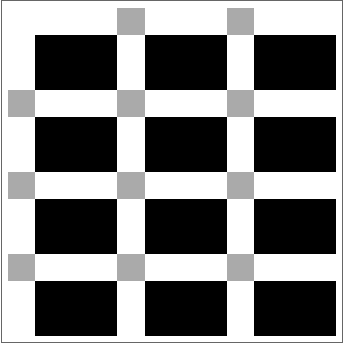
To realistically model a city, traffic lights won't be placed at every intersection. When there is no traffic lights, the car that arrives at the intersection first will continue.
Place lights at random locations:
Now, cars can be placed in some percentage of the remaining spaces. Now that there are blocks, cars can only be placed on a street traveling in their direction.
Locate spots each type of car could be placed at:
With the locations both types of cars could be computed, some percentage of those cells can be filled. To model times of higher and lower density, these variable can be set to any number from 0-1.
Replace the correct percentage of squares on horizontal streets with a 1:
Replace the correct percentage of squares on vertical streets with a 2:
Use ArrayPlot again to visualize where cars have been placed:
Consolidating everything into a single function:
To visualize the city a bit better, the numbers can be replaced with more human-meaningful symbols.
Replacing numbers in the board with visualRules:
There must also be numbers in the cellular automaton to represent traffic lights that also have a car in the intersection. The rules need to be modified so that nearby cars respond to these new symbols correctly.
Finally, each generation of the cellular automaton should be created by applying the rules for cars in both directions and then clearing the last squares of the board for any cars that reached the end.
Function to create next step of the cellular automaton:
Function to show 20 steps of the cellular automaton:
In order to create multiple steps of the simulation, the nextGeneration function should be applied repeatedly. The function NestList does this by creating a list where each next element passes the previous element into nextGeneration.
Light Algorithms
Light Algorithms
To begin testing how the lights can affect traffic, I created three simple algorithms to control the lights. Each algorithms works quite differently and uses different information about the cars in the city.
Random
Random
To start, one way the lights can be controlled is completely randomly. This uses no knowledge at all about the locations of any cars, so it could be set to run without the need for any coordination between lights or sensors to locate cars.
Rule to change all lights:
To decide if the lights should be switched, this function checks if one integer is divisible by another. This way, the frequency at which lights are switched can be controlled.
Randomly change all lights with 1/3 probability:
This modified version of the nextGeneration function will randomly switch the lights 1/3 of the time before applying the rules to move any cars. NestList can be used in the exact same way as before to generate 20 steps of animation.
Generate 30 frames with the lights randomly switching:
Animate the 30 frames:
Nearby Cars
Nearby Cars
As a slightly more intelligent algorithm, lights can look at nearby cells; if a car is next to the light, it immediately turns green for them. In the real world, this means sensors would have to be installed at intersections to detect when cars arrive. Because the lights only look at nearby cells, this algorithm can be described in another set of rules as a part of the cellular automaton.
Rotation Proportional to Density
Rotation Proportional to Density
While the light sensor algorithm uses the knowledge of cars directly next to traffic lights, a better algorithm could be possible with knowledge about the cars in the rest of the city. A simple version of this checks the percentage of cars moving horizontally towards a light and stays green in that direction an equal percentage of the time. This algorithm will turn all of the lights green horizontally, then all vertically, so that cars will be able to travel continuously until the lights change.
Ratio of horizontal to vertical density:
To turn the lights to the right direction for the correct amount of time, this function takes the amount of time the lights should in the vertical direction and calculates the amount of time they should be in the horizontal direction using the density ratio. Then it turns in green in the vertical direction the correct percentage of the time.
Testing Algorithms
Testing Algorithms
Quantifying Efficiency
Quantifying Efficiency
In order to decide which traffic light control algorithms are optimal, the efficiency of traffic flow needs to be quantified. I chose two metrics to measure how efficient the traffic flow is:
Average Speed
Average Speed
First, average speed measures the total cells changed to zero each time step per number of cars per number of steps. The average speed will be a number from 0-1.
To calculate this speed, first count the total number cells with a car in it that did not contain the same type of car in the previous frame.
To calculate this speed, first count the total number cells with a car in it that did not contain the same type of car in the previous frame.
Count the cells that gained a car:
Divide by the number of cars:
Count car movements in between every frame and compute the overall average speed:
Maximum Density Without Gridlock
Maximum Density Without Gridlock
With relatively few cars on the road, they can move very smoothly, rarely having to wait for another car. Obviously, as the density of cars increases, the system takes longer to clear all of the cars. There exists one critical value where a phase transition in the cellular automaton occurs and the cars quickly reach gridlock. At this point, some cars will never be able to reach the edge of the board.
Compute the number of time steps until all cars have cleared:
It takes 24 time steps for the cars to clear with the random algorithm on the board from before:
Around 0.4 density, the time to clear the screen becomes significantly longer. This is when cars begin to become gridlocked and unable to clear for a much longer time.
In this case, the point that the number of frames to clear the board passes the mean is at 50% density.
Comparing Results
Comparing Results
With such a low-density board, the greedy sensor algorithm that looks only at nearby cars is already close to perfect; no cars ever have to wait at a light or behind another car unless the initial condition happens to have two cars next to each other.
Running multiple trials at the same density of cars and same dimensions of the board shows that it out-performs both of the other strategies on average.
However, with a higher density of cars, it performs much worse because the lights are not in sync.
The third algorithm that switches all lights at once performs much better.
Fundamental diagrams
Fundamental diagrams
The fundamental diagrams of traffic flow compare three aspects of a traffic system: mean speed, flow, and density.
◼
Mean speed measures the mean distance traveled each time step, across all cars, the overallAverageSpeed function defined above.
◼
Flow measures the total number of cars that leave the system across a given period of time.
◼
Density measures the percentage of road capacity in number of vehicles that is filled, the average of the horizontalDensity and verticalDensity parameters in my model.
To draw these diagrams, many simulations need to be run to generate data. This function runs a simulation at 100 different different densities between 0 and 1. The simulations will need to be run without clearing the edge of the board so that the density is not changing within one simulation and affecting the average speed.
Run 100 simulations for each algorithm:
Use overallAverageSpeed to plot the speeds at each density:
The plots show that speed and density are inversely related for all algorithms, as expected. Surprisingly, all the algorithms lose speed as density increases pretty quickly and then the mean speed never drops too far below 0.5, but as seen before, the last algorithm is affected by density the least quickly.
Now, the other two fundamental diagrams can be created in a similar way.
Now, the other two fundamental diagrams can be created in a similar way.
Function to count how many cars reach the end of the board to calculate flow:
Calculate how many cars reach the edge per frame:
In the density vs. flow diagrams, density and flow are at first correlated; as more cars are on the road, more cars reach the end. Eventually, increasing the density does not increasing the flow anymore because adding more cars only causes more traffic jams.
Because the traffic simulation is in two dimensions, the horizontal and vertical densities can be graphed on separate axes. This makes a 3-dimensional plot when comparing to the flow.
Plot horizontal density vs. vertical density vs. flow with random algorithm:
With the random algorithm, this graph is pretty symmetrical; the points fall very close to a single plane, indicating that only the overall density affects the flow. However, with the third algorithm, when only one density has a high value, the flow remains relatively high because the lights can spend most of the time allowing that greater quantity of cars to travel.
Plot horizontal density vs. vertical density vs. flow with "rotation proportional to density" algorithm
Finding Optimal Algorithms
Finding Optimal Algorithms
Now that we have simple algorithms to control the traffic lights and can quantify how well they are optimizing the efficiency of traffic, the goal is to find an optimal version of the algorithms for any city with blocks of any size and any density of cars. To do this, a space of possible algorithms needs to be defined in a function so that the parameters can be changed to reach the optimal algorithm in that space. I initially planned to use reinforcement learning to train a model to find the optimal algorithm, but the built in Wolfram Language function FindMinimum can explore the space of possible algorithms, first testing a specified starting point, and searching for the minimum value of the function.
Function to control lights based on time turned green for horizontal cars and vertical cars:
In order for FindMinimum to search for an algorithm, it needs a function that returns a score for any pair of light timings that it tries. The function tries the third algorithm using an input of durations for lights in both directions and computes how many steps it takes to clear the board.
Function to return score for given light timing:
Find the parameters of scoreFunction that result in the best score:
FindMinimum returns the minimum value that it got (in this case, the number of steps it took to clear the board) as well as the inputs (in this case, the amount of time the lights should be green in each direction).
Conclusion
Conclusion
While we don't know any single perfect traffic light algorithm, this project found some interesting insights about which aspects of algorithms are most successful. For example, the algorithms that used the information about where all cars are in the city instead of only cars nearby performed much better. Maybe systems of sensors should be built in real cities to allow traffic lights to access this information.
Further Work
Further Work
◼
Improve traffic flow model
◼
Allow cars to speed up and travel more than one cell each time step
◼
Explore different types of intersections (I used intersections similar to 4-way stops and simple traffic lights)
◼
2-way stops
◼
Protected turns (green left arrows)
◼
Allowing right turns on red lights
◼
Roundabouts
References
References
◼
◼
Geroliminis, N., & Daganzo, C. F. (2008). Existence of urban-scale macroscopic fundamental diagrams: Some experimental findings. Transportation Research Part B: Methodological, 42(9), 759–770. https://doi.org/10.1016/j.trb.2008.02.002