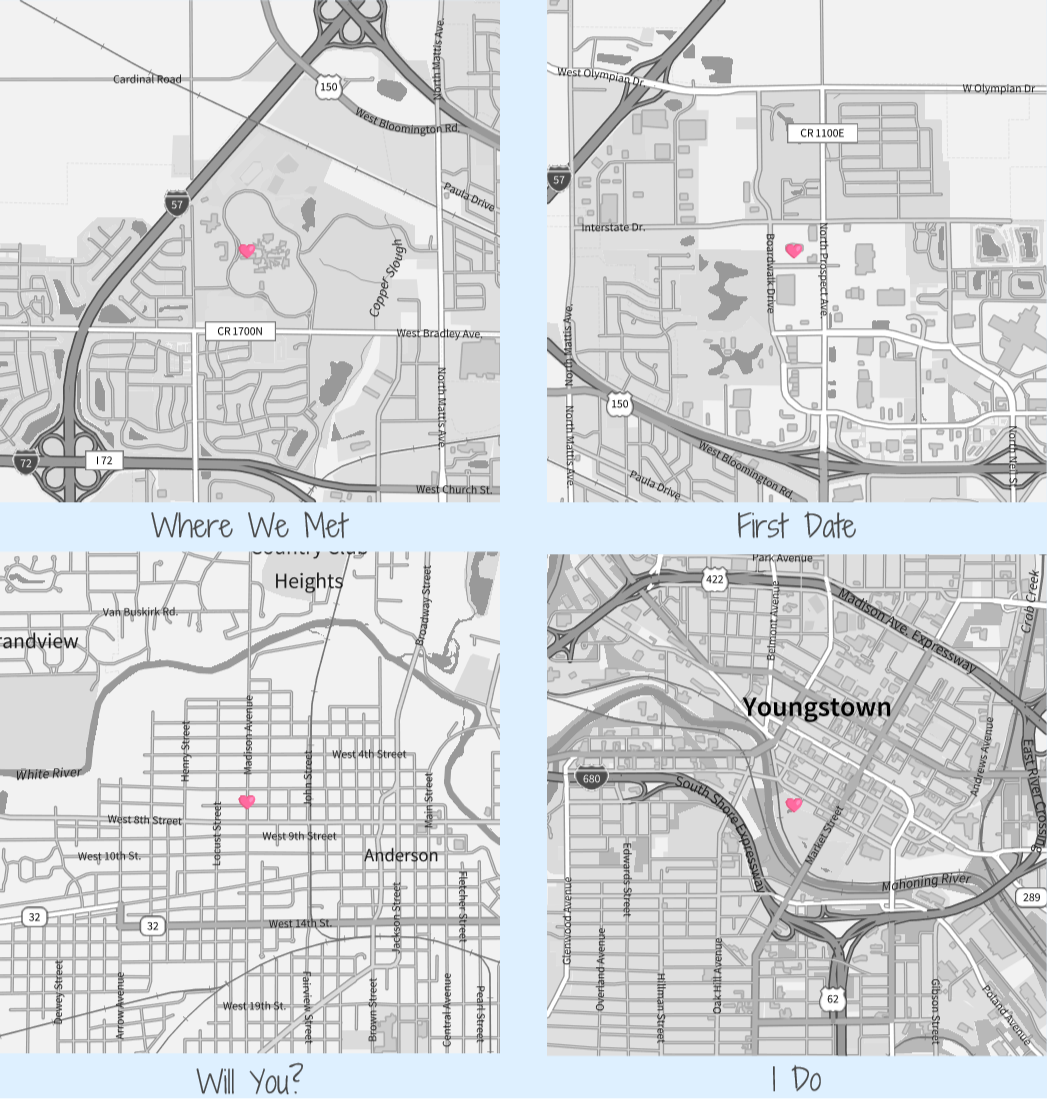
As Valentine’s Day approaches, I thought it might be fun to create some commemorative maps to honor the holiday. I’ve seen various panels/plates/trinkets advertised online that allows you to order similar maps, but you can create your own using Wolfram Language and GeoGraphics.
Local Construction
Local Construction
For best results, constructing maps locally is preferred. The quality is better when you have access to local rendering hardware, unlike remote headless servers with no graphics hardware.
I decided to aim for a four panel result that highlights the meeting location, first official date, proposal location, and wedding location. There are a number of ways of laying out the relevant information and I decided to use a rather “artsy” font for a more commemorative rather than computational feel.
Define the visual representation of the GeoMarkers:
In[]:=
heart=🩷;
Define a set of rules defining the GeoPosition of the four events:
In[]:=
rules={"Where We Met"->GeoPosition[{40.1321839,-88.2914261}],"First Date"->GeoPosition[{40.1473436,-88.26}],"Will You?"->GeoPosition[{40.10904240845442,-85.69168927434205}],"I Do"->GeoPosition[{41.0988907,-80.6535806}]};
Finally, layout the panels in a Grid:
GridColumnGeoGraphics{GeoMarker[rules[[1,2]],heart]},,Style[rules[[1,1]],DarkGray,18,FontFamily->"Shadows Into Light Two"],Alignment->Center,ColumnGeoGraphics{GeoMarker[rules[[2,2]],heart]},,Style[rules[[2,1]],DarkGray,18,FontFamily->"Shadows Into Light Two"],Alignment->Center,ColumnGeoGraphics{GeoMarker[rules[[3,2]],heart]},,Style[rules[[3,1]],DarkGray,18,FontFamily->"Shadows Into Light Two"],Alignment->Center,ColumnGeoGraphics{GeoMarker[rules[[4,2]],heart]},,Style[rules[[4,1]],DarkGray,18,FontFamily->"Shadows Into Light Two"],Alignment->Center,Background->,Spacings->2

Out[]=
FormFunction for Cloud
FormFunction for Cloud
A cloud solution comes with some restrictions compared to doing this locally. The server is headless so doesn’t have the same rendering capabilities as a local and dedicated GPU. Also, choice of fonts is limited so is best to keep it simple.
The following code can be used to deploy a form in the cloud that lets the user specify locations in input fields, and then generates the results
CloudDeployFormPage{{"wheremet","where we met"}->"Location",{"firstdate","first date"}->"Location",{"proposal","proposal"}->"Location",{"wedding","wedding"}->"Location"},GridColumnGeoGraphics{GeoMarker[#wheremet]},,Style["where we met",DarkGray,18,FontFamily->"Arial"],Alignment->Center,ColumnGeoGraphics{GeoMarker[#firstdate]},,Style["first date",DarkGray,18,FontFamily->"Arial"],Alignment->Center,ColumnGeoGraphics{GeoMarker[#proposal]},,Style["Will You?",DarkGray,18,FontFamily->"Arial"],Alignment->Center,ColumnGeoGraphics{GeoMarker[#wedding]},,Style["I Do",DarkGray,18,FontFamily->"Arial"],Alignment->Center,Background->,Spacings->2&,"ResultBelow",ImageSize->1024,AppearanceRules-><|"Title"->"Happy Valentines Day","Description"->"Enter Locations:"|>,"ValentineMaps",Permissions->"Public"
CITE THIS NOTEBOOK
CITE THIS NOTEBOOK
Commemorative Valentine's Day maps via geospatial rendering
by Jeffrey Bryant
Wolfram Community, STAFF PICKS, February 9, 2026
https://community.wolfram.com/groups/-/m/t/3637408
by Jeffrey Bryant
Wolfram Community, STAFF PICKS, February 9, 2026
https://community.wolfram.com/groups/-/m/t/3637408