This project develops a framework for modelling energy systems. It is designed to accommodate a wide range of energy production, consumption, and storage systems. The framework's flexibility allows it to integrate various types of energy sources, including renewable and non-renewable resources. By using real-world data, the model can simulate energy system behaviours in any location and any time-range.
Project
Project
This paclet helps you simulate a wide variety of energy systems over any time period and time-step. It includes built-in functions to create timeseries data for wind speed, solar irradiation, and simplified timeseries for water flow to hydropower. These timeseries can be used for calculating wind energy production or PV production, or you can use your own time series data.
For power production, there are multiple functions to accommodate various production types. If none of these are suitable, you can add your own power generation directly to the simulation using the AnyProduction function.
For demand, you can add any number of demand locations of any size, enabling you to simulate the energy needs of a single house or an entire country with this tool.
For storage, you can add any number of storage sites, with adjustable capacity and maximum input and output powers. Hydropower is also considered a type of storage but can only be charged by incoming water as described by the time series.
All generation, demand, and storage sites are added to the simulation, which then calculates how the system behaves over any specified time frame and step size. The simulation processes sites in the order they are added, so it’s best to add production and demand first and leave storage systems for last.
For power production, there are multiple functions to accommodate various production types. If none of these are suitable, you can add your own power generation directly to the simulation using the AnyProduction function.
For demand, you can add any number of demand locations of any size, enabling you to simulate the energy needs of a single house or an entire country with this tool.
For storage, you can add any number of storage sites, with adjustable capacity and maximum input and output powers. Hydropower is also considered a type of storage but can only be charged by incoming water as described by the time series.
All generation, demand, and storage sites are added to the simulation, which then calculates how the system behaves over any specified time frame and step size. The simulation processes sites in the order they are added, so it’s best to add production and demand first and leave storage systems for last.
To start using the paclet, add the following commands to install it. Also its easier to set the dates in the beginning.
PacletInstall["NiiloKantoniemi/EnergySystem"];Needs["NiiloKantoniemi`EnergySystem`"];startDate=DateObject[{2022,5,1},"Instant"];endDate=DateObject[{2022,5,15},"Instant"];step=Quantity[1,"Hour"];datesWithStep=DateRange[startDate,endDate,step];datesNoStep={startDate,endDate};
Timeseries creation
Timeseries creation
The timeseries part includes three primary timeseries generators. The WindTS (GenerateWindSpeedTimeSeries) generates data for wind speed at a given location and time frame, with output in SI units (m/s). The SolarTS (GenerateSolarIrradianceTimeSeries) produces data for solar irradiance at a specific location and time frame, with output in SI units (W/m²).
The WaterTS (GenerateWaterFlowTimeSeries) creates simplified data for water flow using sine wave functions to represent daily fluctuations, with output in SI units (m³/s). The first parameter is the daily average flow while the second is the daily peak on top of the average flow. These generated time series are simplifications, but users can input their own data into the system’s production, demand, and storage functions, ensuring that the time ranges and units match across all inputs.
Below is one example how to generate different types of timeseries
The WaterTS (GenerateWaterFlowTimeSeries) creates simplified data for water flow using sine wave functions to represent daily fluctuations, with output in SI units (m³/s). The first parameter is the daily average flow while the second is the daily peak on top of the average flow. These generated time series are simplifications, but users can input their own data into the system’s production, demand, and storage functions, ensuring that the time ranges and units match across all inputs.
Below is one example how to generate different types of timeseries
windTS=GenerateWindSpeedTimeSeries[,datesNoStep];solarTS=GenerateSolarIrradianceTimeSeries[,datesNoStep,datesWithStep];waterTS=GenerateWaterFlowTimeSeries[,,startDate,endDate,step];
Energy production functions
Energy production functions
The Packet EnergySystem supports five types of energy sources. The WindSource function requires inputs wind speed time series, air density, turbine blade length, turbine efficiency, maximum power output, and the number of turbines. Based on these parameters the function calculates power produced. The SolarSource function takes inputs of solar irradiance time series, the area of solar panels, and the efficiency of the panels. For simplicity, the NuclearSource function assumes a constant production power with a single input.
The Variable Production function allows for theoretical production that can be modified, currently using a sine function with inputs for average production and peak production on top of the average. The AnyProduction function accepts any time series of power production, provided the time range and units are consistent with the simulation requirements kW or MW in this case. All energy sources are based on the ElectricalSource function and are fed into the ElectricalSystemSimulate function to create a comprehensive simulation of the energy system.
Below is simple example how to add energy source for the simulation.
The Variable Production function allows for theoretical production that can be modified, currently using a sine function with inputs for average production and peak production on top of the average. The AnyProduction function accepts any time series of power production, provided the time range and units are consistent with the simulation requirements kW or MW in this case. All energy sources are based on the ElectricalSource function and are fed into the ElectricalSystemSimulate function to create a comprehensive simulation of the energy system.
Below is simple example how to add energy source for the simulation.
w=WindSource[windTS,,,0.40,,2];s=SolarSource[solarTS,,0.20];n=NuclearGeneration[];vP=VariableProduction[,];aP=AnyProduction[powerProdTS];
Demand Functions
Demand Functions
For energy demand, there are currently three types: ConstantDemand, VariableDemand, and AnyDemand. Constant demand represents a flat, unchanging demand over time and requires only one input, the demand power. Variable Demand simulates theoretical daily fluctuations in demand and can be modified to include seasonal components. It has two inputs: average demand and peak demand above the average.
AnyDemand can accept any time series of power demand to use in the simulation, provided the time range matches the simulation and the units are consistent, kW or MW in this case. All output units are based on input units, but using SI units is recommended. All types of energy demand are modeled using the ElectricalSink function, which is fed into the ElectricalSystemSimulate function to create the simulation.
Below is simple example how to add demand for the simulation.
AnyDemand can accept any time series of power demand to use in the simulation, provided the time range matches the simulation and the units are consistent, kW or MW in this case. All output units are based on input units, but using SI units is recommended. All types of energy demand are modeled using the ElectricalSink function, which is fed into the ElectricalSystemSimulate function to create the simulation.
Below is simple example how to add demand for the simulation.
c=ConstantDemand[];v=VariableDemand[,];aD=AnyDemand[powerDemTS];
Energy storage functions
Energy storage functions
For energy storage, there are currently two types: simple battery and hydropower plant. The SimpleBattery stores electricity during periods of excess production and discharges it when production is insufficient to meet demand. The inputs for the simple battery include maximum energy capacity, maximum charge power, maximum discharge power, roundtrip efficiency and degradation per full equivalent cycle (though last two parameters do not work yet).
Hydropower stores water and uses it to generate power when needed. In this simulation, hydropower can only be charged by incoming water flow provided as a time series. If the reservoir is full, any excess water is lost/spilled over the dam without producing electricity. The inputs for hydropower include height difference, water flow time series, reservoir volume, production efficiency, maximum power production, gravity constant, and water density constant. Again, all output units are based on input units, but using SI units is recommended. All storage types are modelled using the ElectricalStorage function, which is also fed into the ElectricalSystemSimulate function.
Below we add storages to the simulation.
Hydropower stores water and uses it to generate power when needed. In this simulation, hydropower can only be charged by incoming water flow provided as a time series. If the reservoir is full, any excess water is lost/spilled over the dam without producing electricity. The inputs for hydropower include height difference, water flow time series, reservoir volume, production efficiency, maximum power production, gravity constant, and water density constant. Again, all output units are based on input units, but using SI units is recommended. All storage types are modelled using the ElectricalStorage function, which is also fed into the ElectricalSystemSimulate function.
Below we add storages to the simulation.
b=SimpleBattery[,,,0.98,0.00006];h=HydroPowerSource[,waterTS,,0.80,,,];
Simulation
Simulation
The ElectricalSystemSimulate function handles the simulation of these various production, demand, and storage systems. Production, demand, and storage inputs are associated by name, which can be any name since the system recognizes different types based on function type. There can be multiple instances of production, demand, and storage sources, and the same source can be used several times. The order of components in the simulation is important; it is best to start with production or demand and leave storage systems for last.
Below be create a simulation of the production, demand and storage. Note you can use multiple of each.
Below be create a simulation of the production, demand and storage. Note you can use multiple of each.
sim=ElectricalSystemSimulate[<|(*thefirstinlistgetsusedfirst*)"WindGenerator1"->w,"SolarGenerator1"->s,"NuclearGeneration1"->n,"ConstantDemand"->c,"VariableDemand"->v,"HydroPlant"->h,"BatteryBank"->b|>,(*startdateenddatestepsize*){startDate,endDate,step}];
Plotting
Plotting
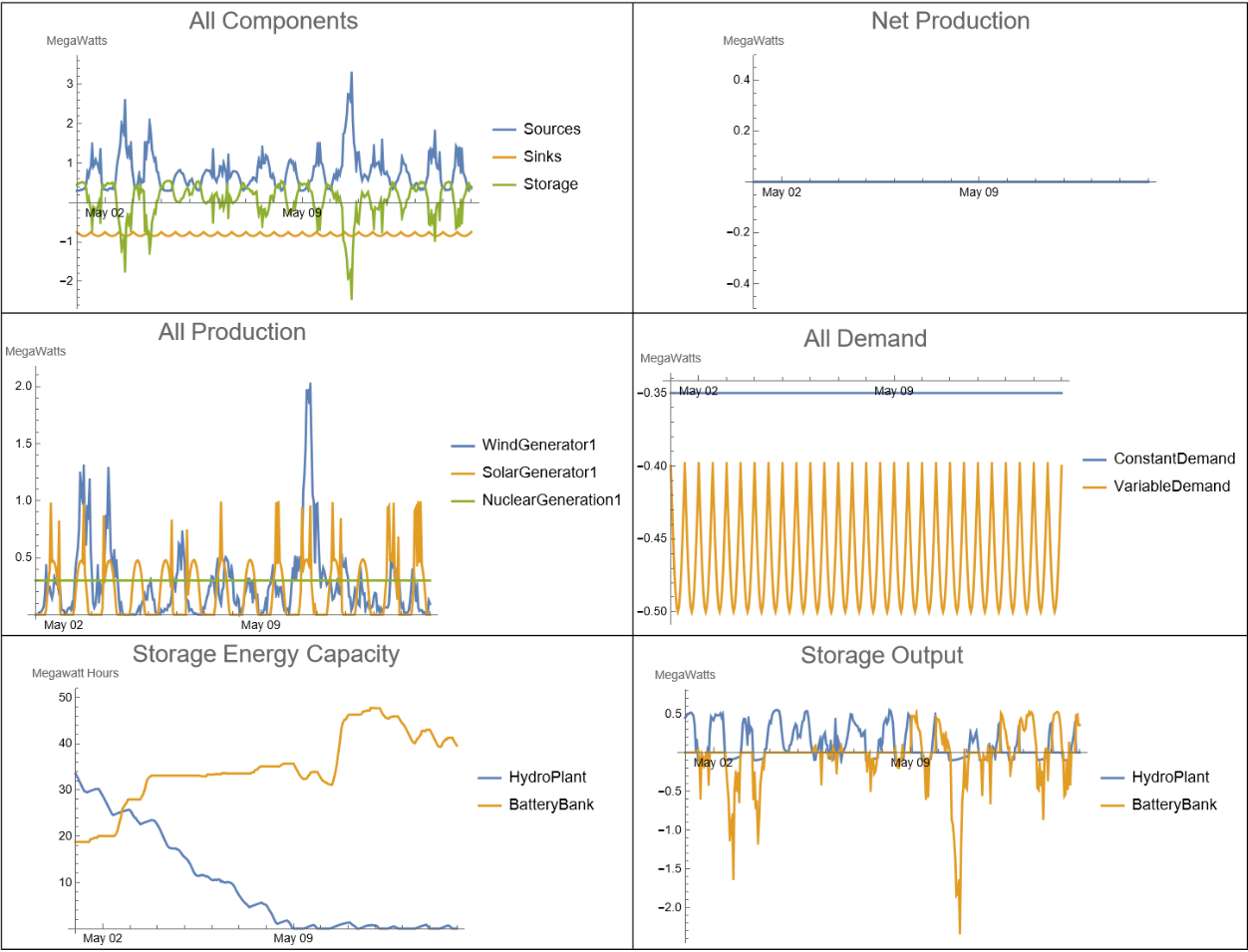
To visualise the simulation there is multiple useful plots to understand the simulation better.
allComponents=ListLinePlot[Total/@sim["NetProduction"],PlotRange->All,TargetUnits->"MegaWatts",AxesLabelAutomatic,PlotLabel->Style["All Components",20],ImageSize->Medium];netProd=ListLinePlot[Total[Total/@sim["NetProduction"]],PlotRange->{-0.5,0.5},TargetUnits->"MegaWatts",AxesLabelAutomatic,PlotLabel->Style["Net Production",20],ImageSize->Medium];generation=ListLinePlot[sim[["NetProduction","Sources"]],PlotRange->All,TargetUnits->"MegaWatts",AxesLabelAutomatic,PlotLabel->Style["All Production",20],ImageSize->Medium];demand=ListLinePlot[sim[["NetProduction","Sinks"]],PlotRange->All,TargetUnits->"MegaWatts",AxesLabelAutomatic,PlotLabel->Style["All Demand",20],ImageSize->Medium];storages=ListLinePlot[sim["State"],PlotRange->All,TargetUnits->"Megawatt Hours",AxesLabelAutomatic,PlotLabel->Style["Storage Energy Capacity",20],ImageSize->Medium];storage=ListLinePlot[sim[["NetProduction","Storage"]],PlotRange->All,TargetUnits->"MegaWatts",AxesLabelAutomatic,PlotLabel->Style["Storage Output",20],ImageSize->Medium];Grid[{{allComponents,netProd},{generation,demand},{storages,storage}},Frame->All]
Concluding Remarks
Concluding Remarks
Future enhancements to the simulation include adding a market mechanism that creates a price time series over the course of the simulation. Each production and storage type would have a price at which they produce electricity, allowing for the creation of a demand that reacts to price fluctuations. With higher prices, demand would decrease, and with lower prices, demand would increase. Development is underway for a new type of demand, called VariableDemandResponse, which adjusts based on price. This function includes inputs for average production, peak production above the average, the price at which demand begins to decrease, the price at which demand starts to increase, and parameters for decreased and increased demand.
vDR=VariableDemandResponce[,,,,,];
Adding a backup power source would also be beneficial. This source would produce electricity when no other methods provide enough power. It would be the most expensive option and would have inputs for maximum power production and maximum ramp-up rate. A function called BackUpPowerSource is currently in development and nearly operational but still requires some modifications.
ba=BackUpPowerSource[,];
Here is useful code in order to add units to timeseries using powerProdTS as a example.
powerProdTS=TimeSeriesMap[#1*Quantity[1,"Megawatts"]&,powerProdTS];
Acknowledgments
Acknowledgments
I thank my mentor, Christoper Wolfram for helping me to turn my ideas into Wolfram Language code. I also thank my Teaching assistant Lina M Ruiz G for with coding.
Cite This Notebook
Cite This Notebook