Training flight control systems for an idealized drone can be a daunting task, especially if your system is a complex, high-count propelled unit like ours. However, the process becomes much easier with access to Wolfram’s suite of advanced AI computational software solutions. Here is how we did it.
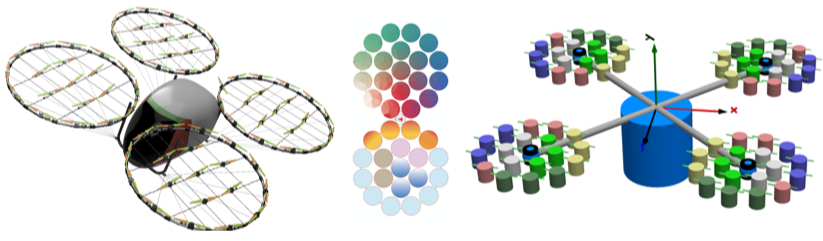
This method of multi-rotor/ engine distributed propulsion system is considered highly computational.
At Wolfram Summer School 2024, I am trained a simple neural net agent as preliminary steps in architecting an AI-driven flight control system for our agriculture multi-rotor propelled electric vertical takeoff and landing vehicle (eVTOL). The vehicle has been modelled in Wolfram System Modeler providing a seamless path to access core modelling functionalities.
Machine Learning Control of Aerial Dynamical Systems
Machine Learning Control of Aerial Dynamical Systems
This quad propulsion ring configuration with counter rotating blades will takeoff on a one-dimensional vertical axis on its weight. The simulation of the model will be in a time step (1.0 millisec.) closer to hardware specifications. The blades will have some thrust values, such that the drone will loose altitude without intervention.
The aim of the agent is to keep the maintain hover for as long as possible once it attains height and not overshoot (or undershoot). This is accomplished by learning which of three possible actions (accelerate, decelerate or hold) should be performed at any given time.
Plan for the Simple Neural Net Training
Plan for the Simple Neural Net Training
◼
The basic loop architecture is as follows:
◼
The agent queries Wolfram SystemModel for the state of drone model. The RL training agent queries for the drone’s “height” and “velocity” variables
◼
The agent now emulating the controller decides to take an action. Its action changes a parametric variable in the system. For this drone, it’ll be the propeller “thrust inputs”.
◼
The system is allowed to evolve for a set amount of time. This amount of time becomes the time step which is assumed ~0.1 millisec.
◼
The agent initializes and resets back to the first step computing a reward for the action taken or penalty
Seamless Integration of System Modeler <> Mathematica
Seamless Integration of System Modeler <> Mathematica
Loading Required Packages
Loading Required Packages
The mentors consulted internally with the System Modeler designers who helped to develop a pseudo model of our quad configuration. The relevant System Modeler packages are then loaded into the Mathematica environment by this command.
In[]:=
SystemModel;
This SystemModel command makes all the System Modeller functions and symbols available for use.
Check if the package is loaded
In[]:=
If[model===$Failed,Print["Failed to load model"],Print["Model loaded successfully"]]
Model loaded successfully
Import the package that contains all the models and components:
In[]:=
ImportString[,"MO"]
Out[]=
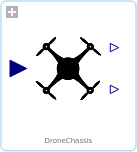
Loading the idealised model of our eVTOL to simulate its behavior and interactions. This model DroneHover.Examples.DroneChassis is meant to include the essential dynamics and control aspects of our eVTOL’s chassis.
In[]:=
model=SystemModel["DroneHover.Examples.DroneChassis"]
Out[]=
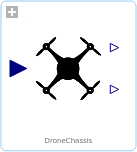
Whilst the function “SystemModel” retrieves the eVTOL model from the SystemModeler library, the string “DroneHover.Examples.DroneChassis” specifies the path to the vehicle’s chassis example within the SystemModeler library.
In[]:=
SystemModel["DroneHover.Examples.DroneChassis",{"Diagram",Frame->False,ImageSize->Large}]
Out[]=
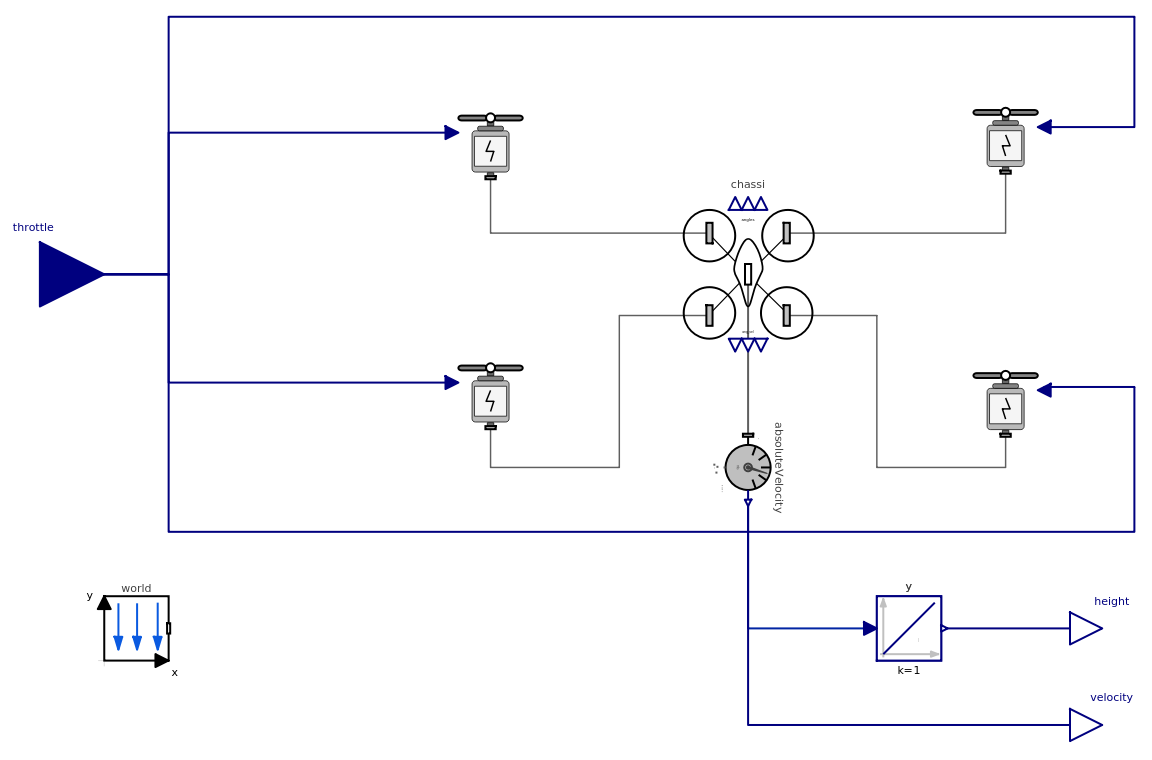
Confirm again that the model was loaded successfully
In[]:=
If[model===$Failed,Print["Failed to load model"],Print["Model loaded successfully"]]
Model loaded successfully
Setting and getting parameter values
In[]:=
pars=SystemModel[model,"ParameterValues"];
Simulation Function
Simulation Function
The next cell here is to define a function for simulating a single step of the eVTOL’s flight given certain inputs. This function updates the vehicle’s state based on the throttle input we give it and the current observed state.
In[]:=
simulateStep[model_,throttle_,observedState_,time_:0.1]:=Module[{sim,finalState,inputFunction},inputFunction=Function[throttle];sim=SystemModelSimulate[model,time,<|"Inputs"->{"throttle"->inputFunction},"ParameterValues"->{"initialHeight"->observedState[[1]],"initialVelocity"->observedState[[2]]}|>,ProgressReporting->None];finalState=sim[{height,velocity},time];finalState]
In[]:=
Clear[simulateStep]
The “simulateStep” function encapsulates the simulation of a single step; the “model_” calls the drone model to be simulated. The “throttle_” is the input that specifies my throttle value.
I tried to use the “observedState_” for the current state of the drone, specifically for height and velocity while “time_” handles the duration of the simulation step, defaulting to 0.1 seconds.
Further inside the function, the “inputFunction = Function[throttle]” creates an input function for the throttle. The “SystemModelSimulate” runs the simulation for the specified time with the given inputs and parameter values and “finalState = sim[{height, velocity}, time]” extracts the final state (height and velocity) after the simulation step.
I tried to use the “observedState_” for the current state of the drone, specifically for height and velocity while “time_” handles the duration of the simulation step, defaulting to 0.1 seconds.
Further inside the function, the “inputFunction = Function[throttle]” creates an input function for the throttle. The “SystemModelSimulate” runs the simulation for the specified time with the given inputs and parameter values and “finalState = sim[{height, velocity}, time]” extracts the final state (height and velocity) after the simulation step.
With suggestions from the mentors, the target was to simulate a step for throttle equal to 10:
In[]:=
simulateStep[model,10,{0,1}]
Out[]=
simulateStep
,10,{0,1}
In[]:=
(*Runasimulationandplottheresults*)sim=SystemModelSimulate[model,{0,5},<|"Inputs"->{"throttle"->Function[36]},"ParameterValues"->{"initialHeight"->1,"initialVelocity"->0.1}|>];heightPlot=SystemModelPlot[sim,"height",PlotRange->All];velocityPlot=SystemModelPlot[sim,"velocity",PlotRange->All];Print[heightPlot];Print[velocityPlot];
The “sim” function simulates the eVTOL from time 0 to 5 seconds. We decided to apply a constant throttle input of 36 using the “Inputs” -> {“throttle” -> Function[36]} call.
“ParameterValues” -> {“initialHeight” -> 1, “initialVelocity” -> 0.1} sets the initial height and velocity and “SystemModelPlot” plots the height and velocity over the simulation period.
“ParameterValues” -> {“initialHeight” -> 1, “initialVelocity” -> 0.1} sets the initial height and velocity and “SystemModelPlot” plots the height and velocity over the simulation period.
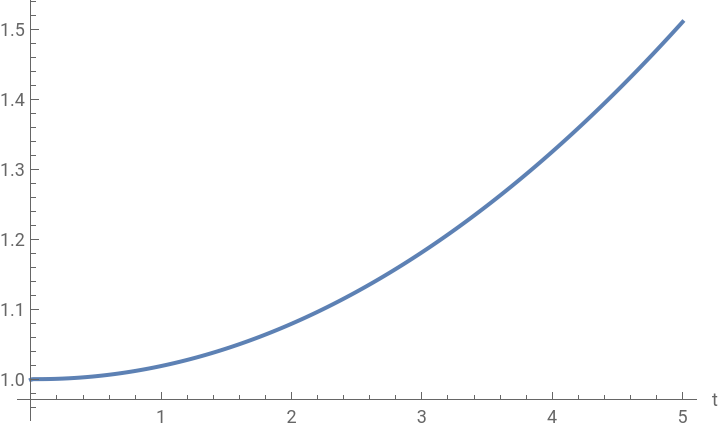
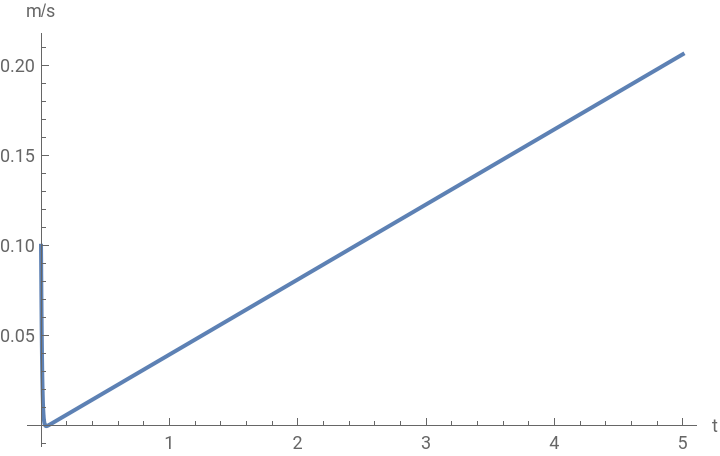
Above, we ran a longer simulation and plot the resulting height and velocity of the vehicle over time. This helped visualize the its behavior under given inputs.
Define and Train the Neural Network Policy
Define and Train the Neural Network Policy
This section of the code starts of with defining functions to compute discounted rewards.
“discountedSum” allows for the sum of rewards discounted figured out by a factor gamma raised to increasing powers.
applyDiscount: Applies the discount function to each reward in the list
applyDiscount: Applies the discount function to each reward in the list
Next was to define the simple feedforward neural network policy
We gave the eVTOL a desired height of 10
The “policyNet” neural network is 64 neurons in a hidden layer using Tanh activation, output layer with Ramp activation. The network takes 2 inputs (height and velocity).
The “policyNet” neural network is 64 neurons in a hidden layer using Tanh activation, output layer with Ramp activation. The network takes 2 inputs (height and velocity).
Collect episodes for reinforced learning
Collect episodes for reinforced learning
Here, we define a function to collect episodes of flights, which will be used for training the neural network policy.
Sampler function
The “reinforceLoss” specifies the loss computation using a mean absolute loss layer and threading layer. The “MeanAbsoluteLossLayer[]” computes the mean absolute error.
ThreadingLayer[#1 * #2 &]: Multiplies the discounted rewards with the predicted actions
ThreadingLayer[#1 * #2 &]: Multiplies the discounted rewards with the predicted actions
Test the Trained Policy
Test the Trained Policy
Finally, we train the policy network using the defined sampler and loss function.
Animation with Trained Policy
Animation with Trained Policy
Here’s the animation for the environment with the trained policy net.
Concluding Remarks
Concluding Remarks
The idealised quadcopter can be controlled by an RL agent to maintain takeoff and hover flight. The idealised rotor propelled eVTOL modelled in System Modeller is a distributed propulsive system intended to capture key constraints in industrial drones as robotic extensions in (human) operational activities at low and very low altitudes in fields with active flight stability, situational awareness, navigation and controls.
Future Developments
Future Developments
The future work will entail exploring the high order of control dynamics which requires very complex and highly actuated compound rotorcraft with its novel DaLI algorithms for the controls allocating signals to redundant actuators as a means of alleviating loads without inducing instability or over-tasking components at any given period in flight.
Review framework to determine if it properly incorporates deterministic dynamics using Koopman forecast and MOL, preprocesses sensor data with AutoARIMA, and integrates advanced neural network architectures like DeepONet and SiNDY Autoencoder for the flight control of quadcopter with counter rotating blades is drafted. Sitting on ground in the initial position the drone is signalled to takeoff vertically to a given height. It maintains that height in hover state for 5 secs, then proceeds to fly forward at a rate of 3m/s for 10 secs. It stops, hovers for 3 secs then lands. It employs a SiNDY loss function for training and utilizes MCMC for probabilistic analysis and risk assessment.
Review framework to determine if it properly incorporates deterministic dynamics using Koopman forecast and MOL, preprocesses sensor data with AutoARIMA, and integrates advanced neural network architectures like DeepONet and SiNDY Autoencoder for the flight control of quadcopter with counter rotating blades is drafted. Sitting on ground in the initial position the drone is signalled to takeoff vertically to a given height. It maintains that height in hover state for 5 secs, then proceeds to fly forward at a rate of 3m/s for 10 secs. It stops, hovers for 3 secs then lands. It employs a SiNDY loss function for training and utilizes MCMC for probabilistic analysis and risk assessment.
Acknowledgments
Acknowledgments
I’d like to acknowledge the relentless support and guidance from Maria Sargsyan and Matteo Salvarezza throughout the duration of this project.
References
References
This is our preferred reference style. You may use “et al.” if there are more than two authors.
1
. Matteo Salvarezza - Neural Networks I
2
.Maria Sargsyan - Neural Networks III
3
.Train an Agent in a Reinforcement Learning Environment by Wolfram - URL - https://reference.wolfram.com/language/ref/device/SimulatedCartPole.html
4
.Prof. Steven Brunton & J. Nathan Kutz (2022), “Data-Driven Science and Engineering - Machine Learning, Dynamical Systems and, Control”. URL - https://www.amazon.com/Data-Driven-Science-Engineering-Learning-Dynamical/dp/1009098489
5
.A. Author Last Name and B. Author Last Name (year), Book Title. Publisher.
Cite This Notebook
Cite This Notebook