A flag can symbolize the history, culture, and ideals of a nation. Because of that, we can use flags to see which nations are similar and which ones are not. In this project, I used Clusters and Image Processing in order to map what flags are most similar to others. I created maps of countries with similar flags, and a function that shows you which nations have similar flags to any nation of your choosing.
Creating the Dictionary.
Creating the Dictionary.
I first chose to make a system that would separate the flags in the Wolfram Database into groups. Though, in order to do this, I would need a system that when given a flag could return the nation to which that flag belongs. I did this by first creating a database of all of the Flags under a variable called "FlagList," creating a database of all of the nations under a variable "CountryList," then creating an AssociationThread to connect the nations. Though we soon learned that the AssociationThread would refuse to recognize France, the Netherlands, and Norway because those nations had colonies that also had the same flag. So because the association thread did not include those nations, we had to resort to another method. We chose to create a "FlagList" variable as we did before, but we removed all of the duplicate flags (There were 6 French Flags due to their colonies of Martinique, Saint Barthelemy, Saint Martin, Saint Pierre and Miquelon, and Wallis and Futuna islands). We then created a Country List under the Variable "CountryList3," though we had some trouble with that. It turns out that FlagList was 249 items long and CountryList3 was 250 Items long. I looked through it, and found that CountryList3 had included Antarctica, while the FlagList had not. Hence born the creatively-named CountryList4 (Antarctica was in the 9th place in the list). Finally, We created a documentation which would attach a flag to the name of a country (or in the case of France, The Netherlands, and Norway a list of countries). I named this F2N3, as it is the documentation for Flag to Nations (F2N).
Putting all the flags into a directory.
In[]:=
FlagList=DeleteDuplicates[CountryData[#,"Flag"]]&/@CountryData[][[1;;249]];CountryList4=DeleteDuplicates[Delete[EntityList["Country"],9]];F2N3=Merge[DeleteCases[If[!MissingQ[CountryData[#,"Flag"]],CountryData[#,"Flag"]#]&/@EntityList["Country"],Null],Join];
Nicely enough, If you attach a flag of any nation into the documentation, it will return the entity of the nation of origin.
In[]:=
F2N3[CountryData["France","Flag"]]
Out[]=
,,,,,
Creating the Color Groupings and the Subsequent Maps
Creating the Color Groupings and the Subsequent Maps
In order to find the groupings for the flags, I decided to use The FindClusters method, this means that Wolfram would go through every flag, and try to group it into how many groups you tell it to. I added "PerformanceGoal → "Quality"" In order to tell Wolfram to take it's time and not rush. After some experimentation, I chose to create 12-30 groups, each map had a different number of groups. After that, I mapped the F2N3 directory over the Group that we want, which, when flattened, would give us a list of nations whose flags were grouped. After placing that into a GeoListPlot, giving it thin edges and a transparent black interior, we get a map of all of the nations who were grouped together.
An example of a map with all of the Tricolor Flags.
In[]:=
TriPlatform=FindClusters[FlagList,100,PerformanceGoal"Quality"];
In[]:=
GeoListPlot[Flatten[Map[F2N3,TryPlatform[[18]]]],GeoRange"World",PlotStyleDirective[EdgeForm[Thin],Opacity[0.5],Black]]
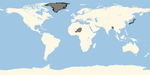
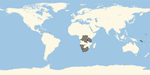
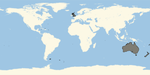
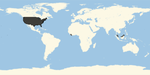
I made 4 other maps with the same strategy. One with all flags containing a circle in the center, one with a diagonal dash, one with the Union Jack, and one with a background similar to the US with red and white horizontal lines. They are shown below.
In[]:=
ImageResize[Rasterize@CircleInMiddle,150]
Out[]=
In[]:=
ImageResize[Rasterize@DiagonalDash,150]
Out[]=
In[]:=
ImageResize[Rasterize@UnionJack,150]
Out[]=
In[]:=
ImageResize[Rasterize@USBackground,150]
Out[]=
Creating the Map of Flags with Union Jacks.
Creating the Map of Flags with Union Jacks.
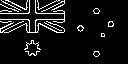
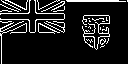
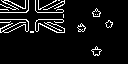
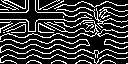
In order to make the Map of Flags with Union Jacks, I used the "EdgeDetect[]" Method to eliminate the colors in the background of the flags, which were causing disturbances with the FindClusters method. So with the "EdgeDetect[]" method, I could create flags like the one below.
ImageResize[Rasterize@EdgeDetect[CountryData["UnitedKingdom","Flag"]]]
Out[]=

After I mapped the "EdgeDetect[]" method across the FlagList, I used the "FindCluster[]" method, and was able to find groups with the Union Jack in the top corner.
The "EdgeDetect[]" method assisted me in creating the Union Jack map.
In[]:=
EdgesList=Map[EdgeDetect,Image[DeleteDuplicates[CountryData[#,"Flag"]]&/@CountryData[][[1;;249]]]];
In[]:=
UnionPlatform=FindClusters[EdgesList,20,PerformanceGoal"Quality"];UnionFlags=Join[UnionPlatform[[4]],UnionPlatform[[8]],UnionPlatform[[18]]]
Out[]=
,

,
,

,

,

,

,

,
,

,
,

,

,

,

,

,

,

In[]:=
Edges=Merge[DeleteCases[If[!MissingQ[CountryData[#,"Flag"]],EdgeDetect[CountryData[#,"Flag"]]#]&/@EntityList["Country"],Null],Join];
In[]:=
Flatten[Map[Edges,UnionFlags]]
Out[]=
,,,,,,,,,,,,,,,,,
So now those nations would be on the map of nations with a Union Jack somewhere on their flag.
Creating the Flag-closeness Function.
Creating the Flag-closeness Function.
After I was finished with the maps, Harshal helped me make a function that would map the nations of the world with colors based on how close their flags are. We did this through the "ImageDistance[]" function, which assigns a numeric value for how far away two images are.
A code which allows me to color the countries of the world based on how close their flags are.
In[]:=
CountryFlagColor[country_]:=GeoRegionValuePlot[Flatten@Map[Function[{x},#Last[x]&/@First[x]],Map[Flatten[F2N3[#]]ImageDistance[Rasterize@CountryData[country,"Flag"],#]&,FlagList]],GeoRange"World"]
In[]:=
ImageResize[Rasterize@CountryFlagColor["Tajikistan"],200]
Out[]=
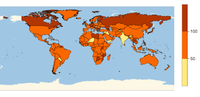
In that map, the darker a color is, the further away it is from the original map. For example, in the map above, we can see that the flags of India, Yemen, Iraq, Syria, Hungary, Niger, The Netherlands, and more are similar to the flag of Tajikistan. Meanwhile the Flags of Russia, Libya, Mozambique, and more have nothing in similar with the flag of Tajikistan.
Using Feature Extraction
Using Feature Extraction
After we were finished with the ImageDistance Function, we chose to make a similar graph but instead employ the "FeatureExtraction[]" method.
In[]:=
Feature=FeatureExtraction[FlagList]FeatureCountryPlot[nation_]:=GeoRegionValuePlot[Flatten@Map[Function[{x},#Last[x]&/@First[x]],Map[Flatten[F2N3[#]]FeatureDistance[Rasterize@CountryData[nation,"Flag"],#,Feature]&,FlagList]],GeoRange"World"]
The "FeatureCountryPlot[]" method works better than the "CountryFlagColor[]" method on some flags, like the example with the United Kingdom Below, but worse with others, like Tajikistan above.
Keywords
Keywords
◼
Flag
◼
Country
◼
Geography
◼
World
◼
Map
◼
Wolfram Summer Camp 2020
◼
Wolfram Language
◼
Website