Proteins are composed of amino acids that bond with each other to form chains. It is interesting to analyze the possibility of two amino acids being adjacent to each other. We can think of adjacency in two ways: one in terms of amino acids being neighbors of each other through bond formation, and another one by measuring distance between residues. We will explore both here.
Downloading protein structure
In order to analyze residue-residue interactions in proteins, we need coordinate files of protein structure that can be downloaded using the four-letter PDB ID with this function written by Jason Biggs at Wolfram Research:
Code
Code
Downloading a protein
Downloading a protein
Let us download the protein structure for the protein with PDB ID "4r80" to be used for analysis. The downloaded file is stored in FileNameJoin[{$UserDocumentsDirectory,”Wolfram”,”CrystalStructures”}]:
In[]:=
pdbid="4r80";protein=proteinStructure[pdbid];
Getting residue information
Extract the residue information:
In[]:=
residues=protein["Residues"]
Out[]=
{{Pro,Ser,Glu,Glu,Glu,Glu,Lys,Arg,Arg,Ala,Lys,Gln,Val,Ala,Lys,Glu,Lys,Ile,Leu,Glu,Gln,Asn,Pro,Ser,Ser,Lys,Val,Gln,Val,Arg,Arg,Val,Gln,Lys,Gln,Gly,Asn,Thr,Ile,Arg,Val,Glu,Leu,Glu,Ile,Thr,Glu,Asn,Gly,Lys,Lys,Thr,Asn,Ile,Thr,Val,Glu,Val,Glu,Lys,Gln,Gly,Asn,Thr,Phe,Thr,Val,Lys,Arg,Ile,Thr,Glu,Thr,Val,Gly,Ser},{Pro,Ser,Glu,Glu,Glu,Glu,Lys,Arg,Arg,Ala,Lys,Gln,Val,Ala,Lys,Glu,Lys,Ile,Leu,Glu,Gln,Asn,Pro,Ser,Ser,Lys,Val,Gln,Val,Arg,Arg,Val,Gln,Lys,Gln,Gly,Asn,Thr,Ile,Arg,Val,Glu,Leu,Glu,Ile,Thr,Glu,Asn,Gly,Lys,Lys,Thr,Asn,Ile,Thr,Val,Glu,Val,Glu,Lys,Gln,Gly,Asn,Thr,Phe,Thr,Val,Lys,Arg,Ile,Thr,Glu,Thr,Val,Gly,Ser}}
Analyzing residue-residue interactions in a protein (neighboring residues connect by bonds)
Residue-residue interaction(via covalent bonds) matrix
There are two chains in the structure. residues has the information of all the amino acids in the two chains. Using this information, we can form an interaction matrix between each amino acid residue. For that we first need to define a list of amino acids that we are considering for our calculations:
In[]:=
AminoAcidList={"Ala","Arg","Asn","Asp","Cys","Gln","Glu","Gly","His","Ile","Leu","Lys","Met","Phe","Pro","Ser","Thr","Trp","Tyr","Val"}
Out[]=
{Ala,Arg,Asn,Asp,Cys,Gln,Glu,Gly,His,Ile,Leu,Lys,Met,Phe,Pro,Ser,Thr,Trp,Tyr,Val}
We want to create an association so that we can define a residue-residue interaction matrix where row and column of the matrix will correspond to location of amino acids in AminoAcidList:
In[]:=
aminoAssoc=AssociationThread[AminoAcidList,Range[Length[AminoAcidList]]]
Out[]=
Ala1,Arg2,Asn3,Asp4,Cys5,Gln6,Glu7,Gly8,His9,Ile10,Leu11,Lys12,Met13,Phe14,Pro15,Ser16,Thr17,Trp18,Tyr19,Val20
Let us initialize the interaction matrix named as neighbourpropensity:
In[]:=
neighbourpropensity=ConstantArray[0,{Length@AminoAcidList,Length@AminoAcidList}]
Out[]=
{{0,0,0,0,0,0,0,0,0,0,0,0,0,0,0,0,0,0,0,0},{0,0,0,0,0,0,0,0,0,0,0,0,0,0,0,0,0,0,0,0},{0,0,0,0,0,0,0,0,0,0,0,0,0,0,0,0,0,0,0,0},{0,0,0,0,0,0,0,0,0,0,0,0,0,0,0,0,0,0,0,0},{0,0,0,0,0,0,0,0,0,0,0,0,0,0,0,0,0,0,0,0},{0,0,0,0,0,0,0,0,0,0,0,0,0,0,0,0,0,0,0,0},{0,0,0,0,0,0,0,0,0,0,0,0,0,0,0,0,0,0,0,0},{0,0,0,0,0,0,0,0,0,0,0,0,0,0,0,0,0,0,0,0},{0,0,0,0,0,0,0,0,0,0,0,0,0,0,0,0,0,0,0,0},{0,0,0,0,0,0,0,0,0,0,0,0,0,0,0,0,0,0,0,0},{0,0,0,0,0,0,0,0,0,0,0,0,0,0,0,0,0,0,0,0},{0,0,0,0,0,0,0,0,0,0,0,0,0,0,0,0,0,0,0,0},{0,0,0,0,0,0,0,0,0,0,0,0,0,0,0,0,0,0,0,0},{0,0,0,0,0,0,0,0,0,0,0,0,0,0,0,0,0,0,0,0},{0,0,0,0,0,0,0,0,0,0,0,0,0,0,0,0,0,0,0,0},{0,0,0,0,0,0,0,0,0,0,0,0,0,0,0,0,0,0,0,0},{0,0,0,0,0,0,0,0,0,0,0,0,0,0,0,0,0,0,0,0},{0,0,0,0,0,0,0,0,0,0,0,0,0,0,0,0,0,0,0,0},{0,0,0,0,0,0,0,0,0,0,0,0,0,0,0,0,0,0,0,0},{0,0,0,0,0,0,0,0,0,0,0,0,0,0,0,0,0,0,0,0}}
Update the interaction matrix to consider all residue-residue interactions:
In[]:=
Table[Table[If[Not[Or[MissingQ[aminoAssoc[residues[[chain,res]]]],MissingQ[aminoAssoc[Part[residues,chain,res+1]]]]],Part[neighbourpropensity,aminoAssoc[Part[residues,chain,res]],aminoAssoc[Part[residues,chain,res+1]]]=Plus[Part[neighbourpropensity,aminoAssoc[residues[[chain,res]]],aminoAssoc[Part[residues,chain,res+1]]],1];Part[neighbourpropensity,aminoAssoc[Part[residues,chain,res+1]],aminoAssoc[residues[[chain,res]]]]=Plus[Part[neighbourpropensity,aminoAssoc[Part[residues,chain,res+1]],aminoAssoc[residues[[chain,res]]]],1],0],{res,Length[Part[residues,chain]]-1}],{chain,Length@residues}];Table[Part[neighbourpropensity,i,i]=Part[neighbourpropensity,i,i]/2,{i,Length@neighbourpropensity}];neighbourpropensity
Out[]=
{{0,2,0,0,0,0,0,0,0,0,0,4,0,0,0,0,0,0,0,2},{2,4,0,0,0,0,0,0,0,4,0,4,0,0,0,0,0,0,0,6},{0,0,0,0,0,2,2,6,0,2,0,0,0,0,2,0,6,0,0,0},{0,0,0,0,0,0,0,0,0,0,0,0,0,0,0,0,0,0,0,0},{0,0,0,0,0,0,0,0,0,0,0,0,0,0,0,0,0,0,0,0},{0,0,2,0,0,0,2,4,0,0,0,8,0,0,0,0,0,0,0,8},{0,0,2,0,0,2,6,0,0,2,6,8,0,0,0,2,6,0,0,8},{0,0,6,0,0,4,0,0,0,0,0,2,0,0,0,2,0,0,0,2},{0,0,0,0,0,0,0,0,0,0,0,0,0,0,0,0,0,0,0,0},{0,4,2,0,0,0,2,0,0,0,2,2,0,0,0,0,8,0,0,0},{0,0,0,0,0,0,6,0,0,2,0,0,0,0,0,0,0,0,0,0},{4,4,0,0,0,8,8,2,0,2,0,2,0,0,0,2,2,0,0,4},{0,0,0,0,0,0,0,0,0,0,0,0,0,0,0,0,0,0,0,0},{0,0,0,0,0,0,0,0,0,0,0,0,0,0,0,0,4,0,0,0},{0,0,2,0,0,0,0,0,0,0,0,0,0,0,0,4,0,0,0,0},{0,0,0,0,0,0,2,2,0,0,0,2,0,0,4,2,0,0,0,0},{0,0,6,0,0,0,6,0,0,8,0,2,0,4,0,0,0,0,0,6},{0,0,0,0,0,0,0,0,0,0,0,0,0,0,0,0,0,0,0,0},{0,0,0,0,0,0,0,0,0,0,0,0,0,0,0,0,0,0,0,0},{2,6,0,0,0,8,8,2,0,0,0,4,0,0,0,0,6,0,0,0}}
Visualizing residue-residue interaction (via covalent bonds) matrix in a protein
Plot the interaction matrix to see how often amino acids are neighbors of each other:
In[]:=
ticklabels=Table[{aminoAssoc[Part[AminoAcidList,i]]+-(1/2),AminoAcidList[[i]]},{i,Length@AminoAcidList}];ticklabelsy=Table[{aminoAssoc[Part[AminoAcidList,i]]+-(1/2),Part[AminoAcidList,-i]},{i,Length@AminoAcidList}];Labeled[ArrayPlot[neighbourpropensity,PlotLegends->Automatic,Axes->True,Frame->False,FrameStyle->Directive[Black,Thick],Ticks->{ticklabels,ticklabelsy},ImageSize->Large,TicksStyle->Directive[Thick,Medium],ColorFunction->"BlueGreenYellow"],Style[StringJoin["Neighbouring residues, PDB ID = ",ToUpperCase@pdbid],Bold,Large],Top]
Out[]=
Neighbouring residues, PDB ID = 4R80 |
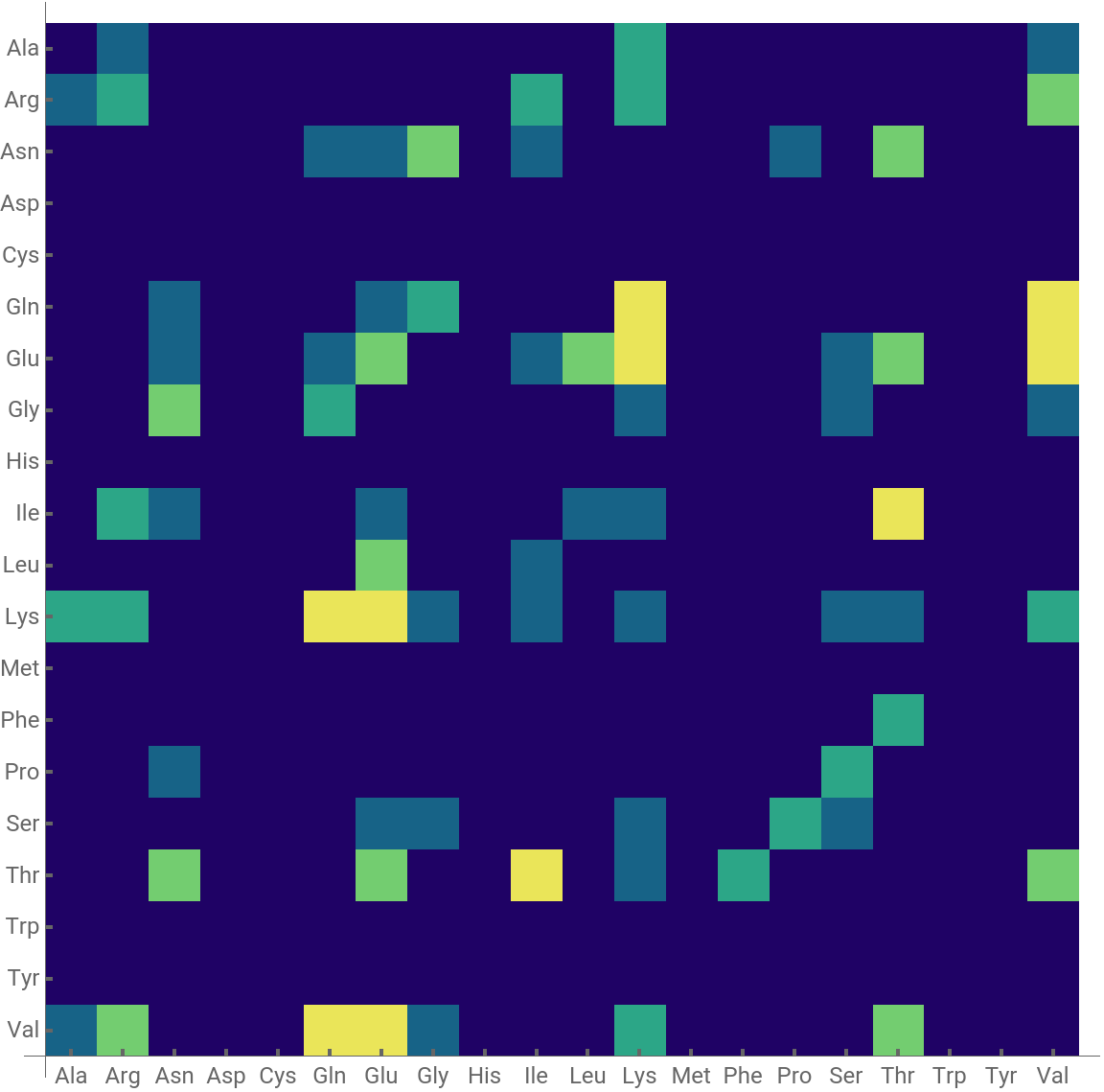

So now we have a code to analyze residue-residue interaction via covalent bond in a single protein using the PDB ID!
Function to visualize interaction matrix using four-letter PDB ID as input
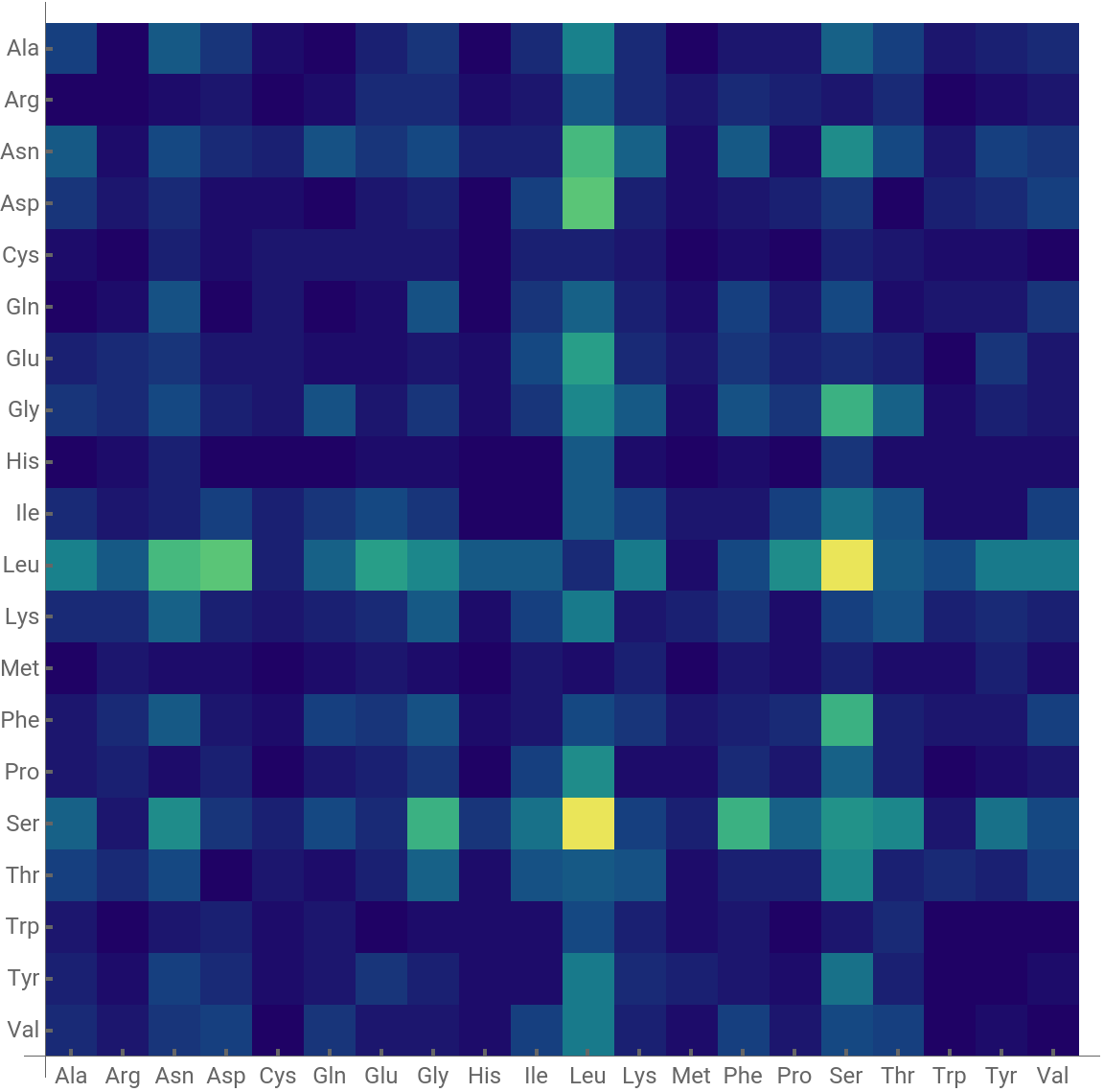
The code above can be wrapped in a function to visualize interaction matrix using four-letter PDB ID or a list of PDB ID’s (for multiple proteins) as input.
ResidueResidueInteractionMatrix function
ResidueResidueInteractionMatrix function
Applying ResidueResidueInteractionMatrix function
Single protein
Single protein
In[]:=
ResidueResidueInteractionMatrix["7w3v",ColorFunction->"BlueGreenYellow"]
Out[]=
Neighbouring residues, PDB ID = 7W3V |

List of Proteins
List of Proteins
Visualizing residue-residue interaction (via covalent bonds) graph in a protein
We can also visualize the interaction matrix neighbourpropensity using a graph where the edge thickness between two amino acids is proportional to the number of times the pair of amino acids are neighbors in the protein or list of proteins. In this case the function is similar to ResidueResidueInteractionMatrix except for the plotting part:
Applying ResidueResidueInteractionGraph function
Single protein
Single protein
List of proteins
List of proteins
Graphs are often more intuitive for analyzing small proteins whereas the heatmap is more intuitive for large proteins.
Analyzing distance of pairs of residues in a protein
Another way to analyze proteins is to analyze distance between pairs of all residues in the protein. For that we define the position of a given residue the same as position of α-Carbon of amino acids. To do the analysis we first need the position of all residues in a protein. We get it using this function:
Getting residue positions in a protein
All positions are in Angstrom units. Now we want to get distance of all residues from all chains. For that we flatten the backbone coordinates to ignore the information about chains:
Calculating the residue-residue distance matrix
Plotting the residue-residue distance matrix
ResidueResidueDistanceMap function
The above analysis can be wrapped in a function:
Applying ResidueResidueDistanceMap function
The protein above with PDB ID 1AV1 has a really interesting structure. Can you guess how many chains the protein has? Check out the structure here to see if your intuition is correct!
Analysis of SARS-CoV-2 spike protein
Analysis of SARS-CoV-2 spike protein
Caution in using ResidueResidueDistanceMap
Caution in using ResidueResidueDistanceMap
The run time of this function scales as square of the number of residues (~size of proteins). So one should be cautious while running it for really large proteins.
Acknowledgement
I would like to thank Jason Biggs for guidance and also for providing the proteinStructure function and Jan Mangaldan for useful suggestions.
Contact
◼
soutick2010@gmail.com
◼
souticks@wolfram.com