Introduction
Introduction
The purpose of this project is to visualize the path from the top of a mountain to the bottom with the least maximum gradient.
This is an optimization problem, meaning that an input is chosen from a feasible set (a list of available inputs, choices) based on the outputs of the items in the feasible set when run through a function. In this function, the slope is being minimized meaning that a coordinate is chosen from a list of coordinates based on which coordinate has the minimum slope between the list and the previous chosen point.
Simply choosing the minimum slope may seem like a simple task for a human, but thinking through it computationally is another matter. For instance, imagine you are trying to create a list of points that is around a center point. You could just look at a grid a write a list of points around a center point, but if you want to create an algorithm that a computer can understand, you must create a program that takes the center point, all of the data points, and the distance between the points and then translates the center point to each surrounding point using the distance between the points and combines the individual outputs into a list. This is only one of the algorithms that go into choosing the minimum slope. One must also consider how to computationally choose the slope that is both negative and closest to zero, how to calculate the slope, and how to convert the chosen slope back into a point that can be reused as the next input.
Assumptions:
◼
Snow and terrain is not an issue and does not affect the path of the road.
◼
Change in elevations between two elevation data points is constant.
Methods
Methods
Importing Data and Locating the Peak
Importing Data and Locating the Peak
Since the input of the final function is a natural language input of a mountains name, the data is obtained from the Wolfram Data Repository of geographic elevation data.
Natural Language to List of Elevations:
naturalToList[naturalLangInput_]:=If[EntityTypeName[naturalLangInput]"Mountain",QuantityMagnitude[GeoElevationData[naturalLangInput]],{Print["Please give a mountain name."],Break[]}]
In[]:=
list=naturalToList
Out[]=
Next, the peak of the mountain needs to be found by finding the maximum of the list.
Finding the Peak of the Mountain:
In[]:=
startingPoint[list_]:=First[Position[list,Max[list]]]
In[]:=
peak=startingPoint[list]
Out[]=
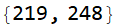
These next two functions are going to be used multiple times in later code, its purpose is to take a pair of coordinates, remove all the brackets around it, and return either the first or second value. These are also used in general to remove all brackets around a value in a list.
Taking the First or Second Coordinate:
In[]:=
firstCoord[coords_]:=First[Flatten[coords]]secondCoord[coords_]:=Last[Flatten[coords]]
In[]:=
firstCoord[{{5,12}}]
Out[]=

Calculating the Slope
Calculating the Slope
After locating the peak of the mountain, a list of coordinates of all of the points around the peak and would-be midpoints needs to be created. The function below gives a list of all the coordinates of the points around the starting coordinate starting at the point to the right of the center point and going clockwise from there.
Coordinates around the Center Point:
In[]:=
pointGoAroundListCoord[midCoord_,colrowdisp_]:=List[{firstCoord[midCoord],secondCoord[midCoord]+colrowdisp},{firstCoord[midCoord]+colrowdisp,secondCoord[midCoord]+colrowdisp},{firstCoord[midCoord]+colrowdisp,secondCoord[midCoord]},{firstCoord[midCoord]+colrowdisp,secondCoord[midCoord]-colrowdisp},{firstCoord[midCoord],secondCoord[midCoord]-colrowdisp},{firstCoord[midCoord]-colrowdisp,secondCoord[midCoord]-colrowdisp},{firstCoord[midCoord]-colrowdisp,secondCoord[midCoord]},{firstCoord[midCoord]-colrowdisp,secondCoord[midCoord]+colrowdisp}]
In[]:=
listcoord=pointGoAroundListCoord[peak,1]
Out[]=

The following function is another sub-function used in later code. It calculates the slope between the center point and all the points around it.
The following function is another sub-function used in later code. It calculates the slope between the center point and all the points around it.
Calculating Slope:
In[]:=
geoSlopeDiaglist[listofpointsaroundstart_,h1coord_,h2coord_,rowvert_,colhoriz_]:=Divide[Subtract[listofpointsaroundstart[[firstCoord[h2coord],secondCoord[h2coord]]],listofpointsaroundstart[[firstCoord[h1coord],secondCoord[h1coord]]]],]
0.5
(+)
2
colhoriz
2
rowvert
Then, the slope between the center point and each surrounding points is calculated. nextPointSlopeList uses geoSlopeDiagList[] and makes a list of slopes around the center point, starting with the point to the right and going clockwise (in the same order as pointGoAroundListCoord).
Creating a List of Slopes to Points Around the Center Point:
In[]:=
nextPointSlopeList[list_,midcoord_,listofcoordaround_,colrowdisp_]:=List[geoSlopeDiaglist[list,midcoord,Extract[1][listofcoordaround],0,colrowdisp],geoSlopeDiaglist[list,midcoord,Extract[2][listofcoordaround],colrowdisp,colrowdisp],geoSlopeDiaglist[list,midcoord,Extract[3][listofcoordaround],colrowdisp,0],geoSlopeDiaglist[list,midcoord,Extract[4][listofcoordaround],colrowdisp,colrowdisp],geoSlopeDiaglist[list,midcoord,Extract[5][listofcoordaround],0,colrowdisp],geoSlopeDiaglist[list,midcoord,Extract[6][listofcoordaround],colrowdisp,colrowdisp],geoSlopeDiaglist[list,midcoord,Extract[7][listofcoordaround],colrowdisp,0],geoSlopeDiaglist[list,midcoord,Extract[8][listofcoordaround],colrowdisp,colrowdisp]]
In[]:=
slopelist=nextPointSlopeList[list,peak,listcoord,1]
Out[]=

Selecting the Slope
Selecting the Slope
After calculating all of the slopes, the least negative slope is chosen. chooseSlope selects the slope from the list of slopes from nextPointSlopeList that is negative and closest to zero. If there are no negative slopes, then the function would break.
Choosing the Least Negative Slope:
In[]:=
chooseSlope[slopeList_]:=If[Length[Select[slopeList,Negative]]0,Break[],First@Nearest[Select[slopeList,Negative],0]]
In[]:=
minslope=chooseSlope[slopelist]
Out[]=

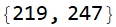
Lastly, the chosen slope gets matched to its respective coordinate. This function takes the minimum slope from chooseSlope and matches it to its respective point. If there are multiple points with the same slope, it simply chooses the first one.
Matching the Chosen Slope to its Coordinate:
In[]:=
matchSlopeToCoord[minslope_, listofcoordsaroundpoint_, slopelistaroundpoint_]:= Extract[listofcoordsaroundpoint,First[Position[slopelistaroundpoint,minslope]]]
In[]:=
nextmidpoint=matchSlopeToCoord[minslope,listcoord,slopelist]
Out[]=
Core Function
Core Function
determinepath[] is the core function that takes all of the previous functions and puts them together in a loop that breaks once there are either no negative slopes or until it reaches the end of the map. It then creates a relief plot of the mountain and maps the path over it. A line plot of your elevations as you go along the path has been included as well for additional information.
Visualizing the Path:
In[]:=
determinepath[naturalLangInput_,step_]:=Module[{list=naturalToList[naturalLangInput],startpoint=startingPoint[naturalToList[naturalLangInput]],aroundlistcoord ,nextpointslopelist,minslope,nextmidpoint,pathlist={}},While[True,AppendTo[pathlist,startpoint];aroundlistcoord=pointGoAroundListCoord[startpoint,step];nextpointslopelist=nextPointSlopeList[list,startpoint,aroundlistcoord,step];minslope=chooseSlope[nextpointslopelist];startpoint=matchSlopeToCoord[minslope,aroundlistcoord,nextpointslopelist];] ;Grid[{{ListLinePlot[pathlist/.{a_, b_} list[[a,b]],AxesLabel{"Step Number", "Elevation"},PlotLabel"Elevation Along Steps in Road"], Show[ReliefPlot[list,DataReversedTrue,AspectRatio1],ListLinePlot[pathlist/.{a_,b_} {b,a},AspectRatio1,PlotStyle{RGBColor[0,0,0],Thickness[0.005]}]]}}]]
Conclusion
Conclusion
This function was overall successful in its function of finding the minimum gradient path down a mountain. Although Mount Everest was used in the example, you can use any mountain as long as the data is in the Wolfram Data Repository.
When comparing the optimized path down Mount Everest to an actual trail, one can see that the optimized path prefers going over ridges, while the actual trails prefer going into valleys. This is most likely because hiking on ridges is much more dangerous than in valleys for climbers. The optimized path and the South Col Route start off going in the same direction, but then the South Col Route goes into a valley while the optimized path stays on the ridges.
Note: The image with the actual trails has been modified to match the optimized path map. The light blue trail is known as the South Col Route and the dark blue trail is known as the North Col-North Ridge Route.
Although the function was generally successful, it is currently very naive mainly in that it breaks if there are no negative slopes, meaning that any time a local minimum is reached, the function stops.
This can be seen in the following image:
Since the step has decreased, the function cannot simply gloss over ridges and gets stuck.
A solution that I intend to keep working on is when the function gets stuck in a local minimum, have it search proposed paths in each direction and take the one that will get it out as well as have the minimum maximum gradient compared to the other paths.
Keywords
Keywords
◼
Visualisation
◼
Mapping
◼
Geographic Information
◼
Earth Science
◼
Earth Data
◼
Geometry
◼
Wolfram Language
◼
Modeling
◼
Optimization
◼
Computational Thinking