Translate French to English by training a vanilla transformer

Introduction
Introduction
In my previous post, we learnt how to train our own GPT-like model, the decoder-only transformer. In this tutorial, we’ll explore how to train an encoder-decoder transformer model to translate French sentences to English using Wolfram Language. We’ll start by explaining the basic concepts of transformer models and then dive into the Wolfram Language code to implement and train the model.
What is a Transformer Model?
What is a Transformer Model?
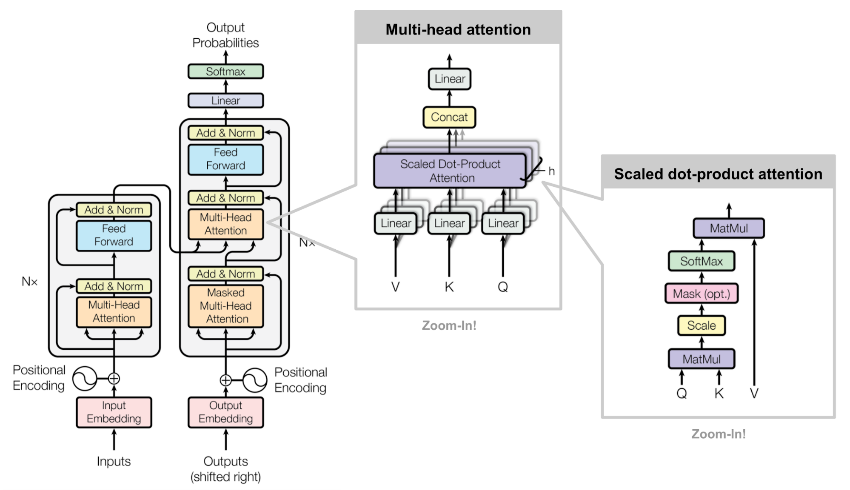
The transformer model is a type of neural network architecture introduced in the paper “Attention is All You Need” by Vaswani et al. in 2017. It has become the foundation for many state-of-the-art natural language processing models and almost all other types of deep learning models as well. Some famous transformer-based models are ChatGPT, AlphaFold and Dall-e. The vanilla transformer model consists of an encoder and a decoder, each composed of multiple layers of self-attention and feed-forward neural networks.
The encoder takes the input sequence (e.g., an English sentence) and converts it into a continuous representation. The decoder then uses this representation to generate the output sequence (e.g., the corresponding French sentence). The self-attention mechanism allows the model to weigh the importance of different words in the input sequence when generating the output.
The encoder takes the input sequence (e.g., an English sentence) and converts it into a continuous representation. The decoder then uses this representation to generate the output sequence (e.g., the corresponding French sentence). The self-attention mechanism allows the model to weigh the importance of different words in the input sequence when generating the output.
Implementing the Transformer Model in Wolfram Language
Implementing the Transformer Model in Wolfram Language
In this section, we’ll go through the Wolfram Language code to implement the encoder-decoder transformer model. We’ll explain each part of the code and how it contributes to the overall architecture.
Converting the training sentences into a sequence of tokens
Converting the training sentences into a sequence of tokens
We can download the English-French sentence pairs from the site: https://www.manythings.org/anki/ Those are selected sentence pairs from the open Tatoeba Project. The downloaded file, “fra.txt”, is a tab separated list of translation pairs:
In[]:=
text=Import["/Users/jofre/ownCloud/Jofre/ChatGPT related/Simple-Trasnformer-Example/translated-sentences/fra-eng/fra.txt"];
Convert the text file into a list of sentence pairs:
In[]:=
sentencePairs=Rule@@@Part[StringSplit[StringSplit[text,"\n"],"\t"],All,{1,2}];
In[]:=
sentencePairs=Import["/Users/jofre/ownCloud/Jofre/ChatGPT related/Simple-Trasnformer-Example/translation-example/data/en-fr-sentences.wl"];
In total there are 197463 en-fr sentences:
In[]:=
Length@sentencePairs
Out[]=
197463
We can check some examples of translated sentences:
In[]:=
Take[RandomSample[sentencePairs],5]//Dataset[Apply[<|"English"->#,"French"->#2|>&,#,{1}]]&
Out[]=

Shuffle sentence pairs
Shuffle sentence pairs
It’s important to shuffle the training dataset first using RandomSample:
In[]:=
$randomSeed=123;SeedRandom[$randomSeed];trainingSet=RandomSample[sentencePairs];
Tokenize the sentences
Tokenize the sentences
There are several ways to tokenize the sentences. The most common type of tokens are “word” tokens and “sub-word” tokens. In this example we will use “1-word” tokens. In addition, on the translated sentence, we will add a start and end of sentence tokens “Start” and “End”. By adding the “Start” and “End” tokens, the model can better understand the context and structure of the sentence, which can improve the quality of the translation. In addition to providing context, the “Start” and “End” tokens also help the model to avoid generating repetitive or nonsensical translations.
In[]:=
netEncoder=ResourceFunction["GPTTokenizer"][]
Out[]=
NetEncoder

In[]:=
netDecoder=NetDecoder[{"Class",NetExtract[ResourceFunction["GPTTokenizer"][],"Tokens"]}]
Out[]=
NetDecoder
Converting sentences into sub-word tokens
Converting sentences into sub-word tokens
Here, for simplicity we will ignore punctuation characters and use directly TextWords to split the sentences into 1-word tokens:
In[]:=
trainingSet[[1]]
Out[]=
That sounds really interesting.Ça a l'air vraiment intéressant.
In[]:=
trainingTokens=MapAt[netEncoder,trainingSet,{All,{1,2}}];
In[]:=
trainingTokens=MapAt[Join[{50257},#1,{50257}]&,trainingTokens,{All,{1,2}}];
In[]:=
trainingTokens[[1]]
Out[]=
{50257,2505,5239,1108,3500,14,50257}{50257,128,230,65,258,301,7,959,411,431,3682,494,2635,602,416,14,50257}
In[]:=
trainingTokens=Import["/Users/jofre/ownCloud/Jofre/ChatGPT related/Simple-Trasnformer-Example/translation-example/data/trainingTokens.wl"];
Create the tokens vocabulary
Create the tokens vocabulary
The vocabulary is the list of words present on the training dataset in addition to the special tokens, “Start” and “End”. We can also include another special token called “UnknownToken”, which can be used to represent unknown words/tokens not included in the vocabulary obtained from the training set:
In[]:=
vocabulary=NetExtract[ResourceFunction["GPTTokenizer"][],"Tokens"];
In total there are 41k+ different words in the training set:
In[]:=
Length@vocabulary
Out[]=
50257
For multi-language transformer translation models like M2M-100 the tokens are typically “sub-word” tokens in order to avoid having a gigantic vocabulary. In the case of M2M-100 model there are around 120K “sub-word” tokens. So, the size of our “1-word” tokens vocabulary should be ok for training.
Tokens Encoder and Decoder
Tokens Encoder and Decoder
Encoder
Encoder
For example the token “love” corresponds to the following integer:
Decoder
Decoder
The output of the model will be a vector with the predicted probabilities for the next token of the sequence. For example the following probabilities vector has 0 probabilities for all tokens with exception of the “love” token that we set to 1 with UnitVector:
Choosing the token with the highest probability to make a final prediction is commonly known as greedy decoding or sampling.
Embedding Layer
Embedding Layer
The embedding layer is responsible for converting the input tokens (words) into continuous vectors. In our implementation, we use an EmbeddingLayer along with a positional encoding to capture the order of the tokens in the sequence. The following embedding function defines this layer:
We can visualize it as the following NetGraph:
Sinusoidal Positional Embedding
Sinusoidal Positional Embedding
The Sinusoidal Positional Embedding was introduced in the original paper “Attention Is All You Need”. In that paper they used the sinusoidal version because they thought it may allow the model to extrapolate to sequence lengths longer than the ones encountered during training. Although, they also tried learned positional embeddings and found that the two versions produced nearly identical results.
Self-Attention Block
Self-Attention Block
The self-attention block is a key component of the transformer model. It allows the model to weigh the importance of different tokens in the input sequence. The selfAttentionBlock function defines this block, which consists of multi-head attention followed by layer normalization.
Feed-Forward Block
Feed-Forward Block
The feed-forward block is a simple neural network that follows the self-attention block. It consists of two linear layers with a GELU activation function in between. The feedForwardBlock function defines this block.
Cross-Attention Block
Cross-Attention Block
The decoder block is similar to the self-attention block but includes an additional attention mechanism that attends to the encoder’s output, usually called cross attention layer.
Encoder and Decoder Stacks
Encoder and Decoder Stacks
The encoder and decoder stacks are composed of multiple layers of self-attention and feed-forward blocks. The encoderStack and decoderStack functions define these stacks, respectively.
Training the Model
Training the Model
Finally, we define the training network, which includes the encoder and decoder stacks. The network takes the source input (English sentence) and target input (French sentence) and computes the cross-entropy loss for training.
M2M-100 Multilingual Translation Net
M2M-100 Multilingual Translation Net
Facebook researchers released a family of multilingual translation models in 2020, based on the transformer architecture, capable of translating between any pair of 100 languages. The training data consists of 7.5 billion sentences from various multilingual datasets. These models are available at the Wolfram Neural Network Repository: M2M-100 Multilingual Translation Net
Using Beam Search Algorithm
Using Beam Search Algorithm
When generating a sequence, there are numerous possible continuations at each time step, and searching through all of them can be computationally expensive. Beam search provides a balance between exhaustive search and greedy search by maintaining a fixed number of “beams,” or candidate sequences, at each time step.
Here’s a brief overview of the beam search algorithm in the context of transformer neural networks:
1- Initialize the search with an empty sequence or a starting token and set the beam width, which is the number of candidate sequences to maintain at each step.
2- For each candidate sequence, generate all possible next tokens and their corresponding probabilities by passing the sequence through the transformer model.
3- Calculate the accumulated probabilities (usually log probabilities) for each extended sequence by summing the probabilities of all tokens in the sequence.
4- Select the top-K sequences with the highest accumulated probabilities as the new candidate sequences, where K is the beam width.
5- Repeat steps 2-4 until a predefined stopping criterion is met, such as reaching the maximum sequence length or encountering an end-of-sequence token for all candidate sequences.
6- Finally, select the candidate sequence with the highest accumulated probability as the generated output.
Beam search provides a trade-off between computational efficiency and the quality of the generated sequences. A larger beam width can yield better results by exploring more alternatives, but it also increases the computational complexity. In practice, typically the beam width is around 5. Here, I’m going to use directly an internal function called BeamSearch.
Here’s a brief overview of the beam search algorithm in the context of transformer neural networks:
1- Initialize the search with an empty sequence or a starting token and set the beam width, which is the number of candidate sequences to maintain at each step.
2- For each candidate sequence, generate all possible next tokens and their corresponding probabilities by passing the sequence through the transformer model.
3- Calculate the accumulated probabilities (usually log probabilities) for each extended sequence by summing the probabilities of all tokens in the sequence.
4- Select the top-K sequences with the highest accumulated probabilities as the new candidate sequences, where K is the beam width.
5- Repeat steps 2-4 until a predefined stopping criterion is met, such as reaching the maximum sequence length or encountering an end-of-sequence token for all candidate sequences.
6- Finally, select the candidate sequence with the highest accumulated probability as the generated output.
Beam search provides a trade-off between computational efficiency and the quality of the generated sequences. A larger beam width can yield better results by exploring more alternatives, but it also increases the computational complexity. In practice, typically the beam width is around 5. Here, I’m going to use directly an internal function called BeamSearch.
100 languages available
100 languages available
The list of available languages is the following:
Translate sentences using a beam size of 5
Translate sentences using a beam size of 5
Creating the header image for the post
Creating the header image for the post