CITE THIS NOTEBOOK: Emotion detection in audio by Wolfram Emerging Leaders Program. Wolfram Community JAN 27 2023.
The Wolfram Emerging Leaders Program is a 4-month long, project-based program designed for gifted high school students to take a deep dive into a topic of their choice. Students work remotely in small groups to take their project from ideation to completion, with the guidance of Wolfram experts. Wolfram Emerging Leaders Program participants are selected from the Wolfram High School Summer Camp, which is open to talented, STEM-oriented students age 17 and under. This essay was written by:
◼
with contributions from Danae Dresiou
Abstract: To detect emotions in an audio clip, we used the classify function.In this project, we used it to classify the data into different emotion classes. We decided to use only three emotions to classify the audio, which were happy, angry and sad. We first trained the classifier by training data and then tested the accuracy of the classifier by testing it on new audio clips. We then tried different methods to build the same classifier, and got different results for the working of each classifier.
Introduction
Introduction
We as humans detect emotion in audio from the tone that the sentence has been spoken in. We even rely on the sentences or the words being spoken and, if it is a conversation, then on the facial features. But to train a classifier to detect the emotion in an audio clip alone, we had to train it with the help of audio clips that contained those emotions. Some emotions, even for humans, are very hard to detect. Sentences can be spoken with sarcasm, or with a loud amplitude but that does not mean they signify those certain emotions. Similarly an audio clip can contain multiple emotions. All these factors have led to our project being limited in terms of the emotions we classify the audio clips into and how we train the classifier.
Classify function and its use
Classify function and its use
The classify function classifies data into classes. To do this, we first train the classifier by inputting data and specifying the classes of the data. Secondly, after training the classifier, we run the classifier on new data, now that it is trained to detect the classes. The classifier then classifies the data, and we can check the accuracy of the classifier through ClassifierMeasurements function.
We mainly use this function in our project, as it classifies the audio data that we used into the emotion classes. This way we can detect the different emotions present in each audio clip.
We mainly use this function in our project, as it classifies the audio data that we used into the emotion classes. This way we can detect the different emotions present in each audio clip.
Data handling and Audio used
Data handling and Audio used
The audio clips we used were imported from the Crowd Sourced Emotional Multimodal Actors Dataset (CREMA-D). We decided on using the audio clips which showed the angry, happy and sad emotions. For the training data set of the emotions we used 50 audio clips of each emotion (happy ,sad and angry) and for the testing data set of the emotions we used 37 samples in total. The audio clips contain only one sentence and so, show only one emotion so as to keep the classifying of the data simpler. If the clips were longer and showed multiple emotions then detecting the emotion and training the classifier would have taken a much longer time. We also only use the audio clips that have a high or unspecified tone, as the audio clips that contained a lower or a medium tone were harder to distinguish between and we needed audio that drew a clear line as to which emotion it contained.
Training the classifier
Training the classifier
Setting up the Training Data:
Setting up the Training Data:
Firstly to enter the audio to train the classifier, we created a function called cleanAudio. The purpose of it was to trim and filter the audio, so that the audio clips are ready to use. By trimming the audio we can trim the silence from the audio clip.
In[]:=
cleanAudio[filelocation_]:=Module[{audio, trimmed,filtered},audio = Import[filelocation];trimmed=AudioTrim[audio];filtered=HighpassFilter[trimmed,Quantity[300,"Hertz"]]]
We stored the audio files in the cloud for easy access, with these file names.
In[]:=
angerfilenames=;happyfilenames=;sadfilenames=;testingfilenames=;
We then pulled the audio files for the angry emotions and created an association with their classification
In[]:=
angryTrainingFeats1= AssociationThread[cleanAudio[#]&/@angerfilenames"angry"];
Then we repeated the same to create happyTrainingFeats1 and sadTrainingFeats1 for the happy and sad emotions respectively.
In[]:=
happyTrainingFeats1= AssociationThread[cleanAudio[#]&/@happyfilenames"happy"];
In[]:=
sadTrainingFeats1 =AssociationThread[cleanAudio[#]&/@sadfilenames"sad"];
Setting up the Testing Data:
Setting up the Testing Data:
As for setting up the testing data for the classifier, we created testingfeats1 which pulled the files and cleaned the audio without labelling the audio files to ensure that failed or empty data clips do not contribute to the training data. This is the data on which we are going to run the classifier.
In[]:=
TestingFeats1 =cleanAudio[#]&/@testingfilenames;
We then wrote a short function which takes the testing data and labels it with the correct emotion, so that we can test the accuracy of the classifier.
In[]:=
assign[filename_]:=Which[StringContainsQ[filename, {"_ANG_XX","_ANG_HI"}], cleanAudio[filename] -> "angry", StringContainsQ[filename, {"_HAP_XX","_HAP_HI"}], cleanAudio[filename] -> "happy",StringContainsQ[filename, {"_SAD_XX","_SAD_HI"}], cleanAudio[filename] -> "sad"]
In TestingFeats2, the data as angry, happy or sad depending on the file name.
In[]:=
TestingFeats2 =assign[#]&/@testingfilenames;
We also checked whether TestingFeats1 , happyTrainingFeats1, sadTrainingFeats1 and angryTrainingFeats1 contained any common elements, as we wouldn’t be able to check the accuracy of the classifier if the training and testing data is the same.
In[]:=
Intersection[TestingFeats1,Keys@happyTrainingFeats1,Keys@sadTrainingFeats1,Keys@angryTrainingFeats1]
Out[]=
{}
Setting up the Classifiers:
Setting up the Classifiers:
Then, through classifier1 we trained the classifier on the audio clips of the joined tables of angryTrainingFeats1, happyTrainingFeats1 and sadTrainingFeats1. We used the Logistic Regression method for this. The Logistic Regression method models class probabilities with logistic functions of linear combinations of features.
In[]:=
classifier1=Classify[Normal[Join[angryTrainingFeats1,happyTrainingFeats1, sadTrainingFeats1]], Method->"LogisticRegression"]Information[classifier1]
Out[]=
ClassifierFunction


Out[]=

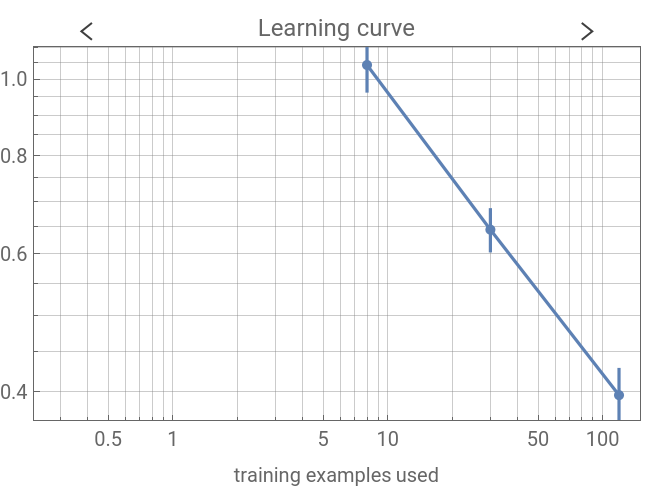
We repeated the same in making other classifiers but with a different methods. In classifier2 we used the method, DecisionTree. The DecisionTree method uses a decision tree to model class probabilities, value predictions or probability densities.
In[]:=
classifier2=Classify[Normal[Join[angryTrainingFeats1,happyTrainingFeats1, sadTrainingFeats1]], Method->"DecisionTree"]Information[classifier2]
Out[]=
ClassifierFunction
Out[]=
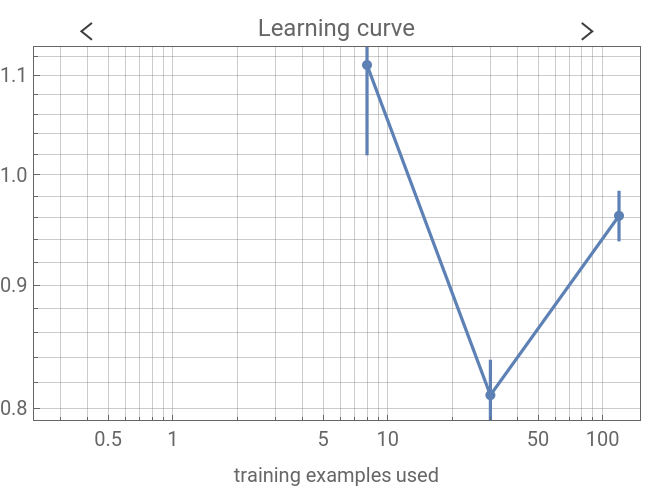
In classifier3 we used the method GradientBoostedTrees . The GradientBoostedTrees method is used to predict the value or class of an example using an ensemble of decision trees. The trees in it are trained sequentially following the boosting meta-algorithm.
In classifier4 we used the method NearestNeighbors.The NearestNeighbors method infers the class or value of a new example by analyzing its nearest neighbors in the feature space.
In classifier5 we used the NeuralNetwork method. The NeuralNetwork method models class probabilities or predicts the value distribution using a neural network.
In classifier6 we used the RandomForest method. The RandomForest method predicts the value or class of an example using an ensemble of decision trees.
In classifier7 we used the SupportVectorMachine method. The SupportVectorMachine method models class probabilities by finding a hyperplane that separates the training data into two classes using a maximum-margin hyperplane.
Testing the classifier and results
Testing the classifier and results
When we classified the data in TestingFeats1 using classifier1 and LogisticRegression method we got the following result. The classifier was seen to be more accurate at classifying the sad data as compared to the happy and angry data which it often got confused between.It showed an accuracy of 49%.
We then did the same with the other classifiers. When classifying the data in TestingFeats1 using classifier2 and DecisionTree method we got the following result. It was seen to be more accurate, as it classified no sad audio clips into the angry category and very few in happy. It produced mostly accurate results compared to the other classifiers. It showed an accuracy of 59%.
When we classified the data in TestingFeats1 using classifier3 and GradientBoostedTrees method we got the following result. The classifier was again seen to be good at classifying the sad audio results but it could not classify the happy and angry clips as well. It showed an accuracy of 59%.
For classifier4 and NearestNeighbors method we got the following result. It was comparatively more accurate as, it was better at classifying the sad and happy emotions but not as good at classifying the audio clips with the angry emotion. It showed an accuracy of 59%.
For classifier5 and NeuralNetwork method we got the following result. It showed an accuracy of 38% and was one of the classifiers with lowest accuracy percentage. The classifier was not as good at predicting the classes of the emotions and classified them into the angry class mostly.
For classifier6 and RandomForest method we got the following result. It showed an accuracy of 46%. Just like the other classifiers, it classified the sad emotion well, but was not as accurate with the angry and happy ones.
Classifier7 with SupportVectorMachine method we got the following result. It had an accuracy of 38% and was the other classifier with the lowest result. It was not good at classifying the emotions into the angry class as it did not classify any emotions into it. And other than that it got confused between the angry and happy emotions and was more accurate with the sad emotion.
Results of the project
Results of the project
Across the different classifiers, we found a general trend that the classifiers got confused between the angry and happy emotions. They were also, comparatively better at classifying the sad emotions. The classifier that was the most accurate were the DecisionTree, GradientBoostedTree and NearestNeighbors methods, which all had an accuracy of 59.8%. The classifiers with the lowest accuracy were the NeuralNetwork and SupportVectorMachine methods. They both had an accuracy of 38%, and did not work well at classifying the angry emotions.
So, through this project using the different methods of the classifier function a common trend that we saw was that the classifier often were not able to distinguish between the angry and happy audio clips, as compared to the sad audio clip. The sad audio clip also had a lower tone as compared to the other two with a higher tone.
So, through this project using the different methods of the classifier function a common trend that we saw was that the classifier often were not able to distinguish between the angry and happy audio clips, as compared to the sad audio clip. The sad audio clip also had a lower tone as compared to the other two with a higher tone.
Conclusion
Conclusion
Problems we faced and Other ways to go about it
Problems we faced and Other ways to go about it
Originally we had decided to use the words of the sentence spoken in the audio clip to detect the emotions. We would have gone about it, by first using the audio to detect the sentence spoken, and through the words, deciding the emotion. We would have then, through the tone of the audio clip, detected the emotion as we did with a classifier in this project. The text part of the project was discarded as many sentences are neutral and we would have to train the classifier on a wide set of words of the English vocabulary to do that. So, as we narrowed the range of emotions that we were going to detect in the audio clips we decided to only use the classifier function. We also, only used the three emotions only, as the other emotions are harder to detect using only tone. This project also would have been limited if we used text in the area that, some sentences can be spoken with sarcasm.
Another way we had decided to go about the project was using the classifier function on the spectrograms of the audio clips, but originally we had faced the problem, that the audio clips spoken with different emotion using the same sentences were classified into the same emotion rather than being classified into the individual emotion classes.
Another way we had decided to go about the project was using the classifier function on the spectrograms of the audio clips, but originally we had faced the problem, that the audio clips spoken with different emotion using the same sentences were classified into the same emotion rather than being classified into the individual emotion classes.
Future ways to expand on the project
Future ways to expand on the project
A future way that we believe we can expand on the project is working with a wider variety of emotions. In this project we worked with only three emotions, and maybe in the future we can work with the audio of emotions like fear and disgust. Those emotions are harder to distinguish between and can be confused as happy or angry as they have a similar tone and way of speaking. Humans generally use the sentence spoken and its words to distinguish between these emotions, so it would be an interesting way to expand on the project by detecting these emotions.
We can also work with more complex networks like neural nets or using the NetModel function to detect the emotions in the audio, rather than using the classify function in our project.
We also believe that an another way to expand on the project would be by taking in user input and detecting the emotions in those audio clips.
We can also work with more complex networks like neural nets or using the NetModel function to detect the emotions in the audio, rather than using the classify function in our project.
We also believe that an another way to expand on the project would be by taking in user input and detecting the emotions in those audio clips.