Version 0.8
Introduction
Introduction
In this notebook we discuss the use of Java, Python, Raku, and Wolfram Language (WL) packages for the generation of Unified Modeling Language (UML) diagrams, [Wk1], from Raku code.
In principle, given Raku's introspection abilities, we should be able to "just" traverse package namespaces, classes, class attributes and methods, and generate UML diagram specifications. This is done with the Raku package "UML::Translators", [AAp1].
We use two Domain Specific Languages (DSLs) for the UML specifications:
1
.The making of the actual UML diagrams is done through two "engines": PlantUML and WL.
Remark: This notebook uses the Mathematica-and-Raku connection described in [AA3]. "Mathematica" and "WL" are more or less used as synonyms.
Remark: Mathematica notebooks can have initialization cells, that are (optionally) run before executing any code of the notebook. See the initialization cells in the section "Setup" below.
Remark: The WL option setting SetOptions[RakuInputExecute,Epilog->UMLGraphEpilog] allows for automatic conversion of the Raku cell results that are UML specs into UML diagrams.
Usage examples
Usage examples

In[]:=
namespace-types('ML::StreamsBlendingRecommender')
Out[]=
((UtilityFunctions) (LSAEndowedSBR) (AbstractSBR) (CoreSBR) (CompositeSBR) (LSATopicSBR))
Here is an example we generate the corresponding UML diagram (by using the Java JAR file provided by the site PlantUML, [PUML1]):
In[]:=
use UML::Translators;
to-uml-spec('ML::StreamsBlendingRecommender'):!methods:!attributes;
to-uml-spec('ML::StreamsBlendingRecommender'):!methods:!attributes;
Out[]=

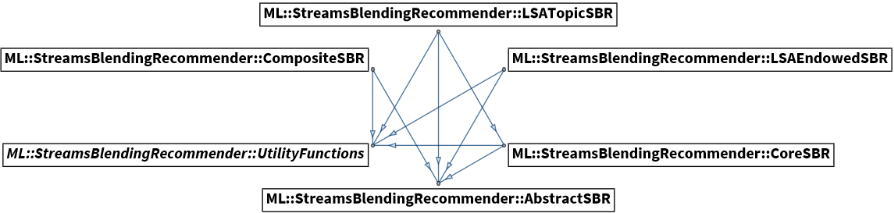
Here is an example using WL's graph visualization capabilities through the WL package, "UMLDiagramGeneration.m", [AAp2, AA2]:
In[]:=
to-uml-spec('ML::StreamsBlendingRecommender', format=>'wl', image-size=>1000, graph-layout=>'CircularEmbedding'):!methods:!attributes;
Out[]=
Command line examples
Command line examples
The package "UML::Translators" provides a Command Line Interface (CLI) function. Here is an example of WL-UML spec generation via CLI:
to-uml-spec --/methods --/attributes --format=WL "ML::StreamsBlendingRecommender"
UMLClassGraph[
"Parents" -> Flatten[{"ML::StreamsBlendingRecommender::LSAEndowedSBR" \[DirectedEdge] "ML::StreamsBlendingRecommender::AbstractSBR", "ML::StreamsBlendingRecommender::LSAEndowedSBR" \[DirectedEdge] "ML::StreamsBlendingRecommender::UtilityFunctions", "ML::StreamsBlendingRecommender::CoreSBR" \[DirectedEdge] "ML::StreamsBlendingRecommender::AbstractSBR", "ML::StreamsBlendingRecommender::CoreSBR" \[DirectedEdge] "ML::StreamsBlendingRecommender::UtilityFunctions", "ML::StreamsBlendingRecommender::LSATopicSBR" \[DirectedEdge] "ML::StreamsBlendingRecommender::CoreSBR", "ML::StreamsBlendingRecommender::LSATopicSBR" \[DirectedEdge] "ML::StreamsBlendingRecommender::AbstractSBR", "ML::StreamsBlendingRecommender::LSATopicSBR" \[DirectedEdge] "ML::StreamsBlendingRecommender::UtilityFunctions", "ML::StreamsBlendingRecommender::CompositeSBR" \[DirectedEdge] "ML::StreamsBlendingRecommender::AbstractSBR", "ML::StreamsBlendingRecommender::CompositeSBR" \[DirectedEdge] "ML::StreamsBlendingRecommender::UtilityFunctions"}],
"RegularMethods" -> Flatten[{}],
"Abstract" -> Flatten[{"ML::StreamsBlendingRecommender::UtilityFunctions"}],
"EntityColumn" -> False, VertexLabelStyle -> "Text", ImageSize -> Large, GraphLayout -> Automatic]
Out[]=
Success

Here is a shell command that generates an UML diagram PNG image (and places in a temporary folder):
to-uml-spec --/methods --/attributes "ML::StreamsBlendingRecommender" | java -jar ~/Downloads/plantuml-1.2022.5.jar -pipe -tpng > /tmp/myuml.png
Out[]=
Success
See the PlantUML site in order to obtain the PlantUML JAR file and get details on command line running. (Available output types, etc.)
Outline
Outline
The rest of the notebook has the following parts:
◼
Problem formulations
◼
Big picture overview
◼
Introductory examples of UML specs and diagrams generation
◼
Includes discovery of all classes and roles in a name space.
◼
Comparison of UML diagram graphics objects and UML diagram images
◼
Technical (i.e. optional) section that show different ways to obtain UML diagrams.
◼
Examples gallery
◼
Various use cases with different namespaces, UML specs, and diagram making packages.
◼
Glitches
◼
Lists various glitches and inconsistencies of the orchestration pipelines components.
Remark: Just reading this introduction is sufficient to start using the Raku package "UML::Translators", [AAp1]. (Meaning the rest of the notebook can be skipped.)
Problem formulations
Problem formulations
This sub-section has more precise problem formulations.
To UML
To UML
To-UML-problem: From the code of a Raku package or namespace programmatically:
◼
Find all classes, grammars, and roles
◼
Generate corresponding UML diagrams
The main motivations for the To-UML-problem are:
◼
The ability to quickly inform ourselves for the structure of a Raku package or namespace.
◼
Easy generation of good (first iterations) of documentation diagrams for Raku code.
◼
Hence, those diagrams can be easily updated to reflect subsequent versions of the code.
From UML
From UML
It is natural to also consider the "inverse" problem of To-UML-problem.
From-UML-problem: From an UML class-diagram specification generate hierarchy of classes that has corresponding:
◼
Inheritance or composition of classes and roles
◼
Attributes and methods per class
Remark: In this notebook we deal only with the first problem, To-UML-problem.
Big picture
Big picture
In this subsection we discuss the main workflow and features breakdown.
Orchestration pipelines
Orchestration pipelines
WL-Raku-PlantUML
WL-Raku-PlantUML
Consider the example:
In[]:=
to-uml-spec('Cro'):!methods:!attributes:remove-unlinked;
Out[]=

The example above uses the "orchestration pipeline": WLZMQRakuZMQWLOS-shellPlantUML-jarOS-shellWL. Here is the corresponding graph:
PipelineGraph[{"WL","ZeroMQ","Raku","ZeroMQ","WL","OS-shell","PlantUML.jar","OS-shell","WL"},ImageSize1000]
Out[]=

We call this first pipeline "WL-Raku-PlantUML".
WL-Raku-WLUML
WL-Raku-WLUML
Consider the example:
In[]:=
to-wl-uml-spec('Cro', graph-layout=>'RadialEmbedding', image-size=>1000):!methods:!attributes;
The example above uses the much simpler pipeline: WLZMQRakuZMQWL. Here is the corresponding graph:
We call this second pipeline "WL-Raku-WLUML".
A more detailed flowchart is given in the section "Big picture."
Flowchart
Flowchart
The following flow-chart summarize the general workflow that applies to Raku script executions, CLI executions, and interactive sessions (like in-notebook invocation):
Scenario walk-through
Scenario walk-through
Consider the following steps using a Mathematica notebook:
1
.Make and evaluate a Raku cell in the notebook.
1
.1
.ZeroMQ is used to connect Raku and Mathematica.
2
.Generate UML specification for a Raku namespace using "UML::Translators".
2
.1
.And send by back the result via ZeroMQ socket.
3
.From Mathematica trigger an OS-shell process:
3
.1
.Using a PlantUML Java JAR file generate a JPEG image for the UML specification
3
.2
.Write that JPEG image into a temporary directory
4
.Import the image generated in the previous step into the notebook.
5
.Alternatively, or in addition, open the image with an appropriate OS image viewer.
Additional clarifications
Additional clarifications
Here is a list of additional details and clarifications:
◼
Using SVG and PDF formats allows Mathematica to import the UML diagrams as "native", scalable graphics. Other formats are imported as images.
◼
Instead of using a Java JAR file to generate the UML images, we can use:
◼
A web service
◼
The built-in WL graph functions, [WRI1-3]
◼
PlantUML provides a web service -- in this notebook we use the Python package [DNp1] via the external evaluation capabilities of WL.
◼
Having a CLI implementation makes the workflows more convenient. The packages we use in this notebook that have CLI are:
◼
PlantUML's Java JAR file
◼
Python's "plantuml"
◼
Raku "UML::Translators"
◼
We do not need the Raku package "UML::Translators" to generate PlantUML DSL specs -- we can write them ad hoc.
◼
Then we can use the functions JavaPlantUML or PythonWebPlantUML from [AAp2] to generate UML diagrams.
◼
The WL package "UMLDiagramGeneration.m", [AAp2], has a function, PlantUMLSpec, that generates PlantUML specs from UML-graph specs.
Feature breakdown
Feature breakdown
There multiple "small" decisions that has to be made in order to have a useful system that satisfies -- at least to a point -- the motivation wants listed above. The following mind-map shows the breakdown of the envisioned features and their implementation status:
UML for ad hoc module
UML for ad hoc module
In this section we introduce the generation of UML specs and diagrams using a user-defined namespace.
Let us define a simple module with two roles and two classes:
In[]:=
module MyPackageClass {
role A { method a1 {} }
role B { method b1 {} }
class C does A { has $!c-var; method c1 {} }
class D does B is C { has $!d-var; method d1 {} }
}
role A { method a1 {} }
role B { method b1 {} }
class C does A { has $!c-var; method c1 {} }
class D does B is C { has $!d-var; method d1 {} }
}
Classes and roles
Classes and roles
Here are the classes and roles in that namespace:
In[]:=
.say for namespace-types( 'MyPackageClass' )
Here we show the meta-object types of the module types (classes and roles):
In[]:=
.say for namespace-types( 'MyPackageClass' ):how-pairs
UML diagrams
UML diagrams
Here is the corresponding UML diagram generated through SVG export/import of the WL-Raku-PlantUML pipeline:
In[]:=
to-plant-uml-spec('MyPackageClass')
Here is the corresponding UML diagram generated with the Raku-WL pipeline:
In[]:=
to-wl-uml-spec('MyPackageClass', image-size=>500)
UML specs
UML specs
In order to get the UML spec in the notebook we have reset the option of the WL function RakuInputExecute:
Here is the UML spec corresponding to the Raku class MyPackageClass:
In[]:=
to-plant-uml-spec('MyPackageClass')
Here we get the corresponding WL-graph spec:
In[]:=
to-wl-uml-spec('MyPackageClass')
Here we make the WL function RakuInputExecute to return UML diagrams when UML specs are generated from the Raku code:
Remark: For this notebook the setting above is first done in the setup section; see below. In that way UML diagrams generation becomes more immediate and interactive. The implementation of UMLGraphEpilog is also given the setup section.
Images vs graphics objects
Images vs graphics objects
This section provides details how UML diagrams are obtained and post-processed.
First we reset the Raku evaluation epilog function:
Here generate an UML spec:
Here we generate an SVG image and import as a graphics object:
In order to demonstrate that we have obtained a graphics object let us change it by inserting graphics style commands:
Here we generate a PNG image for the UML spec:
In order to demonstrate that we have obtained an image let us change it by applying image restyling (de-colorization and jittering):
Remark: We can make the Java PlantUML program to use PNG images (instead of the default SVG) with the command:
SetOptions[JavaPlantUML,"Type"->"PNG"]
Here we reset the epilog function again :
Examples gallery
Examples gallery
This section has examples of using the different functions of the Raku package "UML::Translators", [AAp1], and the WL package "UMLDiagramGeneration.m", [AAp2], over different Raku packages.
Classes and roles of packages
Classes and roles of packages
In[]:=
.say for namespace-types( 'ML::TriesWithFrequencies' ):how-pairs
In[]:=
.say for namespace-types( 'Chemistry::Stoichiometry' ):how-pairs
In[]:=
use Text::Table::Simple;
.say for lol2table(<class type>, namespace-types( 'DSL::English::DataQueryWorkflows' ):how-pairs.sort(*.key).map(*.kv.Array))
.say for lol2table(<class type>, namespace-types( 'DSL::English::DataQueryWorkflows' ):how-pairs.sort(*.key).map(*.kv.Array))
Subs and callables of a package
Subs and callables of a package
Here are the functions in the package "Data::Reshapers", [AAp5], (extensively discussed in "Introduction to data wrangling with Raku", [AA4]):
In[]:=
.say for namespace-types( 'Data::Reshapers' ):how-pairs
Full UML diagrams
Full UML diagrams
Here is an UML diagram of "ML::StreamsBlendingRecommender" that includes the methods and attributes of the classes:
In[]:=
to-uml-spec('ML::StreamsBlendingRecommender')
UML diagrams through WL graphs
UML diagrams through WL graphs
The function to-wl-uml-spec can take the options image-size and graph-layout ( see [WRI1-3]):
In[]:=
to-wl-uml-spec('Data::Reshapers', image-size=>700, graph-layout=>'CircularEmbedding')
In[]:=
to-wl-uml-spec('Cro', graph-layout=>'{"PackingLayout"->"Layered"}', image-size=>800):methods:!attributes
Remark: Currently WL-UML function does not visualize classes that are parents or children.
Using PlantUML Java JAR file
Using PlantUML Java JAR file
We do need the Raku package "UML::Translators" to generate PlantUML DSL specs -- we can write them ad hoc. Then we can use the function JavaPlantUML from [AAp2] to generate UML diagrams.
Here we generate the corresponding UML diagram invoking the function JavaPlantUML:
Using PlantUML Web service
Using PlantUML Web service
Here we call the PlantUML Web service with that spec via the Python library "plantuml", [DNp1]:
PlantUML specs generation in WL
PlantUML specs generation in WL
Here we generate PlantUML DSL spec using the function PlantUMLSpec of "UMLDiagramGeneration.m", [AAp2]:
Here we is the corresponding UML diagram using the JavaPlantUML of [AAp2]:
Glitches
Glitches
The Raku package "UML::Translators" and the combinations of related functionalities with other systems (Java, Python, WL, ZeroMQ) discussed in this notebook have numerous "small" glitches. Nevertheless, I find the package and related orchestration pipelines useful -- they are able to provide quick insights and good enough documentation diagrams. At least for the Raku packages I develop or have the inclination to deal with.
Here is a list of (most of) those glitches:
◼
If using the pipeline WL-Raku-PlantUML then the specs like "$!var" get represented in the PlantUML-made diagrams as "0var".
◼
PlantUML does not generate correct inheritance diagrams for Raku namespaces that are too deep.
◼
For example, "Chemistry::Stoichiometry::Grammar" "Chemistry::Stoichiometry::Grammar::ChemicalElement" from "Chemistry::Stoichiometry".
◼
"UML::Translators" currently produces class diagrams in which constants, packages, roles, and subs are represented as classes.
◼
PlantUML's DSL allows for specification of packages and namespaces.
◼
I do not think representing roles as UML interfaces or abstract classes is a good idea.
◼
Currently roles are marked with "<<role>>".
◼
The PlantUML Java file does not generate PDF files that can be imported in Mathematica.
◼
At least with the most recent versions MacOS, Mathematica, and PlantUML versions in mid-June, 2022.
◼
Here is the PlantUML Java file name (from May, 2022) : "plantuml-1.2022.5.jar".
◼
The PlantUML service does not work with specs that are two big. (Or at least the Python package I have used the web interface with does not.)
◼
The WL-UML specs generated by "UML::Translators" do not include unlinked classes.
Setup
Setup
Load RakuMode, and Raku encoder and decoder
Load RakuMode, and Raku encoder and decoder
UML diagrams package
UML diagrams package
Raku process
Raku process
Raku cells output interpretation
Raku cells output interpretation
Additional WL functions
Additional WL functions
Load Raku packages
Load Raku packages
In[]:=
# use Data::Generators;
# use Data::Reshapers;
# use ML::StreamsBlendingRecommender;
use UML::Translators;
use Mathematica::Serializer;
# use Data::Reshapers;
# use ML::StreamsBlendingRecommender;
use UML::Translators;
use Mathematica::Serializer;
Shell process
Shell process
source ~/.zshrc
References
References
Articles
Articles
[AA1] Anton Antonov, et al., "Find programmatically all classes, grammars, and roles in a Raku package", (2021), StackOverflow.
[AA2] Anton Antonov, "UML diagrams creation and generation", (2016), MathematicaForPrediction at WordPress.
[AA4] Anton Antonov, "Introduction to data wrangling with Raku", (2021), RakuForPrediction at WordPress.
Functions, packages, plug-ins, repositories
Functions, packages, plug-ins, repositories
[AAp2] Anton Antonov, UML Diagram Generation Mathematica package, (2016), MathematicaForPrediction at GitHub/antononcube. (Last updated June 2022.)
[DNp1] Doug Napoleone, Samuel Marks, Eric Frederich, plantuml Python package, (2013-2019), PyPI.org/dogn.
[ES1] Eugene Steinberg and Vojtech Krasa, PlantUML integration IntelliJ IDEA plugin, JetBrains Plugins Marketplace.
[WRI1] Wolfram Research (2010), Graph, Wolfram Language function, https://reference.wolfram.com/language/ref/Graph.html (updated 13).
[WRI2] Wolfram Research (2007), GraphPlot, Wolfram Language function, https://reference.wolfram.com/language/ref/GraphPlot.html (updated 2019).
[WRI3] Wolfram Research (2010), GraphLayout, Wolfram Language function, https://reference.wolfram.com/language/ref/GraphLayout.html (updated 2021).
Sites
Sites