Incorrect color reproduction when printing
Incorrect color reproduction when printing
Oct . 14, 2025, Werner Geiger
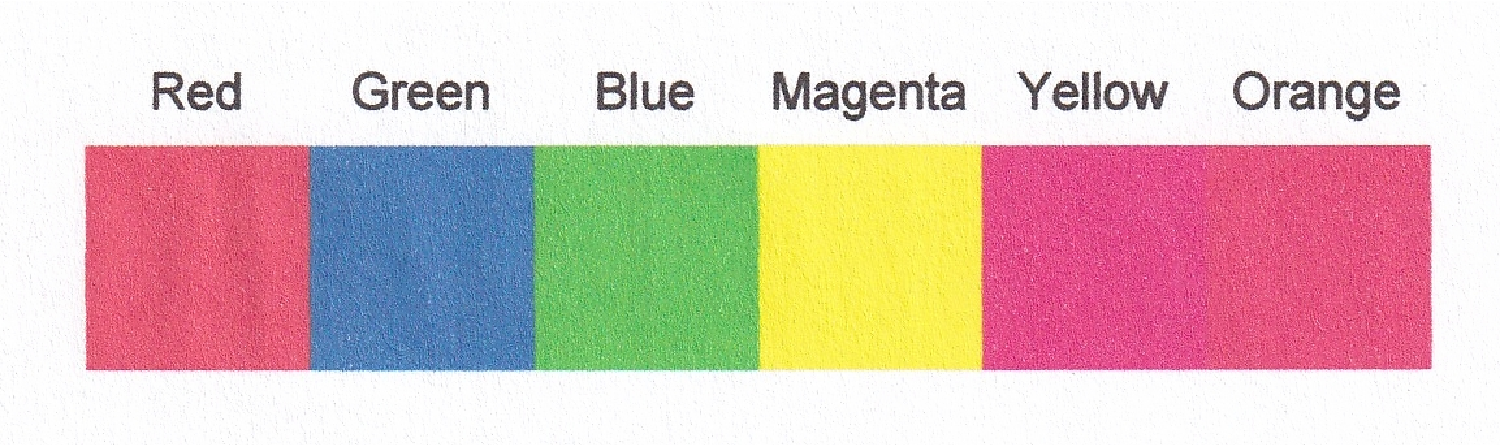
The following graphic shows several squares in different colors. The colors appear as expected in the notebook.
In[]:=
Block[{colors={"Red","Green","Blue","Magenta","Yellow","Orange"},g},g=Graphics[{Table[{FaceForm[ToExpression@colors[[i]]],Rectangle[{i,0}],Inset[Style[colors[[i]],13],{1/2+i,5/4}]},{i,Length[colors]}]}];Print@g;];

However, if you print the Print cell on a color printer using “Print Selection”, the colors are incorrect.
Here is the printout scanned into a JPG image file:
Here is the printout scanned into a JPG image file:
In[]:=
Image[Import[FileNameJoin[{NotebookDirectory[],"251014 Icorrect color reproduction.jpg"}],"Graphics"],ImageSize->Medium]
Out[]=