I don’t happen to like the use of a single letter such as for a function expression (like ) rather than for the name of a function (used in the form ). Ditto for and . Moreover, it’s more consonant with traditional math usage, as in “Let be the function defined by the formula .”
This later avoids the need for such things as taking an expression in and evaluating it at .
You can dispense with all the instances of!
You may now use Red as a named color, instead of RGBColor[1.,0,0], and Gray instead of the RGBColor you had.
My bolding is just a preference and could well be omitted.
s
t^3-6t^2+9t
s[t]
v
a
f
f(t)=…
This later avoids the need for such things as taking an expression in
t
x
You can dispense with all the instances of
Show
You may now use Red as a named color, instead of RGBColor[1.,0,0], and Gray instead of the RGBColor you had.
My bolding is just a preference and could well be omitted.
You may use a notebook’s 2D input to type exponents directly as superscripts (type the letter for the base, use keystroke combination ^, type the exponent in the placeholder box that appears, and finally press right-arrow to get out of the superscript position.
Stewart Calculus 6e pg. 171
Here is the kind of typical collegiate text problem that was probably made on similar CAS technology. I like to make the stories and graphics and colors better than the text, and complete with interactive analysis. I choose not to use the underscore after t and define globally s. I did not assign a rule to s (I think). It means that after t is evaluated the result equals s.
In[]:=
s[t_]:=-6+9t
3
t
2
t
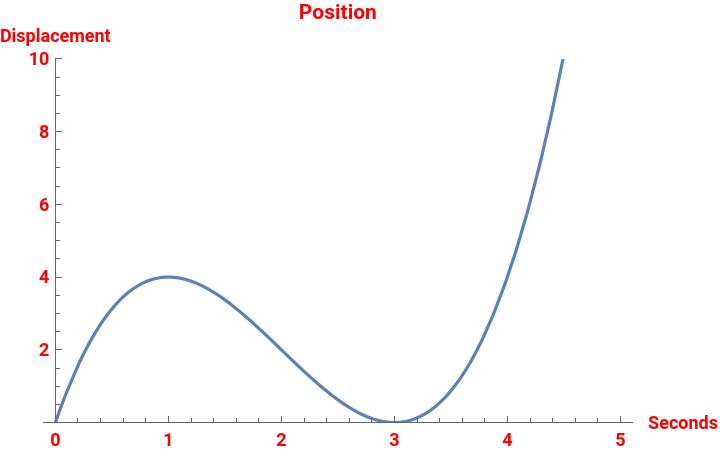
This is my first use of PlotRange as a keyboard command. An incredible accomplishment. In Mathcad these abilities are amazingly point and click user friendly. A great mathematical analysis of this problem can be done with stretching dragging and changing placeholders right on the graphic. I still find Mathematica to be a bit keyboard and code oriented, to be fair. It took quite some time to start from the default form of these plots. It plotted all the way up to twenty something thousand in all four Cartesian planes (inapplicable negative and positive values) and looked nothing like the problem in the textbook. Now they start at real world time zero and look much more like the physics showing that this is not such a smooth looking curve after all.
In[]:=
Plot[s[t],{t,0,5},PlotRange{0,10},AxesLabel{"Seconds","Displacement"},PlotLabel"Position",LabelStyleRed,BaseStyle{Bold,12}]
Out[]=
In[]:=
v[t_]=s'[t]
Out[]=
9-12t+3
2
t
In[]:=
Solve[v[t]0,t]
Out[]=
{{t1},{t3}}
Because s is globally defined, using the letter “s” as (m/s) in my AxesLabel for “meters per second” puts great trust in my understanding of HoldForm. I quickly see the letter remains black in the Show command. I assume the Wolfram Kernel is just saying “yes I recognize this as a defined function of t but I am not going to do any calculations here and just “Show” s as a letter of the English language”.
Murray: the Style expression for m/s below is to force the expression to appear as an in-line fraction, whereas with HoldForm one gets an unpleasant stacked fraction. Compare:
In[]:=
Style["m/s",FontSlant"Italic"]HoldForm[m/s]TraditionalForm[HoldForm[m/s]]
Out[]=
m/s
Out[]=
m
s
Out[]//TraditionalForm=
m
s
In[]:=
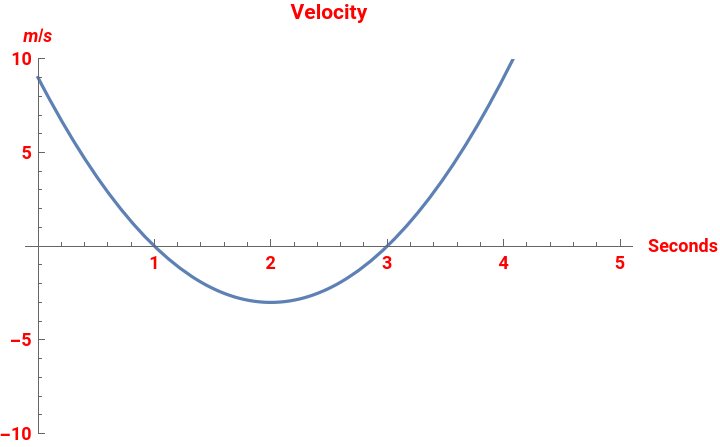
velocityPlot=Plot[v[t],{t,0.,5.},PlotRange{-10,10},AxesLabel{"Seconds",Style["m/s",FontSlant"Italic"]},PlotLabel"Velocity",LabelStyleRed,BaseStyle{Bold,12}]
Out[]=
In[]:=
a[t_]=v'[t]
Out[]=
-12+6t
In[]:=
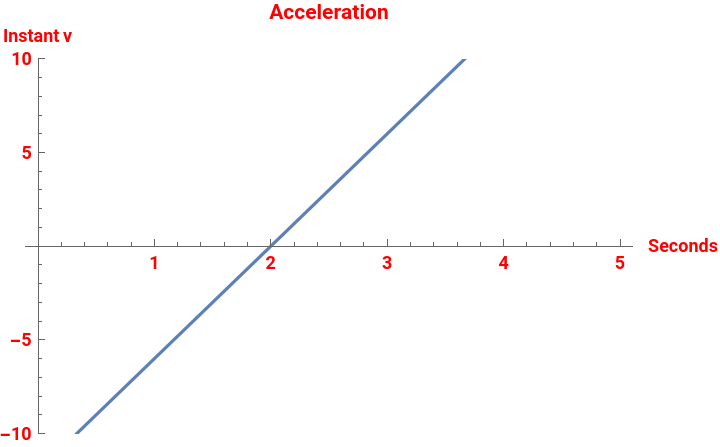
accelerationPlot=Plot[a[t],{t,0,5},PlotRange{-10,10},AxesLabel{"Seconds","Instant v"},PlotLabel"Acceleration",LabelStyleRed,BaseStyle{Bold,12}]
Out[]=
In[]:=
Plot[{s[t],v[t],a[t]},{t,0,5},PlotLabel"Calculus",LabelStyle{10,Gray},BaseStyle{Bold,12},PlotLegends"Expressions"]
Out[]=
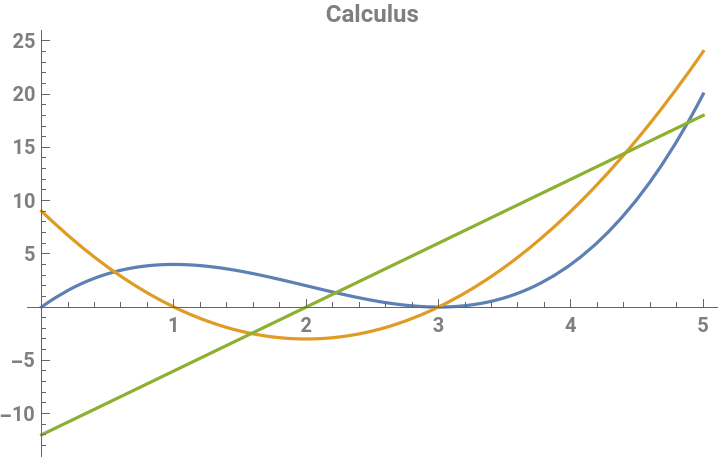


Here of course is the final step in setting up a good mathematical analysis of this typical college level acceleration physics system. And once again I am struggling with not just the Mathematica code, but to be honest the calculus is just as not as good as it used to be. All I want to do here is capture the idea Stewart shows next on page 172. That tiny little area between zero and five seconds when this particle experiences violent back and forth acceleration forces all in a straight line that was not evident looking at the first smooth curve that I will now call the “g of k”. . .
g[k]:=k^3-6k^2+9kPlot[g[k],{k,-20,20}]
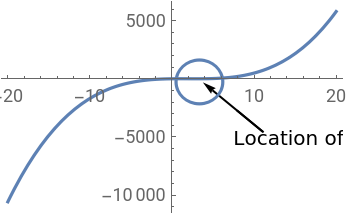
And finally the video. Mathcad has a Trace option that I greatly miss. There are three elements in the list to be plotted. The first is a for acceleration. The other two are just the equations typed in. In other attempts I have defined / assigned v and s for position and velocity . . . and it works.
Murray: Is this what you wanted to show??
In[]:=
Manipulate[Plot[{aa,v[t],s[t]},{t,0,5}],{aa,0,5}]
Out[]=

This was contributed to the Wolfram Demonstrations by Jim Hill in 2011. It is a perfect match. Copy and paste mathematics is the question.
https://demonstrations.wolfram.com/VelocityAndAccelerationInRectilinearMotion/
https://demonstrations.wolfram.com/VelocityAndAccelerationInRectilinearMotion/