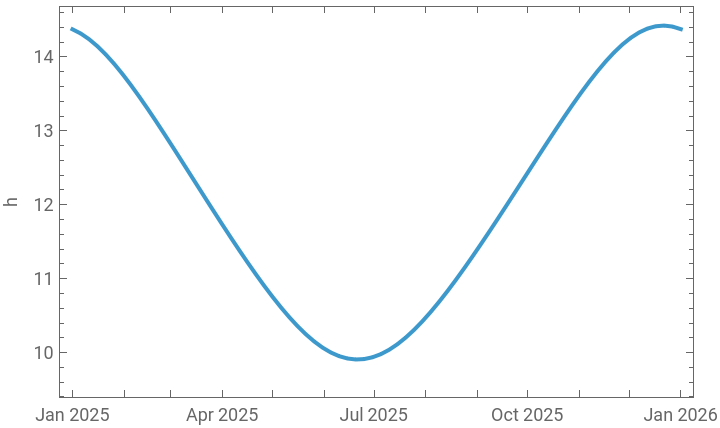
There is an interesting blog post on the Wolfram website by Nick Lariviere about daylight saving time: https://blog.wolfram.com/2025/03/05/whats-up-with-daylight-saving-time-a-brief-history-and-analysis-with-wolfram-language .
When I applied the dayLength function to compute daylight hours for different locations, I got unexpected results. In this post, I looked into the issue and made a small correction to the function so it computes correct daylight hours for different locations.
When I applied the dayLength function to compute daylight hours for different locations, I got unexpected results. In this post, I looked into the issue and made a small correction to the function so it computes correct daylight hours for different locations.
The issue
The issue
Mathematica computes the time of a location with a timezone offset corresponding to your machine’s local timezone, that is if you do not specify the timezone (or offset) specifically.
So when I naively used the same expression as the first DateListPlot for Chicago and the same dayLength function mentioned in the blog post and apply it to Glasgow, I got:
So when I naively used the same expression as the first DateListPlot for Chicago and the same dayLength function mentioned in the blog post and apply it to Glasgow, I got:
In[]:=
dayLength[where_,when_]:=Sunset[where,when]-Sunrise[where,when]
DateListPlot#,dayLength,#&/@DateRange[DateObject[{2025,1,1},"Day"],DateObject[{2026,1,1},"Day"],{5,"Day"}],FrameLabel->Automatic
Out[]=
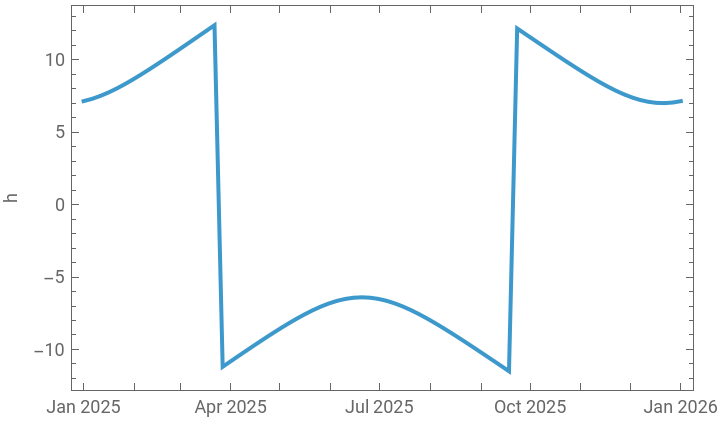
In the DateListPlot, I showed the DateRange with the date ranges in InputForm, because details matter as we will see below.
However, what we achieved is not the same plot as shown in the third DateListPlot (Glasgow) in the post.
Isn’t the DateListPlot expression and variables not the same as the post’s third DateListPlot for Glasgow?
The easy-to-read DateObjects can be a bit deceiving. There is a little detail hidden in the DateObject used the DateRange function of the third DateListPlot. Let’s write DateListPlot in InputFrom:
However, what we achieved is not the same plot as shown in the third DateListPlot (Glasgow) in the post.
Isn’t the DateListPlot expression and variables not the same as the post’s third DateListPlot for Glasgow?
The easy-to-read DateObjects can be a bit deceiving. There is a little detail hidden in the DateObject used the DateRange function of the third DateListPlot. Let’s write DateListPlot in InputFrom:
In[]:=
DateListPlot[{#,dayLength[Entity["City",{"Glasgow","GlasgowCity","UnitedKingdom"}],#]}&/@DateRange[DateObject[{2025,1,1},"Day","Gregorian",0.],DateObject[{2026,1,1},"Day"],{5,"Day"}],FrameLabel->Automatic,PlotRange->{All,{5,20}}]
Out[]=
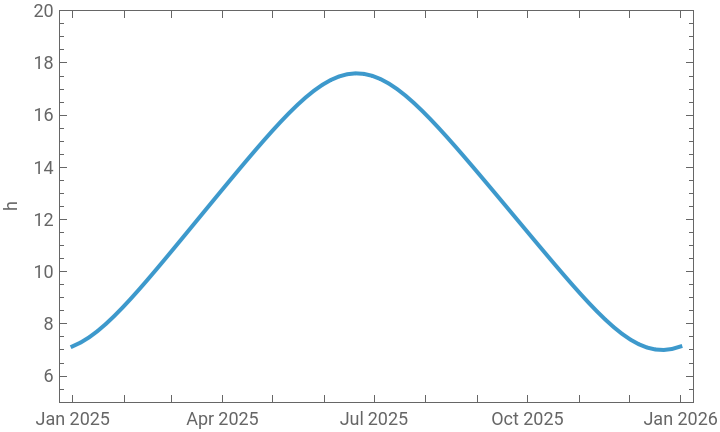
Notice the DateObject[{2025, 1, 1}, “Day”, “Gregorian”, 0.] in the DateRange function.
If we do not use a date in Glasgow’s timezone (GMT+0) in the dayLength function, we will get unexpected results. For example, on March 27 2025 instead, we will get:
If we do not use a date in Glasgow’s timezone (GMT+0) in the dayLength function, we will get unexpected results. For example, on March 27 2025 instead, we will get:
In[]:=
dayLength,DateObject[{2025,3,27},"Day"]
Out[]=
From the DateListPlot at the beginning of this post, we expect negative dayLength results for dates between Mar 27 and Sep 18 2025, so how could Nick Lariviere compute the correct daylight hours for Jun 21, 2025 ?
We have to look at the date in InputForm:
We have to look at the date in InputForm:
dayLength,DateObject[{2025,6,21},"Day","Gregorian",0.]
This confirms the issue with our plot at the beginning of this post.
dayLength function with correct timezone
dayLength function with correct timezone
I work on a machine in the Chicago/Illinois timezone. For example, if I compute the time of sunrise in Stockholm, Sweden on Mar 8, 2025, I get:
In[]:=
Sunset,DateObject[{2025,3,8},"Day"]
Out[]=
We know that Sweden is about 6 hours ahead of the Chicago/Illinois timezone (depending on daylight saving time) , so we expect sunrise in Sweden to happen the night before, relative to the Chicago/Illinois timezone.
Let’s see what Mathematica computes when we follow the same syntax as above:
Let’s see what Mathematica computes when we follow the same syntax as above:
In[]:=
Sunrise,DateObject[{2025,3,8},"Day"]
Out[]=
Mathematica computed the sunrise time when it was March 8 in our timezone, not in Sweden’s timezone. In other words, in Sweden’s timezone it is the sunrise time of the next day (notice also 2 minutes earlier):
In[]:=
TimeZoneConvert,
Out[]=
Details matter, because if we do not input the correct date(time) in the dayLength function, our daylight hours will be off:
In[]:=
Out[]=
This explains the issue with the daylight hours plot at the beginning of this post.
Therefore, we have to compute the sunrise time relative to my timezone, on March 8 in Stockholm’s timezone as so:
Therefore, we have to compute the sunrise time relative to my timezone, on March 8 in Stockholm’s timezone as so:
In[]:=
Sunrise,DateObject{2025,3,8},"Day",TimeZone->
Out[]=
To verify that the sunrise happened on Mar 8, 2025 in Sweden:
In[]:=
TimeZoneConvert,
Out[]=
Now, we can use compute the daylight hours using the correct sunrise and sunset times in Stockholm, again, relative to my location(and to save another timezone conversion):
In[]:=
Out[]=
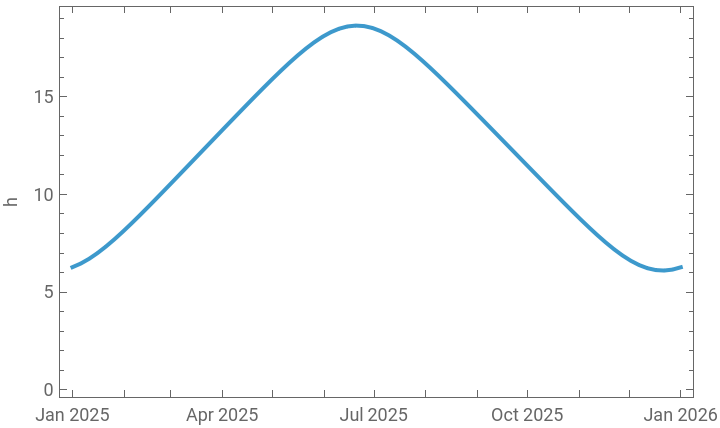
Let’s rewrite the dayLength function to compute the correct daylight hours as so:
In[]:=
dayLength[where_,when_]:=Sunset[where,DateObject[when,TimeZone->where]]-Sunrise[where,DateObject[when,TimeZone->where]]
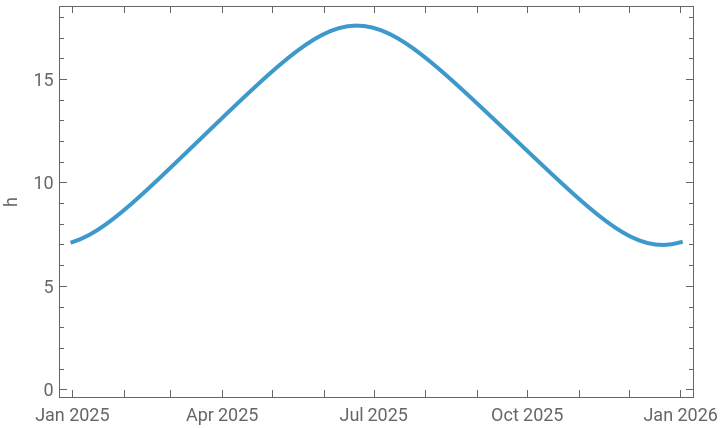
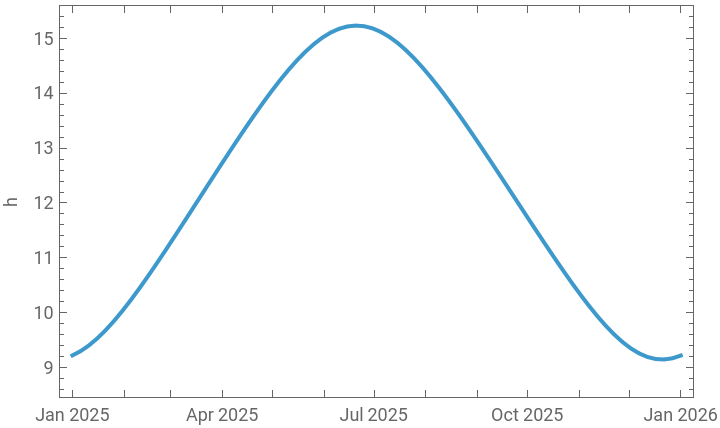
We can use this dayLength function to compute the daylight hours for different locations, for example, revisiting Glasgow first:
In[]:=
DateListPlot#,dayLength,#&/@DateRange[DateObject[{2025,1,1},"Day"],DateObject[{2026,1,1},"Day"],{5,"Day"}],FrameLabel->Automatic,PlotRange->Full
Out[]=
In[]:=
DateListPlot#,dayLength,#&/@DateRange[DateObject[{2025,1,1},"Day"],DateObject[{2026,1,1},"Day"],{5,"Day"}],FrameLabel->Automatic,PlotRange->Full
Out[]=
In[]:=
DateListPlot#,dayLength,#&/@DateRange[DateObject[{2025,1,1},"Day"],DateObject[{2026,1,1},"Day"],{5,"Day"}],FrameLabel->Automatic,PlotRange->Full
Out[]=
In[]:=
DateListPlot#,dayLength,#&/@DateRange[DateObject[{2025,1,1},"Day"],DateObject[{2026,1,1},"Day"],{5,"Day"}],FrameLabel->Automatic,PlotRange->Full
Out[]=