On Earth, oceans cover approximately 71% of the surface, leaving 29% as dry land—how would this look on Mars?
In[]:=
GeoGraphics[GeoRange->"World",GeoProjection->"CylindricalEqualArea"]
Out[]=
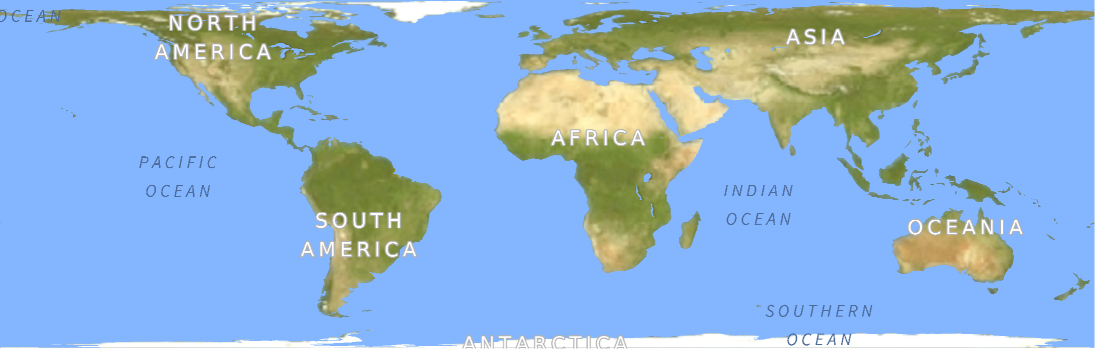
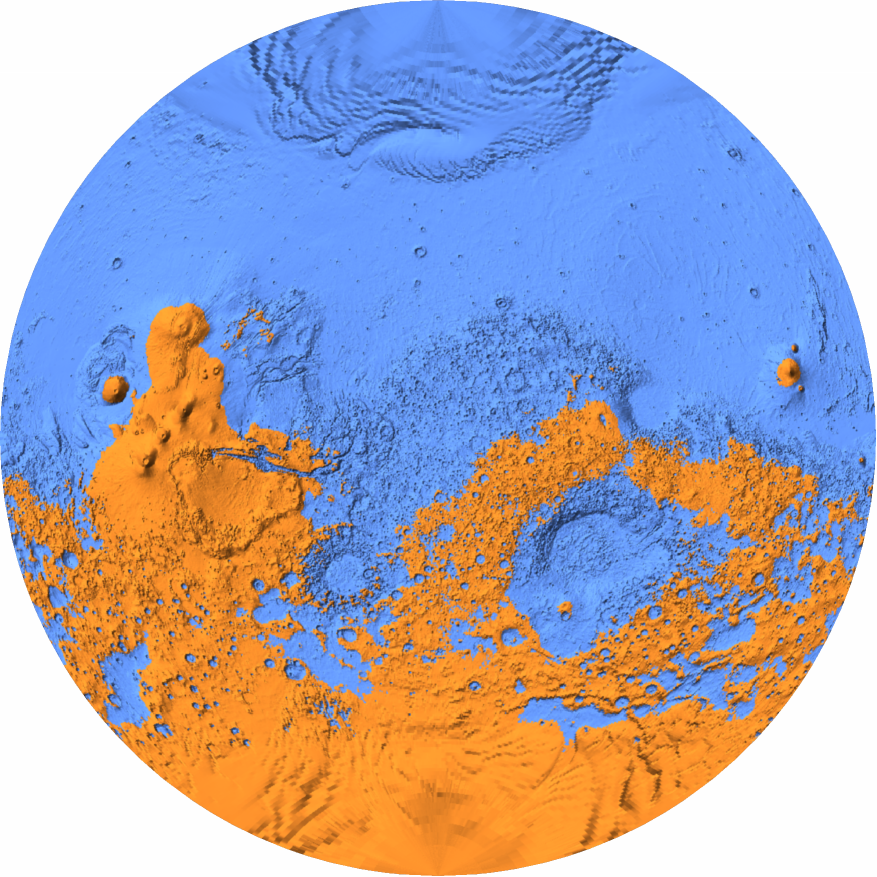
If we apply this exact ratio to Mars, the resulting map reveals a profoundly lopsided world. Because we are mapping pure topography rather than modeling complex atmospheric or climate physics, the theoretical water simply fills the lowest elevations. This creates a single vast ocean across the northern hemisphere and leaves the elevated southern highlands as one massive, continuous supercontinent. This severe global asymmetry perfectly illustrates a major geological feature known as the Martian dichotomy—a stark, planetary-scale difference in crustal thickness and elevation between the two hemispheres. Visualizing this concept is mathematically straightforward. Using the Wolfram Language, we can pair an equal-area map projection with a statistical quantile function to quickly calculate the exact global sea level required and plot the results.
The Martian dichotomy is a geomorphical feature of Mars, characterized by the contrast between the Southern and the Northern hemispheres. The two hemispheres’ geography differ in elevation by 1 to 3 km. The average thickness of the Martian crust is 45 km, with 32 km in the northern lowlands region, and 58 km in the southern highlands.
I think we could try to visualize it be FLOODING MARS WITH WATER.
Simple static map of Mars at 71% surface water (Earth percentage)
Simple static map of Mars at 71% surface water (Earth percentage)
To estimate the surface area ratio of water to land, we need to model the uniform flooding of topographic lowlands up to a specific elevation. Finding this exact elevation threshold for given water surface area percentage requires sampling the planet’s topography uniformly. This snippet fetches the global elevation data using an equal-area projection, generating a grid where every data point represents the exact same amount of physical surface area. This provides the mathematically uniform sample necessary to calculate the exact water-level threshold in the next step.
elSamp = Flatten @ QuantityMagnitude @ GeoElevationData[ GeoProjection -> "CylindricalEqualArea", GeoZoomLevel -> 1, GeoRange -> "World", GeoModel -> "Mars"];
First, Quantile calculates the exact elevation (in absolute meters) where 71% of the planet is underwater. Then, Rescale takes that specific altitude and converts it into a simple fraction from 0 to 1, comparing it against the absolute lowest and highest points on Mars (MinMax). We have to do this because our graphics engine prefers drawing based on relative proportions (like “fill the bottom 26% of the planet’s total height”) rather than absolute meters.
tHeight = Rescale[Quantile[elSamp, 0.71], MinMax[elSamp]];
The below sets up a visually pleasing map of Mars, complete with 3D mountain shadows for texture. Then, it applies a strict, simple rule to every single pixel: if a pixel’s elevation falls below our `tHeight` percentage, it paints it blue for water; if it sits above that line, it paints it orange for dry land. This generates the final, high-contrast visual of our mathematically accurate ocean world.
The Van der Grinten projection bounds the entire globe within a perfect circle, providing an aesthetically balanced compromise between shape and size distortion. Historically, it is best known for serving as the standard world map for the National Geographic Society from 1922 to 1988.
In[]:=
GeoGraphics[ GeoModel -> "Mars", GeoRange -> "World", GeoProjection -> "VanDerGrinten", GeoBackground -> GeoStyling["ReliefMap", ColorFunction -> (If[# < tHeight, StandardBlue, StandardOrange] &) ]]
Out[]=
Animation for filling Mars topography with water
Animation for filling Mars topography with water
To prepare the final output, we first construct a high-resolution title bar. This snippet formats custom text into a single graphic and rasterizes it to a width of exactly 1080 pixels, ensuring it aligns perfectly with the dimensions of our map canvas.
In[]:=
header=Rasterize[Framed[#,Background->Black,FrameMargins7,FrameStyle->Thickness[0]]&@Apply[StringJoin,ToString[#,StandardForm]&/@#],RasterSize->1080]&@{Style[" FILLING",33,White,FontFamily->"DIN Alternate",Background->Black],Style[" MARS",35,StandardOrange,FontFamily->"Phosphate",Background->Black],Style[" WITH",33,White,FontFamily->"DIN Alternate",Background->Black],Style[" WATER ",35,StandardBlue,FontFamily->"Phosphate",Background->Black]}
Next, we retrieve the topographical matrix that will serve as our visual canvas. By selecting the Van der Grinten projection at a higher zoom level, we generate a detailed 2D map optimized for screen presentation rather than pure physical area calculation.
In[]:=
mars = QuantityMagnitude@GeoElevationData[ GeoRange -> "World", GeoModel -> "Mars", GeoProjection -> "VanDerGrinten", GeoZoomLevel -> 3];
Before painting the map, we must calculate the water level. This step flattens the matrix into a single list, deletes the artificial zeros located in the map’s empty corners, and finds the elevation threshold (`zBase`) where exactly 71% of the map’s *pixels* are submerged. It is critical to note that because our visual map projection heavily stretches geometry near the poles, 71% of the pixels does not equal 71% of the planet’s true physical area. We use this pixel-based calculation intentionally for the video: tying the water level to the screen’s pixel distribution rather than true planetary geometry guarantees that the flooding effect will progress at a smooth, uniform rate across the canvas during the animation.
In[]:=
real = DeleteCases[Flatten @ mars, 0.];{zMin, zMax} = MinMax[real];zBase = Quantile[real, .71];
With the threshold defined, we generate the visual plot. This function pushes the empty corner pixels to an extreme negative value so they render as black space. It then applies our color rule: elevations below the calculated water line are shaded with ocean gradients, while the rest are painted as dry land.
rlfplt=ReliefPlotmars /. 0. -> -99999,;
To construct a complete frame, this command acts as a vertical layout board. It takes the pre-rendered title graphic and stacks it directly on top of the newly generated map, producing a single, combined image ready for display.
In[]:=
ImageAssemble[{{header,Rasterize[rlfplt,RasterSize->1080]}}//Transpose]
Out[]=
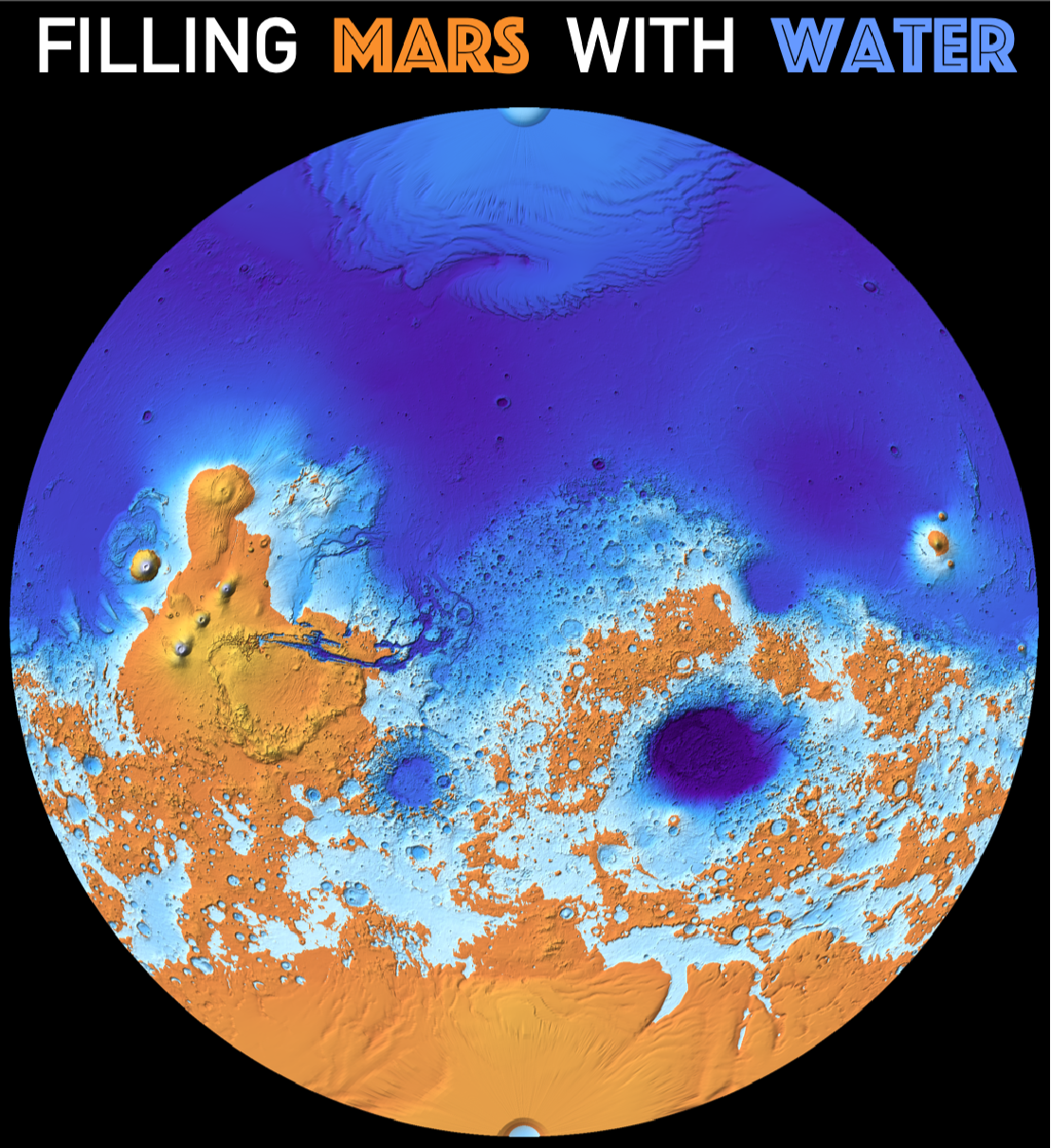
Finally, we simulate the global flooding process. By placing our layout logic inside an animation loop and replacing the static 71% target with a variable t that smoothly scales from 0 to 1, the system generates a continuous sequence of rising water levels. The code computes these frames simultaneously across the computer’s processor cores to compile a 10-second video.
Parallelize@AnimationVideoModule{zBase,rlfplt},zBase = Quantile[real, t]; rlfplt=ReliefPlotmars /. 0. -> -99999,;ImageAssemble[{{header,Rasterize[rlfplt,RasterSize->1080]}}//Transpose],{t,.00001,.99999},DefaultDuration->10,RasterSize->{1080,1183}
Out[]=
CITE THIS NOTEBOOK
CITE THIS NOTEBOOK
Filling Mars with water: Martian dichotomy and oceans versus continents at Earth's 71% water surface
by Vitaliy Kaurov
Wolfram Community, STAFF PICKS, June 2, 2026
https://community.wolfram.com/groups/-/m/t/3725603
by Vitaliy Kaurov
Wolfram Community, STAFF PICKS, June 2, 2026
https://community.wolfram.com/groups/-/m/t/3725603