Recent years have been marked by the rapid development of microservice architecture and the distributed processing of information in real or near real time. This is primarily due to the development and improvement of data delivery mechanisms such as queue managers and event streaming platforms. Based on them, such event-driven products are built as: IoT, which work with the flow of messages from “smart” things; web platforms that display the results of receiving or processing events to the end user; data processing pipelines, responding to events of different nature, and others. The peculiarity of such systems is that they focus not so much on reducing the processing time of each individual event and bringing it closer to real time, but on the guaranteed the processing of each of them. The latter comes to the fore because event generators and consumers are often completely technologically and algorithmically independent, and can also be located in space at a considerable distance from each other.
One of the most popular, fault-tolerant and powerful event streaming platform at the moment is Apache Kafka. It allows to build a distributed system of brokers (managers) of the queue, which is able not only to dynamically adapt to the load from the queue customers of both types (generators and consumers), but also easily scale vertically and horizontally.
Processing of a message streams by mathematical processors allows to use their full range of tools for modelling and analysis of data. For example, the implementation for the MathWorks MATLAB is already underway and has a fairly rich functionality in my opinion. The Mathematica processor also is one of the world leaders in the field of symbolic and numerical data processing and is used in almost every field of knowledge and science. Therefore, the construction of event-driven products based on it is an urgent task. But there is still no effective and reliable mechanism for connecting this math. processor and Kafka to receive or publish data. So, the purpose of this article is to develop the mechanism of interaction between the Mathematica and the Kafka to work in two directions: publishing messages in the queue and consuming from it.
Using Apache Kafka
Using Apache Kafka
The easiest way to organize interaction with Kafka is to locally install Apache Kafka software on the client computer as a queue client and interact with the queue through it. Scripts from the “/bin/” subdirectory for Linux systems and “/bin/windows/” for Windows systems in the Kafka installation directory are used for publishing, reading messages, and other operations in turn. It should be noted that Kafka requires the installation of a Java code execution platform. For certainty, we will consider only Windows as a client, for Linux the difference will be only in the extension of scripts “.sh”. It should also be borne in mind that currently Kafka developers do not guarantee the correct operation of all components of their platform on Windows.
The publishing operation is a one-time execution of the instant termination script “kafka-console-producer.bat”, which is performed each time to send a separate message to the queue (topic), which is read from the standard input stream (stdin). Read operation — one-time execution of the script “kafka-console-consumer.bat” without completion, which is an endless process of reading messages from the queue and output them to the standard output stream (stdout). The main parameters of all scripts are: “--bootstrap-server” — a comma-separated list of boostrap servers to connect to the Kafka cluster, and “--topic” — the name of a specific queue. Hereinafter, these general parameters in the code are replaced by three dots for brevity.
So, the proposed approach to build of the mechanism of interaction of Mathematica with the Kafka cluster is based on the use of built-in functions of executing external applications and reading streaming data that work with standard input and output streams. The diagram of the system constructed on such approach is given in Fig. 1.
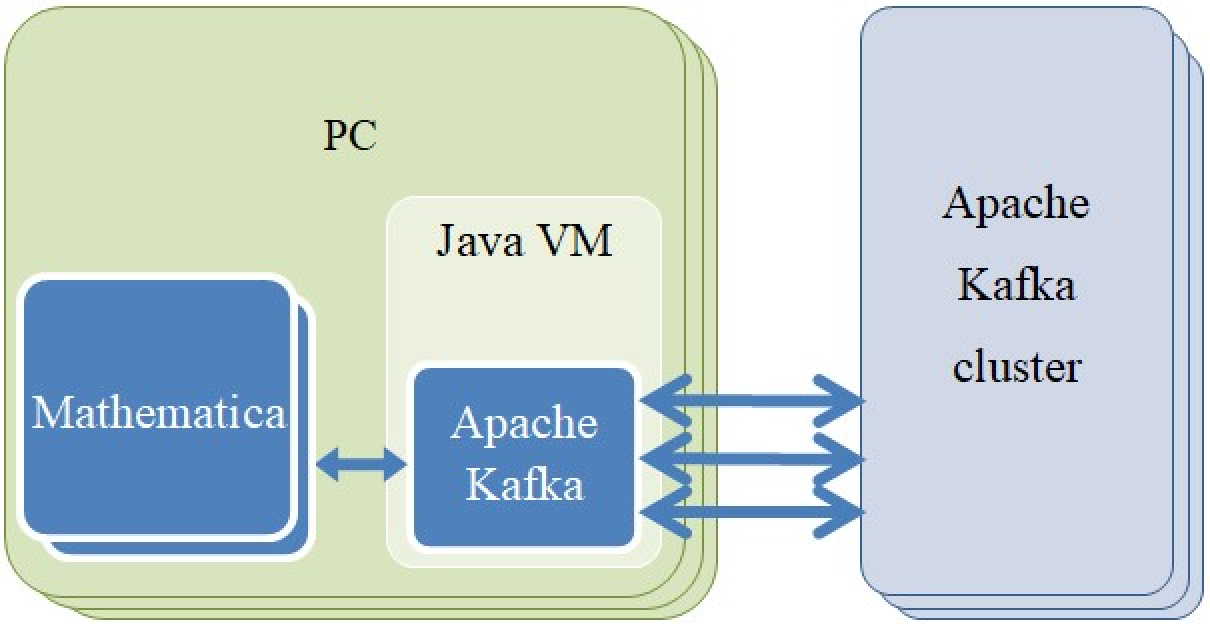
Fig. 1. Connecting to a Kafka cluster via a local Apache Kafka installation as a client
To run external applications from a Mathematica document, we can use the Run function, the only parameter of which is the command to execute. The function of publishing in turn built on its basis looks as follows.
Run["echo \""<>key<>":"<>value<>"\" | kafka-console-producer.bat --bootstrap-server … --topic … --property \"parse.key=true\" --property \"key.separator=:\""];
The publication is made in the form of “key: value” pair, which is indicated by two arguments of the script with the prefix "--property". Moreover, the “value” should not have new lines. The function is a call of echo environment command, which provides data for publication to the Kafka script input.
Creating, deleting and listing queues (topics) is done in a similar way:
Run["kafka-topics.bat --bootstrap-server … --topic … --create"];Run["kafka-topics.bat --bootstrap-server … --topic … --delete"];Run["kafka-topics.bat --bootstrap-server … --list"];
To read from a data stream in Mathematica we can use the Read function, the parameters of which are the file name and read mode : string, word and others. But if we put an exclamation point at the beginning of the file name, it will be treated as a command to execute and the Read function will return its output to the standard stream. Also, instead of the file name, we can pass the handle of the stream opened by the OpenRead function, which takes in the file name with all the comments above. The mechanism of operation of the Read function is such that it does not end until the data stream reaches the value of EndOfFile, i.e. does not end at all for the queue. The reading of queue messages based on it is given below.
stream=OpenRead["!kafka-console-consumer.bat --bootstrap-server … --topic … --from-beginning"];While[True,{Check[str=Read[stream,String],Break[];];If[str===EndOfFile||UserCallback[str]===False,Break[];]}];Close[stream];
The above construction opens a data stream initiated by the script “kafka-console-consumer.bat” and reads it in an infinite loop. Each message is processed by a user function UserCallback. In this case, the simplest way to divide messages in the Read is used — as a text string by the new line character “\ n”. But if the messages contain such characters, it is possible to switch the reading mode to “Record” and set in the RecordSeparators option a valid character for dividing the stream into messages. The use of the intermediate function OpenRead is intended to obtain a stream descriptor for its correct closure by the function Close, however, as mentioned above, we can pass the command directly by the first argument to the function Read. In the latter case, the stream will be closed only when the current Mathematica kernel is closed.
Due to the fact that the queue never ends, and because of this the program will never receive an EndOfFile character during normal operation, it seems promising, if necessary, to develop an additional mechanism for forcibly exiting from message receiving process by a return False from UserCallback.
Using Kafkacat
Using Kafkacat
An alternative approach to publishing to the Kafka queue might be to install Kafkacat on the client, a third-party software for connecting to a Kafka cluster that does not require the Java platform but for Windows requires Windows Subsystem for Linux (WSL) installed and configured. The diagram of the approach built on it is shown in Fig. 2.
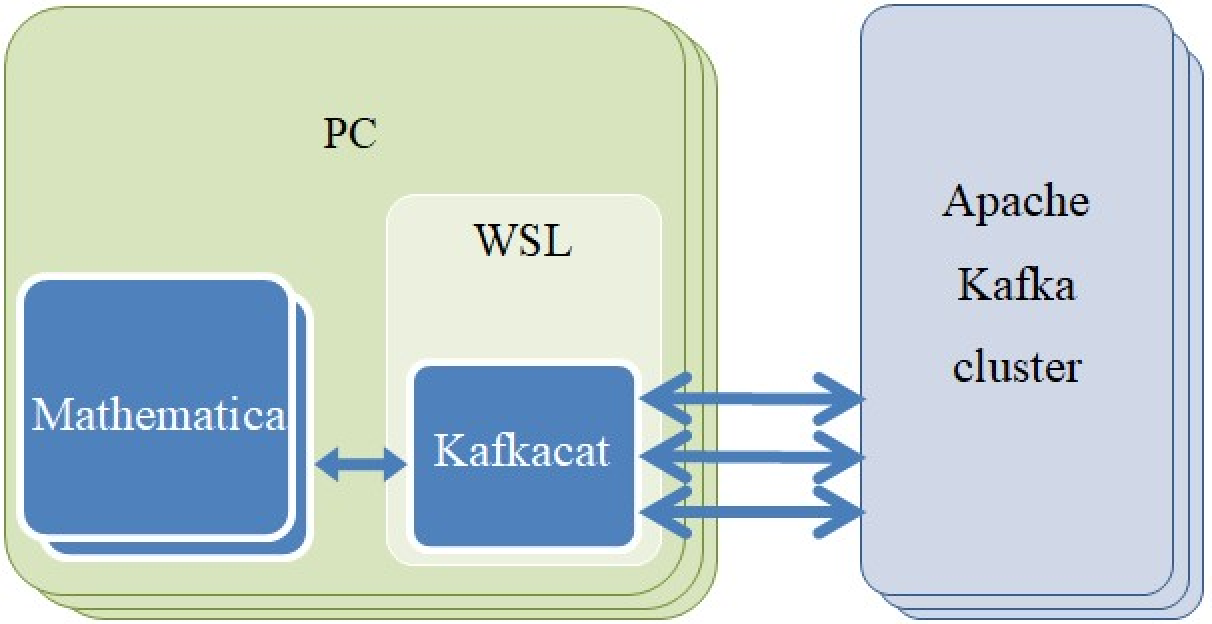
Fig. 2. Connecting to a Kafka cluster via a local Kafkacat installation
In terms of built-in features, this application is not inferior to the original Apache Kafka software, but much more convenient to use. The publishing command in the queue will look much shorter:
Run["echo \""<>key<>":"<>value<>"\" | kafkacat -P -K: -b … -t …"];
The argument “-P” enables publishing mode, “-K” sets the colon as a separator between the key and the value of the message, the last “-b” and “-t” are completely similar to “--bootstrap-server” and “--topic”.
The open stream command for reading from the queue will look like this:
stream=OpenRead["!kafkacat -C -J -u -q -b … -t …"];
Where the argument “-C” enables read mode, “-J” receive a message in full JSON-format, “-u” switches to unbuffered output mode (very important!), "-q" excludes service information from the output .
As mentioned above, using the “-J” parameter for Kafkacat returns a string that is a JSON object with complete information about the message from the queue: publication time, key, value, headers, offset, and more. But Mathematica does not have a built-in convenient mechanism for working with the JSON format, so to process this string and get from it the fields “key” (message key) and “payload” (message text) we need to use the following approach:
json=ImportString[str,"JSON"];key="key"/.json;payload="payload"/.json;
Similar constructs are used to retrieve other fields from the object, such as “headers”, “offset” or “ts” etc.
Simple work demonstration
Simple work demonstration
Fig. 3. Simultaneous publishing (right) and reading from the same queue (left) using the Kafkacat
Table 1. Consumption of computer resources by clients of the Kafka queue
Mathematica package
Mathematica package
Fig. 4. The structure of the directories of the Mathematica package of interaction with Kafka
/Kernel/init.m
/KafkaLocalLink.m
/Produce/Produce.m
/Consume/Consume.m
Conclusions
Conclusions