For you and your coding agent
For you and your coding agent
My paclet QMRITools has grown to about 30 packages and nearly 2000 definitions over the years. At that size it is hard to keep track of how things fit together. Which functions does everything depend on? What breaks if I change this one? Where are the dependency cycles?
Coding agents have the same problem, only worse. They start every session knowing nothing about the code, and they rebuild the picture by grepping and reading files. CodeGraph is a small paclet that builds a static call graph of Wolfram Language source. It uses CodeParser and never evaluates your code. You get interactive views for yourself and plain text files for your agent.
Installation
Installation
In[]:=
Needs["CodeGraph`"]
As an example I use QMRITools itself. The installed paclet contains its source, so you can follow along:
In[]:=
cg=BuildCodeGraph[FileNameJoin[{PacletObject["QMRITools"]["Location"],"Kernel"}]];CodeGraphSummary[cg]
Out[]=
Files30,Definitions1968,Symbols1267,Edges2357,PackageDependencies115,CyclicGroups{{ReconstructionTools,MaskingTools,PlottingTools,ProcessingTools,NiftiTools,DenoiseTools,TensorTools,GradientTools,ElastixTools,TractographyTools},{SegmentationTools,NeuralNetworkTools}},Uncalled{bidsName,BooleC1,ConFuncLC,ConFuncUC,CountSketch,dixAmp,dixFreq,dixRel,ErrorCS,ExportTractsDefault,FitBipolar,FunceC2,FunceC3,ImportNiiInfo,ImportTractsDefault,LeastSquaresError2CS,LeastSquaresErrorCS,MovieSaveDef,MultiFileSaveDef,PosSym,RandomNormalC,RegNorm,RK2T,RK3,SkewNormC,StrucTensCalc,TaggingParPlot,TensMinCLLS,TensMinCNLS,TensMinCWLLS,TensMinDKI,TensMinGMM,TensMinNLS,verb}
The graph comes out at about 2000 definitions and about 2350 call edges between them. Parsing takes around 20 seconds.
The whole paclet at a glance
The whole paclet at a glance
PackageGraph
"Condensed"
In[]:=
PackageGraph[cg,"Condensed"]
Out[]=
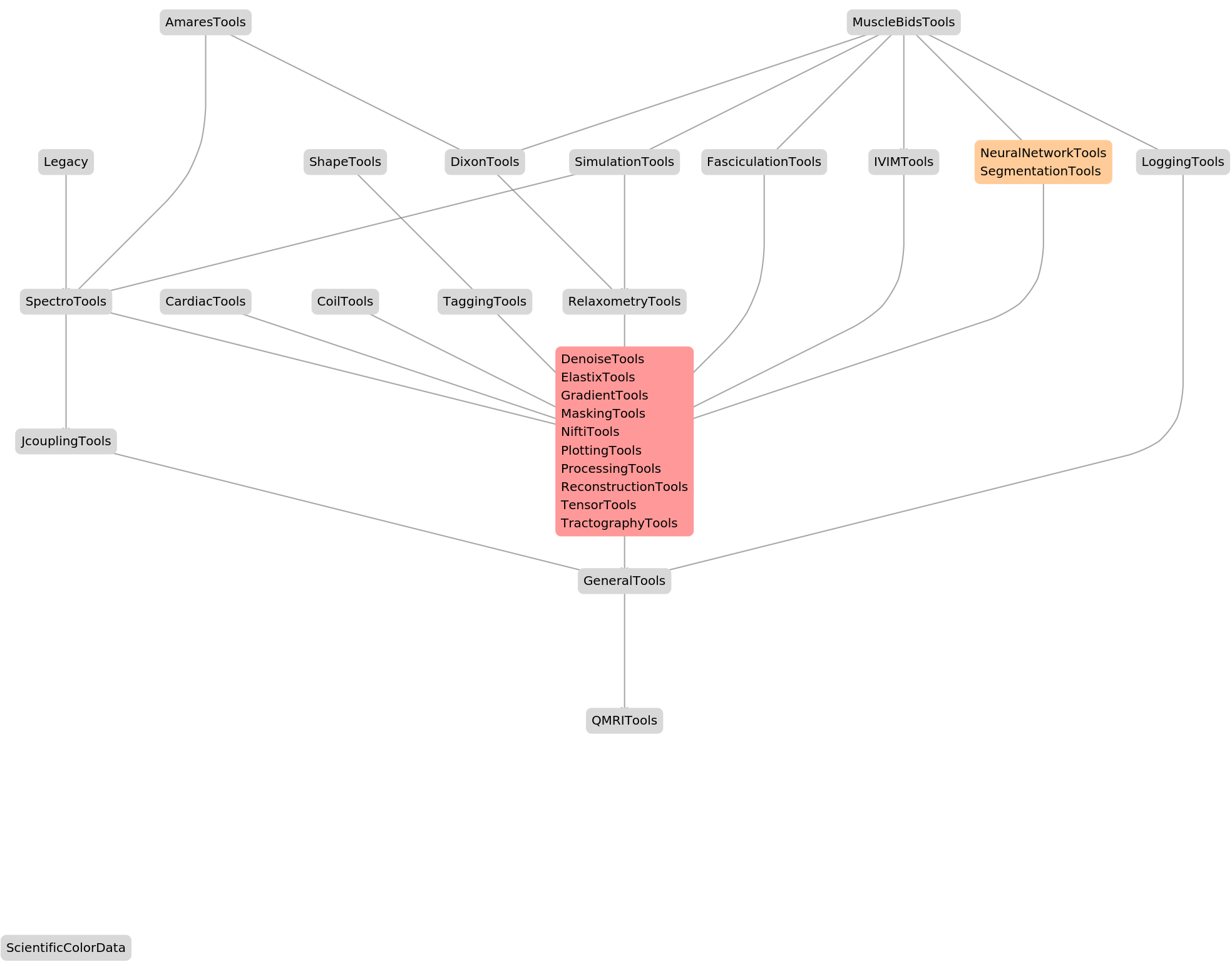
This is the architecture of QMRITools on one screen. The BIDS pipeline sits at the top, the application packages below it, then a core of 10 packages that all depend on each other, and GeneralTools at the bottom. The orange box was a surprise: a cycle between SegmentationTools and NeuralNetworkTools that I had not documented. It comes from a single call to a private function with its full context. shows the full layered graph with every dependency. Hover an edge to see how many calls it stands for.
PackageGraph[cg]
One function in context
One function in context
SymbolGraph
In[]:=
SymbolGraph[cg,"NormalizeData",2]
Out[]=


In[]:=
SymbolGraph[cg,"ApplySegmentationNetwork",2]
Out[]=
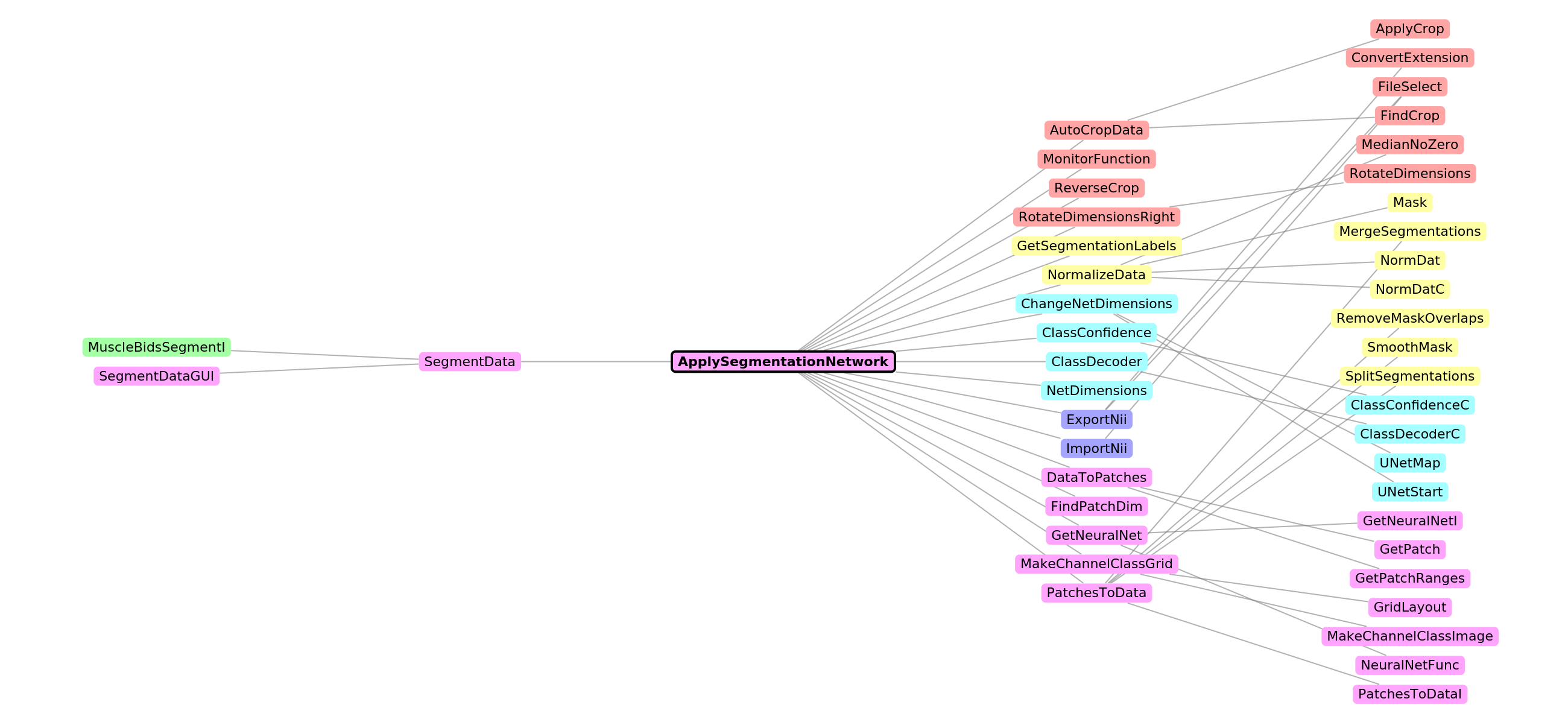
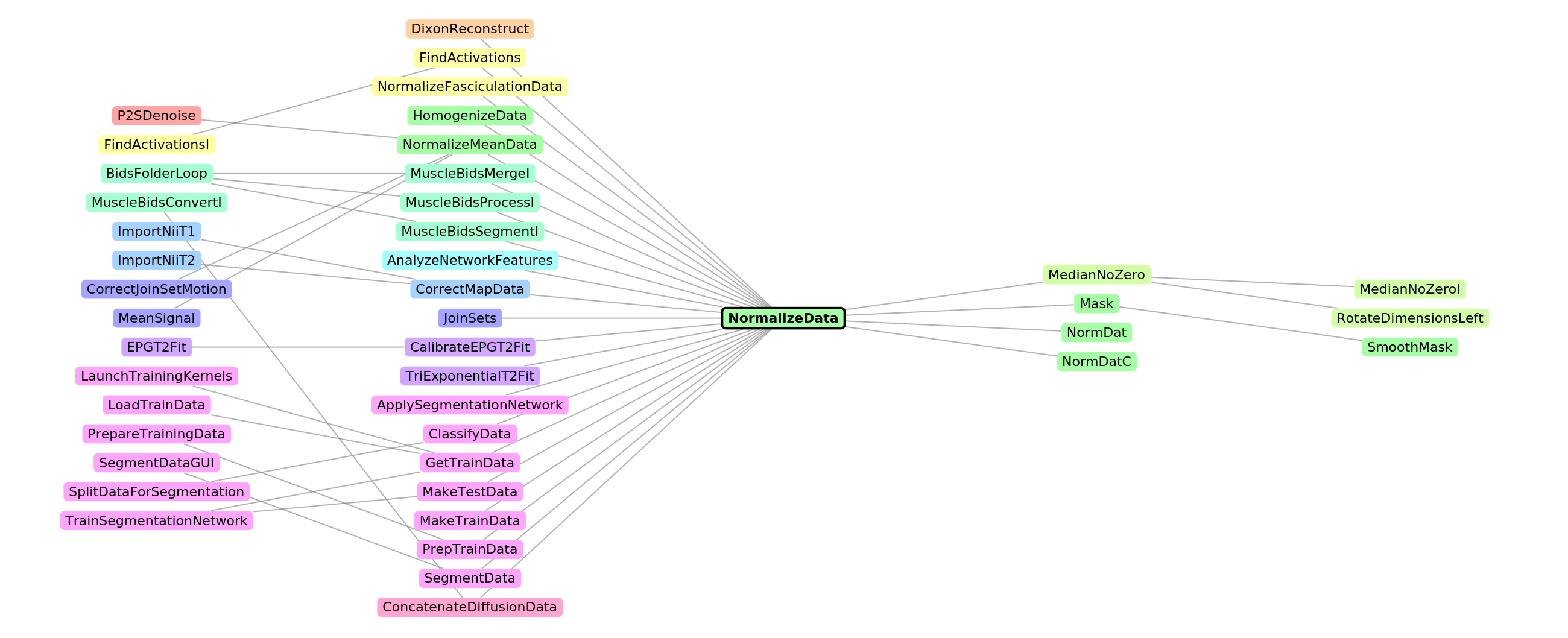
The shape of the picture already tells you something. is heavy on the left: a basic function that many others call, so changing it is risky. is heavy on the right: a high-level function with a single route into it that relies on a lot of code underneath.
NormalizeData
ApplySegmentationNetwork
With or you follow one direction only, here every route to a small helper within three steps:
"In"
"Out"
In[]:=
SymbolGraph[cg,"FindPatchDim",3,"In"]
Out[]=

Which functions matter most
Which functions matter most
CodeGraphOverview
In[]:=
CodeGraphOverview[cg,10]
Out[]=
# Code graph overviewSource: `AppData\Roaming\Wolfram\Paclets\Repository\QMRITools-4.11.0\Kernel`, built 2026-09-29. 30 files, 1968 definitions, 2357 call edges.Static analysis: runtime-built calls and callers outside the source are not seen. Rebuild after adding, removing or moving definitions.Query with `codegraph.wls <graphDir> callers|callees <symbol> [depth]`, or grep edges.tsv (caller, callerPackage, line, callee, calleePackage).## Package layersPackages only call packages in lower layers or in their own cycle (in brackets). Layer 0 depends on nothing.- 5: AmaresTools, MuscleBidsTools- 4: DixonTools, Legacy, ShapeTools, SimulationTools- 3: CardiacTools, CoilTools, FasciculationTools, IVIMTools, [NeuralNetworkTools, SegmentationTools], RelaxometryTools, SpectroTools, TaggingTools- 2: [DenoiseTools, ElastixTools, GradientTools, MaskingTools, NiftiTools, PlottingTools, ProcessingTools, ReconstructionTools, TensorTools, TractographyTools], JcouplingTools, LoggingTools- 1: GeneralTools- 0: QMRITools, ScientificColorData## Dependency cycles- DenoiseTools, ElastixTools, GradientTools, MaskingTools, NiftiTools, PlottingTools, ProcessingTools, ReconstructionTools, TensorTools, TractographyTools- NeuralNetworkTools, SegmentationTools## Most used functions| Function | Package | Callers | From packages || --- | --- | --- | --- || Mask | MaskingTools | 34 | 15 || RotateDimensionsLeft | GeneralTools | 31 | 14 || RotateDimensionsRight | GeneralTools | 30 | 15 || DivideNoZero | GeneralTools | 29 | 15 || FileSelect | GeneralTools | 29 | 6 || ImportNii | NiftiTools | 22 | 5 || NormalizeData | MaskingTools | 21 | 10 || LightDarkV | GeneralTools | 19 | 9 || ShiftedInverseFourier | ReconstructionTools | 18 | 3 || AutoCropData | GeneralTools | 17 | 9 |## Private functions without callers in this sourcebidsName, BooleC1, ConFuncLC, ConFuncUC, CountSketch, dixAmp, dixFreq, dixRel, ErrorCS, ExportTractsDefault, FitBipolar, FunceC2, FunceC3, ImportNiiInfo, ImportTractsDefault, LeastSquaresError2CS, LeastSquaresErrorCS, MovieSaveDef, MultiFileSaveDef, PosSym, RandomNormalC, RegNorm, RK2T, RK3, SkewNormC, StrucTensCalc, TaggingParPlot, TensMinCLLS, TensMinCNLS, TensMinCWLLS, TensMinDKI, TensMinGMM, TensMinNLS, verb
Be careful with the last list. "Uncalled" only means that nothing in this source calls the function. Your notebooks may still use it.
For coding agents
For coding agents
This is where the idea came from. Tools like Graphify give agents a pre-built map of a codebase, but they do not support Wolfram Language. CodeGraph writes its results as plain files that any agent can read or grep:
wolframscript -file codegraph.wls <sourceDir> <outDir>
wolframscript -file codegraph.wls <outDir> callers NormDat 2
wolframscript -file codegraph.wls <outDir> callers NormDat 2
In practice the agent uses it before changing a widely used function, and when it starts work in an unfamiliar part of the code. For small edits, reading the function itself is enough.
Wolfram's code tools, mapped by themselves
Wolfram's code tools, mapped by themselves
How it works, and its limits
How it works, and its limits
◼
It was tested on QMRITools and on several paclets that ship with Mathematica 15.0.
The code is on GitHub under the MIT license: https://github.com/mfroeling/CodeGraph. Feedback, bug reports and ideas are very welcome, especially from people with paclets organized differently from mine.
CITE THIS NOTEBOOK
CITE THIS NOTEBOOK
CodeGraph: a map of your paclet
by Martijn Froeling
Wolfram Community, STAFF PICKS, September 29, 2026
https://community.wolfram.com/t/28202
by Martijn Froeling
Wolfram Community, STAFF PICKS, September 29, 2026
https://community.wolfram.com/t/28202