Mobile automata are a class of simple programs introduced by Stephen Wolfram in his book “A New Kind of Science”. In this project, I extend the idea of mobile automata by implementing non-local rules and considering dependent cells that are further away from the active cell than its immediate neighbors. I analyze the complexity that results from these non-local rules, using the width of the automata as well as plotting active cell growth. I also look at what happens when we increase the number of dependent cells in these simple programs.
Introduction
Introduction
Mobile automata are elementary programs where there is a line of cells, each cell having one of two states: either black or white, with a single cell being the active cell. The active cell updates at each step according to a set of simple rules that takes into consideration both the color of the active cell and the colors of its left and right neighbors. With these rules, it updates the color and position of the active cell on the successive step. With some rules, it is also possible to create new active cells. Below is a possible configuration of a rule for a mobile automaton. The black dot symbolizes the active cell.
In[]:=
ResourceFunction["MobileAutomatonRulePlot"][{{1,1,1}->{0,{1}}}]
Out[]=
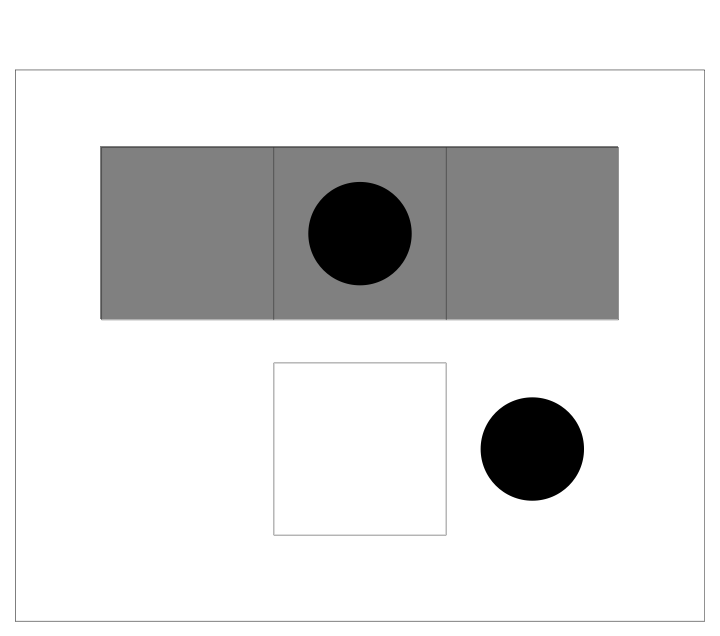
Because there are = 8 possible combinations for the colors of 3 cells, there should be 8 rules that determine the evolution of the mobile automaton.
3
2
In[]:=
ResourceFunction["MobileAutomatonRulePlot"][{{0,0,0}->{1,{1,-1}},{0,0,1}->{1,{-1}},{0,1,0}->{1,{1,-1}},{0,1,1}->{1,{-1}},{1,0,0}->{1,{1,0}},{1,0,1}->{1,{1}},{1,1,0}->{0,{1}},{1,1,1}->{0,{1}}}]
Out[]=

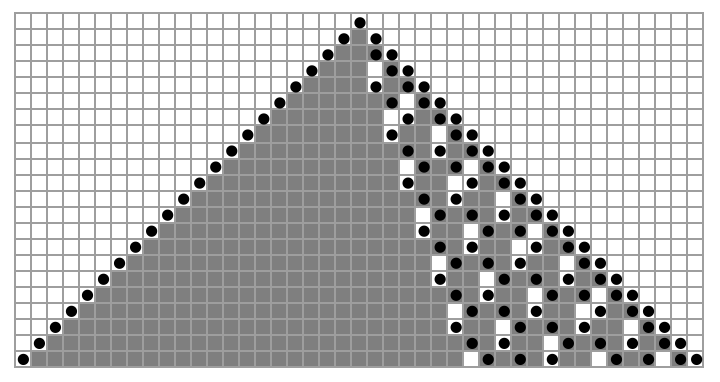
Over the course of many iterations of these rules, the mobile automaton creates a grid like the one below.
In[]:=
ResourceFunction["MobileAutomatonPlot"][ResourceFunction["MobileAutomaton"][{{0,0,0}->{1,{1,-1}},{0,0,1}->{1,{-1}},{0,1,0}->{1,{1,-1}},{0,1,1}->{1,{-1}},{1,0,0}->{1,{1,0}},{1,0,1}->{1,{1}},{1,1,0}->{0,{1}},{1,1,1}->{0,{1}}},{Table[0,{43}],{22}},21],Mesh->True]
Out[]=
Implementing Non-Local Rules
Implementing Non-Local Rules
At the bottom of this computational essay, I have a list of functions that I used to make these non-local rules in mobile automata.
Rule Visualization
Rule Visualization
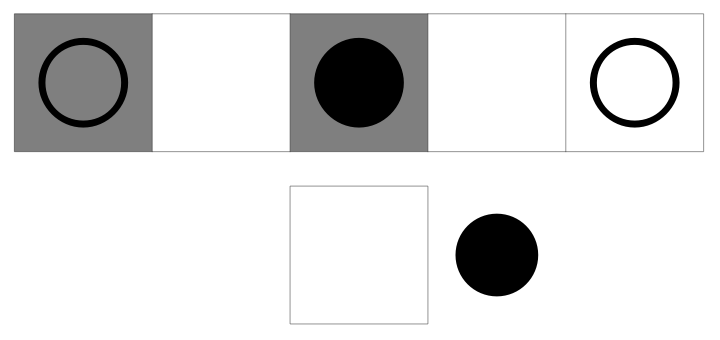
Mobile automata with non-local rules are not restricted to taking their immediate neighbors from the active cell as dependent cells. The picture below represents a non-local rule in which the neighbors are skipped when it comes to selecting dependent cells. The filled-in black circle represents the active cell while the open black circles represent the dependent cells. The specific rule below scans the 1st, 3rd, and 5th cells in the tape which correspond to the 2nd cell to the left, the active cell itself, and the 2nd cell to the right. It then applies the rules accordingly.
In[]:=
mag0NonLocal[{{1,1,0}->{0,{1}},{-2,0,2}}]
Out[]=
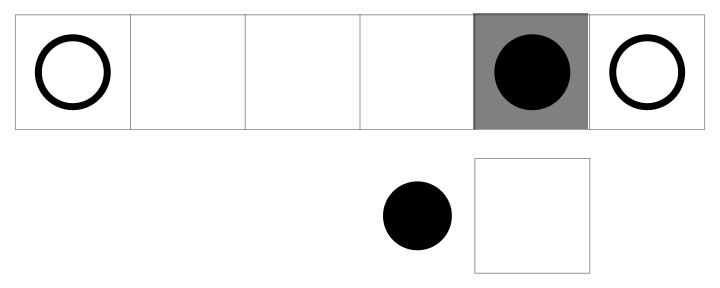
This next rule takes into consideration the 1st, 5th, and 6th cells in the tape, which correspond to the 4th cell to the left, the active cell itself, and the right neighbor.
In[]:=
mag0NonLocal[{{0,1,0}->{0,{-1}},{-4,0,1}}]
Out[]=
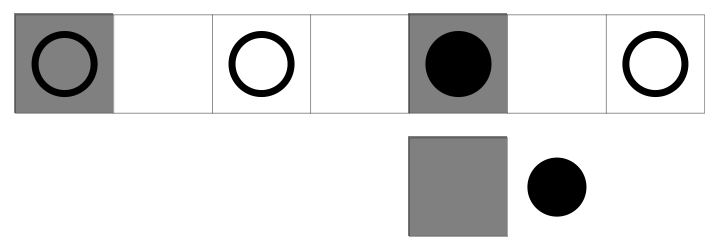
The rule below increases the number of dependent cells from 3 to 4 and measures the 1st, 3rd, 5th, and 7th cells in the tape. These positions correspond to the 4th cell to the left, the 2nd cell to left, the active cell itself, and the 2nd cell to the right.
In[]:=
mag0NonLocal[{{1,0,1,0}->{1,{1}},{-4,-2,0,2}}]
Out[]=
Increasing Iterations and Number of Dependent Cells
Increasing Iterations and Number of Dependent Cells
With more non-local rules and iterations, we get the pictures below in which there are 8 non-local rules per picture with a combination of different scanning ranges and rules. Some mobile automata show rather trivial behavior such as the first one. However, the active cell in the other pictures shows considerably more complex behavior, moving to the left and right in different time intervals.
Out[]=
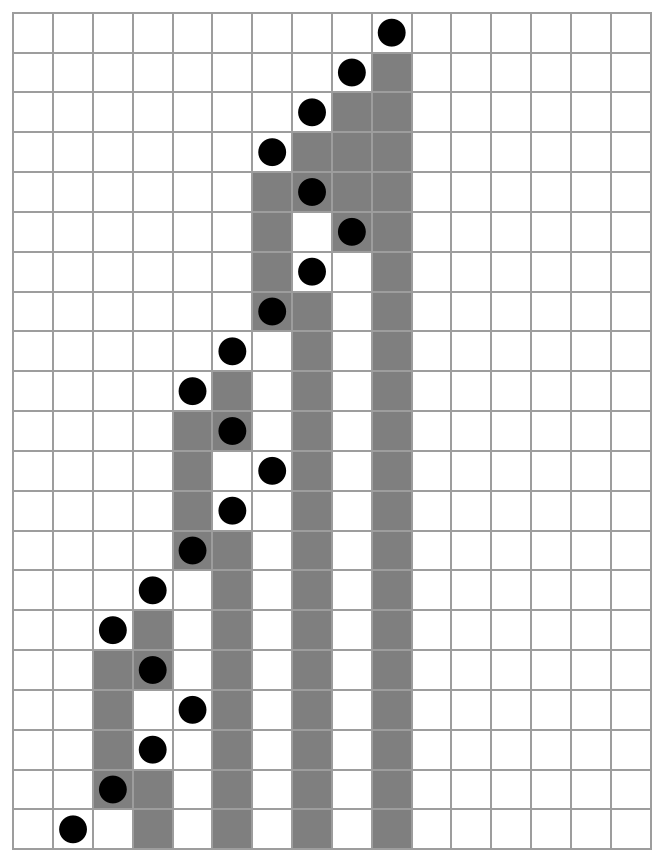

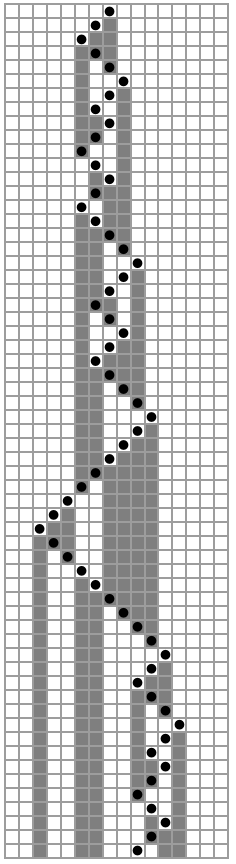

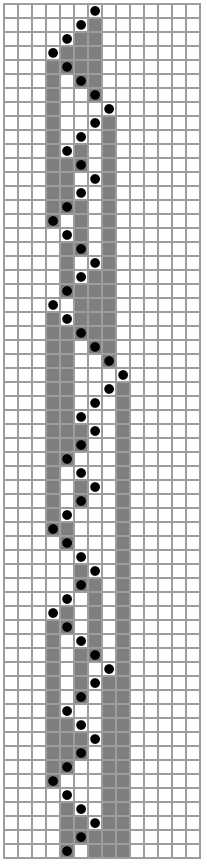

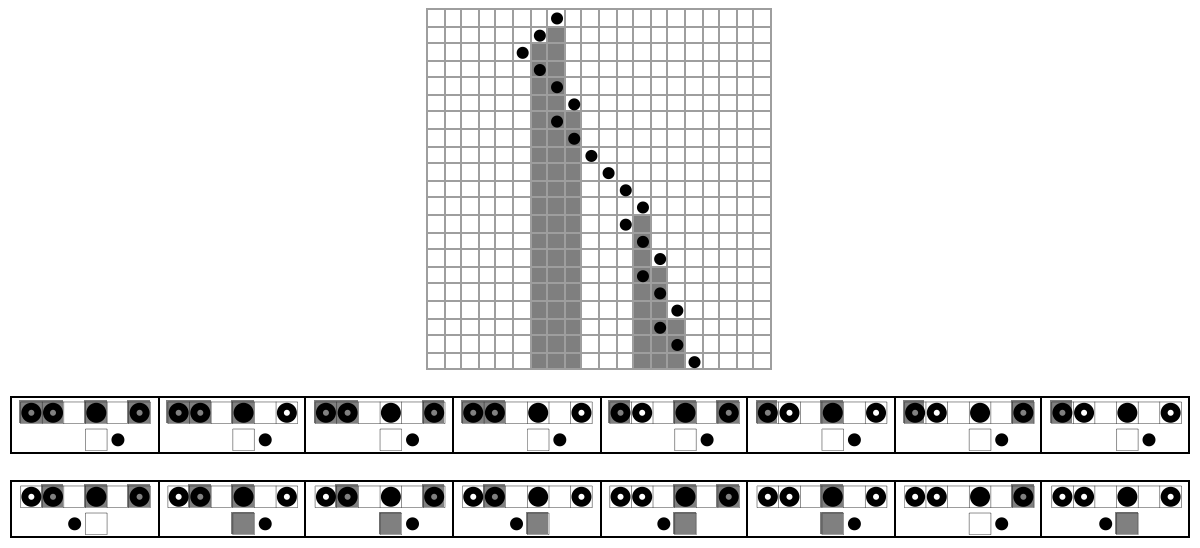
The first mobile automaton has been shown for 20 steps while the latter two have been shown for 60 steps. The picture below shows a mobile automaton with 4 dependent cells: 3 cells to the left, 2 cells to the left, 2 cells to the right, and the active cell itself. It has been shown below for 20 steps. With 4 dependent cells, the number of rules jumps to 16, as shown in the rule plot below the grid. The total number of rule combinations also jumps from around 65,000 to over 4 billion.
Out[]=
Increasing Range of Dependent Cells
Increasing Range of Dependent Cells
Even Range of Dependent Cells
Even Range of Dependent Cells
Taking the rules that produce complex behavior in the two pictures in the section above, we can increase the range of dependent cells taken away from the active cell. In the pictures below, we increase the range of the dependent cells by 2 each time, starting from 2 cells to each side. Each automaton below ran for 150 iterations and produces a zig-zag pattern and doesn’t stray too far off of the origin, which is characteristic of the rule shown.
In the pictures above, as the range gets increased with consistent rules, the oscillation of the active cell gets into larger and larger intervals. This is because increasing the range means the active cell goes further in either direction before reading the color of its dependent cells. For example, with the last picture above, the active cell has to travel 10 cells to the left or right before its left or right dependent cells change color, thereby changing the direction of the active cell.
Odd Range of Dependent Cells
Odd Range of Dependent Cells
In the pictures below, we apply odd numbered ranges to mobile automata. Looking at the details, we see that there are obviously different patterns produced when comparing the even and odd ranges. However, we can see the same swaying pattern when we apply the odd numbered ranges. Note that the first picture represents an elementary mobile automaton because the dependent cells are its immediate left and right neighbors.
Measuring Mobile Automata “Width”
Measuring Mobile Automata “Width”
Looking at the third picture above, and running it for even more iterations gives us the picture below, in which there is a lot of seemingly random active cell behavior.
Let’s visualize this seemingly random behavior by looking at the “width” of the automaton.
We calculate the “width” on any particular step by finding the distance between the furthest left black cell and the furthest right black cell:
We then calculate these widths over the whole mobile automaton output:
We plot these width values over time:
Plotting the width of the automaton above with dependent cells 5 cells on either side gives us the graph below.
As we can see, the plot generally resembles an S-curve with the rapid growth at around step 1000. However, there are a lot of steep drop-offs in the “width” throughout the plot. These dips happen just before the width increases once again, or in other words, the low width steps do not persist throughout the plot.
Dependent Ranges and Scales
Dependent Ranges and Scales
Now let’s look at how adjusting the dependent cell ranges changes the “width” plot of the mobile automaton. In the plot grid below, the dependent cell range starts from 2 cells to either side for the first picture and increases to 5 cells on either side on the last picture. The rule used is the same for all 4 plots.
The general pattern of the width plot is the same for the various dependent cell ranges, with rapid growth in the beginning and then the constant steps afterwards. This is because we used the same rule in each case. However, the factor that changes is scale. As we increase the dependent cell range, the automaton takes longer to rapidly increase and then increase in steps.
But what happens when we plot the “width” for mobile automata with more than 3 dependent cells? Below is a width plot for a mobile automata with dependent cells 3 cells to the left, 2 cells to the left, the active cell itself, and 2 cells to the right.
Because this particular rule gives regularity in the automaton, the “width” plot has a highly regular step structure since the active cell generally goes to the right.
Increasing Number of Active Cells
Increasing Number of Active Cells
We can also change our rules so that some of them spawn more than one active cell that the rules apply to on subsequent steps. The rule below gives an example of a rule where the dependent cells are 2 cells to the left and 3 cells to the right, and the active cell spawns an active cell to the right and left.
Counting Active Cells
Counting Active Cells
In truth, implementing these types of rules makes mobile automata more like cellular automata, where every cell is essentially active. In the picture below, not every cell is active, but there is certainly a lot more active cells. However, using these rules that create more than one active cell, we immediately see more complexity in our result, as seen below.
We can visualize this complexity by plotting the number of active cells of a particular mobile automaton over time.
Making a function that counts the number of active cells over the evolution of a mobile automaton:
Below is the graph for the active cells over time for the mobile automaton shown above.
As we can see, the seemingly random distribution of active cells in the mobile automaton plot is visually quantifiable in the seemingly random dips and peaks of the graph.
Threshold of Complexity
Threshold of Complexity
We can also test the same rules with different ranges of dependent cells to find the threshold of complexity for mobile automata with more than one active cell. Below is a grid of different mobile automata which have different dependent cell ranges but the same rules. The range of dependent cells is listed above the corresponding plot.
Looking at the pictures above, the top row as well as the first picture on the second row show regularity in terms of the active cell. These pictures are characterized by their dependent cells ranges of either 1 or 2 cells to either side. However, as soon as we hit 3 cells to the right side, we see immense complexity with the positions of the active cells. Using this, the threshold of complexity here appears to be scanning at least 3 cells away from the active cell. After this threshold, the behavior of the automata don’t get more complex by a large amount.
We can visualize this threshold of complexity for this rule by plotting our number of active cells for each dependent cell range.
As we can see, the first three mobile automata show a very regular growth in number of active cells. But as soon as we get to the dependent cell range of 3 cells to the right, the graph reflects the complexity jump with the seemingly random peaks and dips.
We can now try different rules to see what the dependent cell ranges affect in each case. In the case below, the traditional mobile automaton still has slight regularity with the diagonal rows of active cells covering the triangle. But that regularity, as well as some active cells on the left side of the automaton, slowly phases away as the dependent cell range gets larger.
We can have a visual of this consistent complexity by generating another graph comparing the numbers of active cells between the automata.
In the graph above, we can see that each of the dependent cell ranges have complex behavior with the seemingly random peaks and dips.
Patterns with Different Distances from Active Cell
Patterns with Different Distances from Active Cell
With the specific rule used below, we can see a unique pattern between mobile automaton which have their dependent cells the same distance from the active cell and mobile automaton which have their dependent cells different distances from the active cell. With equal dependent cell distances, there is a more complex pattern generated with the general form of a triangle. However, with unequal dependent cell distances, a regular line structure shoots off to the right.
We can see this pattern of complexity regarding different dependent cell distances from the active cell by looking at the active cell graph.
As we can see, the graphs for the unequal dependent cell distances show great regularity with consistent peaks and dips. However, with equal dependent cell distances, the number of active cells grow with complexity in their path.
Simplification of Initially Complex Behavior
Simplification of Initially Complex Behavior
In the rule used below, the traditional mobile automaton already produces highly complex behavior. But as soon as we increase the dependent cell range, the mobile automaton immediately produces a highly regular structure. This shows that increasing the dependent cell range doesn’t always lead to more complex behavior in mobile automaton.
We can visualize this simplification of complexity by looking at the active cell graph for this rule.
As we can see, all of the dependent cell ranges except for the traditional mobile automaton show extreme simplicity with their active cell numbers staying at 2 active cells for the entirety of the evolution.
Increasing Dependent Cells
Increasing Dependent Cells
We can also increase the number of dependent cells while having rules that create more active cells. The mobile automaton below has its dependent cells 3 cells to the left, 1 cell to the left, the active cell itself, and 2 cells to the right.
Plotting the active cell graph:
As we can see, there is still immense complexity regarding the arrangement of active cells, but there isn’t any more considerable complexity comparing to mobile automata with 3 dependent cells, signaling the threshold of complexity for rules that we explored earlier.
Application
Application
The graphs we produced showing the growth of active cells over time in a mobile automaton can possibly be used to model business-cycles in economics. In real business-cycle theory (RBC theory), definite real-world factors produce seemingly random fluctuations in a variety of economic measures such as GNP (Gross National Product). Also, the graphs of these economic measures generally trend up for advanced countries, as they show sustained growth over the time series. This is very similar to the graphs of active cell number that we produced which were based on simple rules, showed random fluctuations, and generally trend upwards as active cells get generated.
These definite real-world factors might also be exhibit properties of nonlocality similar to non-local rules in mobile automata, such as the distances taken into consideration for economies on a regional or even global scale. For example, the increasing technology in shipping and transportation allowing greater interaction between distant places could be modeled by increasing dependent cell ranges that I explored in this project.
Functions
Functions
The implementation for the following functions was based on the MobileAutomaton and MobileAutomatonRulePlot resource functions in the Wolfram Function Repository.
mobileAutomatonNonLocal
mobileAutomatonNonLocal
This function is the main entry point for implementing non-local rules in mobile automata. It defines multiple formats for entering rules and uses helper functions to process these rules. These definitions allow users to input rules in a structured format, which is then converted to the appropriate format using the toMARuleNonLocal helper function. The rules can specify the state, direction, and positions involved in the automaton’s behavior.
The next section matches the input to the desired formats for the helper functions. This uses Dispatch to create a dispatch table for the rules, making pattern matching more efficient. The Switch statement directs the input to the appropriate helper function (maStepNonLocal, blockMAStepNonLocal, or xmaStepNonLocal) based on the structure of the rules.
The following definitions handle the time evolution of the automaton, generating a list of states over time. These allow for different configurations of time evolution, including specifying a range of time steps and handling cases where the active cell position might go out of bounds.
The following definition of the main function calculates the step of the mobile automaton in cases where you only want one specific iteration. This is because the NestList function gives a list of all the iterations from step 1 to n but Nest gives only the specific amount of nesting you want.
This alert notifies the user if the active cell goes outside the defined range.
maStepNonLocal
maStepNonLocal
This helper function calculates the next step for the mobile automaton in basic cases. It updates the list based on the rule and current position, adjusting the active cell’s position accordingly. The function does this by extracting the indices in the list which the rules apply to, and then using the replacement rules to change the list.
blockMAStepNonLocal
blockMAStepNonLocal
This helper function splices together different sections of the tape created by maStepNonLocal into a single tape. It is used when the rule specifies blocks of cells that need to be manipulated as a unit.
toMARuleNonLocal
toMARuleNonLocal
This helper function generates the rules for the mobile automaton using a base 2 format given a list of integers. It creates a list of tuples that define how the automaton should behave based on the given state and direction values.
xmaStepNonLocal
xmaStepNonLocal
This function calculates the next step for the mobile automaton in cases with more than one active cell. It handles more complex scenarios where multiple cells need to be updated simultaneously based on the given rules.
mobileAutomatonRulePlotNonLocal
mobileAutomatonRulePlotNonLocal
This function outputs a graphical representation of a row of rule plots using the mag0NonLocal helper function. It uses GraphicsRow to arrange the rule plots in a single row for easy visualization.
mag0NonLocal
mag0NonLocal
This function generates the graphical representation for any given rule by creating rectangles and circles to denote dependent cell positions and active cells. It creates a visual representation of the rules and the cells they affect, making it easier to understand and analyze the behavior of the mobile automaton.
Conclusion & Future Work
Conclusion & Future Work
Through this project, I explored the intricacies of mobile automata with non-local rules, analyzing their dependent cell ranges, “width”, and looking at how they apply to automata with multiple active cells. There was considerable complexity shown in the graphs and plots throughout this analysis, showcasing the power of simple rules in generating complex behavior. Specifically, the graphs produced by plotting the number of active cells showed immense complexity.
In the future, I would like to explore rules in mobile automata which change the dependent cell color instead of just the active cell color. It would be interesting to see how changing the dependent cell colors could also produce complexity when using non-local rules, with cells far away from the active cell changing states. It would also be interesting to explore more specifically how mobile automata could apply to business-cycles as discussed in the application section.
Acknowledgement
Acknowledgement
I would like to thank my mentor Felipe Amorim for helping me through the highs and lows of this project. I’m also grateful for all the TA’s and directors who helped proofread my writing and code and make sure it was up to par. And thanks to Stephen Wolfram for laying the groundwork for mobile automata and to the Wolfram High School Summer Research Program for providing me with this great opportunity to explore my interests.
References
References
◼
Stadler, G. W. (1994, December). Real Business Cycles. Journal of Economics Literatute, 32(4), 1750-1783. https://faculty.econ.ucdavis.edu/faculty/kdsalyer/LECTURES/Ecn200e/Stadler.pdf
◼
Wolfram, S. (2002). Mobile automata. In A new kind of science (pp. 71–77). Wolfram Media.
◼
Wolfram, S., & Mangaldan, J. (2021). MobileAutomaton. Wolfram Function Repository. https://resources.wolframcloud.com/FunctionRepository/resources/MobileAutomaton/
◼
Wolfram, S., & Mangaldan, J. (2021). MobileAutomatonPlot. Wolfram Function Repository. https://resources.wolframcloud.com/FunctionRepository/resources/MobileAutomatonPlot/
◼
Wolfram, S., & Mangaldan, J. (2021). MobileAutomatonRulePlot. Wolfram Function Repository. https://resources.wolframcloud.com/FunctionRepository/resources/MobileAutomatonRulePlot/
CITE THIS NOTEBOOK
CITE THIS NOTEBOOK
Mobile automata with non-local rules
by Akshaj Devireddy
Wolfram Community, STAFF PICKS, July 11, 2024
https://community.wolfram.com/groups/-/m/t/3214519
by Akshaj Devireddy
Wolfram Community, STAFF PICKS, July 11, 2024
https://community.wolfram.com/groups/-/m/t/3214519