From Wiki:
Sangaku or San Gaku (算額; lit. translation: calculation tablet) are Japanese geometrical problems or theorems on wooden tablets which were placed as offerings at Shinto shrines or Buddhist temples during the Edo period by members of all social classes
Michael Penn recently did an interesting video on the following geometry problem from the Sacred Mathematics. Given ABC a regular triangle with side length equal to 2. CE and BD are two cevians of equal length intersecting at point P. If the radii of the incircles of triangle PBC and quadrilateral AEPD are the same, what are the radii of the two identical circles?
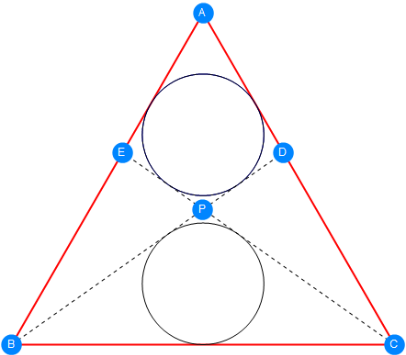
This problem is quite challenging regardless of the simple configuration. Please refer to the YouTube video for step by step instruction. In this article I am going to generalize the configuration for arbitrary triangle. Lets first watch a demo (AnimatedImage is a nice feature in V12.2!)
In[]:=
Out[]=
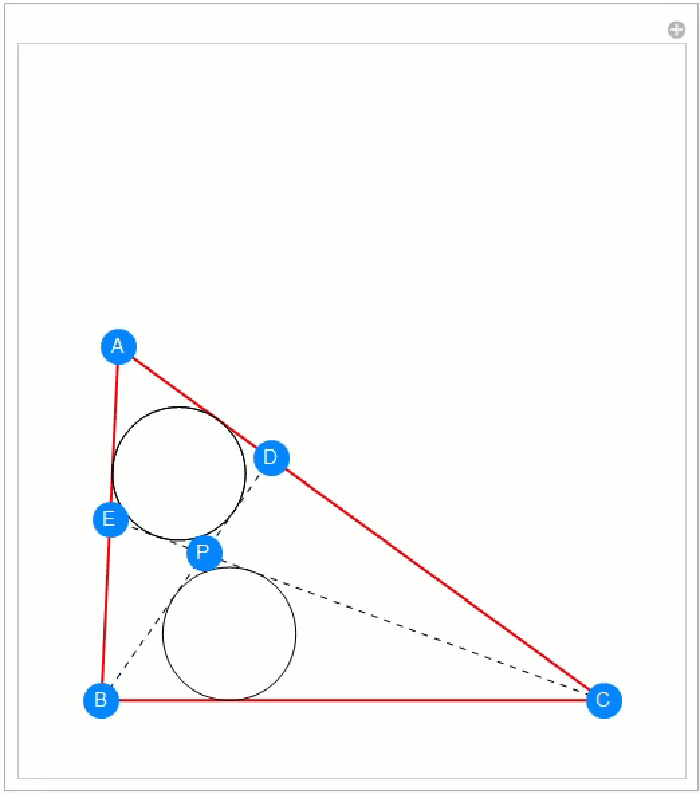

The code is quite similar to what is shown in Michael’s video. Base on our previous diagram, for any triangle ABC, it is sufficient and necessary that when a circle is tangent to four sides of quadrilateral AEPD, the incircles of triangle AEC and triangle ABD overlap (you can intuitively visual check the conclusion). Assume BE = λ1 * AB and CD = λ2 * AC. WLOG let the coordinate of point A (arbitrary), B (fixed) and C (fixed) be
In[]:=
a={1.2,1.4};b={0,0};c={2,0};
Therefore the coordinate of E and D are
In[]:=
{λ1*(a-b)+b,a,c}
Out[]=
{{1.2λ1,1.4λ1},{1.2,1.4},{2,0}}
and
In[]:=
{λ2*(a-c)+c,a,b}
Out[]=
{{2-0.8λ2,1.4λ2},{1.2,1.4},{0,0}}
respectively. If we fix point E, aka fix λ1, then point D is uniquely determined by equating the radii of incircles for both triangles AEC and ABD
In[]:=
inradiusAEC=FunctionInterpolation[TriangleMeasurement[{λ1*(a-b)+b,a,c},"Inradius"],{λ1,0,1}];inradiusABD=FunctionInterpolation[TriangleMeasurement[{λ2*(a-c)+c,a,b},"Inradius"],{λ2,0,1}];findLambda2[a_?ListQ,λ1_?NumericQ]:=Block[{λ2},λ2/.FindRoot[inradiusAEC[λ1]inradiusABD[λ2],{λ2,0.5},PrecisionGoal4,AccuracyGoal4]]
Say λ1 = 0.7, I can immediately find the location of D on AC, which makes CD around 67.2% the length of AC. FunctionInterpolation is used here to accelerate numerical root finding later
In[]:=
findLambda2[a,0.7]
Out[]=
0.664217
Once λ1 and λ2 are determined, we can find the location of P by
In[]:=
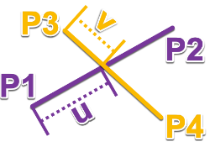
segmentIntersection[p1_List,p2_List,p3_List,p4_List]:=Block[{u,v},Module[{sol},sol=Solve[u*(p2-p1)+p1v*(p4-p3)+p3,{u,v}];{u,v,u*(p2-p1)+p1}/.sol〚1〛]]
in which the convention of P’s follows this diagram
In[]:=
Wrap up segmentIntersection[...] and findLambda2[...] I can write a function to find P given the coordinate of A and λ1
In[]:=
findP[a_?ListQ,λ1_?NumericQ]:=With[{λ2=findLambda2[a,λ1]},segmentIntersection[b,λ2*(a-c)+c,c,λ1*(a-b)+b]][[-1]]
Again, once P is determined, the radius of the incircle of triangle PBC is determined. If I use λ1 = 0.7, then the inradius of PBC is
In[]:=
TriangleMeasurement[{findP[a,0.7],b,c},"Inradius"]
Out[]=
0.323528
This number is different from the inradius of triangle AEC.
In[]:=
inradiusAEC[0.7]
Out[]=
0.228002
This apparently meets my expectation that E cannot be any point on AB to make the top and bottom circle identical. So instead of giving λ1 any value at beginning, I have to solve for this parameter by constraining the inradius of AEC equal to that of PBC
In[]:=
sol=FindRoot[inradiusAEC[λ1]TriangleMeasurement[{findP[a,λ1],b,c},"Inradius"],{λ1,0.5},PrecisionGoal4,AccuracyGoal4]
Out[]=
{λ10.621088}
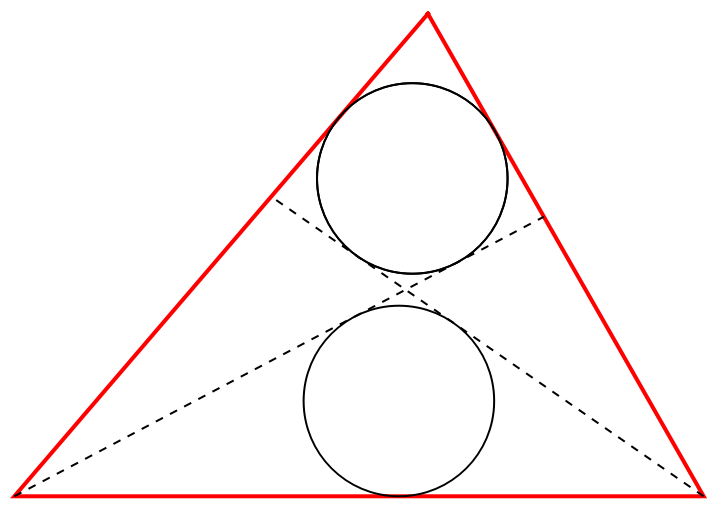
Then I can use the root to find the perfect shape fits two identical circle
In[]:=
Graphics[{{Transparent,EdgeForm[{Thick,Red}],Triangle[{a,b,c}]},{TriangleConstruct[{λ1*(a-b)+b,a,c},"Incircle"]},{TriangleConstruct[{findLambda2[a,λ1]*(a-c)+c,a,b},"Incircle"]},{TriangleConstruct[{findP[a,λ1],b,c},"Incircle"]},{Dashed,Line[{b,findLambda2[a,λ1]*(a-c)+c}]},{Dashed,Line[{c,λ1*(a-b)+b}]}}/.sol]
Out[]=
In the end, I would like to create a beautiful dynamic demonstration for the generalized sangaku problem, I just put everything above in a Manipulate function and setting the initial value to the regular triangle case
In[]:=
label[sym_String,pos_]:={PointSize[0.045],Hue[0.58,1,1],Point[pos],Text[Style[sym,White,12],pos]};Manipulate[a={Min[ptA[[1]],1.9],Max[ptA[[2]],1]};inradiusAEC=FunctionInterpolation[TriangleMeasurement[{λ1*(a-b)+b,a,c},"Inradius"],{λ1,0,1}];inradiusABD=FunctionInterpolation[TriangleMeasurement[{λ2*(a-c)+c,a,b},"Inradius"],{λ2,0,1}];sol=λ1/.FindRoot[inradiusAEC[λ1]TriangleMeasurement[{findP[a,λ1],b,c},"Inradius"],{λ1,0.5},PrecisionGoal4,AccuracyGoal4];λ2=findLambda2[a,sol];p=findP[a,sol];ptE=sol*(a-b)+b;ptD=λ2*(a-c)+c;Graphics[{{Transparent,EdgeForm[{Thick,Red}],Triangle[{a,b,c}]},{Blue,TriangleConstruct[{ptE,a,c},"Incircle"]},TriangleConstruct[{ptD,a,b},"Incircle"],TriangleConstruct[{p,b,c},"Incircle"],{Dashed,Line[{b,λ2*(a-c)+c}]},{Dashed,Line[{c,sol*(a-b)+b}]},label["B",b],label["C",c],label["D",ptD],label["E",ptE],label["A",a],label["P",p]},PlotRange{{-.2,2.2},{-0.2,2.2}},ImageSize400],ptA,1.,
3.
,Locator,AppearanceNone,SynchronousUpdatingFalse,TrackedSymbols:>{ptA},SaveDefinitionsTrue]The output is the same as the demo in the beginning with A as a dynamic locator, you can drag it around to see different configuration. The first line of Manipulate is to let A never below y = 1.9 to ease the root finder without dealing with out of domain issue yet still keeps the demo meaningful.
Summary
Summary
◼
TriangleMeasurement is very convenient to find inradius both symbolically and numerically
◼
FunctionInterpolation speeds up root finding without solving complicated equation for inradius formula
◼
The generalized geometry problem reduces to root finding procedure thus easy to handle in WL
◼
Not need to deal with tangential quadrilateral theorems