Demonstrating a custom View functions with a working toy-like piano and guitar fingerboard. This covers basic graphics manipulation, sound emission and working with dynamic graphics groups. Based on the blog here.
GitHub repository for WLJS Notebook: https://github.com/JerryI/wolfram-js-frontend
Helper function to work with notes and scales
Helper function to work with notes and scales
Piano view
Piano view
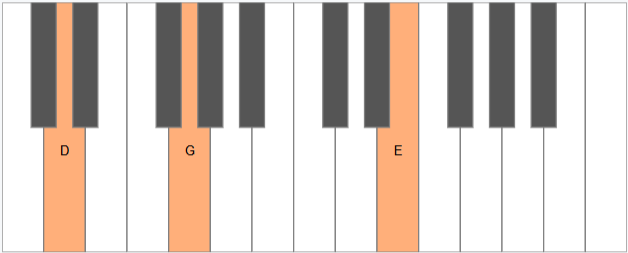
A view-function to visualize and play SoundNote on a keyboard.
Helper functions to generate keys
In[]:=
keyLevels={0,1,0,1,0,0,1,0,1,0,1,0,0};generateKeys[keyCount_]:=Module[{index=1,position=1,keyWidth,keyOffset},Table[With[{cycleIndex=Mod[index-1,12]+1,level=keyLevels[[Mod[index-1,12]+1]]},keyWidth=0.5-0.2level;keyOffset=0.5level;position+=1-level;index++;Rectangle[{position-keyWidth+keyOffset,keyOffset},{position+keyWidth+keyOffset,1}]],{keyCount}]];annotateKeys[keys_]:=MapIndexed[Annotation[#,keyLevels[[Mod[#2[[1]]-1,12]+1]],#2[[1]]]&,keys];highlightNotes[skeys_,indexes_]:=Map[Function[key,If[MemberQ[indexes,key[[3]]],{,key},key]],skeys]separateKeys[keys_]:=Module[{annotatedKeys=annotateKeys[keys]},{Cases[annotatedKeys,Annotation[_,0,_]],Cases[annotatedKeys,Annotation[_,1,_]]}];

A main function to construct a piano view
In[]:=
PianoView[]:=PianoView[SoundNote[{}]]PianoView[SoundNote[rawNotes_List],OptionsPattern[]]:=Module[{keys,separated,scene,highlighted,names={"C","C#","D","Eb","E","F","F#","G","Ab","A","Bb","B","C"},annotations,notes=convertToSemitones@rawNotes},keys=generateKeys[OptionValue["Size"]];separated=separateKeys[keys];scene=FrontInstanceReference[];highlighted=Mod[#,Length[keys]]+1&/@notes;annotations=Text[names[[Mod[#,12]+1]],Mean@(List@@keys[[Mod[#,Length[keys]]+1]])+{0.,-0.1},{0,0}]&/@notes;notes=Switch[OptionValue["Mode"],"Play",notes,"Show",{},_,notes];Graphics[{scene,{White,EdgeForm[Gray],highlightNotes[separated[[1]],highlighted],Black//Lighter,highlightNotes[separated[[2]],highlighted]},{Yellow,Opacity[0.3]},{Black,annotations},EventHandler[Graphics`Canvas[],{"click"->clicker[scene,separated,keys,notes,names]}]},ImageSize->OptionValue[ImageSize],"Controls"->False]]Options[PianoView]={ImageSize->{500,200},"Size"->25,"Mode"->"Play"};
Define a handler for emitting sound and highlighting keys
In[]:=
ClearAll[clicker]clicker[scene_,separated_,keys_,additional_:{},notes_][xy_]:=With[{whiteMatch=SelectFirst[separated[[1]],RegionMember[#[[1]],xy]&],blackMatch=SelectFirst[separated[[2]],RegionMember[#[[1]],xy]&],group=FrontInstanceGroup[]},With[{key=If[!MissingQ[blackMatch],blackMatch[[3]],whiteMatch[[3]]]},FrontSubmit[SoundNote[Join[additional,{key-1}]//DeleteDuplicates]//Sound];FrontSubmit[{Red,Text[notes[[Mod[#-1,12]+1]],Mean[List@@(keys[[#]])]-{0,0.2},{0,0}]&/@Join[(Mod[#,Length[keys]-1]&/@additional)+1,{key}],Opacity[0.3],keys[[Join[((Mod[#,Length[keys]-1])&/@additional)+1,{key}]]]}//group,scene];SetTimeout[Delete[group],200];]]
Testing
Testing
Time to play some chords
In[]:=
SoundNote[{"D4","E5",7}]//PianoView
Guitar Fingerboard
Guitar Fingerboard
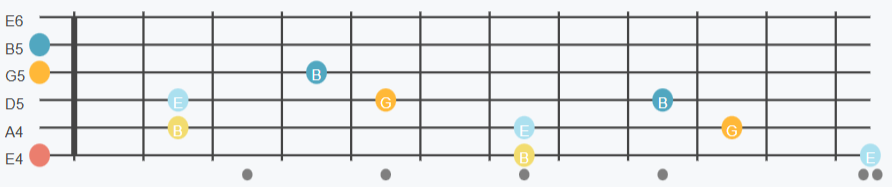
A view function to do the same, but on the fingerboard of a guitar with an arbitary tuning
GuitarView[SoundNote[rawNotes_List],OptionsPattern[]]:=Module{tuning=OptionValue["Tuning"],scene=FrontInstanceReference[],names={"C","C#","D","Eb","E","F","F#","G","Ab","A","Bb","B","C"},annotations,notes=convertToSemitones@rawNotes,board,highlighted,semitoneTuning=Reverse[convertToSemitones@OptionValue["Tuning"]]},notes=Switch[OptionValue["Mode"],"Play",notes,"Show",{},_,notes];notes=With[{c=Mod[#,convertToSemitones@(semitoneTuning[[-1]]+12)]},If[c<semitoneTuning[[1]],c+12,c]]&/@notes;board=GroupBy[Flatten[Table[With[{note=semitoneTuning[[y]]+x},Annotation[Disk[{x,y},{0.15,0.15×2.8}],note,names[[Mod[note,12]+1]]]],{x,0,12},{y,Length[tuning]}]],#[[2]]&];highlighted[notes_]:=ColorDataFunction/@Range[notes//Length],Map[Function[place,If[place[[1,1,1]]>0.5,{place,White,Text[place[[3]],place[[1,1]]-{0,0.16},{0,0}]},place]],board[#]]&/@notes//Transpose;Graphics[{scene,EventHandler[Graphics`Canvas[],{"click"->plucker[scene,board,highlighted,notes]}],Table[Line[{{0,string},{12,string}}],{string,Length[tuning]}],Table[Line[{{i-0.5,1-0.2},{i-0.5,Length[tuning]+0.2}}],{i,12}],Table[Text[tuning[[Length[tuning]+1-string]],{-0.5,string-0.2},{-1,0}],{string,Length[tuning]}],{AbsoluteThickness[4],Line[{{0.5,1},{0.5,Length[tuning]}}],Gray,Table[Disk[{0.5+2.5+k,0.3},{0.15,0.15×2.8}/2],{k,0,6,2}],Disk[{0.5+2.5+8.9,0.3},{0.15,0.15×2.8}/2],Disk[{0.5+2.5+9.1,0.3},{0.15,0.15×2.8}/2]},highlighted[notes]},ImageSize->(1.2{500,100}),"Controls"->False,ImagePadding->None,PlotRange->{{0-0.5,12+0.5},{0,Length[tuning]+.5}}]Options[GuitarView]={"Tuning"->({"E4","A4","D5","G5","B5","E6"}//Reverse),"Mode"->"Play"};


A handler function to emit sound
plucker[scene_,board_,highlighted_,additional_][xy_]:=With[{group=FrontInstanceGroup[],match=SelectFirst[board//Values//Flatten,With[{reg=Disk[#[[1,1]],#[[1,2]]*2]},RegionMember[reg,xy]]&]},If[MissingQ[match],Return[]];With[{notes=Join[additional,{match[[2]]}]//DeleteDuplicates},FrontSubmit[SoundNote[notes]//Sound];FrontSubmit[{Opacity[0.7],highlighted[notes]}//group,scene];SetTimeout[Delete[group],200];]]
Testing
Testing
Let’s play some guitar chords
SoundNote[{"E4","G5","B4","E5","B5"}]//GuitarView
Explore chords
Explore chords
Let’s build chords in E Major. Firstly we need to define scales
scale["Major"]={2,2,1,2,2,2,1};scale["Dorian"]={2,1,2,2,2,1,2};scale["Lydian"]={2,2,2,1,2,2,1};makeScale[root_Integer,scale_List]:=With[{base=Accumulate[Join[{root},scale]]},(base[[Mod[#-1,Length[base]-1]+1]]+12Floor[#/Length[base]])&]makeScale[root_String,scale_List]:=makeScale[convertToSemitones[root],scale]
Structures for building chords
makeChord[root_,scalename_String,ext_Integer:3]:=With[{s=makeScale[root,scale[scalename]]},chordObject[s,ext]]NoteTranspose[SoundNote[l_List],i_Integer]:=With[{c=convertToSemitones[l]},SoundNote[Map[(#+i)&,c]]]NoteMerge[s:(SoundNote[_List]..)]:=SoundNote[DeleteDuplicates[convertToSemitones[Join@@({s}[[All,1]])]]]makeChord[root_,scalename_String,ext_String];makeChord[root_,scalename_String,ext_Integer,mod_Rule];makeChord[root_,scalename_String,ext_Integer,mod:{__Rule}];chordObject[s_,ext_][offset_String]:=chordObject[s,ext][FromRomanNumeral[offset]-1]chordObject[s_,ext_][offset_Integer]:=SoundNote@Table[s[i+offset],{i,1,2ext,2}]
Use GuitarView to show all chords
With[{m=makeChord["E4","Major",3]},Table[{GuitarView[NoteMerge[m[r],NoteTranspose[m[r],12]]],Spacer[40],Style[r,FontSize->20]},{r,{"I","II","III","IV","V","VI"}}]]//TableForm
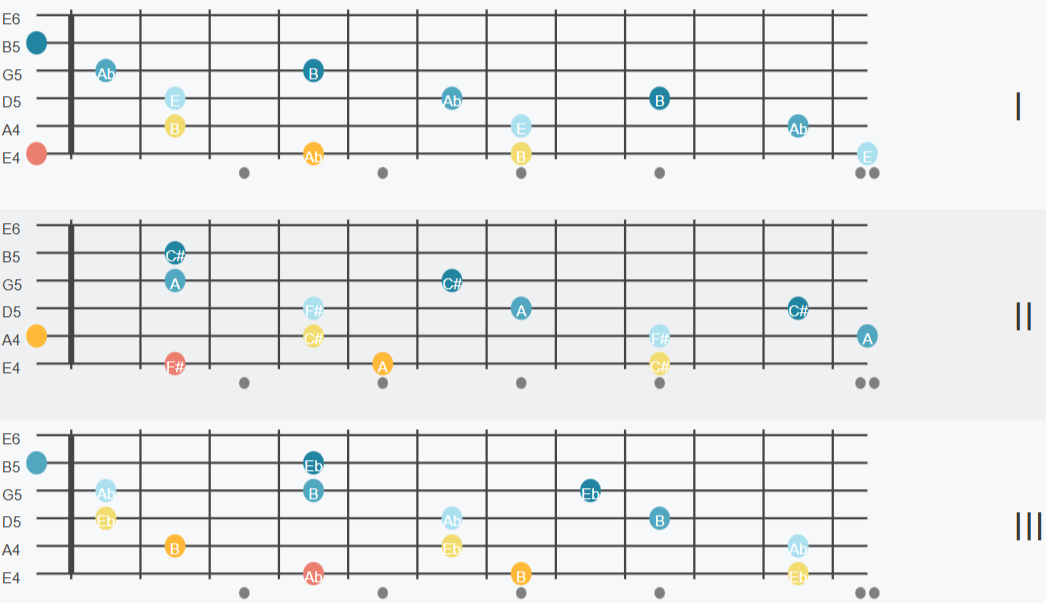
A common pop progression could be like I - V - VI - IV - I - ... repeat
CITE THIS NOTEBOOK
CITE THIS NOTEBOOK
Scales and chords visualized on guitar / piano
by Kirill Vasin
Wolfram Community, STAFF PICKS, April 8, 2025
https://community.wolfram.com/groups/-/m/t/3441665
by Kirill Vasin
Wolfram Community, STAFF PICKS, April 8, 2025
https://community.wolfram.com/groups/-/m/t/3441665