Introduction
Introduction
I will be teaching multivariable calculus again soon, after a hiatus of quite a few years. So I’ve begun dusting off my old notebooks. A recent blog post, https://blog.wolfram.com/2023/11/06/learn-multivariable-calculus-through-incredible-visualizations-with-wolfram-language/, partially inspired the two demos below. So did what ChatGPT said about maximizing the function I use as an example. (I asked it to answer as if it were Isaac Newton, and it answered as if Isaac Newton were a pirate. One of the most enjoyable lessons in math I’ve ever been given.) So did a desire to give a real-world context to the notions of gradient and directional derivative, which is the purpose of the second demo. So did the fact I spend time hiking through woods and mountains, on and off trail, feeling the effects of gradients and directional derivatives.
The problem
The problem
The problem we start with is to find the maximum of . Pretty straightforward in Mathematica. The ulterior objective, however, is slightly different. We wish to illustrate, through interactive computation, climbing up to the maximum and to compare an ascent along the gradient with an ascent pitched at a fixed angle to the gradient. The objective in this is to understand the concepts of the gradient and directional derivatives and to see the level curves as orthogonal to gradient ascents.The first demonstration is adapted to a second one to solve a problem encountered in road construction. Safety standards require the slope of a road (also called “gradient”) be no more than some limit. We ignore actual safety standards and explore paths that ascend as steeply as allowed. At present, when the gradient of the surface is too large, the demo picks a path to the left of the gradient (a direction rotated counterclockwise from the direction of the gradient).
-cos(4x)sin(3y)--2
2
x
2
y
Some snippets
Some snippets
Convergent paths and one pair of diverging paths (lower right corner of the contour plot, front corner of the 3D plot):
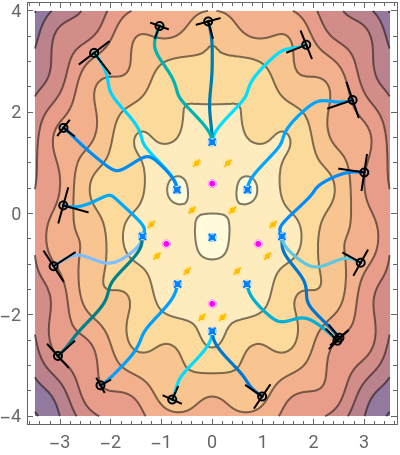

Late-diverging paths. One scales the summit:
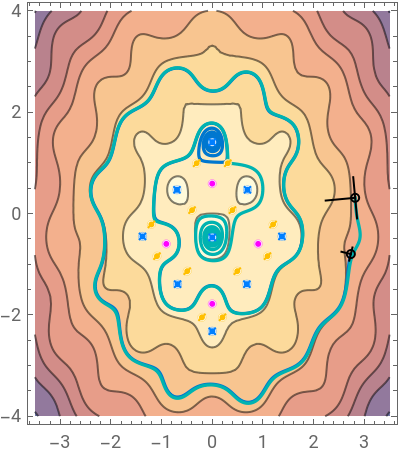

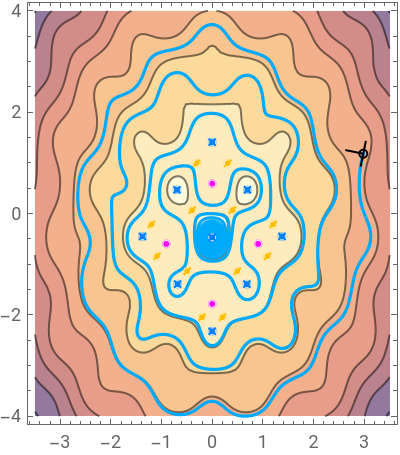
Find a tour of the major peaks:

Some mathematics to investigate
Some mathematics to investigate
One question this demonstration inadvertently illustrates is the following: Suppose are a family of continuous (or smooth) functions and that for each , f(t,θ)=F(θ) exists. Is the limit of continuous functions always continuous? Most or all mathematicians know the answer to this, but most students in calculus do not.
f(t,θ)
θ
t∞
There seem to be points where a path and a slight perturbation of it diverge in different directions. What characterizes these points?
It seems possible to find a trajectory from any initial point to any maximum by varying the parameter θ. Unless, of course, the point starts too high. Other than starting low enough, is there something special about this surface or is it always possible to reach any maximum on a smooth graph? Can we characterize what is low enough?
These are questions students can explore computationally, even if they or their professor do not know the answer. Not knowing answers excited me more in math and science and drove me to learn, and ponder, and figure out.
Code for the problem
Code for the problem
In[]:=
problem1=<|"F"->-Cos[4x]Sin[3y]-x^2-y^2/2,"dom1"->{x,-3.5,3.5},"dom2"->{y,-4.,4.}|>;
Common Utilities
Common Utilities
In[]:=
(*usefultools*)xyTOxyt=v:x|y:>v[t];xytTOxy=(v:x|y)[t]:>v;domTOinterval={v_,a_,b_}:>a<v<b;intervalTOdom=_[a_?NumericQ,___,v:x|y,___,b_?NumericQ]:>{v,a,b};subXY[{x0_,y0_}]:={x->x0,y->y0};colorlist=(*colorsawayfromtheContourPlotgradient*)Table[LABColor[0.9Mod[5c,0.5,0.4],2Mod[7c-0.1,0.5]-1,2Mod[3c-0.3,0.5]-1],{c,Rescale[Range[16]]/2}];
In[]:=
(*Getproblemdata*)get//ClearAll;get//Attributes={HoldFirst};(*firstlookupkey*)get[a_?AssociationQ,key_]/;KeyExistsQ[a,key]:=Lookup[a,key];(*ifnokey,constructdata*)get[a_?AssociationQ,Grad]:=a[Grad]=D[a["F"],{{x,y}}];get[a_?AssociationQ,Hessian]:=a[Hessian]=D[get[a,Grad],{{x,y}}];get[a_?AssociationQ,Plot3D]:=Block[{$PerformanceGoal="Quality"},a[Plot3D]=Plot3D[a["F"],a["dom1"],a["dom2"],MeshFunctions->{#3&},BoxRatios->{-Subtract@@Rest@a["dom1"],-Subtract@@Rest@a["dom2"],0.3(-Subtract@@Rest@a["dom1"]-Subtract@@Rest@a["dom2"])}]];get[a_?AssociationQ,ContourPlot]:=Block[{$PerformanceGoal="Quality"},a[ContourPlot]=ContourPlot[a["F"],a["dom1"],a["dom2"],AspectRatio->(Subtract@@Rest@a["dom2"]/Subtract@@Rest@a["dom1"])]];get[a_?AssociationQ,"CPs"]:=a["CPs"]=NSolve[get[a,Grad]==0&&Rationalize@(a["dom1"]&&a["dom2"]/.domTOinterval)];get[a_?AssociationQ,"CPType"]:=(*" Morse index: dim=2 => i=2: min, i=1: saddle, i=0: max. Assumes nonsingular Hessian. "*)a["CPType"]=Total@UnitStep[-Eigenvalues@#]&/@(get[a,Hessian]/.get[a,"CPs"]);(*Criticalpointmarker(marksmin,saddle,maxaccordingtoMorse)*)cpMarker//ClearAll;cpMarker//Options={ColorRules->{0->Magenta,1->Blend[{Yellow,Orange}],2->Blend[{Cyan,Blue}]}};cpMarker[p_,morse_,r_:0.08,OptionsPattern[]]:=With[{color=morse/.OptionValue[ColorRules]},{White,EdgeForm[Directive[color,Thin]],Disk[p,r],color,Point[p],Table[(*numberoflines=morseindex*)Line[{p-r*ReIm@Exp[I*(Pi*k/2-Pi/4)],p+r*ReIm@Exp[I*(Pi*k/2-Pi/4)]}],{k,morse}]}];(*Locatormarker(marksgradientdirection)*)locMarker//ClearAll;locMarker[grad_,sc_:15][p_,r_:0.08]:={Circle[p,r],Line[{p,p+grad/sc/.subXY@p}],Line[{p-0.7Cross@grad/sc,p+0.7Cross@grad/sc}/.subXY@p]};
From level curves to gradient ascent: climbing at a fixed inclination to the gradient
From level curves to gradient ascent: climbing at a fixed inclination to the gradient
The “theta” slider sets the angle to the gradient, the direction of which defines the path.
Path solver
Path solver
Solves the ODE system {x’[t],y’[t]} == direction.
Demonstration
Demonstration
The “theta” slider sets the angle to the gradient. The colors can be edited by clicking on them.
Routes with a slope limitations
Routes with a slope limitations
The “max” slider sets the maximum allowable slope. The path will follow the gradient, unless the slope along the gradient exceeds the max. In that case, the direction is rotated counterclockwise to a slope equal to max.
Path solver
Path solver
Solve the ODE system {x’[t],y’[t]} == direction. It differs from the previous path solver in that it computes the angle from the gradient and the setting of “max.” The angle, therefore, is a function of the gradient and not constant, as it is above.
Demonstration
Demonstration
The “max” slider sets the maximum allowable slope. The colors can be edited by clicking on them.
I suppose the next step would be to do this on a GeoGraphics[].
Programming notes
Programming notes
Both path-solver functions memoize (store in memory, make a “memo” of) the solutions for the current points. That is so they can be reused at different points in the program. When one of the points is changed, the old solutions are discarded and new solution are computed and stored. The last rule in DownValues[...] will contain the general function. Wolfram Language stores the more specific rules earlier in DownValues[]. One could, theoretically, use Unset[pattern] to remove the memoized rule, provided one had the exact pattern for it. Using DownValues[] seemed easier.
Keeping the list of colors and the list of the initial points synchronized is a bit of a headache. From a programming point of view, one would like a single data structure representing each point and its color. I imagined working out how to interface that with the Manipulate controls would take a lot of work. Whether it would or not, I decided against it at this point.
The color palette itself is one-dimensional, admittedly. It was chosen to diverge from the gradient used by ContourPlot[] and the lit surface color of Plot3D[]. A linear gradient through the Lab space was the easiest way for me to do that. Hopefully, the color scheme makes it easy for color-blind people to distinguish two or three lines from each other, as well as, from the background plots. This is, I think, difficult to do for monochromats, given the gradient in the contour plot. The colors can be edited by clicking on the “colors” control color-squares. I am not an expert in color-blindness. If you have feedback, I would appreciate the opportunity to learn.
The color palette itself is one-dimensional, admittedly. It was chosen to diverge from the gradient used by ContourPlot[] and the lit surface color of Plot3D[]. A linear gradient through the Lab space was the easiest way for me to do that. Hopefully, the color scheme makes it easy for color-blind people to distinguish two or three lines from each other, as well as, from the background plots. This is, I think, difficult to do for monochromats, given the gradient in the contour plot. The colors can be edited by clicking on the “colors” control color-squares. I am not an expert in color-blindness. If you have feedback, I would appreciate the opportunity to learn.
I used get[a, key] to manage the data in problem1 because I imagine I’ll use the functionality for other applications and problems in multivariable calculus. And it was adopted from another project, which it easy. For the limited purpose here, it is unnecessary. One could simply just define problem1[Plot3D] = Plot3D[...] and so forth. One could use the “default” argument of Lookup[], but I preferred the above way.
Plotting of the paths is done by drawing a Line[] through the points in the memoized solution computed by NDSolve[]. The values of x and y are available through the “ValuesOnGrid” method of InterpolatingFunction[]. This is usually faster than using a plot command, and NDSolve[] usually takes small enough steps that the line looks smooth. It can be slow if NDSolve computes too many steps.
There are stopping criteria for various cases (using WhenEvent[]) to prevent excess steps. Sometimes they save a lot of steps and sometimes only a few. Each of two criteria for level curves tend to stop integration after one circuit, which saves a lot. They use either x[t]==#[[1]] or y[t]==#[[2]], where # represents the initial point, as a stopping criterion (plus another condition to ensure other coordinate is sufficiently close to the initial point). The program chooses between them depending on whether the motion is mainly horizontal or vertical, respectively. The third criterion is used when the path seeks a maximum. It stops integration when the step size becomes extremely small. (This criterion sometimes stops integration at a saddle point, even though one suspects that numerical error would eventually lead the integration away from the saddle. I decided this stopping was acceptable to me.) In a gradient ascent, this saves very few steps, because the time steps become large near the maximum. When the angle to the gradient is nonzero, the path spirals toward the maximum and the time steps are of moderate size. How much this saves depends on how long it takes the path to reach the maximum. It could be from zero to a couple thousand steps.
These savings do not appear to matter if there is only one path. The updates are relatively fast. With several long paths, there is a noticeable lag.
There are stopping criteria for various cases (using WhenEvent[]) to prevent excess steps. Sometimes they save a lot of steps and sometimes only a few. Each of two criteria for level curves tend to stop integration after one circuit, which saves a lot. They use either x[t]==#[[1]] or y[t]==#[[2]], where # represents the initial point, as a stopping criterion (plus another condition to ensure other coordinate is sufficiently close to the initial point). The program chooses between them depending on whether the motion is mainly horizontal or vertical, respectively. The third criterion is used when the path seeks a maximum. It stops integration when the step size becomes extremely small. (This criterion sometimes stops integration at a saddle point, even though one suspects that numerical error would eventually lead the integration away from the saddle. I decided this stopping was acceptable to me.) In a gradient ascent, this saves very few steps, because the time steps become large near the maximum. When the angle to the gradient is nonzero, the path spirals toward the maximum and the time steps are of moderate size. How much this saves depends on how long it takes the path to reach the maximum. It could be from zero to a couple thousand steps.
These savings do not appear to matter if there is only one path. The updates are relatively fast. With several long paths, there is a noticeable lag.
CITE THIS NOTEBOOK
CITE THIS NOTEBOOK
Paths to maxima
by Michael Rogers
Wolfram Community, STAFF PICKS, December 15, 2023
https://community.wolfram.com/groups/-/m/t/3084844
by Michael Rogers
Wolfram Community, STAFF PICKS, December 15, 2023
https://community.wolfram.com/groups/-/m/t/3084844