This tutorial is a follow-up to a recent post by the author herself about archeoastronomical modeling of Central European Neolithic Circular Ditches [1] or roundels with Wolfram 3D graphical primitives. Here, the focus will be instead on the use of mesh-based primitives from computational geometry to build a realistic 3D model of a rondel recently excavated in Vinoř, a northeastern outskirt of Prague (Czech Republic). This rondel has a diameter of 55 m, with ditches 3.2 m wide and 1.7m deep and three entrances, which is quite unusual for Central European ditches [2].
Computational Geometry from 2D images
Computational Geometry from 2D images
The discovery with full excavations of the Vinoř rondel [3-5], which dates back to 4800 BC, is unique for its excellent conservation and was also recently highlighted and celebrated with the making of an artistic model sculpture placed at the crossroads of the location, as reported in this online photographic PDF document.
Below, a screenshot of the rondel 2D floor map with the traces of the rondel ditches and palisades sticks is reproduced from page 5 of the above mentioned PDF [6].
This will be the starting point for the 3D reconstruction of the Vinoř rondel with the help of ImageMesh. The image is pointing to the North direction.
Below, a screenshot of the rondel 2D floor map with the traces of the rondel ditches and palisades sticks is reproduced from page 5 of the above mentioned PDF [6].
This will be the starting point for the 3D reconstruction of the Vinoř rondel with the help of ImageMesh. The image is pointing to the North direction.
In[]:=
rondel2D=
;
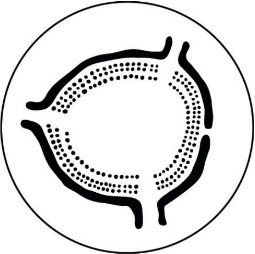
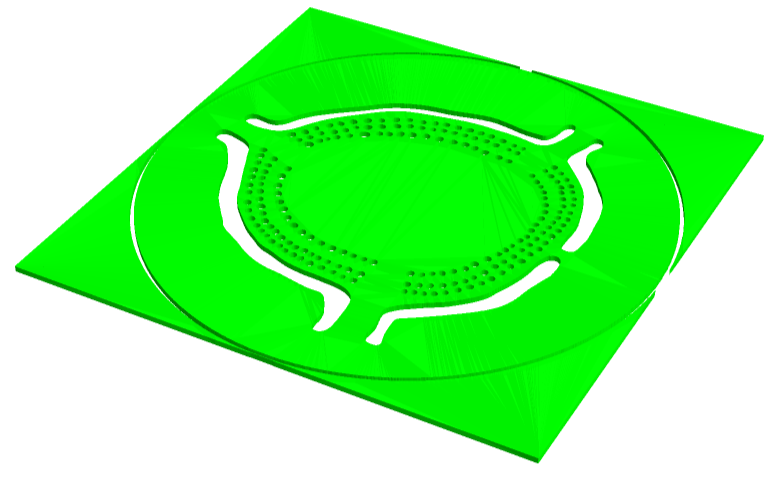
The Method option “MarchingSquares” is required to smooth mesh edges, otherwise the palised sticks will get polygonal sections, not circular. The following code liner will allow for 3D extrusion of the ditches and the holes left by palisade sticks.
In[]:=
lawnmesh=MeshRegion[RegionProduct[ImageMesh[rondel2D,Method->"MarchingSquares"],MeshRegion[{{0},{(*height*)h=5}},Line[{1,2}]]],MeshCellStyle{{3,All}Opacity[0.9,Green]}]
Out[]=
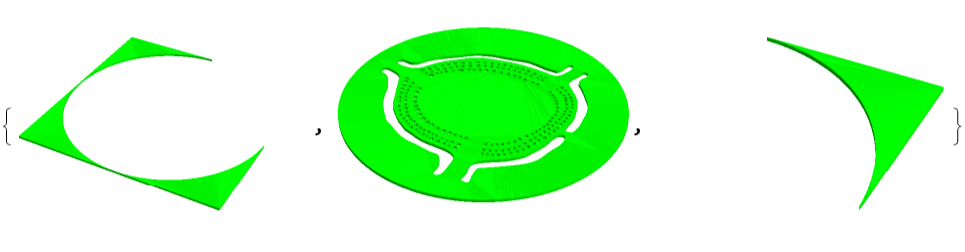
To select the circular mesh one can make use of ConnectedMeshComponents and select the circular one, which is of course the most relevant
In[]:=
ConnectedMeshComponents[lawnmesh]
Out[]=
In[]:=
lawnmeshcircle=ConnectedMeshComponents[lawnmesh][[2]]
Out[]=

Computational Geometry for Extrusion from 2D models
Computational Geometry for Extrusion from 2D models
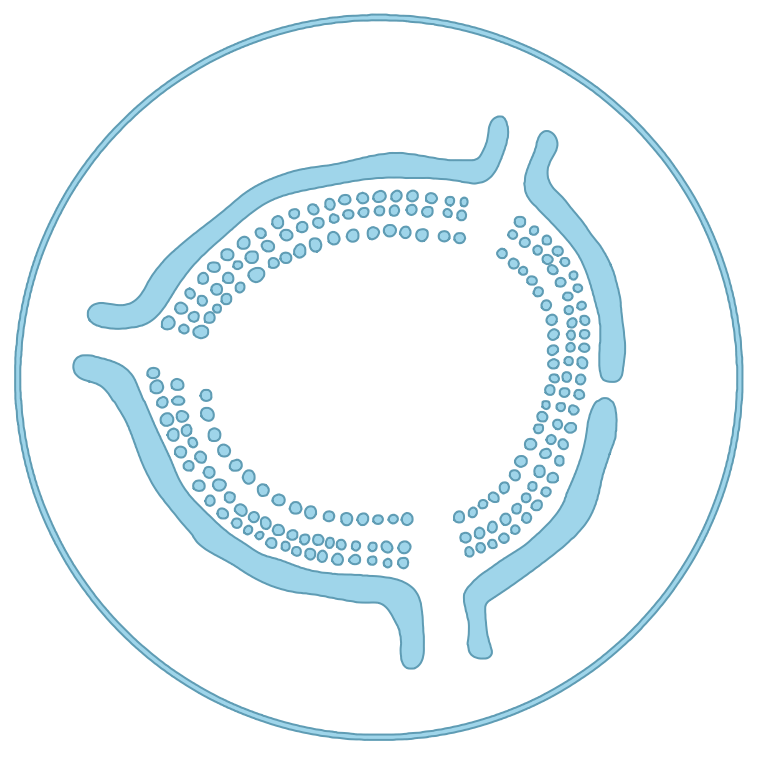
The most intriguing part is the 3D extrusion of the triple-timbered palisade, which should be treated separately from the arc-shaped ditches. One needs to revert back to the 2D floor map image and use ColorNegate before applying ImageMesh with the usual option mentioned above. Then ConnectedMeshComponents is used again to obtain all mesh cells describing ditches and palisade holes.
In[]:=
imsq=ImageMesh[ColorNegate[rondel2D],Method"MarchingSquares"]
Out[]=
In[]:=
cmc=ConnectedMeshComponents[imsq];
One needs to find a general way of identifying the mesh cell indices corresponding to ditches in order to discriminate them from the holes which will be used for placing sticks. Also, the mesh corresponding to the enclosing outer circle needs to be removed, which always occurs as first in the list of the connected mesh components. In order to accomplish this step, only the mesh cells larger than the average hole areas will be selected, as reported in the code section below.
In[]:=
areas=Rationalize[AnnotationValue[{imsq,2},MeshCellMeasure],1];selcomp=Rationalize[Select[AnnotationValue[{imsq,2},MeshCellMeasure],(#>100)&],1];tobedel=Flatten[Table[Position[areas,selcomp[[i]]],{i,1,Length[selcomp]}],1]
Out[]=
{{1},{2},{3},{16},{17}}
Here are the cell meshes corresponding to the arc-shaped ditches, which are grouped in a single MeshRegion with RegionUnion
In[]:=
ditchmesh=MeshRegionRegionProduct[RegionUnion[Extract[cmc,Drop[tobedel,1]]],MeshRegion[{{0},{5.3}},Line[{1,2}]]],
Out[]=
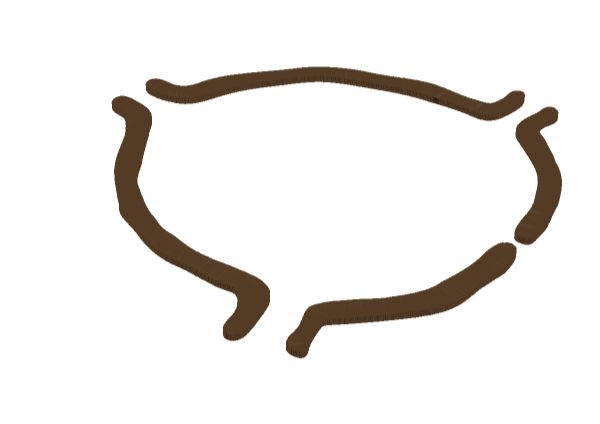
whereas here in a similar way, but deleting the meshcells corresponding to ditches, the full palisade can be extruded from the holes in the 2D map.
In[]:=
palisademesh=MeshRegionRegionProduct[RegionUnion[Delete[cmc,tobedel]],MeshRegion[{{0},{h=42.5}},Line[{1,2}]]],
Out[]=
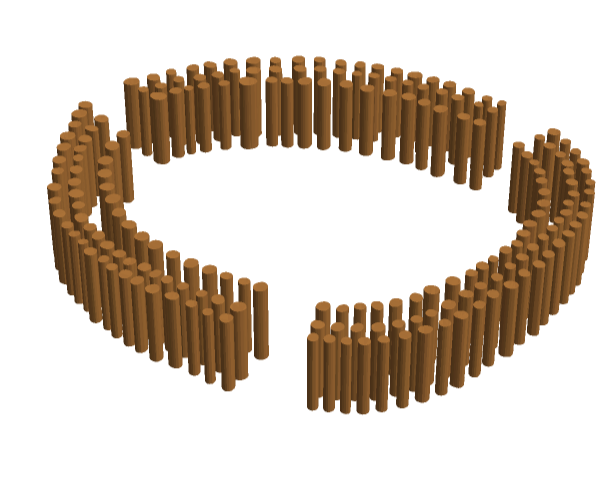
Finally, all the three extruded and differently colored mesh regions can be composed together to get a nice 3D realistic model of the Vinoř rondel.
In[]:=
Show[{lawnmeshcircle,palisademesh,ditchmesh},ViewPoint->{-0.7,2,2}]
Out[]=

Final remarks about Neolithic rondels
Final remarks about Neolithic rondels
It should be pointed out that the above presented reconstruction of the rondel is just based on a minimal hypothesis supported by archaeological evidence, although in a recent congress held in Prague last November 2025 [7] it was clearly stated that no one actually knows how a Neolithic roundel looked like, Vinoř rondel included. Far richer reconstructions with a lush 3D graphics have been imagined [8]. Astronomical orientations for the entrances have been suggested but not clearly defined up to date. The author suggests an equilux alignment for the easter-western gates (sunrise and sunset at equinoxes) and a major lunistice alignment for the northeastern gate, as with other Bohemian rondels [9], although in this case more than one central point of view could be identified in the middle of the rondel. However, it should be stressed again that the functions of rondels are still not totally clear and that even the lunisolar calendar function cannot be fully assessed. It’s also interesting that the easternmost rondel structures were found in Caucasus, which hint for a common origin for farming settlements in prehistoric Europe [10].
References
References
[10] https://en.wikipedia.org/wiki/Ring_ditch (see paragraph about “Caucasian ring ditches” and notes nr.3 therein)
CITE THIS NOTEBOOK
CITE THIS NOTEBOOK
Computational geometry modeling of the neolithic circular ditch in Vinoř, Prague
By Jessica Alfonsi
Wolfram Community, STAFF PICKS, May 1, 2026
https://community.wolfram.com/groups/-/m/t/3710432
By Jessica Alfonsi
Wolfram Community, STAFF PICKS, May 1, 2026
https://community.wolfram.com/groups/-/m/t/3710432