Genetic disorders are diseases that occur as a result of an abnormality in the genetic makeup of an individual. Colorblindness is one such genetic disorder. Color blindness occurs when you are unable to see colors in a normal way . It is also known as color deficiency. Color blindness often happens when someone cannot distinguish between certain colors . This usually happens between greens and reds, and occasionally blues .The goal of this project is to create a function that turns any image into an Ishihara's test for Color blindness.
Introduction
Red green color blindness:
Red green color blindness:
Red-green color deficiency is the most common type of color blindness. It affects how you see any colors or shades that have some red or green in them.
Cure for Color Blindness
Cure for Color Blindness
Colorblindness is a genetic disease and there is no cure for the same but early detection and use of special glasses and contact lens can help .
Ishihara' s test examples
Ishihara' s test examples
Now let us see what an Ishihara' s test looks like. This is the code to get the most common images of the Ishihara' s test from the Wolfram Data Repository.
Ishihara' s test plate examples:
In[]:=
Grid[Partition[Normal@ResourceData[ResourceObject["Ishihara's Test for Color Deficiency"]][All,#Image&],UpTo[4]]]
Out[]=
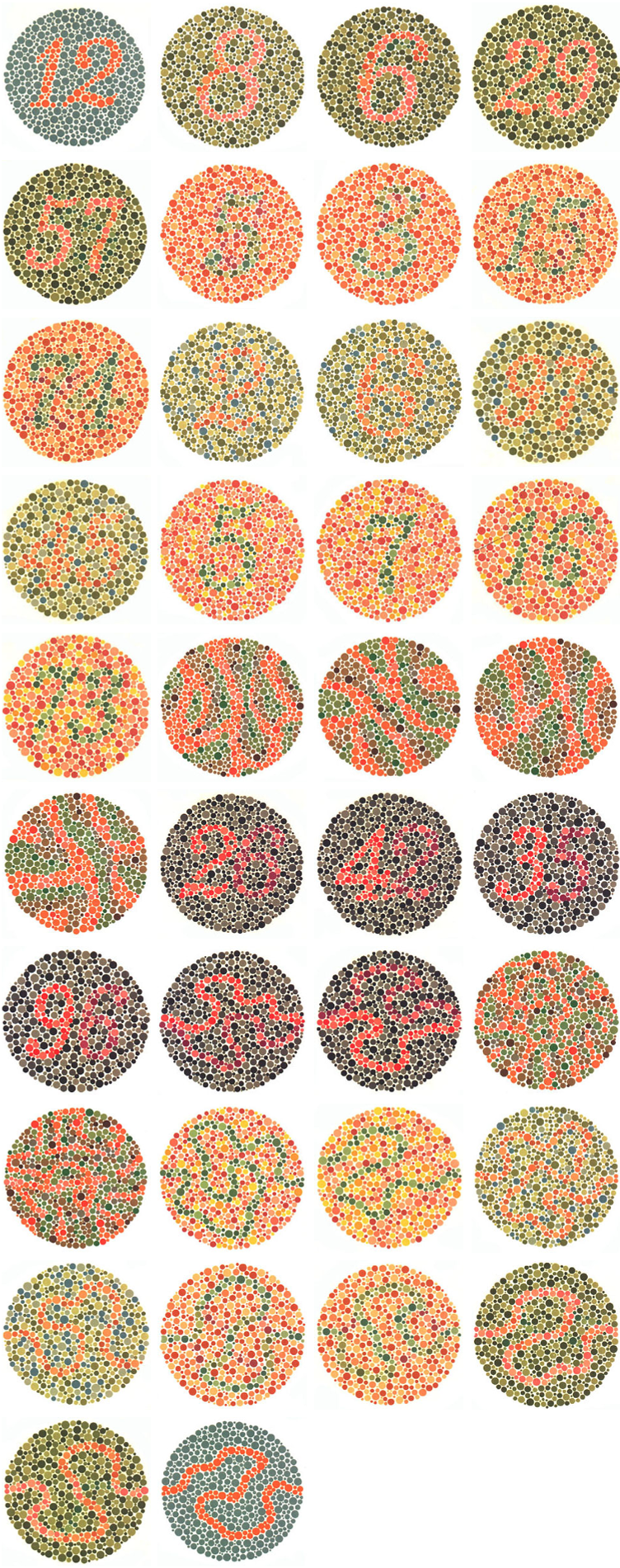
My goal is to create a function that turns any image into an Ishihara' s test for Color Deficiency that can be used for early detection of color blindness by using images, especially for the people who cannot read .
Initial Attempts at Working With Data
Sample Data
Sample Data
Retrieving Sample Data
Retrieving Sample Data
The first step of my project was to collect data. I was able to retrieve images the CIFAR-100 image dataset from the Wolfram Data Repository.
I have used CIFAR - 100 to retrieve multiple test images , followed by grouping of similar images to work and test the functions on .
Retrieve the relevant data and return an example:
In[]:=
imageDataset=ResourceObject["CIFAR-100"];trainingData=ResourceData[imageDataset,"TrainingData",100];Part[trainingData,2]
Out[]=
Now I wanted to retrieve images by label so I used GroupBy. I used GroupBy to group the items according to the second part of each element. I am storing the grouped elements in the variable groupedData for future use.
Group similar elements:
In[]:=
groupedData=GroupBy[trainingData,(Part[#,2]&)->(Part[#,1]&)];Take[#,10]&/@groupedData[[;;1]]
Out[]=

Show some possible named datasets from groupedData:
In[]:=
RandomSample[Keys[groupedData],10]
Out[]=
{cloud,cattle,mountain,snake,can,beaver,chimpanzee,fox,clock,road}
Importing list of images with distinct foreground and background
Importing list of images with distinct foreground and background
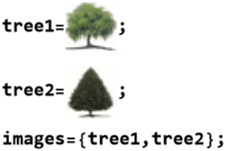
I retrieved images which had distinct foreground and background because I want to get the outline of the body next and use different color pixels for the background and foreground. I got a list of trees since the outline of the body of the tree is distinct when we use EdgeDetect in the next step. I assigned images of trees to two variables, choosing the trees with a clear distinction between background and foreground.
Retrieving images:
In[]:=
Take[groupedData["pine tree"],10]
Out[]=

Storing images in variables :
In[]:=
Expanding the border of the image
Expanding the border of the image
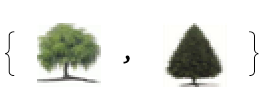
All the images which were retrieved and assigned to the variables were RGB images of size 32 x32, hence I used ImagePad to expand the border of the images .
storing the expanded images :
In[]:=
paddedImages = ImagePad[#,10,White]&/@images
Out[]=
Getting the Outline of the body
Getting the Outline of the body
I used EdgeDetect to get the outline of the body
Detecting the outline of the body:
In[]:=
EdgeDetect/@paddedImages
Out[]=
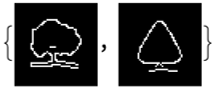
Modifying the images to look like the dotted plates of an Ishihara' s test
Modifying the images to look like the dotted plates of an Ishihara' s test
In an Ishihara' s test the images are in the form of dotted plates , So in order to change the images to dotted plates I need to get the pixel values of the images first .
I have used PixelValuePositions to get the positions of the white and Black pixels respectively
Positions of the White pixels and the Black pixels:
In[]:=
whitePixels=PixelValuePositions[EdgeDetect[images[[1]]], White, .05];blackPixels=PixelValuePositions[EdgeDetect[images[[1]]], Black, .05];
Replacement of the pixels with disks
Replacement of the pixels with disks
Now I have the position values of the black and white pixels, I have to replace the pixels with disks to create dotted plates of the images.
Replace white pixels with Red disks and replace black pixels with Green disks:
Defining the main function
To convert an image into an Ishihara' s test for color blindness it needs to be in the form of a dotted plate with pixels of different size and shades of red and green, this can be done by combining the set of previous code and improving it to define a function. I compiled the previous code into one function which is our main function , on applying the function to the input image one should get the desired output image to test color blindness.
Define the function:
The Wolfram Language normally assumes that all your variables are global . We can set up local variables in the Wolfram Language using modules . Within each module, we can give a list of variables which are to be treated as local to the module.
Next I have used Graphics to introduce the disks, Disks of different size and different shades of red and green have replaced the white and black pixels respectively using RandomChoice, Lighter and Darker functions which are inbuilt in the Wolfram language .
Choosing different images
I have mapped the function over different kinds of images to observe the difference in output images and worked on improving the efficiency of the function for the respective types of images.
CIFAR Images
CIFAR Images
Examples of the test with more CIFAR Images
I have used the image of a butterfly and expanded the border of the image using ImagePad
AI Generated Images
AI Generated Images
Examples of the test with AI Generated Images
I have used an AI Generated image of fruits, Since the resolution of AI Generated images is high the evaluation time is more hence to reduce the evaluation time I reduced the resolution using ImageResolution in Wolfram Language.
Accessing the AI Generated image using CloudGet:
Adjusting the Resolution of the Image
Adjusting the Resolution of the Image
The time taken to produce the output varies for different resolutions, hence the resolution of the image can be altered . I used Rasterize and ImageResolution on some images in order to work from a lower resolution image. Rasterize is used to get rasterized version of the images and ImageResolution is used to change the resolution of the existing image.
Adjusting the resolution of the image for faster evaluation:
Line drawing Images
Line drawing Images
As mentioned above that the goal of this project is to create a color blindness test for the individuals who are unable to read hence I made use of simple line drawings to be used as a test. Examples of the test with AI Generated Image of a tiger's face, using the prompt "make a line drawing of a tiger's face".
I used https://www.fotor.com/features/ai-image-generator/ to get AI Generated line drawing of a tiger' s face .
Accessing the AI Generated line drawing of a tiger' s face using CloudGet:
Since the image of the tiger is massive which increases the evaluation time of the code I have used ImageResize in Wolfram Language to alter its size.
Altering the size of the image for faster evaluation:
Traffic signs
Traffic signs
Examples of the test with traffic signs
I have used traffic signs since they are easy to understand and can be interpreted by people who speak a variety of languages
The image of crossing sign is stored in variable crossguy2 for future use, the border of the image is expanded using ImagePad
Storing the expanded image of traffic sign :
Creating the tests
This involves mapping the function over the image
I have mapped the function colorFunction over the variables tree1 and tree2 (CIFAR images)
mapping colorFunction over the images of trees:
mapping the function over the second set of CIFAR Images
mapping colorFunction over the CIFAR image of a butterfly:
mapping the function over the AI Generated Image of fruits
Running colorFunction over aiFruit :
mapping the function over the AI Generated line drawing of a tiger' s face
mapping colorFunction over the tiger' s face :
mapping the function over the traffic sign Image
mapping colorFunction over the traffic sign which is stored in variable crossguy2 :
Verifying the tests using ImageEffect
The output images need to be tested , so I have used the ImageFilter "Deuteranopia" in Wolfram Language to test the efficiency of the output images from the point of view of a colorblind individual.
Test for Deuteranopia (Red Green Color Blindness)
Test for Deuteranopia (Red Green Color Blindness)
Testing the CIFAR Images
Testing the CIFAR Images
Code to test the efficiency of the function on CIFAR image of a tree:
Code to test the efficiency of the function on CIFAR image of a butterfly :
Testing the AI Generated Fruit
Testing the AI Generated Fruit
Code to test the efficiency of the function on AI Generated image of fruits :
Testing the AI Generated line drawing of a tiger' s face
Testing the AI Generated line drawing of a tiger' s face
Code to test the efficiency of the function on AI Generated line drawing of a tiger' s face :
Testing the traffic sign Image
Testing the traffic sign Image
Code to test the efficiency of the function on traffic sign image :
Other Color Deficiencies
Since my project is specifically on red green color blindness test I have used the red and green disks to replace the white and black pixels respectively . However, we can use the same function to test blue yellow color blindness by just replacing the red and green disks with blue and yellow disks . In case of blue yellow color blindness, the efficiency of the output images can be tested using ImageEffect "Tritanopia" in Wolfram Language .
In the test for the Blue Yellow Color Blindness , the foreground and the background of the image seem distinct because the blue yellow color blind person may see spots of gray or neutral shade in place of certain colors
Hence the gray and white is seen in the test of the colorFunction for the blue yellow color deficiency .
Hence the gray and white is seen in the test of the colorFunction for the blue yellow color deficiency .
Testing deficiency of a particular color
Testing deficiency of a particular color
What is Tritanopia?
What is Tritanopia?
Tritanopia is a rare form of "blue–yellow" color blindness, Blue–yellow color blindness can be a more serious form of color deficiency because some may also have red–green color blindness . In either case, people with blue–yellow color deficiency may see spots of gray or a neutral shade in place of certain colors .
There are seven official diagnoses of color blindness : four different types of color blindness fall in the red - green category, two are in the blue - yellow spectrum and one version describes a type of vision completely lacking in color .
Function to turn an image into a color deficiency test for a particular color
Function to turn an image into a color deficiency test for a particular color
Yellow color deficiency
Yellow color deficiency
Choosing Different Images
Choosing Different Images
I have reused the previous set of images to create the test for yellow color deficiency.
Defining the function for yellow color deficiency
Defining the function for yellow color deficiency
To test color deficiency particularly for yellow color, I replaced the white pixels with yellow disks and black pixels with gray disks.
While defining the function , I used gray to replace the black pixels because the color yellow is observed gray by the yellow color deficient individuals hence on modifying the background to gray they are unable to observe the outline of the body distinctly which serves as a verification for the test .
Defining a function that turns any image into an Ishihara' s test for yellow color deficiency :
Creating the test for yellow color deficiency
Creating the test for yellow color deficiency
applying colorFunctionYellow over the traffic sign image :
Storing the dotted plate of traffic sign in a variable for future use :
applying colorFunctionYellow over AI Generated line drawing of a tiger' s face :
Storing the dotted plate of AI Generated line drawing of a tiger' s face in a variable for future use :
applying colorFunctionYellow over AI Generated image of fruits :
Storing the dotted plate of AI Generated image of fruits in a variable for future use :
mapping colorFunctionYellow over CIFAR image of a butterfly :
Storing the dotted plate of a butterfly in a variable for future use :
Testing The Result Of the output for Yellow Color Deficiency
Testing The Result Of the output for Yellow Color Deficiency
Testing the efficiency of the test
Code to test the efficiency of colorFunctionYellow on traffic sign image :
Code to test the efficiency of colorFunctionYellow on AI Generated line drawing of a tiger' s face :
Code to test the efficiency of colorFunctionYellow on AI Generated image of fruits :
Code to test the efficiency of colorFunctionYellow on CIFAR image of a butterfly :
Blue Color Deficiency
Blue Color Deficiency
Choosing Different Images
Choosing Different Images
I have reused the previous set of images to create the test for blue color deficiency .
Defining the function for Blue color deficiency
Defining the function for Blue color deficiency
To test color deficiency particularly for blue color, I replaced the white pixels with blue disks and black pixels with gray disks .
Defining a function that turns any image into an Ishihara' s test for blue color deficiency :
Creating the test for Blue color deficiency
Creating the test for Blue color deficiency
Mapping the function over Images
applying colorFunctionblue over the traffic sign image
Storing the dotted plate of traffic sign in a variable for future use :
applying colorFunctionblue over the AI Generated line drawing of a tiger' s face :
Storing the dotted plate of AI Generated line drawing of a tiger' s face in a variable for future use :
applying colorFunctionblue over the AI Generated image of fruits:
Storing the dotted plate of AI Generated image of fruits in a variable for future use :
mapping colorFunctionblue over the CIFAR image of a butterfly :
Storing the dotted plate of a butterfly in a variable for future use :
Testing The Result Of the output for Blue Color Deficiency
Testing The Result Of the output for Blue Color Deficiency
Testing the efficiency of the test
Code to test the efficiency of colorFunctionblue on traffic sign image :
Code to test the efficiency of colorFunctionblue on AI Generated line drawing of a tiger' s face :
Code to test the efficiency of colorFunctionblue on AI Generated image of fruits :
Code to test the efficiency of colorFunctionblue on CIFAR image of a butterfly :
Conclusion
The main function which was defined earlier can be altered to test different color deficiencies .
Acknowledgment:
I would like to thank my mentor ,Isabel Skidmore ,for helping me with the coding part and for her guidance along this whole process .
References:
CITE THIS NOTEBOOK
CITE THIS NOTEBOOK
Function that turns any image into an Ishihara's test for color deficiency
by Aishwarya Main
Wolfram Community, STAFF PICKS, July 13, 2023
https://community.wolfram.com/groups/-/m/t/2963560
by Aishwarya Main
Wolfram Community, STAFF PICKS, July 13, 2023
https://community.wolfram.com/groups/-/m/t/2963560