This a guide on how to use clustered networks (graph communities) to highlight key ideas in a text. For a practical example I work with the text data from a speech by the President Joe Biden titled “Remarks on the Continued Battle for the Soul of the Nation” and delivered on September 1, 2022. My main tool is KeywordsGraph from the Wolfram Function Repository that I designed (and recently updated). I use it to concisely visualize and summarize the 3000-words speech with just a set of 51 most frequently used non-generic words.
Introduction
Introduction
In any text or speech the data have a particular structure being delivered not all at once but continuously with time. Usually one must listen to or read everything before a specific moment, to completely comprehend and appreciate what is being said at that moment. KeywordsGraph transforms that into a time-independent visualization that can be grasped at a glance. It also allows to observe structure and relations in the text that are hard to notice while reading or listening due to being constantly at a particular moving moment and due to limitations of memory and mind having difficulties to process massiveness of data in the raw time-line format. The algorithm of KeywordsGraph transforms such data structure into a weighted graph connecting frequently used keywords of a text that are sequential neighbors and thus visualizing the flow and clustering of ideas in the text. Because such keywords and their clustering are unique for a specific text, such visualization and network data structure behind it can be considered as a fingerprint of the text. It is not my intent to simplify or reduce the speech, but to highlight and stress the key ideas via at-a-glance view. I recommend also reading the original transcript that has been published the White House and video available at many sources, for instance C-SPAN.
Getting the raw and filtered data
Getting the raw and filtered data
In[]:=
rawDATA=Import"https://www.whitehouse.gov"<>;
We are importing from a website so the raw data has non-relevant text noise, coming from footer, header, hyperlinks, etc. The speech transcript can be easily identified by time stamps of the beginning and end of the speech:
In[]:=
StringPosition[rawDATA,"8:03 P.M. EDT"]StringPosition[rawDATA,"8:27 P.M. EDT"]
Out[]=
{{2761,2773}}
Out[]=
{{20175,20187}}
Using the positions of the time stamps in text it is easy to extract the pure transcript (plus-minus a few characters, which are statistically negligent in our processing):
In[]:=
speech=StringTake[rawDATA,{2773,20175}];
There are about 3000 words in this speech:
In[]:=
Length[TextWords[speech]]
Out[]=
3007
Setting up styles for visualization
Setting up styles for visualization
First I define a typical set style options I use wile working with this type of graphs:
In[]:=
styles={VertexLabelStyleDirective[White,25,Opacity[.9]],EdgeStyleOpacity[.5],VertexStyleOpacity[.5],VertexSize"VertexWeight",GraphStyle"Prototype",BackgroundBlack,AspectRatio->1,ImageSize->1000};
Experimenting with key ideas in the text
Experimenting with key ideas in the text
The function KeywordsGraph is defined at he end and also at the Wolfram Function Repository (pending my recent update). The function by default removes the stopwords. Yet the text will still have many words that are generic and do not carry high meaning, such as obvious (for U.S. political speech) “America” or frequent but insignificant “say” or “just” and so on. By playing with a few evaluations of the KeywordsGraph one can easily find such generic words and build a list of them to be removed from the text:
In[]:=
generic={"america","american","americans","today","know","passed","say","lies","stand","applause","just","look","matter","come","’re","’s","’ve","t"}~Join~{"need","going","watch","single","face","states","united","tonight","fellow"}~Join~{"’ll","millions","years","create","make","big","lives","protect","tool","better","past","forward","folks","reject","like","succeed","backwards","determined","tell","’m","clear","want","greatest","words","centuries"};
Also looking at and playing with a few evaluations / outputs of KeywordsGraph we can easily see words that will have a very similar meaning and cam be consolidated in a single term, e.g. singular and plural forms of the same word (also use such list to “rename”, for example, capitalize some terms):
In[]:=
similar={"elections"->"election","right"->"rights","fair"->"justice","believed"->"believe","covid"->"COVID","believes"->"believe","republicans"->"republican","maga"->"MAGA","hearts"->"heart","trump"->"Trump"};
No I can finally build the graph (after a few trials I liked the output with 51 keywords, but the choice is pretty arbitrary):
In[]:=
kewogra=KeywordsGraph[speech,51,generic,similar,styles];
I also like to resize the vertices a bit differently from the default procedure:
In[]:=
kewogra=Annotate[kewogra,VertexSize->Thread[VertexList[kewogra]->.3+Rescale[AnnotationValue[kewogra,VertexWeight]]^.5]];
To find clusters in the graph and generate the final visualization we use CommunityGraphPlot with an option:
In[]:=
ideanet=CommunityGraphPlot[kewogra,CommunityBoundaryStyleDirective[Yellow,Dashed,Thickness[.002],Opacity[.7]]]
Out[]=
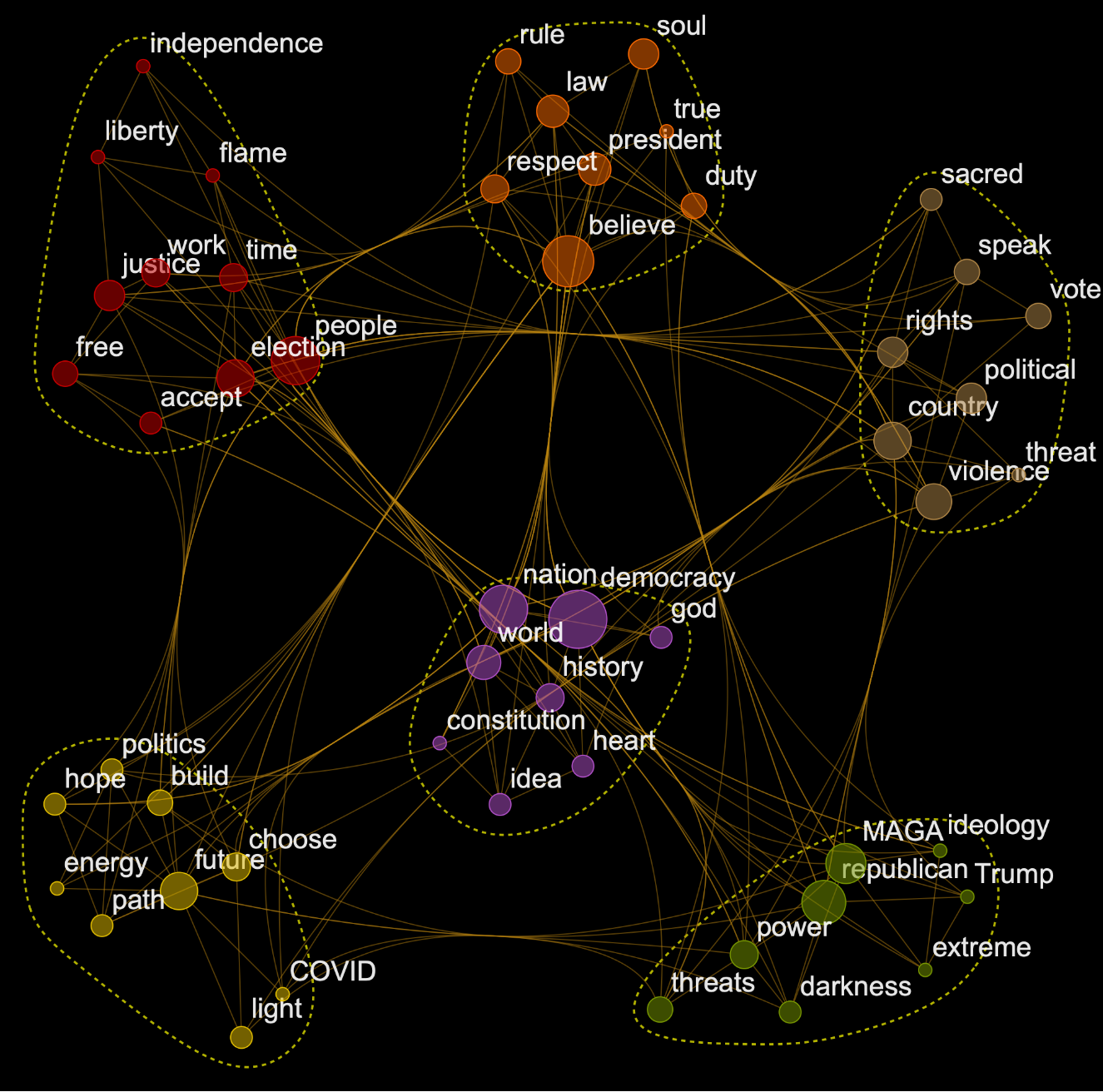
Because graphs are data structures they are computable -- we can find various properties. First define a convenient visualization function
In[]:=
vBar[data_]:=BarChart[data,ChartLabels->Keys[data],BarOrigin->Left,AspectRatio->4,PlotTheme->"Detailed",BaseStyle->13,ImageSize->250]
Now let's see what actual counts in the text we have for our 51 keywords and also their various graph centralities such as “Counts”, ”Degree”, ”Closeness”, ”PageRank”:
In[]:=
Row@MapThread[Labeled[vBar[#1],#2,Top]&,{Table[Sort[AssociationThread[VertexList[kewogra]->vp[kewogra]]],{vp,{AnnotationValue[#,VertexWeight]&,DegreeCentrality,ClosenessCentrality,PageRankCentrality}}],{"Counts","Degree","Closeness","PageRank"}}]
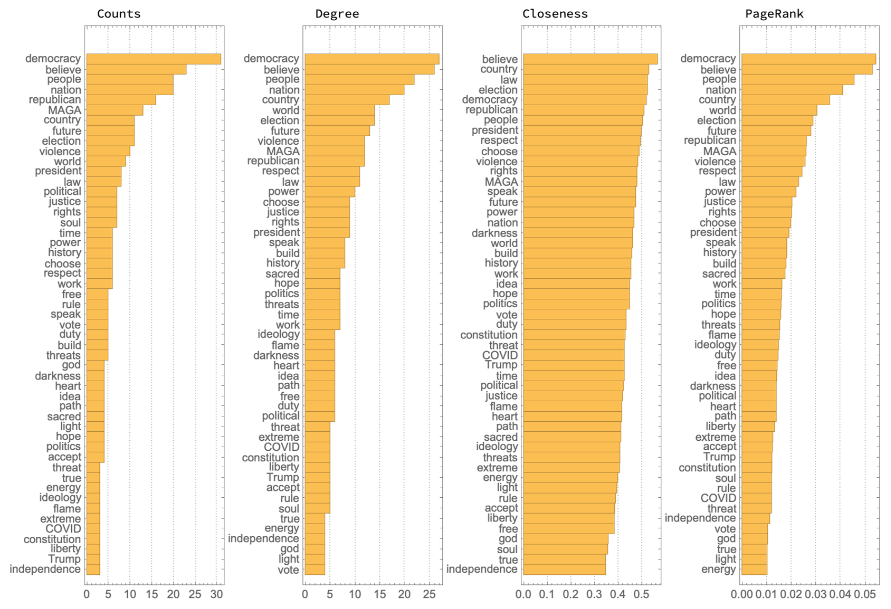
Closeness looks interesting as it has most rearranged rankings and seems more smooth, almost linear-like. ClosenessCentrality will give high centralities to vertices that are at a short average distance to every other reachable vertex. What other interesting analytics the reader ( you :-) ) think we can run on this?
At last the code below annotates and makes the final visualization:
In[]:=
Column Style["biden in 51 words",70,Gray,FontFamily->"Phosphate"], Style["Continued Battle for the Soul of the Nation. SEP 01, 2022",37,Gray,FontFamily->"Georgia"], Showideanet, Epilog->InsetStyle["SOURCE: wolfr.am/BidenSoul TECH: Wolfram Language © Vitaliy Kaurov",17,Gray,Italic], Scaled[{.99,0}],{Right,Bottom},Spacings->.2,Alignment->Center
Definition of the function KeywordsGraph
Definition of the function KeywordsGraph