A. What are recursive functions?
A. What are recursive functions?
A recursive function is a function that calls itself. It means that to compute the result for a function with a specific input, you have to compute other results of that function, with different inputs. Since the structure of that function keeps calling itself, there needs to be a stopping point. This is what we call initial conditions. When these initial conditions are met, we have a specified value returned, and the recursion will stop. Then the previous functions will be able to be computed. Probably the most famous recursive function is the Fibonacci sequence. It goes as such: . Where the initial conditions are and . To compute you have to know and , and so on. This can be best visualised in the call graph of the Fibonacci sequence. The call graph of a recursive function show us the the previous results of the function that were used to compute the current result.
F(n)=F(n-1)+F(n-2)
F(0)=0
F(1)=1
F(10)
F(9)
F(8)
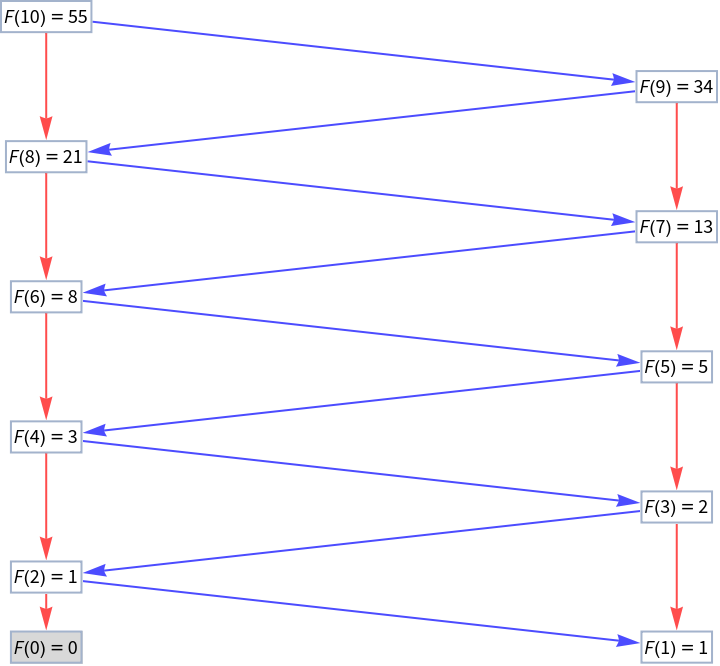
The color of the edges represent the order of the calls . Red is the first call and blue is the second. The number of times a function calls itself is thus depicted by the colors of the edges. We see, here, how the function needs to go all the way to the initial conditions and to then bubble back up to calculate each step.
F(0)
F(1)
Recursion is an important concept in Computer Science and it will enable us to look at some key differences in programming paradigms and structures between Mathematica and Python.
B. Simple recursive function
B. Simple recursive function
Our first recursive function will be as simple as possible, more or less a one-liner for both languages. At first, we won’t be checking for negative inputs, to keep the functions as simple as possible. We assume our user (me), knows what they’re doing. Later on, we won’t make this mistake.
Both Mathematica and Python deal with recursion in a similar way. Like for most major programming languages, function is directly able to call itself. Although those functions have the same name, they will exist in different namespaces (this is a term used for python, but the idea is the same for Mathematica), so that they don’t collide, although they might look identical. They might have the same name, but they live in different parts of the code, that do not clash. Since they are being run in different namespaces, multiple instances of that function can run concurrently. This enables these functions to call themselves, multiple times.
The difference here is how we arrive at our initial conditions. In Python, we have to define the base condition inside the body of the function. We use an If-Else construct to check if we have arrived at our initial condition.
In[]:=
def recursive_fibonacci(n: int) -> int: return n if n <= 1 else (recursive_fibonacci(n-1) + recursive_fibonacci(n-2))recursive_fibonacci(10)
Out[]=
55
In Mathematica, however, we define this differently. Function overloading defines different versions of a function, depending on the argument that is being passed. In our case, whenever 0 or 1 is passed, the function automatically returns 0 and 1, respectively. Although not here, this overloading is often pattern-based, enabling a function to treat cases when the number of arguments are different or when the inputs are of different types. This gives the function a lot of flexibility. Usually, the most specific definition is applied first.
In[]:=
recursiveFibonacci[0]=0;recursiveFibonacci[1]=1;recursiveFibonacci[n_Integer]=Plus[recursiveFibonacci[n-1],recursiveFibonacci[n-2]];recursiveFibonacci[10]
Out[]=
55
Note that the type hint in the Python code will only be useful if we use a static type checker like mypy. Since Python is dynamically typed, it does not type check at compile time, only at runtime, when the code is executed. So we would catch a TypeError if anything else than a number is passed only when the code is run, not before. Using a static type checker can check for the correct types before we run our code.
In[]:=
recursive_fibonacci("n")
Out[]=
Failure

For Mathematica, the function will only be evaluated if the parameter passed is of the correct type . So, if we do not pass an integer, an error will not be raised, the function will just simply not be evaluated .
In[]:=
recursiveFibonacci[n]
Out[]=
recursiveFibonacci[n]
If we did not have this type checker, the function would try to run and an error would be raised.
B. Memoized recursive function
B. Memoized recursive function
Next we want to upgrade our recursive function. First, we want to safeguard against the user passing negative integers as a parameter and we want to implement memoization. Memoization is the idea that a function with a specific input should only be evaluated once. Once it is evaluated, the results should be stored somewhere, so we never have to run it again. This makes our computation more efficient and prevents us from running the same computation more than once. Here, we will be implementing memoization manually, in the code.
In Python, we need to check, in the body of the function, that the input integer is non-negative. If it is, we raise a ValueError with a custom message for the user. We then pass an empty dictionary as our memo. Then, our function will first check whether the result we are looking for is in our memo. If it is, then we just return the result, if not, then we compute and store it in the memo and then return the result.
In[]:=
def memoized_fibonacci(n: int, memo: dict = {}) -> int:
if n < 0:
raise ValueError("Input cannot be negative")
if n <= 1:
return n
elif n in memo:
return memo[n]
else:
memo[n] = memoized_fibonacci(n-1) + memoized_fibonacci(n-2)
return memo[n]
memoized_fibonacci(10, {})
if n < 0:
raise ValueError("Input cannot be negative")
if n <= 1:
return n
elif n in memo:
return memo[n]
else:
memo[n] = memoized_fibonacci(n-1) + memoized_fibonacci(n-2)
return memo[n]
memoized_fibonacci(10, {})
Out[]=
55
In Mathematica, we use function overloading to return a custom error to the user when the input is a negative integer. This time, however, we do not use overloading to set the initial conditions . As in Python we pass an association, which is the equivalent to Python’s dictionary, as an argument to our function. Then, the structure is the same as Python : return the memoized result if available, otherwise compute, store and return it.
In[]:=
memoizedFibonacci[n_Integer,memo_]:=Module{result,updatedMemo=memo},IfKeyExistsQ[updatedMemo,n], Return[updatedMemo[n]],Ifn<=1,updatedMemo[n]=n;Return[n], result=memoizedFibonacci[n-1,memo]+memoizedFibonacci[n-2,memo]; updatedMemo[n]=result; Return[result];;memoizedFibonacci[n_Integer,memo_]/;n<0:=(Message[Fibonacci::argx,n];$Failed)memoizedFibonacci[10,<||>]
Out[]=
55
What is different is how we modify our memo. In Python, arguments are passed by object reference, which means that mutable objects (like lists, dictionaries) can be modified in place inside a function (immutable objects like strings and integers cannot, though). Since our memo is a dictionary, it is a mutable object and the changes we make to our memo inside the function also affects the original object. This is why we then do not need to pass our memo for every next function call. Since it already exists, we can just modify it in place as we bobble down our call stack. The different namespaces know about this memo and directly reference it.
In Mathematica, on the other hand, we have to explicitly pass around our memo to all our function calls. We cannot initialize it once, and then let our different function calls reference it and make changes to it, like in Python.
One tweak to both of our codes could be to already populate our memo with our required initial conditions and avoid checking for them in the body of the function. This might be useful if our initial conditions get more complex and would make the body of our function too complex and not readable.
C. Cached recursive function
C. Cached recursive function
Our final recursive function also utilizes memoization. In this step, we use the built-in tools from each language instead of building our memo manually.
lru_cache is a decorator, it wraps another function to extend the behaviour of the wrapped function, without permanently modifying it. Simply put, lru_cache works the same way as our memoization above. The decorator enables results of the function to be stored and if a function with the same arguments is called again, we re-use our stored result. Note that LRU stands for Least Recently Used, which means that if our cache gets too large, the least recently used values will be discarded to make space. You can also set the maximum size of the cache as an argument to the decorator, here we have explicitly specified it to None.
In[]:=
from functools import lru_cache
@lru_cache(None)
def cached_fibonacci(n: int) -> int:
if n < 0:
raise ValueError("Input cannot be negative")
if n <= 1:
return n
else:
return(cached_fibonacci(n-1) + cached_fibonacci(n-2))
cached_fibonacci(10)
@lru_cache(None)
def cached_fibonacci(n: int) -> int:
if n < 0:
raise ValueError("Input cannot be negative")
if n <= 1:
return n
else:
return(cached_fibonacci(n-1) + cached_fibonacci(n-2))
cached_fibonacci(10)
Out[]=
55
In Mathematica, it is even simpler. You simply have to add a colon before the function definition := , and call the function again, and the results will be internally cached.
In[]:=
cachedFibonacci[0]=0;cachedFibonacci[1]=1;cachedFibonacci[n_Integer]/;n>1:=cachedFibonacci[n]=cachedFibonacci[n-1]+cachedFibonacci[n-2];cachedFibonacci[n_Integer]/;n<0:=(Message[Fibonacci::argx,n];$Failed)cachedFibonacci[10]
Out[]=
55
D. Recursion limits
D. Recursion limits
Finally, we will introduce a common problem in recursive functions. Programming languages usually have a set recursion depth limit, to avoid a program running forever. We run in this limit relatively quickly here, even with our cached functions:
In[]:=
cached_fibonacci(10000)
Out[]=
In[]:=
from sys import getrecursionlimit
getrecursionlimit ()
getrecursionlimit ()
Out[]=
1000
In[]:=
cachedFibonacci[10000]

Out[]=
2TerminatedEvaluation[RecursionLimit]
In[]:=
$RecursionLimit
Out[]=
1024
Indeed, it is possible to inspect the recursions limits and even modify them. However, it is not recommended because you usually want to avoid very large recursions that are computationally very complex and time and energy consuming.
In[]:=
from sys import setrecursionlimit
setrecursionlimit(2000)
getrecursionlimit()
setrecursionlimit(2000)
getrecursionlimit()
Out[]=
2000
In[]:=
$RecursionLimit=1025
Out[]=
1025
There might be cases where we actually want to compute very large recursions, for scientific research and exploration’s sake. In this case, we don’t want these recursion limits to hinder us. This is what we will attempt to tackle in the next two parts of this series of blog posts.
E. The ultimate recursive function?
E. The ultimate recursive function?
In Part 2 we will be looking at a much more complex recursive function. A function that not only computes the Fibonacci sequence, but can compute any kind of functional form that is recursive. And not just recursive, but nestedly recursive, meaning that the function calls itself multiple times (Ad infinitum...kind of). This new recursive function should memoize results, avoid recursion depth limits and deal with all kinds of recursive functional constructs. Why is this useful? First, we will be able to see more clearly the different programming paradigms and applications between Mathematica and Python. More importantly, though, it will enable us to explore in depth the complex behaviors that arise from recursive functions.
References & Acknowledgements
References & Acknowledgements
1
.Stephen Wolfram (2002), p128-129-130 & notes 4-3, “A New Kind of Science”. https://www.wolframscience.com/nks/
2
.Thomas Adler (2024), “Exploring Call Graphs of Nestedly Recursive Functions”. https://community.wolfram.com/groups/-/m/t/3210833?p_p_auth=sp4pFdlb
This project builds on a project done by myself during the 2024 Wolfram Summer School. The community post of this project can be found above and linked here is the project presentation delivered at the Wolfram Institute. This work was done in collaboration with the Wolfram Institute.
This project builds on a project done by myself during the 2024 Wolfram Summer School. The community post of this project can be found above and linked here is the project presentation delivered at the Wolfram Institute. This work was done in collaboration with the Wolfram Institute.
Initialization Code
Initialization Code
CITE THIS NOTEBOOK
CITE THIS NOTEBOOK
Wolfram Language vs. Python - which one calls itself better? Part 1
by Thomas Adler
Wolfram Community, STAFF PICKS, September 6, 2024
https://community.wolfram.com/groups/-/m/t/3268180
by Thomas Adler
Wolfram Community, STAFF PICKS, September 6, 2024
https://community.wolfram.com/groups/-/m/t/3268180